The Complete Guide to Field Service Scheduling: Tips, Tools, and Best Practices
Why Scheduling Is the Most Impactful Process in Field Service
Every field service operation runs on scheduling. It determines how many jobs you complete per day, how far your technicians drive, how long customers wait, and ultimately how much revenue you generate.
Yet most small contractors still schedule the same way they did a decade ago — a whiteboard, a spreadsheet, or a dispatcher making calls from memory. The result: technicians zigzag across town, gaps appear between jobs, and customers get vague “sometime between 8 and 5” arrival windows.
Modern scheduling practices can help you complete 20-30% more jobs per day with the same team. Here’s how.
The 5 Pillars of Effective Field Service Scheduling
1. Geographic Clustering
The biggest scheduling sin is sending technicians across town for every job. Geographic clustering groups nearby jobs together so technicians work in zones, minimizing drive time between calls.
How to implement:
- Divide your service area into zones (north, south, east, west — or by zip code)
- Assign each technician to a zone for the day
- When a new call comes in, assign it to the tech already working in that area
- Adjust zones dynamically based on demand
Impact: Reduces average drive time by 15-25 minutes per job. For a 5-job day, that’s 75-125 minutes saved — nearly enough for an extra job.
2. Skill-Based Routing
Not every technician can handle every job. Sending a junior apprentice to diagnose a complex commercial refrigeration issue wastes everyone’s time (and likely creates a callback).
How to implement:
- Tag each technician with their certifications and specialties (EPA 608, NATE, specific equipment brands)
- Tag incoming jobs with required skill level (basic maintenance, standard repair, complex diagnostic, installation)
- Dispatching software matches job requirements to technician skills automatically
Impact: Improves first-time fix rate by 10-15% and reduces callbacks.
3. Dynamic Time Blocks
Different jobs take different amounts of time. A thermostat replacement is 30 minutes; an AC system installation is 6 hours. Your schedule needs to reflect this.
How to implement:
- Build standard time estimates for each service type based on your historical data
- Block the appropriate time window for each job (not just “one slot per job”)
- Add buffer time between appointments (15-20 minutes for drive time + admin)
- Flag jobs likely to run long (e.g., old equipment, first-time customer, complex system)
4. Priority Queuing
When the phone is ringing off the hook, not every call should be treated equally. Build a priority system:
- Emergency (same-day): No heat in winter, no AC in summer, gas leaks, flooding
- Service agreement customers: Within 24 hours guaranteed
- Standard service: Within 48-72 hours
- Non-urgent/scheduled: Booked for next available convenient time
This isn’t just about customer satisfaction — it’s about revenue optimization. Emergency calls and service agreement customers are your highest-value segments.
5. Capacity Planning
How many jobs can your team actually handle per day? Most contractors overbook in peak season (causing delays and overtime) and underbook in slow season (wasting capacity).
How to calculate:
- Available work hours per technician per day: 8 hours
- Subtract average drive time: -1.5 hours
- Subtract admin/breaks: -0.5 hours
- Productive hours per tech: 6 hours
- Average job duration: 1.2 hours
- Max jobs per tech per day: 5
- Comfortable target (90% capacity): 4-5 jobs
If you have 4 technicians, your daily capacity is 16-20 service calls. Plan marketing, hiring, and overtime based on this math — not gut feeling.
Common Scheduling Mistakes (and How to Fix Them)
The “First Call, First Served” Trap
Scheduling jobs in the order they come in ignores geography, priority, and efficiency. Use dispatching logic that considers location, skill match, and urgency — not just chronological order.
No Buffer Time Between Jobs
Scheduling back-to-back jobs with zero buffer means the first job that runs 15 minutes long cascades delays through the entire day. Add 15-20 minutes between every appointment.
Ignoring Travel Time in the Schedule
A 1:00 PM appointment and a 2:00 PM appointment look fine — until you realize they’re 45 minutes apart. Always account for drive time when building the schedule.
Static Scheduling (No Real-Time Adjustments)
The schedule you plan at 7 AM rarely survives contact with reality. Cancellations, emergencies, and jobs running long require real-time adjustments. Your dispatcher (or software) needs to continuously re-optimize throughout the day.
Technology That Makes It Work
Scheduling at this level is nearly impossible with a whiteboard or spreadsheet. Field service scheduling software gives you:
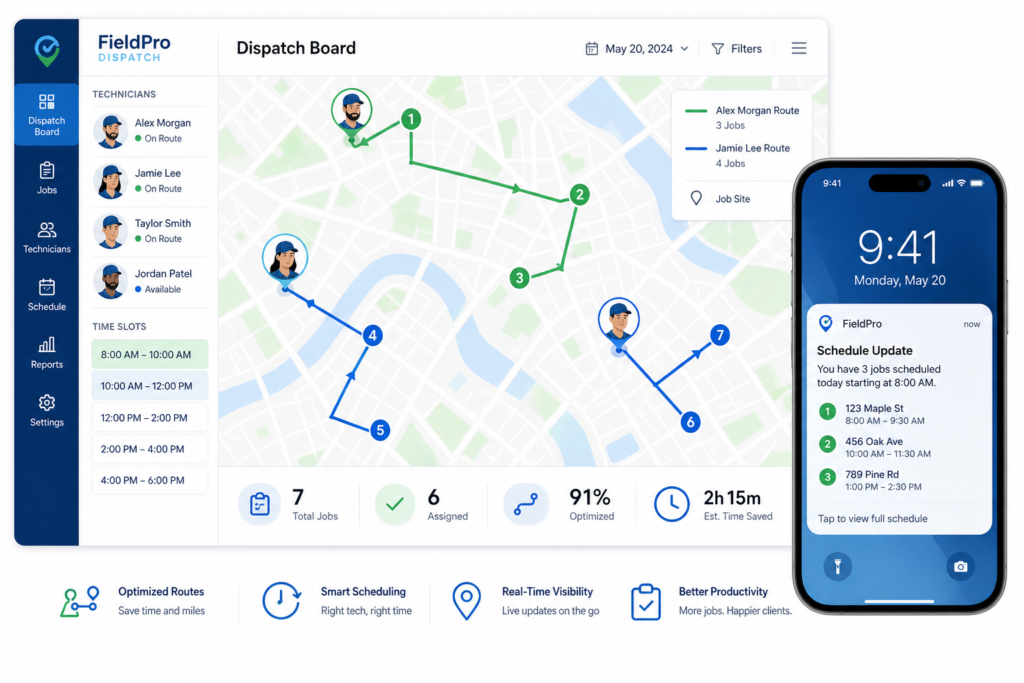
- Drag-and-drop dispatch board — Visual calendar with all technicians and their jobs
- GPS tracking — See real-time technician locations for smarter dispatch decisions
- Automated routing — Optimize job sequence to minimize total drive time
- Customer notifications — Automatic “on my way” texts with live ETA
- Capacity visualization — See at a glance who’s overbooked and who has availability
TackOn FSM includes smart scheduling and dispatch in every plan — giving small contractors the same efficiency tools that large enterprises use.
→ Read more: 10 Field Service Tasks You Should Automate
Ready to Schedule Smarter?
TackOn FSM’s drag-and-drop dispatch board, GPS tracking, and smart routing help you complete more jobs per day with less drive time and happier customers.