How to Price Field Service Jobs: A Contractor’s Guide to Profitable Pricing
The Pricing Problem Every Contractor Faces
Price too high and you lose bids to the guy down the street. Price too low and you work 60-hour weeks just to break even. Most contractors fall into the second trap — underpricing because they don’t fully understand their true costs.
This guide walks you through both major pricing models, shows you how to calculate your actual costs, and helps you set prices that keep customers happy and keep your business profitable.
Time & Materials vs. Flat Rate: Which Model Is Right?
Time & Materials (T&M) Pricing
How it works: You charge an hourly labor rate plus the cost of materials with a markup. The customer pays for the actual time and parts used.
Pros:
- Simple to calculate — hourly rate + parts
- Fair when job scope is unpredictable
- Covers you on complex, unknown-duration jobs
Cons:
- Customers hate open-ended pricing — “how much is this going to cost?” creates anxiety
- Penalizes fast, efficient technicians (they complete jobs quicker, so they bill less)
- Disputes over hours are common
- Difficult to give accurate quotes upfront
Best for: Complex diagnostics, unusual jobs, commercial/industrial work with unknown scope.
Flat Rate Pricing
How it works: You charge a fixed price for each service, regardless of how long it takes. Prices come from a pre-built pricebook that lists every service your company offers.
Pros:
- Customers know the cost upfront — no surprises, no disputes
- Rewards efficient technicians (faster completion = more jobs per day)
- Higher average ticket sizes (customers choose from options, not hourly rates)
- Professional presentation builds trust
Cons:
- Requires building and maintaining a pricebook
- Can lose money on unusually complex jobs (price includes the risk)
- New or uncommon repairs need to be added to the book
Best for: Residential service work, maintenance visits, common repairs with predictable scope.
How to Calculate Your True Costs
Before you can set profitable prices, you need to know what it actually costs to put a technician on a job. Most contractors only count parts and hourly wages — and miss 40% of their real costs.
Step 1: Calculate Your Fully Loaded Labor Rate
A technician earning $30/hour doesn’t cost you $30/hour. Add:
- Payroll taxes (7.65% FICA + state unemployment): ~$4/hour
- Workers’ comp insurance: ~$3-6/hour
- Health insurance: ~$3-5/hour
- Paid time off: ~$2/hour
- Training: ~$1/hour
- Vehicle cost (fuel, insurance, maintenance, depreciation): ~$5-8/hour
Total loaded cost for a $30/hour tech: $48-56/hour
Step 2: Calculate Your Overhead Rate
Your overhead includes everything that doesn’t directly tie to a specific job:
- Office rent/mortgage
- Office staff salaries
- Software subscriptions
- Advertising and marketing
- Insurance (general liability, commercial auto)
- Tools and equipment
- Accounting and legal
Total these up monthly, then divide by total billable hours per month. If your overhead is $15,000/month and your team bills 800 hours/month, your overhead rate is $18.75/hour.
Step 3: Set Your Desired Profit Margin
A healthy field service business targets 15-25% net profit margin. This is what’s left after covering all costs — it’s your return for the risk and effort of running the business.
Step 4: Build Your Price
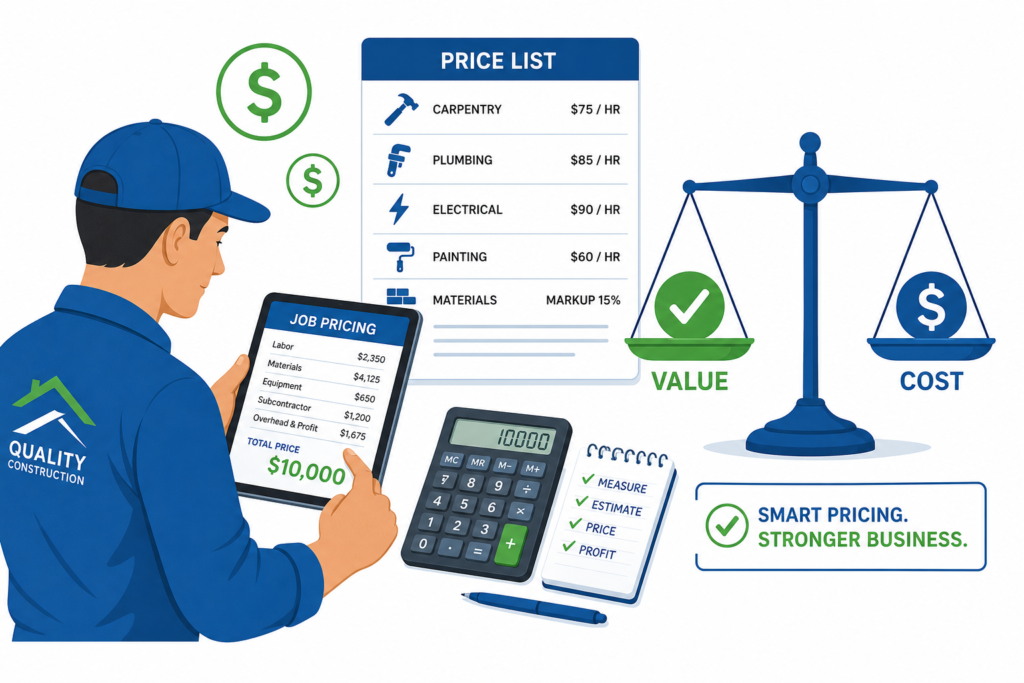
Minimum hourly billing rate = (Loaded labor + Overhead) ÷ (1 – Target profit margin)
Using our example: ($52 + $18.75) ÷ (1 – 0.20) = $88.44/hour minimum
That means if you’re charging $75/hour, you’re likely losing money on every call — even if it doesn’t feel like it.
Building a Flat Rate Pricebook
If you’re switching to flat rate, here’s how to build your pricebook:
- List every service you commonly perform — Start with the top 50 jobs that represent 80% of your work
- Estimate average time per job — Use your actual data from the last 6-12 months, not best-case scenarios
- Calculate labor cost per job — Average time × your minimum billing rate
- Add materials cost — Average parts/materials for each job + your markup (typically 30-50%)
- Add a complexity buffer — 10-15% padding for jobs that run longer than average
- Create Good/Better/Best options — Give customers 3 choices; most will pick the middle option
The Good/Better/Best Strategy
Instead of presenting a single price, offer three options for every job:
- Good: Fix the immediate problem (lowest price)
- Better: Fix the problem + preventive maintenance on related components (mid-price)
- Best: Comprehensive service + warranty + maintenance agreement enrollment (highest price)
This psychology-driven approach typically increases average ticket size by 25-40% because:
- Most people avoid the cheapest option (perceived as low quality)
- The “Best” option makes “Better” look reasonable
- Customers feel empowered by having a choice
Common Pricing Mistakes
1. Matching the cheapest competitor
There’s always someone cheaper. Competing on price is a race to the bottom. Instead, compete on value — speed of response, quality of work, warranty, professionalism, and communication.
2. Not raising prices annually
Your costs go up every year (insurance, wages, fuel, materials). If you don’t raise prices, your margins shrink invisibly. Review and adjust prices at least once per year — most customers expect it.
3. Giving free estimates for complex jobs
A 2-hour diagnostic visit costs you $100+ in real costs. Charging a diagnostic fee (waived if the customer proceeds with the repair) qualifies serious buyers and eliminates tire-kickers.
4. Forgetting to include drive time
Your technician’s time starts when they leave the previous job, not when they arrive at the customer’s door. If you don’t factor in average drive time per job, you’re donating 30-60 minutes of labor per call.
Using Software to Manage Pricing
A digital pricebook built into your field service software makes flat rate pricing practical. Your technicians pull up the pricebook on their phone, select the service, present options to the customer, and generate the invoice — all without calling the office or doing math in their head.
TackOn FSM lets you build and manage your pricebook digitally, with instant access for every technician in the field.
Ready to Price for Profit?
Use our free FSM Savings Calculator to see how optimizing your pricing and operations impacts your bottom line. Then book a demo to see how TackOn FSM helps you manage pricing, invoicing, and profitability in one platform.