Field Service Automation: 10 Tasks You Should Stop Doing Manually
Why Field Service Automation Matters in 2026
The average field service business spends 40% of office hours on administrative tasks that could be automated. That’s dispatching calls manually, typing up invoices from paper work orders, sending appointment confirmations by hand, and chasing payments with phone calls.
Automation doesn’t replace your team — it frees them to do work that actually grows the business. Here are 10 tasks you should stop doing manually, starting today.
1. Appointment Confirmations and Reminders
Manual way: Your office manager calls or texts each customer the day before their appointment. Takes 30-60 minutes daily.
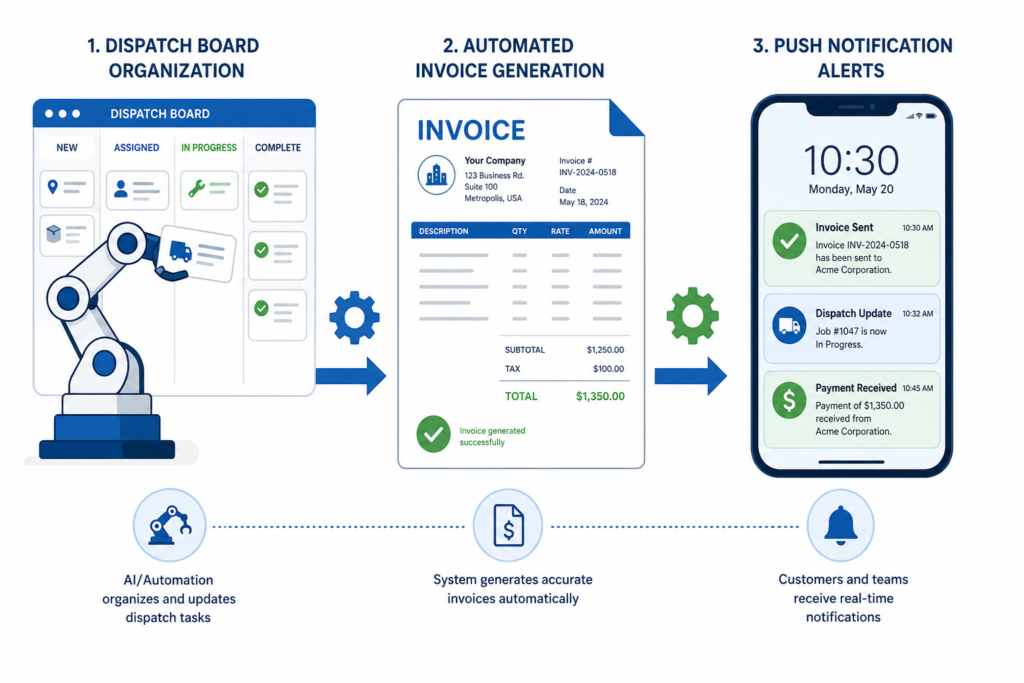
Automated way: The system sends an SMS and email confirmation at booking, a reminder 24 hours before, and an “on our way” alert when the tech departs. Automatically.
Time saved: 5+ hours per week
2. Technician Dispatching
Manual way: You look at the whiteboard, figure out who’s closest, call them on the radio or phone, and give them the address.
Automated way: Jobs are assigned based on technician location, skill set, and availability. The tech gets a push notification with full job details and optimized driving directions.
Time saved: 3+ hours per week, plus 15-20% reduction in drive time
3. Invoice Generation
Manual way: Technician fills out a paper work order. Office staff types it into the billing system, creates the invoice, and sends it to the customer. Total time: 15-20 minutes per job.
Automated way: Technician completes the digital work order on their phone. Invoice is auto-generated from the parts used, labor time, and service performed — and sent to the customer immediately.
Time saved: 10-15 minutes per job × 50 jobs/week = 8-12 hours per week
4. Payment Collection and Follow-Ups
Manual way: Send an invoice, wait, send a reminder, wait, make a phone call, wait some more.
Automated way: Customers pay on-site via the tech’s mobile app (credit card, ACH, or tap-to-pay). For outstanding invoices, automated reminders go out at 3, 7, and 14 days past due.
Time saved: 3-5 hours per week in collections calls. Days Sales Outstanding (DSO) drops from 30+ days to under 7.
5. Schedule Optimization and Routing
Manual way: You eyeball the map and try to group nearby jobs together. Some days it works; most days someone’s driving 45 minutes between calls.
Automated way: Smart routing algorithms group jobs by location and sequence them to minimize total drive time. If a cancellation opens up, the system suggests the best replacement from your waitlist.
Time saved: 30-60 minutes of drive time per technician per day
6. Customer Follow-Up and Review Requests
Manual way: You make a mental note to call the customer tomorrow and see if everything’s working. You forget. No review gets posted.
Automated way: 24 hours after job completion, the customer gets a thank-you message with a satisfaction check and a link to leave a Google review. Happy customers review you. Unhappy ones get flagged for your immediate attention.
Time saved: 2+ hours per week. Google reviews increase by 300-500%.
7. Estimate and Proposal Creation
Manual way: Back at the office, you type up an estimate in Word or Excel, convert it to PDF, and email it. Takes 20-30 minutes per estimate.
Automated way: Build the estimate on your phone at the job site using pre-built service templates and a parts catalog. Send it to the customer on the spot. They approve with one tap.
Time saved: 15-20 minutes per estimate. Close rate increases because the customer receives it while you’re still in front of them.
8. Recurring Service Scheduling
Manual way: You maintain a spreadsheet of maintenance agreement customers and manually schedule their seasonal visits. Someone always falls through the cracks.
Automated way: The system automatically generates maintenance jobs at the right intervals, schedules them based on your capacity, and notifies the customer. Zero manual intervention.
Time saved: 2-4 hours per month, plus zero missed appointments
9. Inventory Reordering
Manual way: A technician texts you “we’re out of 30-amp disconnect switches.” You add it to a list. You forget. Next week, another tech needs one and doesn’t have it.
Automated way: The system tracks inventory across all trucks and warehouses. When stock drops below your reorder point, it creates a purchase order automatically (or alerts your parts manager).
Time saved: Fewer return trips (parts are always in stock), less emergency ordering at premium prices
10. Reporting and KPI Tracking
Manual way: At the end of the month, someone spends half a day pulling numbers from different systems and building reports in Excel.
Automated way: Real-time dashboards show revenue, job completion rates, technician productivity, customer satisfaction scores, and more — updated live, no manual effort.
Time saved: 4-8 hours per month. Plus better decisions because you’re looking at live data instead of last month’s numbers.
The Cumulative Impact
Add it up: automating these 10 tasks saves the average small contractor 20-30 hours per week in administrative time. That’s a full-time employee’s worth of work — redirected toward revenue-generating activities like selling more jobs, training technicians, and growing your customer base.
Curious what the specific savings look like for your business? Run the numbers with our free FSM Savings Calculator.
How to Get Started
You don’t have to automate everything at once. Start with the three highest-impact items:
- Automated reminders (reduces no-shows immediately)
- Digital invoicing (gets you paid faster)
- Smart dispatch (reduces drive time and increases daily job count)
TackOn FSM includes all 10 automations on every plan. Whether you’re running a 2-person electrical contracting business or a 30-truck HVAC operation, the platform scales with you.