Work Schedule Software: The Ultimate Guide for Trade Pros in 2026

If you’re still running your field service business on spreadsheets and whiteboards, I can almost guarantee you're leaving money on the table. It’s a slow, grinding approach that creates constant bottlenecks, missed appointments, and wasted technician time—all of which quietly eat away at your profits.
Why Spreadsheets Are Holding Your Business Back

Trying to manage a field service team with spreadsheets is like handing your techs a paper map of a city that’s full of dead ends and constant traffic jams. Your dispatcher has one version, your technicians have another, and the office manager is working off a printout from yesterday. For too many HVAC, plumbing, and electrical shops, this disconnected chaos is just another Tuesday.
This forces you to be reactive. When a customer cancels last-minute, it kicks off a chain reaction: erasing entries, manually re-assigning jobs, and then a flurry of calls and texts to get everyone on the same page. An emergency call sends someone scrambling to figure out which tech is closest, often leading to terrible routing and pushing back other scheduled jobs.
For a great breakdown of why these old-school methods just don't cut it anymore, this comparison of Spreadsheets Vs Timesheet Apps really hits home.
The Real Cost of Manual Scheduling
The global market for employee scheduling software shows just how fast things are changing. It was valued at USD 0.48 billion in 2024 and is on track to hit USD 1.36 billion by 2033.
Despite this, a staggering 65% of small contractors are still stuck in the past, using manual methods that can cause a productivity loss of up to 15%. On the flip side, shops that switch to modern tools often report a 25% increase in the number of jobs their teams can complete each day.
To see what this looks like day-to-day, let's compare the two approaches.
Manual vs Software Scheduling for Contractors
| Operational Task | Using Spreadsheets & Whiteboards | Using Work Schedule Software |
|---|---|---|
| Assigning a New Job | Manually find a time slot, call a tech, and hope they see the update. | Drag-and-drop the job onto a tech's schedule; they get an instant notification. |
| Handling a Cancellation | Erase the entry, find a replacement job, and call multiple people to update them. | The time slot opens up automatically. Drag a new job in to fill the gap instantly. |
| Dispatching an Emergency | Frantically call techs to see who is closest and available. | View a live map of all techs, see who's free, and dispatch with one click. |
| Tracking Job Status | Wait for the tech to call or text back after the job is done. | See real-time status updates (en route, working, complete) on a central dashboard. |
| Generating an Invoice | The tech brings back paperwork; someone in the office types it all up. | The tech generates and sends the invoice from their phone right on site. |
It's clear that the old way is riddled with friction and wasted effort, while a dedicated software system is built for speed and efficiency.
The true cost of using spreadsheets isn’t just about being disorganized. It’s a direct hit to your bottom line through:
- Wasted Technician Time: Inefficient routes and last-minute changes mean more windshield time and less billable time.
- Scheduling Errors: Double-bookings or completely missed appointments don't just cost you a job—they kill customer trust.
- Delayed Invoicing: When job details are on scraps of paper, the billing cycle slows to a crawl and hurts your cash flow.
- No Real-Time Visibility: You’re flying blind, with no clear idea of where your techs are or how jobs are progressing.
Without a central, live system, your team is forced to operate in the dark. It’s impossible to be proactive when you’re constantly putting out fires because your information is already out of date.
The Shift to a Central Nervous System
This is where modern work schedule software completely changes the game. Don't think of it as just a digital calendar. Think of it as the central nervous system for your entire trade business.
This system connects every moving part—your dispatcher, your technicians in the field, your inventory, and your billing—into a single, real-time platform. You can see how this works in our guide on why field service management software matters.
Instead of navigating chaos, you get a command center that gives you total clarity and control. This is the foundation you need to stop reacting, start planning, and finally unlock real growth and profitability.
Understanding Work Schedule Software
Forget the dictionary definitions. Let's talk about what this software actually does for a service business like yours. Think of your old whiteboard or spreadsheet schedule. It’s static, isn't it? It’s a list of jobs, but it doesn't tell you the whole story. Work schedule software is what turns that flat, lifeless list into your business's live command center.
It's the brain of your field operation, guiding every job from the first phone call to the final invoice. This is how you stop reacting to problems and start getting ahead of them. It's the difference between guessing who’s free for an emergency and knowing instantly who the closest, best-equipped tech is.
From Static Calendar to Dynamic Command Center
The real power of modern scheduling software is how visual it is. We're not just talking about a calendar with appointments plugged in. We're talking about a living, breathing overview of your entire operation.
Most of these tools give you a digital "job board" that tracks every single task. You see cards for each job moving across columns like "Booked," "Traveling," "On-Site," and "Done." At a glance, you know the exact status of everything, no phone calls required.
The beauty of a visual system is that it's just plain intuitive. You don't need a manual to understand it. In seconds, you can see where every job and every technician is, and what needs to happen next.
This is all made possible by a few core functions that work together:
- Drag-and-Drop Scheduling: An emergency call comes in for a busted water heater. Instead of scrambling, your dispatcher just drags the new job onto the timeline of the nearest tech. The system instantly pings the tech’s phone with all the details. No frantic calls, no confusion.
- Color-Coding and Filters: You can set colors for different job types—maybe red for emergencies, green for routine maintenance, and blue for new installs. This lets your dispatcher see the day's priorities instantly and make sure the workload is balanced, without having to read a dozen work orders.
- Real-Time GPS Tracking: Seeing your techs on a live map is a complete game-changer. Is a tech stuck in traffic? Who just wrapped up a job early? Who is actually closest to that panicked customer? The map tells you the truth, helping you make the smartest dispatch call every time.
The Strategic Heart of Your Operations
When you combine these visual tools, the software becomes much more than just a way to book appointments. It becomes the strategic engine driving your daily workflow. Your dispatcher is no longer just answering phones; they're a field coordinator making decisions that directly boost your bottom line. These platforms are often part of a bigger category of work management software that helps organize your team's entire workflow for maximum efficiency.
Here’s a perfect example: a tech finishes an HVAC repair 45 minutes early. The software immediately flags him as available. Your dispatcher sees this, glances at the map, and assigns him a quick filter change appointment that was scheduled for later that afternoon. Just like that, you’ve squeezed an extra billable job into the day.
Now, imagine that happening a few times a week. The extra revenue adds up fast. That’s a level of agility you can only dream of with paper and spreadsheets. It's how you build a smarter, more profitable service company.
The Core Features That Actually Make You Money
Good work schedule software is more than just a digital calendar. It’s a complete operational system where every single feature is designed to put more money in your pocket. These platforms are built around four key areas that tackle the biggest headaches for contractors: dispatching chaos, spotty field communication, leaky billing, and parts going missing.
When you get these four things working in sync, your business stops being a collection of frantic, disconnected tasks and starts running like a well-oiled machine. This is the point where you stop bleeding cash on inefficiency and start capturing every dollar you’ve earned.
Think of it as a central command center connecting all the moving parts of your operation—from scheduling and dispatching to tracking your techs in the field.

Having this single source of truth is what finally puts an end to the "he said, she said" confusion and costly delays that come from juggling multiple, separate tools.
Visual Scheduling and Dispatch Boards
The heart of any great system is the visual dispatch board. This is your mission control. It takes the mess of a spreadsheet or a cluttered whiteboard and turns it into a clean, drag-and-drop board. It’s the difference between using a crumpled paper map and having a live GPS for your entire field team.
Imagine your dispatcher looking at a single screen showing every technician's day, with jobs color-coded by type or priority. They can see who's driving, who's working, and who's about to wrap up. A new emergency call comes in? No more panicked phone calls. They just spot the nearest available tech and drag the new job right onto their schedule.
This visual approach is why the scheduling software market is set to hit USD 4.73 billion by 2032—contractors are finally getting fed up with their old, clumsy methods. For shops with 1-20 technicians, making this switch can slash scheduling mistakes by up to 40% and dramatically reduce those frustrating "Where's the tech?" calls from customers.
This gives you a level of agility you just can't get with paper and pencils.
- Fill Gaps Instantly: A customer cancels, and that slot immediately opens up on the board. Your dispatcher can pull a lower-priority job forward to fill it, keeping your techs billing hours instead of sitting idle.
- Optimize Routes on the Fly: With real-time GPS tracking on the map, you can group jobs in the same neighborhood, cutting down on drive time and fuel costs.
- Balance Workloads: You can see at a glance if one tech is getting hammered with back-to-back tough jobs or long drives, helping you prevent burnout.
A Mobile App for Your Techs
Let’s be honest: if the software is a pain for your techs to use in the field, it's useless. A powerful but simple mobile app isn't a "nice-to-have"; it's essential. The best ones put every piece of information a technician needs right in their pocket.
When you assign a job, the tech gets a notification on their phone. They can pull up the customer's entire service history, read notes from the office, and get turn-by-turn directions. Once they arrive, they can:
- Update their job status in real time (“En Route,” “Working,” “Completed”).
- Snap photos or videos of the problem and attach them directly to the work order.
- Run through digital checklists to make sure they follow company procedures every time.
- Build a quick estimate and get the customer's signature on their tablet or phone.
A great mobile app turns your technicians into more than just wrench-turners. It empowers them to be true professionals who can close sales, collect payment, and deliver an amazing customer experience on the spot.
Integrated Estimates and Invoicing
Think about all the money that slips through the cracks. Forgotten parts on an invoice. A handwritten quote that gets lost in the truck. Integrated estimating and invoicing plugs these leaks for good by connecting your field operations directly to your cash flow.
A tech can build a clean, professional estimate right on their tablet, pulling from your pre-loaded catalog of parts and labor rates. The customer sees a clear breakdown, not a scribbled number. Once they approve it with a digital signature, that estimate becomes a work order with one tap.
When the job is done, the work order converts into an invoice, making sure every part and every minute of labor is accounted for. No more trying to decipher messy handwriting back at the office. For contractors who need to simplify estimates quotes and invoicing, this is a game-changer. You can often have the final invoice in the customer’s inbox before the truck has even left their driveway.
Real-Time Inventory Management
Nothing torpedoes a profitable day like a tech getting to a job site only to realize they don't have the right part. That second trip to the supply house is pure loss—wasted time, wasted fuel, and an annoyed customer.
Real-time inventory management gives you total visibility into every part you own, whether it’s on a shelf in the warehouse or rattling around in one of your service vans.
When a technician uses a part on a job, they add it to the work order on their app, and the system automatically deducts it from their van's stock. This lets you:
- Prevent Stockouts: Set up automatic alerts when a van or the warehouse is running low on a critical part.
- Track Part Usage: See exactly which parts are used on which jobs, helping you spot trends and reduce shrinkage (i.e., parts that just disappear).
- Improve First-Time Fix Rates: Dispatch techs with confidence, knowing they have what they need to finish the job on the first visit.
This feature alone can save you thousands of dollars a year. By linking inventory directly to your work schedule software, you close the loop and ensure every part of the job is tracked, managed, and optimized for profit.
How to Choose the Right Software for Your Trade

Picking the right work schedule software can feel overwhelming. The market is flooded with options, and every salesperson promises their platform will solve all your problems. The secret is to ignore the flashy sales pitches and focus on what actually matters for a field service business like yours, whether you’re in HVAC, plumbing, or electrical.
Think of it this way: you wouldn't buy a one-size-fits-all tool for a specialized job. Your software is no different. You're not just buying a product; you're investing in a central nervous system for your business. It has to be built by people who get the day-to-day grind of your trade.
To help you cut through the noise, here's a straightforward evaluation checklist. It's designed to help you ask the right questions and spot the software that will truly support your business, not just add another layer of complexity.
Work Schedule Software Evaluation Checklist
| Evaluation Criteria | What to Look For | Why It Matters for Contractors |
|---|---|---|
| Trade-Specific Design | Pre-built templates, parts lists, and workflows for your industry (HVAC, plumbing, electrical). | A generic platform forces you into awkward workarounds. A trade-specific one feels like it was built just for you, because it was. |
| Mobile App Usability | A clean, simple interface that works fast. Crucially, it must have offline functionality. | If your techs can't or won't use the app in a basement with no signal, the entire system falls apart. Data must sync automatically when a connection is restored. |
| Accounting Integration | Seamless, two-way sync with your accounting software (QuickBooks, etc.). | This eliminates double data entry, which is a massive time-drain and a major source of errors. It directly impacts how quickly you get paid. |
| Ease of Use (Office vs. Field) | A powerful, flexible drag-and-drop schedule for the dispatcher. A simple, step-by-step process for the technician. | The software must serve two very different users. It fails if it's too complex for the field or too basic for the office. |
| Customer Support Quality | Access to real, knowledgeable humans via phone or chat. Check reviews for mentions of support response times. | When your schedule goes down on a busy Monday, you need a partner who will pick up the phone and help you fix it, not a ticket system with a 48-hour wait. |
By running each potential software through this checklist, you move beyond marketing claims and focus on the practical, real-world performance that will determine its value to your company.
A Deeper Look at the Non-Negotiables
The Mobile App Must Be Bulletproof
Your technicians are your boots on the ground. If they hate the mobile app, your investment is dead on arrival. It needs to be fast, intuitive, and—most importantly—reliable in areas with poor cell service.
A great mobile app should be as easy for your techs to use as the apps they already have on their phones. If it requires a thick manual or a week of training, it's the wrong tool for a fast-paced field environment.
This means robust offline functionality is a must-have. A tech has to be able to pull up job details, fill out a form, and get a signature even when they're in a sub-basement. That data should then sync automatically the moment they get a signal.
Insist on Flawless Accounting Integration
Your work schedule software cannot be an island. It has to talk to your accounting software, whether that's QuickBooks Online or Desktop. This connection is non-negotiable because it kills the soul-crushing task of entering data twice.
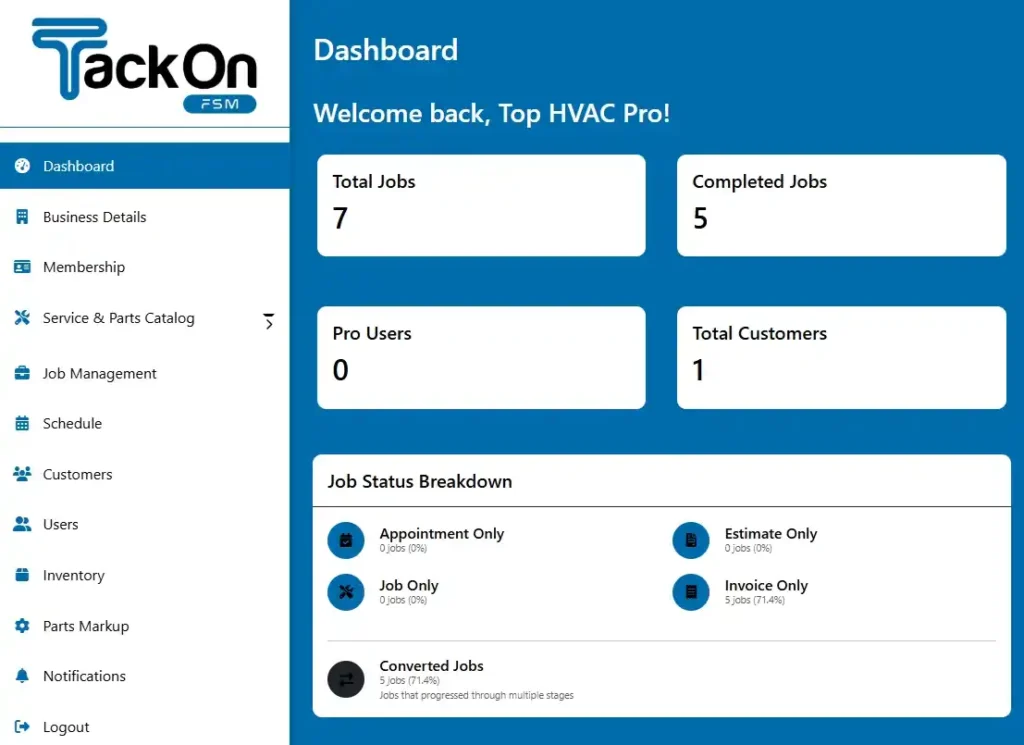
When your tech finalizes an invoice on their tablet, that information should flow directly into your accounting system without anyone in the office lifting a finger. This keeps your books accurate in real-time and dramatically speeds up cash flow. Without that link, you’re just creating more admin work. You can see how a unified system works by checking out how the TackonFSM dashboard pulls everything into one place.
Prioritize Simplicity for Everyone
The best software is a paradox: it's powerful for the office manager but dead simple for the field crew. Your dispatcher needs a flexible drag-and-drop board to manage chaos, while your tech just needs to see their next job and get it done.
Ask yourself these questions during a demo or free trial:
- For the Office: Can the dispatcher see the whole day at a glance, reassign a job in seconds, and text a customer an ETA with one click?
- For the Field: Can a tech pull up customer history, update a job's status, and build an invoice without having to call the office for help?
Get your office manager and one of your lead techs to test drive the software with you. Their feedback will tell you everything you need to know about whether a platform is a genuine fit for your entire team.
Your 5-Step Implementation Plan
So you’ve picked your new work schedule software. Now comes the part that makes most contractors nervous: getting it up and running. But switching systems doesn't have to throw your entire operation into chaos.
The secret is a smart, deliberate plan. Think of it like a big commercial install—you wouldn't just show up with a truck full of parts and start winging it. You’d have a blueprint, stage your materials, and brief the crew. Let's apply that same logic here.
Breaking the process into these five manageable steps will get your team on board, keep daily work flowing, and help you see the benefits of your investment right away.
Step 1: Data Preparation and Migration
First things first: your new software is an empty box. We need to fill it with the information that makes your business run. This is all about getting your customer lists, parts catalog, and current job schedule loaded in. Getting this right from the start is non-negotiable.
Don’t sweat it, though. You aren't expected to handle this data puzzle alone. Most providers, like TackonFSM, offer free onboarding support and will basically do the heavy lifting for you. They’ve migrated hundreds of businesses and know how to make it painless.
Here’s what you need to pull together:
- Customer Lists: Get your customer data into a clean spreadsheet. We're talking names, service addresses, phone numbers, and any key notes about their history or equipment.
- Parts and Inventory: You'll need your full pricebook and an accurate count of what’s in the warehouse and on each van.
- Existing Jobs: Make a list of all your future appointments so they can be plugged directly into the new calendar from day one.
Step 2: System Configuration
Once your data is in, it’s time to make the software work the way you work. This is where you customize the platform so it feels like it was built specifically for your shop, not some generic company.
Start with user roles. Your dispatcher needs a completely different view and set of permissions than a field technician or the owner. Setting these up properly keeps things simple and prevents someone from accidentally messing up a setting they shouldn’t have access to.
"A well-configured system acts like a guide, gently steering your team toward the right actions. It removes guesswork by building your company’s best practices directly into the software."
Next, you’ll want to set up your specific job types (think HVAC Maintenance, Plumbing Emergency, or Electrical Install) and attach digital checklists to them. This is how you guarantee every tech follows the same process and maintains your quality standards on every single call.
Step 3: Focused Team Training
Training is where you turn skepticism into enthusiasm. The trick is to split the training into two separate sessions: one for your office staff and one for your field techs. They use the system in completely different ways, so a one-size-fits-all approach just doesn't work.
For the office crew, focus on the dispatch board, creating and assigning jobs, and pulling up key reports. For your techs, the training should be 100% on the mobile app. Walk them through checking their schedule, updating job statuses on-site, and building an invoice before they even leave the customer's driveway.
Step 4: The Phased Rollout
Whatever you do, don't flip the switch for the whole company at once. A phased rollout is your safety net. Start small by picking one or two of your most tech-friendly technicians to be your pioneers.
Have them run their entire workday through the new software for about a week. This "beta test" is your chance to find any awkward workflows, configuration issues, or training gaps in a low-stakes environment. Their feedback will be gold for making the full launch go smoothly.
Step 5: Full Launch and Review
After you've worked out the kinks with your test group, you're ready to go live. Announce the official launch date, make it clear this is the new standard, and fully commit. This is the moment you stop running two systems and start reaping the rewards.
And those rewards are significant. The workforce management software market is expected to reach USD 9.76 billion by 2026 for a reason. Contractors who make the switch see real results; 75% of contractors using these tools report 30% faster invoicing, often because they can collect payment in the field. To dig deeper into the numbers, you can learn more about how scheduling directly impacts contractor profitability in this market report.
Your Top Questions, Answered
Making a change to how you run your business is a big deal. It’s only natural to have questions about the cost, the learning curve, and whether this kind of software is even right for a business your size. Let’s cut through the noise and tackle the real concerns we hear from HVAC, plumbing, and electrical owners every day.
We'll get straight to the point with practical answers so you can feel confident about what’s next.
Is This Software Hard for Techs to Learn?
This is the most important question, bar none. If your techs in the field can't—or won't—use the software, you've just wasted your money. The great news is that modern field service apps are nothing like the clunky, confusing software you might remember from a decade ago.
Think about it: your crew already uses apps like Google Maps, Facebook, or their banking app every single day. They didn't need a manual or a week of training for those. The best work schedule software is built with that same intuitive design in mind.
The goal isn't to turn your expert plumbers or electricians into computer wizards. The goal is to give them a tool that's so simple it feels like a natural part of their day, not another frustrating chore.
A good mobile app walks a technician through their tasks with a clear, logical flow. Buttons are big and easy to see, and the process mirrors the job itself: check your schedule, tap for directions, update your status, take photos, build the invoice, and get paid. Providers like TackonFSM are laser-focused on making their field app so straightforward a new hire can be up and running in under an hour. It’s all about making their job easier, not adding another headache.
How Much Does Work Schedule Software Cost?
Pricing can seem all over the map, but it usually comes down to one common model. Once you understand it, you can budget properly and—more importantly—avoid getting nickel-and-dimed.
Most companies charge on a per-user, per-month basis. You simply pay a flat fee for each person who needs access. For instance, if a plan is $40 per user per month and you have five techs and two office staff on the system, your total monthly cost would be $280 (7 users x $40).
This model works well because it scales with you. As you grow and hire more people, you just add them to your plan. It’s a common approach used by platforms like TackonFSM, which offers different tiers depending on the features and number of users you need.
Watch Out for Hidden Fees
While per-user pricing is simple, you have to read the fine print. Some companies bury extra costs that can blow up your budget.
- Onboarding and Setup Fees: Some providers will hit you with a one-time fee, sometimes thousands of dollars, just to get you started and import your data.
- Training Costs: Is training included, or will you have to pay extra for live sessions to get your team comfortable with the new system?
- Long-Term Contracts: Be very cautious of anyone trying to lock you into a 12- or 24-month contract. This kills your flexibility if the software isn’t a good fit or your business needs change.
- Premium Support Charges: You might find that basic email support is free, but if you want to actually talk to a human on the phone, it could cost you extra.
Look for a provider with transparent pricing, a free trial, and no long-term contracts. This gives you the power to make sure the software truly works for your business before you make a big financial commitment.
Is My Small Business Ready for This?
There’s a common myth that this kind of powerful software is only for the big companies with fleets of trucks. That couldn't be more wrong. In fact, it’s often the small businesses—even one-person shops—that see the biggest and fastest return on their investment.
Don’t think of it as an expense. Think of it as laying the foundation to grow without chaos. Getting the right system in place from day one prevents you from hitting a wall when business starts picking up.
For a small business, a dedicated work schedule software delivers:
- A Professional Edge: When you send a digital estimate or invoice with your company logo, you immediately look more organized and trustworthy than the competition still using a carbon copy book.
- Faster Payments: Creating an invoice on the spot and emailing the customer a payment link means you get paid in days, not weeks. This is a game-changer for cash flow, the lifeblood of any small business.
- A Foundation for Growth: The moment you’re ready to hire your first technician, the system is already there. You just add them as a new user, and they can start running jobs immediately. No need to reinvent your entire process.
- Time Back in Your Day: As a small business owner, your time is your most valuable resource. By automating your scheduling, invoicing, and follow-ups, the software frees you up to do more billable work or focus on finding new customers.
You’re not just buying a scheduling tool. You’re buying back your time and building an efficient, professional operation that customers will trust and that’s ready to grow when you are.
Ready to stop the scheduling chaos and see how a true field service platform can transform your business? TackonFSM replaces spreadsheets and paperwork with one simple system to schedule jobs, manage technicians, and get paid faster. Start your free 14-day trial today and discover a better way to run your trade business.