A Contractor’s Guide to Work Order Management Systems
A work order management system is your digital command center. It replaces the old-school chaos of paper, whiteboards, and endless phone tag with a single, organized hub that runs your entire field service operation.
Think of it as the central nervous system for your business, connecting every moving part—from the initial customer call to the final invoice.
How Work Order Management Fixes Your Workflow
If you're an HVAC, plumbing, or electrical contractor, you know the daily grind. Paperwork vanishes, techs arrive at a job missing the right part, and figuring out if a job was actually profitable feels like guesswork. This is the exact pain a dedicated work order management system is built to solve. It moves your entire process off of cluttered clipboards and into one clean, digital space.
Let’s walk through a real-world scenario. A frantic customer calls because their AC died on the hottest day of the year. Instead of grabbing a notepad, your dispatcher creates a digital work order in seconds. This isn't just a simple note; it's a living record that instantly captures everything that matters:
- The customer's name, address, and service history
- A clear description of the problem (e.g., "AC not blowing cold air")
- Any gate codes or special instructions for the technician
This single action kicks off a smooth, connected workflow that bridges the gap between your office and your team in the field.

From Dispatch to Done
Once that work order is live, it pops up on a central dispatch board. Your dispatcher can see every technician's real-time location and schedule, making it easy to assign the job to the nearest available pro with the right expertise. No more calling around to see who's free.
The technician gets an instant notification on their phone or tablet. All the job details are right there—no risk of mishearing an address over a crackly phone call. As they work, they can update the job status, snap photos of the repair, and add notes directly into the app. This means everyone in the office knows exactly what’s happening without ever having to interrupt the tech.
This shift from manual to digital is why the global market for these systems, valued at US$ 745 million in 2023, is expected to more than double by 2031. Contractors are realizing they can't compete using yesterday's tools. You can find more details in this work order management systems market analysis.
At its heart, a work order management system is about taking back control. It turns reactive, chaotic days into proactive, predictable operations, giving you the visibility to ensure every single job is tracked, managed, and profitable.
To really see the difference, let’s compare the old way of doing things with the new.
Manual vs Digital Work Order Management
| Task | Traditional Method (Paper & Spreadsheets) | Work Order Management System |
|---|---|---|
| Creating a Job | Scribbled notes, easily lost or misread. | Instant digital record with all customer info. |
| Dispatching | Phone calls, texts, hoping the right tech is free. | Visual drag-and-drop board, optimized assignments. |
| In-Field Updates | Tech has to call the office; no real-time visibility. | Live status updates, photos, and notes from a mobile app. |
| Invoicing | Handwritten invoices, delayed billing, manual data entry. | Instant invoice generation on-site, digital payments. |
| Tracking History | Digging through old file cabinets for past job info. | Complete customer history available in a few clicks. |
The contrast is stark. One method is built on friction and manual effort, while the other is designed for speed, accuracy, and profitability.
Core Features That Power Your Field Operations
A work order management system is so much more than a digital to-do list. Think of it as the central nervous system for your entire field operation, with each feature designed to solve a specific, real-world headache that HVAC, plumbing, and electrical contractors face every single day. Once you see how the pieces connect, you'll understand how this kind of software turns chaos into predictable control.
This diagram shows how a work order system acts as the central hub, tying jobs, technicians, and customers together into one smooth workflow.
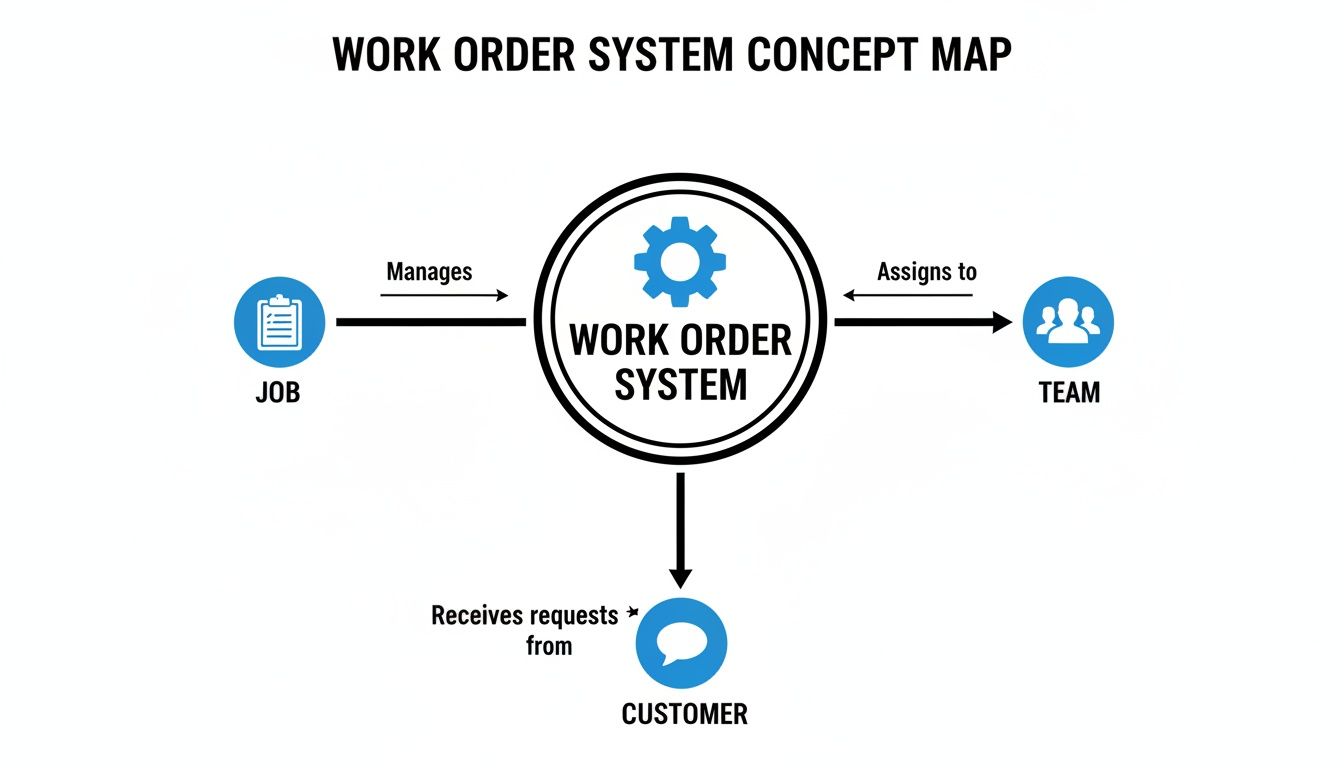
As you can see, its real power comes from centralizing all that information. Everyone—from the dispatcher to the tech in the field—is finally working from the same playbook.
Dynamic Scheduling and Dispatching
It's time to ditch the messy whiteboard and the endless back-and-forth phone calls. Modern systems give you a visual, drag-and-drop scheduling board that’s less of a calendar and more of a command center. Your dispatcher gets a bird's-eye view of the entire day, week, and month, seeing every technician’s availability, job status, and location in real time.
When an emergency call comes in for a furnace on the fritz, the dispatcher can instantly spot the closest tech with the right skills and assign the job with a click. The system can even map out the most efficient routes, helping you squeeze more profitable jobs into every day. This is a crucial element, and you can learn more in our deep dive on field service scheduling software.
A smart dispatch board doesn’t just assign tasks; it optimizes your entire team's time. It turns your schedule from a static list into a flexible, responsive asset that adapts to unexpected changes and new opportunities.
Mobile App for Real-Time Field Updates
The gap between what’s happening in the office and what’s happening in the field is a classic source of frustration and wasted time. A dedicated mobile app closes that gap for good, turning every technician's smartphone or tablet into a direct line to the main system. No more paper forms or trying to decipher handwritten notes.
For example, a plumber can snap a few photos of a corroded pipe before starting work and upload them right to the work order. This creates a permanent visual record, protects you from potential disputes, and gives the next tech who visits that home valuable context. This mobile-first approach is a huge reason the work order management systems market stood at USD 760.4 million, as mobile-enabled solutions have become the standard. You can explore more about these market trends and their impact.
Digital Checklists and Quality Control
How do you guarantee every tech performs a 21-point HVAC tune-up to the same high standard? Digital checklists are the answer. You can build custom, mandatory checklists for specific job types right inside the work order template.
This simple feature ensures nothing gets missed. Before an electrician can close out a panel upgrade job, they have to confirm they’ve completed every step, from torqueing breakers to labeling circuits. This not only standardizes your service quality but also creates a clear, documented history of the work you performed for every customer.
Integrated Inventory Management
"I have to run back to the shop for a part." Those are the words that kill a day’s productivity. Integrated inventory management gives you real-time visibility into your parts and equipment, both in the warehouse and on every service van.
When a technician uses a specific capacitor on a job, they log it in the mobile app, and the system automatically deducts it from their van's stock. This unlocks a few key benefits:
- Track Usage: Know exactly which parts are used on which jobs, making sure billing is always accurate.
- Set Reorder Points: Get automatic alerts when stock on a van or in the warehouse runs low, before it becomes a problem.
- Reduce Shrinkage: Maintain accountability for every part and piece of equipment, minimizing costly losses.
Suddenly, your inventory goes from being a major liability to a well-managed asset that prevents delays and wasted trips.
Streamlined Estimating and Invoicing
The final—and most critical—part of any job is getting paid. A work order management system connects your field operations directly to your financial workflow. Technicians can build professional estimates right on their tablet using pre-loaded parts and labor rates, get a digital signature from the customer, and instantly convert that approved estimate into a work order.
Once the job is done, the system generates an invoice on the spot. All the details—parts used, labor hours, and tech notes—are already there. This eliminates the tedious manual data entry and the errors that come with it, dramatically shortening the time between job completion and getting paid.
The Real-World Payoff for Trade Contractors
Okay, let's move past the features list. What does a work order management system actually do for a trade contractor on a Tuesday afternoon? For small and mid-sized HVAC, plumbing, and electrical shops, the benefits are about more than just getting organized—they hit your bank account, your team's sanity, and your customers' happiness. It's about turning the daily chaos into a predictable, growing business.
The market for this kind of software is set to more than double, hitting US$ 947.39 million by 2029, and it’s not because it's a flashy new toy. The results are undeniable. Field service businesses that adopt this tech often see job completion times shrink by 20-30%. Think about that. On top of that, those "where's the tech?" calls from customers can drop by a whopping 40-60%, freeing up your team to handle more work without burning out.

Fit More Profitable Jobs into Every Day
One of the first things you'll notice is you get your time back. Right now, without a smart system, your technicians are probably losing precious hours driving all over town, getting stuck in traffic, or having to double back to the shop for a part they forgot.
A work order management system with good scheduling and route optimization completely changes this picture. It's like having a master dispatcher constantly shuffling the day's jobs to find the most efficient path forward.
- Before: Your best plumber zig-zags from one end of the county to the other. They lose two hours of billable time just sitting in their van.
- After: The system groups jobs by location and maps out the smartest route. That "lost" two hours is now another profitable service call, boosting that day's revenue.
This isn’t about making your crew work harder. It's about removing all the little frustrations that slow them down.
Stop Profit Margins from Leaking Away
We all know how thin the margins can be in the trades. They get eaten alive by sloppy estimates, forgotten parts on an invoice, or under-billed labor. A centralized system is your financial watchdog, making sure every single job is priced for profit right from the start. We have a great resource on how to Simplify Estimates, Quotes, and Invoicing that dives deeper into this.
When your techs can build a quote on-site from a pricebook that already has your markups baked in, you kill the guesswork. Every part they use and every minute they work gets tracked against that job, giving you a crystal-clear picture of what you actually made.
A work order management system turns every job into a predictable financial outcome. You stop hoping for a profit and start engineering it with real data.
End the Expensive Inventory Blind Spots
How much cash is sitting on a disorganized shelf in your shop or rolling around in the back of a van? Parts get lost, over-ordered, or just "disappear"—a problem we call shrinkage. A system with built-in inventory control gives you total visibility.
You know exactly what parts are in the warehouse and what's on each tech's truck. When a part is used on a job, it's automatically logged, and the system can even flag you when stock is low. This puts an end to last-minute runs to the supply house that delay jobs and stops you from wasting money on parts you didn't even know you had.
This level of efficiency also does wonders for customer satisfaction. Prompt service and clear communication are key to winning online and getting those five-star reviews that bring in new business.
Get Paid Faster and Fix Your Cash Flow
Finally, let’s talk about the big one: getting paid. The lag time between finishing a job, sending the invoice, and actually seeing the money hit your account can be a huge strain on a small business.
With a modern system, that whole process becomes seamless. The moment a technician marks a job as "complete" on their tablet, an accurate invoice is ready to go. It can be emailed or texted to the customer right then and there. Even better, your tech can take a credit card payment on the spot. This one change can shrink your payment cycle from 30+ days down to just a few minutes, completely transforming your cash flow.
How to Choose the Right System for Your Business
Picking the right work order management system can feel like a massive undertaking, but it doesn't have to be. The best way to think about it isn't like you're just buying software; it's more like hiring a new operations manager. You're looking for a partner that gets your trade, slots right into your team's workflow, and can grow with you without creating a bunch of new headaches.
The whole point is to find something that solves your specific problems—not just the platform with the longest list of features. A system built for a giant manufacturing plant is going to be a complicated, expensive mess for a five-person plumbing crew. Your focus needs to be on how it actually works for your team in the real world.
To cut through all the sales hype, you need a solid way to evaluate your options. That means asking pointed questions that show you how a system will perform on a chaotic Wednesday morning, not just how it looks in a slick demo.
Your Evaluation Checklist
When you start looking at different systems, use this checklist to guide your conversations. The answers you get will quickly tell you which platforms are truly all-in-one solutions and which are just a bunch of disconnected tools that will end up making more work for you. Don't be shy about pushing for details; your business is on the line.
Core Functionality Questions
- Is it a real all-in-one system? Find out if scheduling, inventory, estimating, and invoicing are actually built together or if they're just separate modules cobbled together. A truly unified platform means no more entering the same data twice.
- How good is the mobile app, really? Your techs are the ones who will use this thing every day. The app has to be simple, quick, and work even when cell service is spotty. Can they pull up job history, snap photos, and take a payment without a two-hour training session?
- Does it actually manage inventory the way you do? Get into the weeds here. Can you track parts on multiple trucks and in the shop? When a tech uses a part, does it automatically come out of their van's stock so you know when to reorder?
The best work order management systems are built with the technician in mind. If your field team thinks the mobile app is clunky or confusing, they won’t use it. If they don't use it, you'll never get the benefits you're paying for.
Understanding the True Cost and Support
Beyond the features, the business side of things is just as important. Hidden fees and terrible customer support can sour a great investment fast. You need a clear picture right from the start.
Pricing and Onboarding Questions
- What’s the total cost? Ask for a complete breakdown of every single fee. Are there charges for setup? For migrating your data? Do you have to pay extra for decent support? Predictable costs are a must for any small business.
- What does "onboarding" actually mean? Will they help you clean up and import your customer list and parts database? Do they offer real, hands-on training for your office staff and your field techs? A smooth launch is everything for getting your team on board.
- How will this scale with my business? As you bring on more technicians, how does the price change? Make sure the system can grow with you without forcing you into some ridiculously expensive enterprise plan you don't need.
Choosing the right platform is one of the most important steps you can take to get a handle on your business and improve your bottom line. By asking these direct questions, you can pick a work order management system that’s a perfect fit.
Implementing Your System and Avoiding Common Pitfalls
Making the switch to a new work order management system can feel like a massive undertaking. But with a smart plan, what seems like a daunting project becomes a smooth, manageable transition. Success isn't about just flipping a switch one day; it’s about getting your team, your data, and your processes ready for a better way of working.
A great launch starts long before "go-live" day. It begins with a clear, step-by-step process that brings everyone on board. This ensures your new system is an asset from day one, not just another source of headaches.

Your Step-by-Step Implementation Roadmap
Breaking down the process into smaller, more digestible steps makes the whole thing feel less overwhelming. Think of it as a project with a clear beginning, middle, and end—not a single, scary event. A structured rollout keeps important details from falling through the cracks.
- Data Cleanup and Migration: This is your foundation, so don't skip it. Before you move anything over, take a hard look at your current customer lists and parts inventory. Weed out duplicate entries, update old contact information, and make sure your part names are consistent. Starting with clean data is non-negotiable.
- Team Training and Buy-In: The best software on the planet is useless if your crew won't use it. You need to schedule dedicated training sessions for both the office staff and your field techs. Focus on the features each group will use every day and, more importantly, show them how it makes their jobs easier.
- Phased Rollout: Don't try to change everything overnight. A great strategy is to run the new system alongside your old methods for a week or two. This gives your team a safety net to get comfortable with the software without the pressure of a hard cutover. It builds confidence for a much smoother final switch.
This measured approach turns what could be a chaotic scramble into a controlled, predictable process.
Steering Clear of Common Implementation Pitfalls
Knowing what not to do is just as important as knowing what to do. Too many businesses stumble over the same preventable hurdles when adopting new work order management systems. If you know what they are ahead of time, you can navigate around them.
One of the biggest mistakes? Failing to get your team on board from the beginning. If your technicians feel like a new system is being shoved down their throats, they’ll find every reason not to use it. That’s why bringing a lead tech into the evaluation process is so powerful—they become a champion for the change among their peers.
Another classic blunder is messy data migration. Simply dumping your old, disorganized data into a shiny new system just moves the problem. Garbage in, garbage out. You’re investing in this software for clarity and accuracy, and that starts with clean information.
The real goal of implementation isn't just to install software. It's to fundamentally change your operational habits for the better. A rushed or poorly planned rollout almost always leads to low adoption, a wasted investment, and a frustrating slide back to the old, inefficient ways of doing things.
Finally, don't skimp on training. A quick 30-minute demo won't cut it. Your team needs hands-on time to build muscle memory and confidence. Invest in thorough training upfront, and you'll see the payoff in productivity and smoother operations for years to come.
Your Path to Greater Profitability and Control
This isn't just about getting new software. It's a real investment in the future of your business. If you're tired of digging through paper invoices, wrestling with scattered spreadsheets, and playing endless phone tag, this is the single most powerful step you can take to get your time back. A work order management system is designed to fix the very things that drain your profits and cause headaches: disorganization, wasted hours, lost revenue, and inventory that seems to have a mind of its own.
You’ve seen how this kind of tool can turn your manual, often chaotic, processes into a smooth, automated workflow. Every single job—from the first call a customer makes to the final payment—is managed in one central place. This is more than a small tweak; it’s a complete change in how you run your business, giving your team what they need to succeed and directly improving your bottom line.
From Chaos to Command
Picture this: every technician has all the job details they need right on their phone, and your customers get updates automatically. That’s not a fantasy; it's what happens when you have the right system in place.
- No More Guesswork: You finally get a real-time, accurate pulse on how your business is actually doing, both financially and operationally.
- Empowered Teams: Your techs show up to jobs prepared, finish their work faster, and can even collect payment on the spot. This is a huge boost for morale and efficiency.
- Satisfied Customers: When you communicate professionally and show up on time, you build the kind of customer loyalty that makes your reputation shine.
A work order management system turns reactive firefighting into proactive control. You stop chasing problems and start engineering predictable, profitable outcomes for every single service call.
Building a Stronger Foundation
To really push for peak efficiency and profit, many modern trade contractors connect their work order management system with other powerful tools. For instance, using something like Exayard construction takeoff software can help you nail down estimates from the very beginning. By linking precise project planning with your day-to-day field operations, you're building a much stronger, more resilient business from the ground up.
The path forward is clear. When you bring everything into one unified system, you're doing more than just organizing a schedule or tracking parts. You're building a solid foundation that can support real, sustainable growth. It’s time to take that next step and get complete control over your business.
Frequently Asked Questions
Even when you see the potential, it's natural to have a few practical questions before jumping into a new system. Let's tackle some of the most common things contractors ask when they're thinking about a work order management system. We'll give you straight answers to help you feel confident about your next move.
How Much Does a Work Order Management System Cost?
The price can be all over the map, but modern, cloud-based systems are much more affordable than you'd guess. We're not talking about the massive upfront installation fees of the old days. Today, most companies run on a subscription model, usually a monthly fee for each user or technician.
For a small crew, you can get a really powerful plan for somewhere between $40 to $60 per technician each month. If you need more advanced tools like custom reports or integrations with other software, you might be looking at $80 to $150 per technician. The trick is to find a provider with clear, upfront pricing—no surprise setup fees or locked-in annual contracts. This approach makes top-tier software a realistic option even for a one or two-truck shop.
The real question isn't "what's the price?" but "what's the value?" If a system costs you $150 a month but helps you squeeze in just one extra service call, it's already paid for itself several times over.
How Long Does Implementation Actually Take?
This is another area where the software has gotten so much better. A huge company might spend months rolling out a new system, but a small trade business can be up and running in just a few days or a couple of weeks. It really comes down to two things: how clean your current data is and how much help the provider gives you.
A typical setup process looks something like this:
- Data Prep (1-3 days): You’ll pull together your customer lists, parts inventory, and price books and get them tidied up.
- System Setup & Import (1-2 days): The software provider helps you upload all that info and tweak the settings to fit how you work.
- Team Training (2-5 days): Your office staff and field techs get a walkthrough of how to use the new tools.
- Go-Live & Support (Ongoing): You start running all your jobs through the new system, knowing their support team is there to help with any snags.
For a focused team, you can realistically go from signing up to running your first job in less than two weeks.
Is My Business Too Small for This Software?
This is one of the biggest misconceptions out there. The answer is a hard no. In fact, it's often the smaller businesses that see the biggest and fastest return on their money because every bit of efficiency makes a huge, immediate difference.
Think about it. If you're a solo operator or running a small crew, you're doing it all—you're the tech, the dispatcher, the bookkeeper, and the salesperson. A good system takes a ton of that admin work off your plate, freeing you up to do the billable work that actually makes you money. It gives you the organization of a bigger company without the payroll, helping you look professional and compete with anyone.
Ready to get a real handle on your jobs, team, and profits? TackonFSM is an all-in-one platform built for trade contractors who are done with the chaos and ready to grow. See how our simple scheduling, mobile app, and inventory tools can change how you operate. Start your free 14-day trial today.