Small Business Inventory Control System A Path to Higher Margins
A small business inventory control system is your command center for every part, tool, and piece of material your business owns. It’s a digital solution that gets you out of the weeds of messy spreadsheets and forgotten clipboards, creating one central, accurate record of your stock.
Whether a part is sitting in the main warehouse, rolling around in a service van, or already installed at a job site, the system knows exactly where it is. This level of control is what stops the costly, all-too-common mistakes—like running out of a critical part mid-job or accidentally ordering expensive equipment you already have.
What Exactly Is a Small Business Inventory Control System?
Think of it this way: instead of a chaotic pile of parts and materials, imagine a perfectly organized toolkit where every single item has a name, a place, and a purpose. A small business inventory control system is that digital toolkit. It’s the central hub that watches over every component, from the tiniest screw to the biggest HVAC unit, giving you total visibility over your assets.
This kind of system is built to solve the painful, everyday headaches of trying to track everything by hand. We’ve all been there—the frantic, last-minute run to the supplier because a tech just realized a crucial part is missing from their van. Or that sinking feeling when you discover you just spent a grand on materials that were already collecting dust on a back shelf, tying up cash you could have used elsewhere.
These aren’t just small hiccups. They're direct hits to your efficiency and, ultimately, your bottom line.
From Manual Chaos to Proactive Control
Without a dedicated system, most businesses are stuck in a reactive loop. Inventory is managed with a mix of memory, scribbled notes, and disconnected spreadsheets that are almost always out of date. This approach creates constant uncertainty and forces your team to spend more time hunting for parts than actually doing the work.
A proper inventory control system flips that script completely. It creates a single, reliable source of truth that everyone on your team can access, from the office dispatcher to the technician in the field. Suddenly, the guesswork is gone.
This shift empowers your team to make smart, proactive decisions instead of just reacting to problems as they pop up.
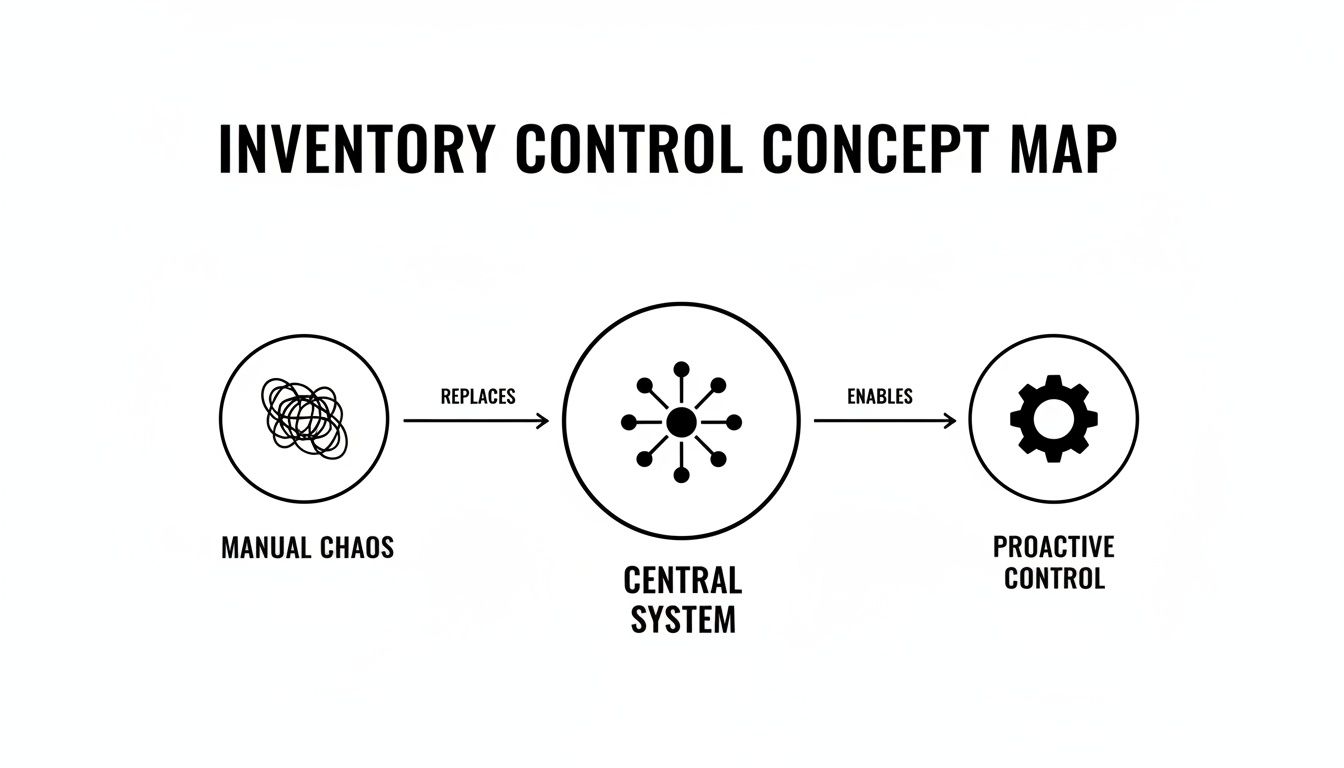
The real takeaway here isn't just about tracking stuff better. It's about fundamentally changing how your business runs, moving it from a state of constant firefighting to one of strategic control.
Manual Tracking vs. Automated Inventory Control
The difference between wrestling with a spreadsheet and using a dedicated system is night and day. One method drains resources, while the other builds a more resilient, profitable business. Let’s break down the comparison.
| Aspect | Manual Method (Spreadsheets or Clipboards) | Automated Inventory Control System |
|---|---|---|
| Accuracy | Prone to human error, typos, and forgotten entries. Often out of date. | Real-time updates as parts are used, moved, or received. High accuracy. |
| Visibility | Siloed information; the office doesn't know what's in the van. | Centralized view of all stock across all locations (warehouse, vans, etc.). |
| Efficiency | Time-consuming manual counts and data entry. Slows down quoting and invoicing. | Automated reorder points, barcode scanning, and instant stock level checks. |
| Job Costing | Difficult to accurately track which parts were used on which job. Leads to lost revenue. | Parts are directly linked to jobs, ensuring every item is billed correctly. |
| Decision Making | Based on guesswork and outdated information. "I think we have that part…" | Based on real-time data. "We have 3 in Van #2 and 5 in the warehouse." |
In short, manual methods leave you guessing, which costs you time and money. An automated system gives you the hard data needed to operate with confidence and protect your margins.
Why It Matters for Trade Businesses
For any trade or field service business, the stakes are even higher. Your inventory isn’t sitting neatly in one place—it’s constantly on the move, spread across multiple service vehicles that are essentially mini-warehouses on wheels. An effective system is built to handle this exact challenge.
Here’s what it really accomplishes for your team:
- Real-Time Van Stock: You know precisely what parts are in which van, at any given moment. This stops technicians from showing up to a job unprepared, preventing wasted trips and unhappy customers.
- Accurate Job Costing: By linking specific parts directly to work orders, you guarantee that every single item used is accounted for and billed correctly. This is one of the fastest ways to protect your profit margins.
- Less Admin Headaches: The system automates the tedious tasks that used to eat up hours, like updating stock levels after a part is used or automatically generating a purchase order when supplies get low.
Ultimately, a small business inventory control system is the foundation for operational excellence. It transforms a major source of stress and financial drain into a well-managed asset that actively supports growth, efficiency, and customer satisfaction.
The Core Features That Power Modern Inventory Control
A modern small business inventory control system isn't just a fancy spreadsheet. Think of it less like a static list and more like a dynamic, intelligent hub designed to solve the very real headaches that trade businesses deal with every single day. The real power comes from a few core features that work in tandem to connect your office, your warehouse, and your technicians out in the field.
These aren't just bells and whistles; they’re tools that turn your inventory from a constant source of stress into a genuine asset. Instead of guessing what you have and where it is, you get total clarity. This visibility lets your team move faster, quote with confidence, and make sure every job actually turns a profit.
Let's pull back the curtain on the three most important features that make this all happen.

Real-Time Van and Warehouse Tracking
For any trade business, inventory is constantly on the move. It's not sitting neatly on shelves in one location; it’s scattered between the main shop and a fleet of service vans that are essentially mini-warehouses on wheels. This is where pen-and-paper or simple spreadsheets fall apart—they can't give you a live, unified view of all that moving stock.
A proper inventory control system solves this with real-time van and warehouse tracking. It gives you a bird's-eye view of your entire stock, accessible from a phone or computer, no matter where you are.
Picture this: an emergency call comes in for a busted water heater. Before sending someone out, your dispatcher glances at the system and sees which tech is closest. More importantly, they can see exactly what parts are in that tech's van. They confirm he has the right replacement valve and a couple of compatible heating elements.
The technician gets the job, sees the parts are already accounted for on his tablet, and heads straight to the customer, completely prepared. No more frantic calls back to the shop asking, "Hey, do we have one of these?" No more last-minute, profit-killing trips to the supply house. This feature alone slashes wasted travel time and massively boosts your first-time fix rate.
Connecting Parts Directly to Jobs
How many times has a small part—a capacitor, a few feet of pipe, a specific fitting—been used on a job but forgotten on the final invoice? This "parts leakage" is a silent killer of profitability, slowly bleeding margins from every single job you do.
This is where linking parts to jobs becomes a total game-changer. When a tech uses a component, they simply scan its barcode or tap it from a list within the work order on their phone. The system instantly does two critical things:
- It deducts the part from your inventory, keeping your stock counts perfectly accurate.
- It adds the part as a line item to the invoice, guaranteeing you get paid for it.
This direct link gives you laser-focused job costing. You stop guessing what materials were used and start knowing. It’s the difference between hoping a job was profitable and ensuring it is.
This simple action—tying a physical part to a digital work order—is one of the most powerful ways to plug financial leaks in a service business. It ensures the value of every single item is captured, from a $2 fitting to a $2,000 compressor.
The Shared Digital Pricebook
Inconsistent quoting is another massive, often hidden, problem. One tech quotes from memory, another uses an old price sheet from the glovebox, and the office quotes something else entirely. It creates confusion for customers and makes your profitability a total crapshoot.
A shared digital pricebook fixes this by putting all your parts, materials, and labor rates into one central, up-to-date database that your whole team can access. When a tech builds a quote in the field, they just pull items from the pricebook, and your pre-set, profitable markup is automatically applied.
This ensures every single quote is consistent, professional, and built to protect your margins. It gives your team the confidence to create accurate estimates on the spot, which helps close sales faster and win more work. A great system, like the one built into TackonFSM, even allows this pricebook to evolve as you add new items, making your quoting process faster and smarter over time.
How Inventory Control Directly Boosts Your Bottom Line
It's one thing to understand the features of a small business inventory control system, but it's another thing entirely to see how those features translate into actual dollars and cents. An effective system isn't just a fancy way to organize parts on a shelf; it's a powerful engine for profitability that touches nearly every part of your daily operations.
So, instead of looking at it as another business expense, think of it as a tool designed to deliver a clear and measurable return on investment. This return materializes in three key areas where manual tracking methods almost always fall short. By getting a real grip on your stock, you start plugging the financial leaks that quietly drain your profits and smoothing out the operational bumps that slow your team down.
Let's break down exactly how this happens.
Drives Down Stockouts and Project Delays
A stockout isn't just a minor hiccup—it's a direct blow to your revenue and your reputation. Picture this: your technician arrives at a job site, ready to work, only to discover they're missing one critical part. The entire project grinds to a halt. That single moment sets off a chain reaction of expensive problems that a good inventory control system is built to prevent.
The immediate fallout is easy to spot:
- Wasted Labor Hours: You're now paying a skilled technician for an unproductive trip back to the shop or to a local supplier.
- Increased Fuel Costs: Those unplanned trips burn gas and put extra wear and tear on your service vans.
- Delayed Project Timelines: The job gets pushed back, which can throw off your whole schedule for the day and, worse, leave you with a frustrated customer.
With real-time visibility into what’s in every van and what's in the warehouse, these fire drills become a thing of the past. The system makes sure your techs are sent out with everything they need for the job, which dramatically increases your first-time fix rate. That means more jobs completed per day, happier customers, and a huge reduction in the hidden costs that come from being unprepared.
Protects and Grows Your Profit Margins
In the trades, profit margins are won and lost in the details. A small business inventory control system essentially acts as a financial watchdog, protecting those margins in ways that are nearly impossible to do by hand. It zeroes in on the two biggest culprits of profit erosion: shrinkage and unbilled parts.
Shrinkage—the loss of inventory from theft, damage, or just simple administrative mistakes—is a silent killer of profitability. A system that tracks the movement of every single part creates accountability. When items are scanned out of the warehouse and assigned to a specific van or job, they don't just vanish into a black hole anymore.
Even more significant is how the system makes sure every part used on a job actually gets billed to the customer. By linking materials directly to a work order, your techs no longer have to rely on memory to add that $50 valve or $15 fitting to the final invoice. When you add up those small, missed items across hundreds of jobs, you’re talking about thousands of dollars in reclaimed revenue each year.
The data doesn't lie: businesses that adopt dedicated inventory control see real financial gains. Industry analyses show an average profit increase of around 4–6% and storage-cost reductions near 8–12%, proving a direct and powerful impact. You can discover more insights about these inventory management findings and see how the numbers apply to businesses of all sizes.
Streamlines Quoting and Invoicing
Every minute your team spends on administrative work is a minute they aren't spending on billable tasks. Building quotes and creating invoices are two of the most time-consuming admin jobs, and they’re often riddled with expensive mistakes when handled manually.
This is where an integrated digital pricebook comes in. It puts accurate, up-to-the-minute pricing for every part and service right at your team's fingertips. This delivers two huge benefits:
- Faster, Consistent Quoting: Technicians can build professional, profitable quotes right on-site in a matter of minutes. Every quote uses the correct markup, ensuring you never accidentally underbid a job again.
- Automated Invoicing: When parts are linked to a job, they flow straight onto the invoice. This gets rid of manual data entry, cuts down on billing errors, and gets accurate invoices to your customers faster—which means you get paid faster.
By slashing the time it takes to create quotes and invoices, your team can get back to what they do best: serving customers and completing more jobs.
Choosing the Right Inventory System for Your Trade Business
Let's be honest, not all inventory systems are built the same, especially when your team is constantly on the move. Picking the right small business inventory control system isn't about finding the one with a million bells and whistles; it’s about getting the one that actually works for your field-based workflow.
Think of it like buying a new work van. You wouldn't show up to a job site in a tiny sedan when you need to haul ladders, pipes, and heavy equipment. In the same way, your software needs to be built for the reality of trade work—tough enough for the daily grind, simple enough for a tech to use on-site, and powerful enough to keep up as you grow. This is your practical guide to the non-negotiables.

Prioritize Field-First Accessibility
Your technicians are the heart of your operation. If the system is a pain for them to use, it's dead on arrival. A "field-first" design has to be your top priority. That means an intuitive mobile app that works like a charm on a phone or tablet, even when the cell service is weak.
The app needs to make their daily tasks simple. Can a tech quickly see what parts are in their van? Can they log a part used on a work order with just a couple of taps? If the mobile experience is clunky, your team will find workarounds, and you’ll be right back to guessing your stock levels and losing money on unbilled parts.
Ensure Effortless Scalability
The system you pick today needs to work for you three years from now. A common mistake is choosing a solution that patches a current problem but has no room for growth. It’s like buying work boots that are a size too small—they might get you through the week, but they’ll become a massive pain down the road.
Look for a system that can expand with your business. Ask yourself:
- User Limits: Can you add new techs and office staff without a huge hassle?
- Location Management: Does it support tracking across multiple vans and, eventually, multiple warehouses?
- Feature Tiers: Are there more advanced features, like multi-location management, that you can turn on when you're ready for them?
A scalable small business inventory control system saves you the massive headache of having to switch platforms right when your business is taking off.
Demand Seamless Integrations
Your inventory system can't be an island. It has to talk to the other critical software you use every day, especially your accounting platform. A system that integrates cleanly with tools like QuickBooks creates a single, powerful workflow and cuts out hours of mind-numbing data entry.
When your inventory and accounting are connected, every part used on a job automatically syncs to your books. This keeps your job costing razor-sharp and your financials up-to-date. That connection turns two separate tools into one cohesive hub for running your business.
Choosing a system with strong integrations isn't a luxury—it's a necessity for operational efficiency. It prevents the double-entry errors that create accounting nightmares and gives you a true, real-time picture of your company's financial health.
Scrutinize Transparent Pricing
Finally, look closely at the pricing model. The sticker price is rarely the whole story. Some companies will hook you with a low monthly fee, only to hit you with surprise costs for extra users, essential features, or even just to talk to a support person.
Look for providers with straightforward, transparent subscription plans. They should clearly lay out what’s included in each tier, so you know exactly what you’re paying for. Try to avoid getting locked into long-term contracts. Even better, find a system that lets you test it out first, like the 14-day trial from TackonFSM. A trial period lets you kick the tires in your own real-world environment before you commit, making sure it’s the right fit for the long haul.
Your Step-by-Step Implementation Blueprint
Making the switch to a dedicated small business inventory control system can feel like a huge project, but it doesn’t have to be. With a clear roadmap, you can move from guesswork to total control without all the headaches. The secret isn't some complex, months-long ordeal; it's just a series of practical steps that build momentum and get your team on board from day one.
Think of it like setting up a service van before a big job. You wouldn't just toss tools in at random and hope for the best. You’d organize everything, make sure each tool has its place, and stock the van for success. This blueprint follows that same no-nonsense logic.
Step 1: Start with a Full Inventory Audit
Before you can bring your inventory online, you need to know exactly what you have. This first step is the most important one because your new system is only as good as the data you feed it. A complete physical count creates a clean, accurate baseline and stops old errors from messing up your new setup.
This is your chance for a total reset. If you don't have an accurate starting point, you're just digitizing chaos. You might be shocked to learn that many businesses are flying blind; some analyses show that average inventory accuracy can be as low as 66%. This problem directly leads to failures—about a third of businesses ship orders late simply because an item was oversold or out of stock. You can get more insights about inventory accuracy and see how it impacts operations on a larger scale.
Step 2: Configure Your Physical and Mobile Locations
Once your data is clean, it's time to build a digital framework that matches your real-world operations. This just means setting up every spot where you store parts.
- Define Your Warehouses: Start by creating your main storage locations, whether it's the back of the shop or a rented storage unit. Give each one a clear name in the system.
- Set Up Your Service Vans: This part is non-negotiable for trade businesses. Every single van needs to be set up as its own mobile warehouse. This is how you'll track parts assigned to specific techs and their trucks.
This digital map is what gives you that real-time visibility you're after. When a part moves from the warehouse to Van #3, the system reflects that change instantly, keeping everyone on the same page.
Think of this as creating a digital twin of your business. Every shelf in your shop and every bin in your vans now has a counterpart in the software, laying the groundwork for precise tracking.
Step 3: Import Your Parts and Pricebook
With your locations defined, you can now load in your most valuable assets: your parts list and pricing. A modern small business inventory control system makes this incredibly simple, usually letting you upload everything from a single spreadsheet.
This step pulls all your operational knowledge into one central place. No more prices scribbled on notepads or stuck in someone's memory. Now, everything is standardized in a shared digital pricebook. This guarantees every quote your team builds is consistent, professional, and—most importantly—profitable. It's the engine that powers accurate job costing and protects your margins on every single job.
Step 4: Train Your Team for Adoption
Technology is just a tool; your team is what makes it work. Getting this right comes down to good training and getting everyone to actually use the new system. The key is to show them how it makes their jobs easier, not just how it adds another task to their plate.
Your field technicians are the most critical group to train. Get them comfortable with the mobile app by focusing on a few core actions:
- Checking Van Stock: Show them how to quickly see what parts they have on hand before they even head to a job.
- Assigning Parts to a Job: Drill the simple process of scanning or selecting a part to link it directly to a work order.
- Building Quotes On-Site: Demonstrate how the digital pricebook helps them whip up fast, accurate quotes for customers right then and there.
When your crew sees the system as a tool that prevents frustrating supply runs and helps them close more jobs, they'll actually want to use it. This final step is what turns your new software from a plan on paper into a living, breathing part of your daily workflow.
Turning Inventory Chaos into Your Competitive Edge
We've walked through the whole journey, from the headaches of tracking parts on a clipboard to the genuine control you get with a modern small business inventory control system. The road ahead isn't just about cleaning up a messy process. It’s about turning a major operational weakness into one of your biggest strengths, transforming that chaotic pile of parts and materials into a powerful asset that helps you grow.
The key ideas here are straightforward but incredibly important. When you ditch the scattered spreadsheets and handwritten notes, you finally get the power to protect your profit margins. You put an end to those expensive project delays that happen when a tech realizes they're missing a critical part, which ultimately leads to happier customers who know you’ll get the job done right.
Stop Putting Out Fires and Start Planning Ahead
This kind of change lifts up your entire team. Imagine your technicians showing up to a job with everything they need, ready to create a professional quote on the spot. Your office staff can dispatch jobs confidently, knowing exactly what’s in the warehouse and on every single van. It’s not just about being more efficient; it’s about creating a calmer, more organized, and much more profitable business.
Let’s be honest—the problems we talked about, like parts going missing, quotes being all over the place, and techs making extra runs to the supply house, aren't small annoyances. They are direct hits to your bank account. If any of that sounds painfully familiar, it’s a clear sign your current system is costing you money.
The real goal here is to master your stock. An inventory control system is more than just software; it's the playbook that turns a source of daily chaos into a rock-solid foundation for your business, giving you the control you need to grow without breaking a sweat.
Your Next Move: Take Back Control
If you're tired of guessing and ready to know, it’s time to look at a solution built for the way trade businesses actually work. Consider this your invitation to leave the old, manual methods behind and get the clear view you need to run a smarter, more reliable operation.
Getting a handle on your inventory is one of the most significant things you can do to protect your company's financial health and set it up for the future. When you pick a system designed for your workflow, you aren’t just buying a piece of software—you're making a direct investment in a smoother, more profitable future for your entire company.
Frequently Asked Questions
Jumping into a new small business inventory control system always brings up a few questions. We get it. Here are some straightforward answers to the things we hear most often from owners like you.
How Long Does It Take to Get Set Up?
This isn't your grandad's software rollout. Forget about months-long projects. Most modern, cloud-based systems are built to get you up and running in just a few weeks.
Of course, the exact timeline hinges on a couple of things, mainly how clean your current parts data is and the size of your team. If your parts list is already pretty organized, you're on the fast track to a smooth switch.
Is This Worth It for a Really Small Team?
Absolutely. In fact, it might be more critical for a small crew of two or three techs than for a huge operation.
Think about it: when you're a small team, every little mistake hits harder. Every wasted trip back to the shop costs more. A simple, affordable system pays for itself almost immediately by protecting your margins on every single job, helping you look more professional with accurate quotes, and cutting out the expensive errors that a small business just can't afford.
Isn't "Inventory Control" Just Another Name for "Inventory Management"?
It's a common mix-up, but they are two sides of the same coin. The easiest way to think about it is like a coach and their playbook.
Inventory management is the coach. It’s the big-picture strategy—forecasting what you'll need, deciding when to reorder parts, and setting the budget. It's all about high-level planning.
Inventory control is the playbook in action on game day. It's the day-to-day work of handling the stock you have on hand: tracking parts in the vans and the warehouse, doing cycle counts, and making sure every screw and filter gets assigned to the right job. One is planning, the other is doing.
Ready to turn your parts inventory from a constant headache into a real asset? TackonFSM gives you the control you need to protect your profits and get your team on the same page. Start your free 14-day trial today.