

invoicing and estimating software: Top Picks for 2025
Invoicing and estimating software is what lets service businesses create, send, and keep track of their most important financial documents. It’s a huge leap from wrestling with spreadsheets or paper invoices, giving you a single, organized system to manage your finances, get paid on time, and look more professional to your clients.
Why Modern Invoicing and Estimating Software Matters
Moving away from paper and spreadsheets isn't just about keeping up with the times—it's a critical business decision. Let's be honest, manual invoicing is a pain. It's slow, and it's incredibly easy to make a mistake. A misplaced decimal point or a forgotten part on an invoice can mess with your cash flow and even create awkward conversations with customers.
Good invoicing and estimating software takes this entire headache and turns it into a smooth, automated process. Instead of losing hours building quotes or chasing down payments, the right platform does the tedious work for you.
- Fewer Mistakes: Automated calculations for taxes, discounts, and totals mean no more costly human errors.
- Quicker Payments: When you send a digital invoice with an online payment link, you can get paid in days, not weeks.
- A Sharper Image: Clean, branded templates show clients you’re serious about your business.
- Everything in One Place: Every estimate, invoice, and payment history is stored securely where you can actually find it.
More Than Just Billing—It's Your Financial Command Center
The first digital invoicing tools were really just digital versions of a paper invoice. But today, they've become full-blown financial hubs that give you real insight into how your business is doing. This shift is happening for a simple reason: everyone needs to be more efficient. The proof is in the numbers—the global billing and invoicing software market is expected to explode from USD 5.7 billion to USD 20.04 billion by 2035. If you want to dig deeper, you can explore more about these market trends and what they mean for businesses like yours.
The core parts of an invoice—like itemized services, costs, and payment terms—haven't changed. What has changed is that software now builds, sends, and tracks it all for you, freeing up a massive amount of your time.
Staying Competitive in a Tough Market
When you're up against other businesses, efficiency and customer experience can make all the difference. If you're still doing things the old-fashioned way, you're at a serious disadvantage.
The real cost of manual invoicing isn't just the time spent on paperwork; it's the lost opportunities. Every hour spent correcting an invoice is an hour not spent quoting a new job or serving a customer.
Modern software gives you the edge you need to compete. It lets you fire off an accurate, professional-looking estimate just moments after leaving a job site. And once the work is approved, you can turn that estimate into an invoice with a single click. That kind of speed and polish doesn't just win over clients—it secures your cash flow and gives you the stability to grow. Choosing the right invoicing and estimating software isn't just buying a tool; it's a strategic investment in the future of your business.
Getting the Core Software Features Right
Before we get lost in the weeds of advanced, trade-specific tools, let's talk about the fundamentals. Any invoicing and estimating software worth its salt has to master the basics—the core features that manage the daily financial pulse of your business. Without a solid foundation, even the flashiest platform will just create more headaches.
Think of these as your non-negotiables. They’re the bread and butter of your billing process, the tools that save you hours, cut down on expensive mistakes, and make sure you look like a pro on every job. Nailing these basics is the first real step to getting your financial workflow in order.
Customizable Invoice and Estimate Templates
Let's be honest: your invoices and estimates are a direct reflection of your company. A generic, cookie-cutter template just doesn't cut it. It can make your business look amateurish. Good software lets you easily slap your logo, brand colors, and contact info onto every document you send.
But it’s not just about looking good. Customization means you can add critical details like specific payment terms, detailed service descriptions, or even a small-print disclaimer. This level of clarity helps head off disputes before they even start. A professional-looking document builds trust and reinforces the quality of your work long before a customer has to pay for it.
Automated Payment Reminders and Tracking
We've all been there—chasing down late payments is a massive time-suck and a source of constant frustration. It’s a well-known fact that automated reminders can get you paid significantly faster. The best invoicing and estimating software takes this entire tedious process off your plate.
You should have the power to:
- Set custom reminder schedules: Automatically send out a polite nudge when an invoice is coming due, is due today, or is officially late.
- Track invoice status in real-time: Get a live look at which invoices are sent, viewed, paid, or overdue. No more guessing.
- Eliminate manual follow-up: This frees you up to focus on what actually makes you money—quoting new jobs and taking care of customers—instead of playing debt collector.
This kind of automation doesn't just boost your cash flow; it also helps maintain good customer relationships by keeping the follow-ups professional and consistent, not personal.
One of the biggest game-changers in modern software is the ability to see precisely when a client has viewed your invoice. That tiny bit of intel completely kills the "I never got it" excuse and lets you follow up with confidence.
Essential Financial Management Tools
Great software does more than just create and send documents. It should give you a clear, straightforward picture of your company's financial health. That means having tools that do the heavy lifting on complex calculations and give you insights without needing a CPA on standby.
Two absolute must-haves are automated tax calculations and multi-currency support. If you work across different states or have international clients, these are indispensable. The software needs to handle sales tax, VAT, or GST calculations on its own, drastically reducing your risk of making a costly compliance error.
On top of that, a clean, intuitive reporting dashboard is crucial. You need to be able to pull reports in a few clicks, showing you things like:
- Total sales for the month or quarter
- Outstanding accounts receivable
- Your most profitable clients or services
- Tax summaries ready for your accountant
This data is what allows you to make smarter business decisions. You can spot payment trends and truly understand your financial standing without drowning in spreadsheets. Platforms like TackonFSM build these core functions right into their system, giving you a complete financial overview and the essential tools needed to manage and grow your business effectively.
Comparing Advanced Features for Service Businesses
While basic invoicing gets the bills paid, it's the advanced features that really move the needle for a service business. This is where a generic billing tool falls short and specialized invoicing and estimating software starts to shine. These tools are built to solve the messy, real-world problems that trades professionals face every day, from tracking parts in a service van to protecting your profit on a complex job. Once you move past simple billing, you start unlocking some serious operational power and profitability.
This shift toward smarter financial tools is a massive trend. The market for invoice processing software was valued at a huge USD 36.1 billion in 2025 and is on track to hit USD 189.2 billion by 2035. That's not just random growth; it shows a clear industry-wide move toward automation and smarter financial management. You can dive into a detailed market analysis of these trends to see what's driving this change.
This decision tree gives you a straightforward way to think about whether your business can get by with the basics or really needs to step up to more advanced software.
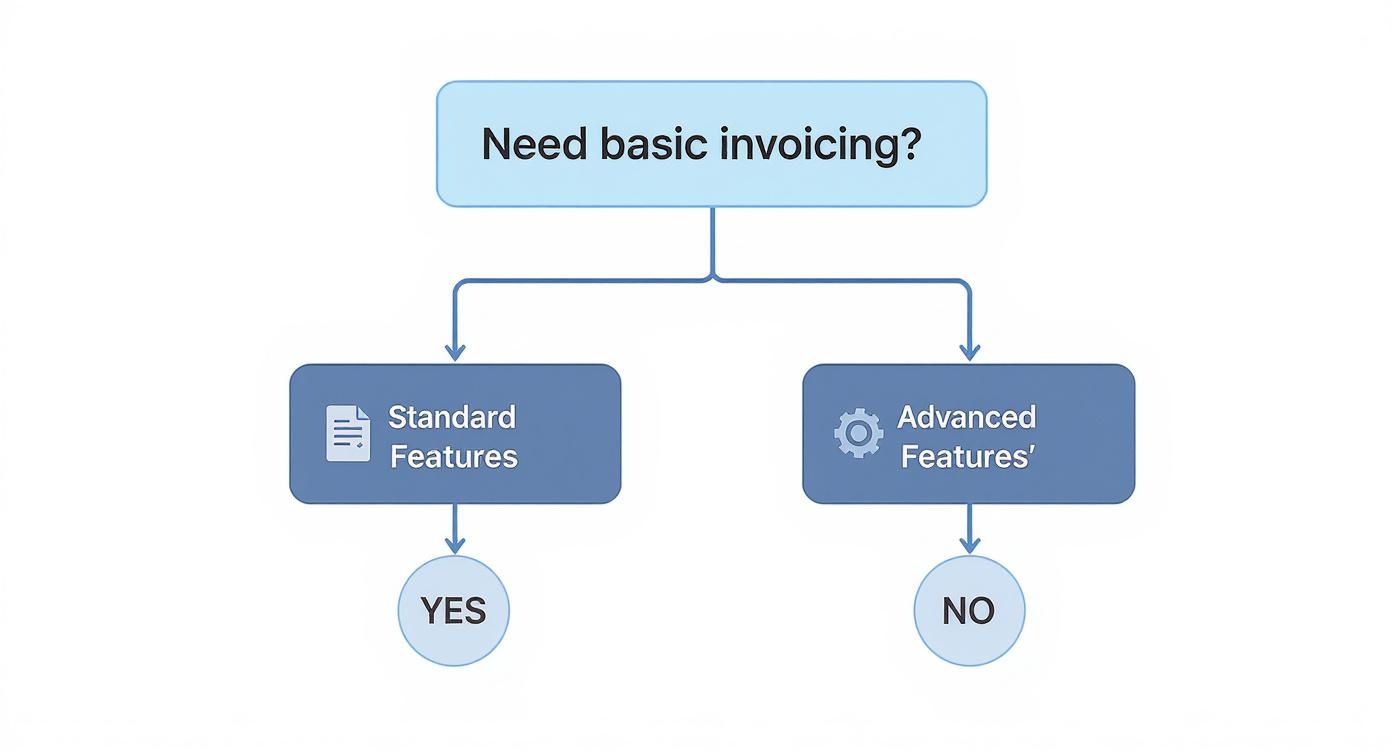
As the flowchart shows, the moment your needs expand beyond sending a simple invoice, you’re in the territory of specialized tools built for the complexities of service work.
To really understand the difference, let’s compare what standard software offers versus a more advanced platform designed for field service.
Core vs Advanced Feature Comparison for Service Businesses
| Feature Category | Standard Software Capability | Advanced Software Capability (e.g., TackonFSM) | Business Impact |
|---|---|---|---|
| Quoting & Estimating | Basic line-item entry. Manual price lookup. | Mobile quoting with multi-option "good, better, best" choices. On-site digital signature capture. | Closes deals faster, increases average ticket size, and improves customer experience. |
| Parts Management | No dedicated parts database. Parts are added as simple line items. | Integrated parts database with live inventory tracking across vans and warehouses. | Eliminates pricing errors, prevents lost revenue from unbilled parts, and improves first-time fix rates. |
| Pricing & Profitability | Fixed pricing. No visibility into job profitability during quoting. | Dynamic markup controls by part type, job type, or customer. Real-time profit margin calculation. | Protects profit margins on every job and empowers strategic pricing decisions. |
| Customer Interaction | Sends invoices and quotes via email. | Automated follow-ups, customer portal for job history, and integrated payment processing. | Streamlines communication, reduces administrative work, and gets you paid faster. |
This table makes it clear: while standard software handles the transaction, advanced software manages the entire job lifecycle, from the initial quote to the final payment, with profitability baked in at every step.
Mobile Quoting and On-Site Approvals
For a field technician, their truck is their office. The ability to build, tweak, and send a professional-looking estimate right from a phone or tablet isn’t just a nice-to-have anymore—it’s a competitive must. Techs who have to jot down notes and call the office for pricing are already a step behind. That delay gives the customer time to call someone else.
Advanced software puts your entire pricing and parts catalog in your tech’s hands. This means they can:
- Build a detailed, multi-option estimate right there with the customer.
- Show it to them immediately for review.
- Get a digital signature to approve the work on the spot.
This completely transforms the sales cycle. What used to be a days-long back-and-forth of phone calls and emails now happens in minutes. You can go from estimate to approved job before your tech even leaves the driveway.
Integrated Parts Databases and Inventory Control
One of the sneakiest ways service businesses lose money is through poor parts management. Quoting the wrong price for a part or simply forgetting to bill for materials used can kill your profit on a job. An integrated parts database that syncs with your invoicing and estimating software is the fix.
Think about it: an HVAC tech needs to replace a common capacitor. With a system like TackonFSM, they can pull up that exact part on their app, see the company’s correct cost and sale price, and instantly add it to the estimate. This simple step ensures every part is accounted for and billed correctly. No guesswork, no mistakes.
A dynamic parts database does more than just ensure accurate billing; it creates a single source of truth for your entire team. When everyone quotes from the same pricebook, you eliminate pricing inconsistencies and protect your margins.
This functionality often goes a step further with live inventory tracking. You can see what parts are in which service van and what's back at the shop. This helps avoid the dreaded second trip because a technician showed up without a critical component, saving time and fuel while keeping customers happy.
Dynamic Markup Controls for Profitability
Just adding up your labor and material costs and tacking on a flat percentage isn't a strategy for long-term success. Real profitability is born from strategic pricing, and that requires flexible markup controls built right into your estimating workflow. Your average invoicing tool just doesn't offer that kind of financial precision.
Advanced platforms give you sophisticated control over your pricing. For example, you could automatically set different markups for different categories—maybe a 25% markup on common parts but a 40% markup on special-order items. Or, you could apply a blanket markup across an entire estimate to ensure you hit a specific profit target.
These tools let you make smart pricing decisions in real time. You can see the total cost, the applied markup, and the final profit on an estimate before it ever goes to the customer. That kind of visibility is absolutely critical for keeping your margins healthy, especially on bigger projects where costs can get away from you. You’re no longer just sending quotes; you’re building profitable jobs from the ground up.
Choosing the Right Pricing Model
When you’re shopping for invoicing and estimating software, it’s easy to get bogged down in the different pricing schemes. You'll see everything from per-user fees to tiered subscriptions and transaction-based models. The monthly cost is what jumps out, but the real story is the software’s return on investment (ROI), not the price tag itself.
Let's break down the common pricing structures so you know what you're looking at. Each model is built for a different kind of business, and picking the wrong one can mean you’re either paying for features you don't need or hitting a wall right when your business starts to take off.
Common Pricing Structures Explained
The most common model you’ll run into is the tiered subscription. You pay a set monthly or annual fee for a specific package of features. These tiers usually scale up based on how many users you have, how many customers you manage, or what level of functionality you need. A starter plan might give you basic invoicing and payments, while the top-tier plan adds in things like advanced reporting and full inventory management.
Next up is the per-user fee. This one is simple and clean, especially for smaller crews. You just pay a flat rate for every person who needs access. It's totally transparent, but keep an eye on it—this model can get pricey fast if you plan on growing your team.
Finally, there’s the transaction-based model. Some platforms will take a small percentage of every payment that runs through their system. This can be great for businesses with unpredictable revenue because your costs scale directly with your income. The catch? For high-volume businesses, those tiny fees can really stack up over the course of a year.
Calculating Your Potential ROI
So, how do you see past the monthly fee and figure out what the software is actually worth to your business? You need to calculate its potential ROI. This isn't just about dollars and cents; it’s about winning back time and eliminating costly mistakes.
Here’s a straightforward way to think about it. Start by adding up the hours your team spends on manual tasks the software could handle.
- Time Saved on Invoicing: How many hours a week does your team burn creating, sending, and following up on invoices?
- Reduced Billing Errors: Think about the cost of forgotten parts, wrong labor rates, or totally missed invoices. What does that add up to in a year?
- Improved Cash Flow: How much quicker could you get paid if customers could pay online instantly? Cutting your payment cycle from 30 days down to 7 makes a huge difference to your operating cash.
Let’s put some real numbers on it. Say a new software saves your office manager five hours of administrative work each week. If you pay them $25 an hour, that’s $500 a month in saved labor right there. Now, add in just one $200 invoice that would have otherwise slipped through the cracks. You're suddenly looking at $700 in value every month.
When you see that a powerful platform like TackonFSM has plans starting at just $69/month, the math becomes pretty clear.
The biggest returns often come from places you don't expect. Quoting faster means you win more jobs. Tracking parts accurately stops profit from leaking out of your inventory. Suddenly, that monthly subscription fee looks less like a cost and more like a smart investment.
When you shift your thinking from price to value, you’re in a much better position to choose invoicing and estimating software that actually helps your business grow.
When you're running a business in a specialized field, you quickly realize that not all invoicing and estimating software is built the same. A generic platform might get the basic job done, but it often crumbles under the weight of unique workflows and compliance rules.
Industries like legal, construction, and IT services play by a completely different set of rules. For them, a one-size-fits-all solution isn't just inefficient—it can be a liability. Trying to force a standard tool to fit a specialized need usually leads to manual workarounds, which are breeding grounds for errors and a major drag on your cash flow. It's not about finding a fancy tool; it's about finding one that actually understands how your industry works.
Specialized Billing for the Legal Sector
Take the legal industry, for example. Billing here is far more than just sending an invoice. Law firms have to manage client funds in trust accounts and follow incredibly strict formatting rules just to get paid.
For a law firm, the right software needs to have some non-negotiable features:
- Trust Accounting: This is the big one. You have to keep client retainers and settlement funds completely separate from your firm’s operating cash to stay compliant with bar association rules.
- LEDES Billing: Many corporate clients won't even look at an invoice unless it's in the Legal Electronic Data Exchange Standard (LEDES) format. Your average invoicing tool has never even heard of it.
- Time and Expense Tracking: Since billable hours are the core of most firms, the software must be able to capture every minute and every expense with pinpoint accuracy.
The need for these specific tools is exploding. The global market for legal billing software hit USD 2.15 billion in 2025 and is on track to more than double to USD 4.28 billion by 2034. That kind of growth tells you just how essential it is for firms to have software that can manage their unique financial workflows. You can dig deeper into this trend over at Custom Market Insights.
Unique Needs in Construction and IT Services
The construction world operates on a project-by-project basis, where billing is tied to milestones, not just a final delivery date. A standard invoicing app simply can’t keep up with that kind of dynamic workflow.
For a construction manager, an invoice isn't just a bill; it's a progress report. It needs to clearly communicate what work has been completed, what materials have been used, and how the project is tracking against the original estimate.
Software built for construction has to include features like:
- Progress Invoicing: This lets you bill clients in stages as you complete different phases of a job, which is crucial for maintaining healthy cash flow on long-term projects.
- Change Order Management: Projects almost never go exactly to plan. You need a clear, documented process for managing, approving, and invoicing for any changes to the original scope.
- Job Costing: This feature is your lifeline for profitability, tracking every dollar spent on labor, materials, and subs for a specific job in real-time.
IT service providers and Managed Service Providers (MSPs) have their own puzzle to solve. They juggle retainers, service-level agreements (SLAs), and project work all at once. The right invoicing and estimating software for them has to handle recurring billing, track time against support tickets, and roll it all up into one clean invoice. Without that, billing becomes a monthly nightmare of stitching together data from different systems, which wastes time and invites mistakes.
Getting Your New Software Up and Running

You’ve done the hard part and picked your new invoicing and estimating software. That's a huge step, but making it a core part of your daily operations is where the real work begins. A messy rollout can cause headaches and kill team morale, turning a great investment into a source of frustration.
The whole point is to switch systems without disrupting your cash flow or creating chaos for your crew. This isn't just about installing an app; it's about thoughtfully moving your data, training your people, and adjusting how you work so you can reap the benefits right away.
Prepping Your Data for the Move
Your customer lists, job histories, and parts databases are the lifeblood of your business. Getting that information into the new system cleanly is the single most important part of the setup process. Before you even think about importing, you need to do some housekeeping.
Take a hard look at your current data and:
- Merge Duplicates: How many times is "John Smith" in your system? Get rid of redundant customer entries and old contact info.
- Standardize Everything: Make sure phone numbers, addresses, and part codes all follow the same format. Consistency is key.
- Archive Old Jobs: Do you really need to import every invoice from eight years ago? Decide what's essential and what can be stored elsewhere. Moving a decade of messy records will only clog up your new system.
A little cleanup now prevents you from dragging old problems into a fresh start. Once your data is tidy, you'll "map" it—basically, telling the new software where to put the information from your old spreadsheets. For example, your "Client Name" column will match up with the new system's "Customer Name" field. Good software providers will help you with this.
A Smart Rollout and Team Training
Flipping the switch for everyone at once is a recipe for disaster. A phased rollout is a much smarter approach, as it minimizes disruption and gives your team time to get comfortable. You can test the waters with a small group before the entire company dives in.
Here’s a practical plan that works:
- Start with a Pilot Team: Pick one or two of your sharpest team members and have them use the software on real jobs. They'll be your canaries in the coal mine, spotting any issues before they affect everyone.
- Run Role-Specific Training: Don't throw everyone into the same generic training session. Your office admin needs to learn different things than your techs in the field. Keep the training short, sweet, and relevant to their daily tasks.
- Launch with Strong Support: When it's time to go live, make sure your team knows exactly who to call with questions. This could be an internal "super user" or a direct line to the software's support desk.
It's easy to overlook training, but it's a critical mistake. With 54% of contractors planning to adopt new technology in 2025, getting it right matters. Success isn't about the tool itself; it's about how well your team can actually use it.
Solid training turns invoicing and estimating software from just another subscription into a powerful business asset. And when platforms like TackonFSM include free onboarding and handle the data migration for you, the whole process feels less like a leap of faith and more like a guided, logical next step.
Frequently Asked Questions
Jumping into new invoicing and estimating software always stirs up questions. It doesn't matter if you're ditching the old clipboard and paper for the first time or just switching systems—getting straight answers is what helps you make the right call. We’ll tackle a few of the most common things business owners ask.
Here's the essential info you'll need to know about how these tools work, what to expect when you make the switch, and how to find a platform that actually works for your business.
How Long Does It Take To Get Started?
Honestly, this can vary, but modern cloud-based software is built to get you up and running fast. For most trade businesses, the basics—like uploading your customer list and adding your logo to templates—can be knocked out in an afternoon. The biggest variable? The state of your current records. Clean, organized data makes the import process a breeze.
If you’re adopting a more advanced system with features like full-blown inventory management, expect a bit more setup time. The good news is that most software companies provide guided onboarding to walk you through it and get everything dialed in correctly.
A good implementation should have you sending your first professional estimate from the new system on day one. The right support helps you skip the headaches and start seeing a return on your investment right away.
Platforms like TackonFSM will often manage the data migration for you, which is a huge weight off your shoulders. That kind of hands-on help is what makes for a smooth, stress-free launch.
Can This Software Integrate With My Accounting Tools?
Absolutely. In fact, if a platform doesn't integrate with major accounting software like QuickBooks, that's a major red flag. This connection is non-negotiable because it kills double data entry—one of the biggest time-wasters and sources of costly mistakes.
When your field service software and accounting system are talking to each other, a few great things happen automatically:
- Invoices and Payments Sync Up: As soon as you create an invoice or mark it as paid in the field app, that information pops up in your accounting software. No more manual updates.
- Customer Info Stays Clean: Add a new customer in one place, and their details are mirrored in the other. Your records are always consistent.
- Financial Reports Are Actually Accurate: With all your revenue data flowing directly into your books, you get a real-time, reliable view of your company's financial health.
This link between your field operations and your back office is what makes everything click. It closes the gap between doing the work and managing the money, making your entire process more efficient and a lot less prone to errors.
Ready to see how an all-in-one platform can transform your operations? TackonFSM combines powerful scheduling, estimating, invoicing, and inventory management into one easy-to-use system built for the trades. Start your 14-day free trial today and discover a smarter way to run your business.


