Efficient Invoice Approval Workflow: Boost Cash Flow in 2026
That stack of invoices on your desk and the flurry of back-and-forth emails? It’s more than just a headache—it’s a direct drain on your profits. As a trade contractor, I've seen it countless times: the real cost of a messy billing process shows up in wasted hours, late payments, and money left on the table. An invoice approval workflow is what separates a chaotic shop from a profitable one. It’s the system that ensures you get paid for every single job.
The Real Cost of Your Manual Invoicing Process
For anyone in HVAC, plumbing, or electrical work, trying to manage billing without a solid system feels like fighting a losing battle. The typical "process" is a jumble of paper invoices from techs, blurry photos of receipts texted to the office, and confusing email chains just to confirm which parts were used on a job. It's disorganized and exhausting.

This manual approach creates small but constant financial leaks. Over time, those drips add up to a flood, washing away your hard-earned cash flow and profitability.
Where Your Profits Are Disappearing
The hidden costs of a disorganized invoicing system can be staggering. A single forgotten invoice for a small repair might not feel like a disaster, but when it becomes a habit, you're looking at a serious dent in your annual revenue.
These are some of the most common profit drains I see:
- Lost or Forgotten Invoices: A tech finishes a job, but the paperwork gets lost in the truck or never even makes it back to the office. That's pure revenue, gone forever.
- Delayed Client Payments: When invoices go out late or contain errors, clients naturally take longer to pay. This directly impacts your cash flow, making it tough to cover payroll or order materials for the next job.
- Missed Supplier Discounts: Many suppliers offer discounts for paying early. If your internal approvals are slow, you’ll miss those deadlines and end up paying more for your materials, shrinking your profit margins.
- Inaccurate Billing: Forgetting to add that one part pulled from van stock or under-billing for labor hours are common mistakes that chip away at the profitability of every single job.
A disorganized invoicing process doesn't just slow you down; it makes your business less profitable. Every delayed approval and billing error is a direct hit to your bottom line.
Moving from Chaos to Control
The answer is to implement a clear invoice approval workflow. Think of it as a defined, step-by-step roadmap that shows exactly how an invoice gets from creation to payment. This structure guarantees every invoice is checked for accuracy, reviewed by the right person, and sent out on time. If you want to get a better handle on your operations, you should understand why the right field service software matters.
Modern tools like TackonFSM are built specifically to automate these steps. Instead of relying on paper and memory, you get a digital system that acts as a single source of truth. Invoices can be generated automatically from a work order, routed for approval with a click, and tracked until the payment hits your account. This is the first, most crucial step toward plugging those financial leaks and building a more resilient, cash-flow-positive business.
Anatomy of an Effective Invoice Approval Workflow
A solid invoice approval workflow isn't just about ticking boxes. It’s a clear, predictable path every invoice follows from the moment a job is done until the payment hits your bank account. For a trade contractor, this system needs to be seamless, whether it's for a tech in the field or the manager back at the office. It’s the difference between chasing payments and having total command over your cash flow.
Let's walk through a real-world example. Imagine one of your plumbers is on an emergency call for a burst pipe. Using a mobile app on their phone, they log the job details, note the two hours of labor, and record the specific shut-off valve and two feet of copper pipe they pulled from their van.
From a Finished Job to a Draft Invoice
The moment your plumber marks the job as complete in the app, the system gets to work. It automatically pulls all the crucial data—customer info, labor hours, and the exact parts used—and generates a draft invoice. That draft is instantly sent to your office manager for a first look.
This is where you really see the power of a connected system. Your manager isn't just staring at a final number. They can see the tech's notes, view photos of the finished repair, and get a digital confirmation that the parts were deducted from the van's inventory. They can quickly verify the labor rate is correct and that the parts are billed at the right price, catching any potential errors right away.
The Approval and Payment Cycle
With all the details confirmed, the office manager approves the invoice with a single click. Let's say you've set a rule that any invoice under $1,000 doesn't need a second sign-off from you, the owner. The system recognizes this, finalizes the invoice, and automatically emails it to the customer, complete with a secure payment link.
This entire process, from your tech leaving the job site to the customer getting the bill, can take just a few minutes. It’s a world away from the manual methods that, believe it or not, many businesses are still stuck with.
In fact, research shows that nearly 60% of accounts payable teams are still wrestling with emails and spreadsheets. This manual grind means invoices get handled an average of 4.1 times before payment, and a staggering 58% hit at least one approval delay. You can dig deeper into these invoicing problems by reviewing this research on modern invoice approval tools.
For a small contractor, those holdups are more than just annoying. They lead to wasted hours, frustrated staff, and a direct hit to your bottom line.
An optimized invoice approval workflow ensures every bill is accurate, approved quickly, and sent without delay. It converts completed work into cash in the bank faster than any manual process ever could.
To see just how big the difference is, take a look at the comparison below. It clearly lays out the challenges of sticking with old-school methods versus adopting a modern, automated system.
Manual vs Automated Workflow Comparison
The table below breaks down the key differences in time, cost, and accuracy. For most small contractors I've worked with, the shift from manual to automated isn't just an improvement; it's a complete change in how they manage their finances.
| Metric | Manual Workflow (Email & Spreadsheets) | Automated Workflow (TackonFSM) |
|---|---|---|
| Time to Approve | 2-5 business days | Under 1 hour |
| Error Rate | High (missed parts, wrong labor) | Low (data auto-populates from job) |
| Visibility | None (lost in email chains) | Full (real-time status tracking) |
| Payment Speed | Slow (weeks) | Fast (days or even same-day) |
Ultimately, the numbers speak for themselves. An automated workflow doesn't just save you a few minutes here and there—it gives you back days of your time, eliminates costly errors, and dramatically speeds up your cash flow.
How to Build Your Invoice Approval Workflow from Scratch
Switching to an automated invoice workflow isn't as daunting as it sounds. The key is to break it down into a few practical steps. You’re not trying to build some generic, one-size-fits-all system; you’re creating a process that fits your trade business, your team, and your way of working.
Think of it as a simple journey every invoice takes. It gets created, reviewed, and then approved before going out the door.

This diagram shows the basic flow. Each stage is a checkpoint, ensuring nothing slips through the cracks before you get paid.
Figure Out Who Does What: Roles and Permissions
First things first, you need to map out who’s responsible for each part of the invoicing process. In most small trade shops, these roles are already clear, but writing them down helps you build a system that reflects how you actually operate.
For a typical electrical contractor, the roles might look something like this:
- Technician: They’re on the front line, creating the initial invoice or job report right from the field. Their job is to get the labor hours and materials down accurately.
- Office Manager: They’re the first line of defense. They give the invoice a once-over, checking for typos, matching it to the original quote, and making sure the customer’s details are correct.
- Business Owner: You’re the final backstop. You’ll likely want to give the final approval on high-value invoices, big change orders, or any job that just feels a bit unusual.
Once you know the roles, you can assign permissions in a system like TackonFSM. This is where the magic happens. A tech can create an invoice from a job, but they can't approve it themselves. The owner, however, gets a bird's-eye view and can approve anything. This gives you complete control. Honestly, seeing the full range of business process automation benefits is what convinces most owners to finally set up a system like this.
Set Up Your Approval Rules
Your approval rules are the simple "if-then" logic that makes your workflow run on its own. They get routine invoices out the door fast and automatically flag the ones that genuinely need your attention. This is the heart of an efficient invoice approval workflow.
A great place to start is with simple, dollar-amount thresholds.
For example:
- Invoices under $500: Automatically approved after the office manager’s review. No need for you to get involved.
- Invoices between $501 and $5,000: Need a sign-off from both the office manager and the business owner.
- Invoices over $5,000: Get flagged for a mandatory owner-only review.
These rules stop you from becoming the bottleneck on every small job, freeing you up to focus on the big-ticket items. You can get more specific, too. Maybe you want a special rule where any invoice for a warranty job automatically requires an extra review to make sure it’s processed correctly.
My advice? Keep your rules simple. Start with two or three clear conditions and add more later if you need to. The goal is to make fewer manual decisions, not create a tangled web of new ones.
Nail Down Your Master Invoice Template
Using a standard invoice template is non-negotiable. It’s what makes every bill that leaves your shop look professional, complete, and easy for your customers to pay. It also forces your team to capture all the essential information right from the start. A clean, consistent template is step one to https://tackonfsm.com/wp-content/uploads/2025/11/Simplify-Estimates-Quotes-and-Invoicing-165×300.webp.
Think about the old way of doing things. An incredible 58% of invoices get held up by at least one approval snag when you do it all manually. Automation flips that on its head. With a modern system, up to 80% of invoices can sail right through without anyone needing to touch them.
The entire approval cycle shrinks from days down to seconds. That speed helps you capture early-pay discounts, which a surprising 42% of companies are currently missing out on. It's a fundamental shift in how you manage your cash flow.
How TackonFSM Backs Up Your Invoice Workflow
Talking about a perfect workflow is one thing. Actually building it—and getting paid faster—comes down to the tools you use. Instead of juggling spreadsheets, email chains, and accounting software, a platform like TackonFSM brings your entire invoice approval workflow under one roof. Let's look at the specific features that get rid of the manual headaches for good.
One of the biggest drags on getting paid is waiting for someone to physically sign a piece of paper. With digital approvals, you and your managers can give the final nod on invoices from anywhere, right on a phone or tablet. This is a huge deal for owners who are always on the move between job sites or coordinating different crews.

When you can approve an invoice from the truck, the billing cycle doesn't grind to a halt. Cash keeps flowing, and that bill gets to your customer's inbox that much faster.
From Estimate to Paid Invoice, Seamlessly
I’ve seen it countless times: a huge chunk of profit disappears between the initial quote and the final bill. A part gets added, a couple of labor hours aren't tracked, and those details get lost. You end up under-billing without even realizing it.
TackonFSM puts a stop to that with one-click estimate-to-invoice conversion.
As soon as your team creates an estimate, all the line items—every part, every labor rate, and your markup—are locked in. When the job's finished, that approved estimate becomes the final invoice with a single click. There’s no re-typing anything, which means no chance for someone to make a costly typo. This simple feature is what protects your profit margins on every single job.
Get Full Control and See Everything
A workflow that actually works needs clear rules and total transparency. You can’t run a growing business if just anyone can edit or approve an invoice. This is where having tight control becomes non-negotiable.
TackonFSM gives you that control in a few key ways:
- Role-Based Permissions: You get to decide exactly who can do what. For example, a tech can generate an invoice from a finished work order, but they can't send it. Your office manager can review and prep the invoice, but maybe only you can approve anything over $2,000. These rules put you in complete command of your money.
- Automated Notifications: Stop wasting time asking, "Did you see that invoice?" The system automatically pings the right person when it's their turn to review or approve, keeping the whole process moving without you having to chase people down.
- Detailed Audit Logs: Every single action is tracked. You can see who created the invoice, who looked at it, who approved it, and exactly when it happened. This gives you a digital paper trail that’s rock-solid if a client ever questions a bill or you need to sort things out internally.
A good invoice approval process is built on trust, but it's verified by the system. With a full audit trail, you have a permanent record that ends any "he said, she said" debates before they start.
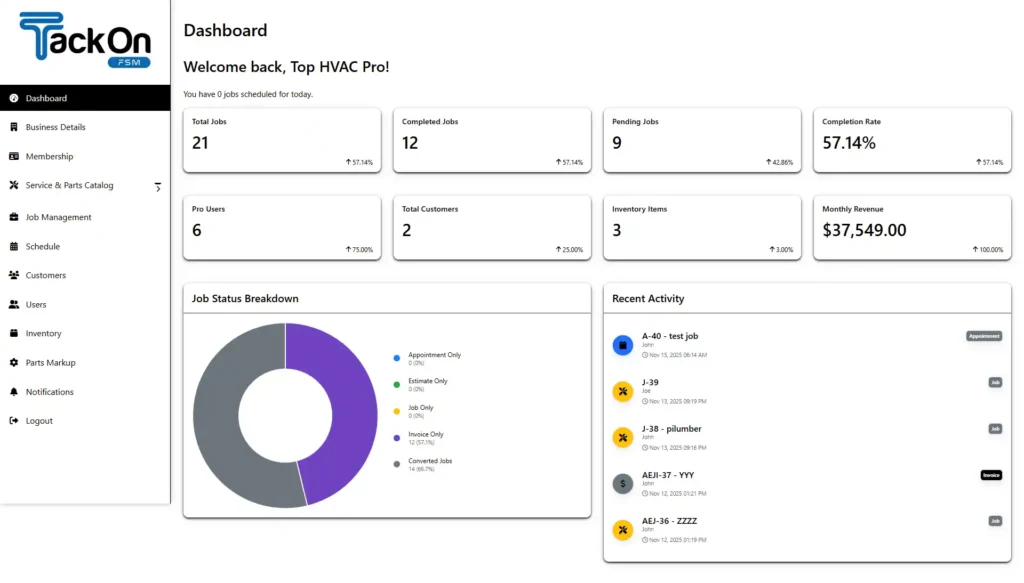
This kind of detail isn't just about fixing problems—it's about preventing them in the first place. When you have a clear, transparent record, you build accountability within your team and trust with your customers. You can see how all these pieces fit together by taking a look at the TackonFSM company dashboard. Together, these tools turn your invoicing from a chaotic mess into a predictable, organized, and more profitable part of your business.
Common Pitfalls and How to Sidestep Them
Bringing in a new system is always a great feeling, but I've seen firsthand that the road to a smooth rollout can have a few bumps. Even the most well-thought-out invoice approval workflow can hit a snag if you're not ready for the usual suspects. Let's talk about what can go wrong and how to get ahead of it.
The biggest mistake I see? Overcomplicating things right out of the gate. In an effort to have total control, contractors sometimes build these massive, multi-step approval chains. Suddenly, a simple system designed for speed becomes a new digital bottleneck. Seriously, does an invoice for a $150 repair really need three different people to give it the nod? Of course not.
Keeping It Simple and Getting Your Team Onboard
The fix is almost always to start smaller than you think you need to. Forget trying to build a workflow that handles every single "what if" scenario from day one. Kick things off with a basic two-step process. Maybe the office manager reviews everything, and you only get looped in for final approval on invoices over a certain threshold, like $1,000. You can always add more complexity later if you genuinely find it's needed.
The other major hurdle is getting your team, especially your field techs, to actually use the new system. Let’s be honest, they’re used to doing things a certain way. Just handing them a new app and expecting them to run with it is a surefire way to meet resistance. If they don't see how it makes their day easier, they'll find every reason to stick to the old paper-and-pen routine.
To get your crew on board, you need a solid game plan:
- Run a 'Mock Job' Drill: Before you go live, walk everyone through a fake job from start to finish inside the software. Create a work order, have a tech "complete" it on their phone, and process the invoice using your new approval steps. This kind of hands-on practice makes a world of difference.
- Show Them the Payoff: Pointedly show your techs how the mobile app saves them a trip back to the office or eliminates the headache of trying to remember parts used on a job from three days ago. Focus on the "what's in it for me" angle.
- Use Your Software's Support Team: Don't try to do it all yourself. The team behind your software is a resource, so use it. For example, TackonFSM's onboarding specialists can help walk your staff through the setup, ensuring everyone feels confident.
The whole point of an automated workflow is to make life easier, not harder. Keep your focus on simplicity and good training, and you'll see your team actually embrace the new system from day one.
By anticipating these common issues, you can roll out your invoice approval workflow with far fewer headaches. This means you get everyone using it faster, and you start seeing the benefits—like getting paid sooner—that much quicker.
Common Questions About Invoice Approval Workflows
Even with a solid plan, switching up how you handle invoicing is bound to bring up some questions. It's a big change. Let's walk through some of the most common things we hear from contractors when they're getting started.
How Long Does It Really Take to Set This Up?
You can get a basic workflow up and running in under an hour with a tool like TackonFSM. Honestly, the tech part is fast. The real work happens first: deciding on your rules.
You just need to figure out who needs to approve what, and at which dollar amounts. Once you have that logic down, plugging it into the software is a breeze. Most contractors we work with are fully up and running well within their 14-day free trial.
My Techs Aren't Great with Technology. Will They Use It?
We hear this all the time. It’s a valid concern, but modern field service apps are designed with exactly these guys in mind. The interface on a technician's phone or tablet is stripped down to only what they need.
They'll see their schedule, check off job tasks, and update the job status. Turning that completed job into an invoice is usually just a single tap. All the details get pulled in automatically, which is a whole lot easier than wrestling with carbon copies or trying to remember details for an email chain.
How Does an Automated Workflow Handle Change Orders?
This is where automation really shines. Manually, change orders are a nightmare—they're a huge source of billing mistakes and missed revenue. To really see the difference, it’s helpful to understand what a proper invoice approval workflow is designed to do.
In a system like TackonFSM, your tech can create a digital change order right there on-site. They get the customer's signature on their tablet, and those approved changes—every part, every extra minute of labor—are added to the final invoice automatically. No more trying to piece it all together back at the office.
What's the Real ROI on Automating Our Invoicing?
The return on your investment comes from a few different places. First and foremost, you get paid faster. That alone is a massive win for your cash flow. You also slash the administrative time spent chasing down approvals and manually keying in data.
The biggest payoff, though, comes from eliminating revenue leakage. By making sure every part, every hour of labor, and every single change order is captured and billed correctly, you’re protecting your profit margins on every job you do.
And there's a final bonus: when you can pay your own suppliers faster, you can often take advantage of early-payment discounts. It's a small thing that adds up, boosting your profitability from another angle.
Ready to stop chasing paperwork and start getting paid faster? See how TackonFSM can build a seamless invoice approval workflow for your business. Explore the features and start your free trial at https://www.tackonfsm.com.