

Mastering Invoice and Purchase Order Workflows for Contractors
Think of a purchase order as the shopping list for a job and an invoice as the final bill you present to your customer. They might sound similar, but they play completely different roles in your business.
A purchase order (PO) is what you send to a supplier when you need to order parts. An invoice is what you send to your client asking for payment once the work is done. One is about spending money, the other is about getting paid.
Understanding Invoice vs Purchase Order
Let's break it down with a real-world example. Say you're an HVAC contractor and a customer needs a new compressor. The purchase order is the document you send to your parts supplier to buy that specific compressor. It details the model number, the agreed-upon price, and when you need it delivered.
Once your supplier accepts that PO, it becomes a binding agreement. You've officially ordered the part.
Fast forward to after you’ve installed the new compressor and the customer’s AC is blowing cold again. Now, you create an invoice. This is the document you give the homeowner, listing the cost of the compressor, your labor, and any other materials. It's your formal request for payment.
These two documents bookend the financial part of a job. The PO kicks things off by authorizing a purchase and controlling your costs, while the invoice wraps it all up by collecting your revenue.
For a quick reference, here’s how they stack up side-by-side.
Purchase Order vs Invoice At a Glance
This table offers a clear, at-a-glance comparison of the core functions and characteristics of each document.
| Attribute | Purchase Order (PO) | Invoice |
|---|---|---|
| Purpose | To order goods or services from a supplier. | To request payment from a customer. |
| Who Creates It? | You (the buyer) | You (the seller) |
| Who Receives It? | Your supplier or vendor. | Your customer or client. |
| When Is It Sent? | Before the work begins or parts are delivered. | After the work is completed or goods are delivered. |
| Key Information | Item descriptions, quantities, agreed prices, PO number. | Itemized costs, labor charges, total amount due, payment terms, invoice number. |
As you can see, they are two sides of the same coin—essential for managing both your expenses and your income effectively.
Key Roles in Your Workflow
Getting this distinction right is the first step toward true financial control. A strong invoice and purchase order system helps you manage job costs, keep track of your inventory, and make sure you get paid on time. Without it, you’re just guessing.
Here’s why each document is so important:
- Purchase Orders Protect Profits: Creating a PO locks in prices with your suppliers. This stops unexpected cost hikes from eating into your job margins.
- Invoices Accelerate Cash Flow: A professional, accurate invoice that matches the original quote or estimate gets paid faster. This avoids back-and-forth disputes and keeps your business's cash flow healthy.
It's also useful to understand how a PO compares to other agreements. For a deeper dive into the legal side, you can explore the differences between a purchase order vs contract, as both can create legally binding obligations.
Ultimately, mastering this workflow isn't just about paperwork; it's about building a predictable, profitable business. Modern tools like TackonFSM turn this entire sequence—from creating a PO to tracking parts and generating the final invoice—into one smooth process, protecting your bottom line from start to finish.
Why Purchase Orders Are a Contractor's First Line of Defense

A purchase order (PO) isn't just another piece of paperwork—it's your financial shield on every single job. Think of it less like a shopping list and more like a pre-approved, legally binding contract with your supplier. Once they accept it, you've locked in the price, the exact parts you need, and when you’ll get them. This simple document is your best protection against those costly surprises that can blow up a budget.
When you skip a formal PO and just rely on a phone call or a quick email, you’re flying blind. It's a gamble. You're leaving the door wide open for the wrong parts to show up, for prices to suddenly jump, or for materials to arrive late, throwing your whole project schedule into chaos. A solid invoice and purchase order process is what keeps these common headaches from eating into your profits.
The connection between the PO you send and the invoice you receive later is everything. If they don't match up, you're looking at a dispute that can freeze payments and strain your supplier relationships. And with all the recent uncertainty in global trade, getting this right has never been more important.
In the first quarter of 2025, global invoice rejections skyrocketed by a staggering 273%, jumping from 1.86% to 6.95% of all processed invoices. This surge, largely blamed on escalating tariffs and trade issues, shows how crucial it is for your purchase order to perfectly match the final invoice to avoid payment gridlock. Discover more insights about this invoice rejection surge and its impact on supply chains.
The Anatomy of an Effective PO
A great purchase order is all about clarity. It’s a detailed set of instructions that leaves zero room for misinterpretation. To make sure your POs do their job, every single one needs to have a few key ingredients.
These are the non-negotiables for any PO you create:
- Unique PO Number: This is your tracking number. It's how you'll connect the order to the job and, eventually, the supplier's invoice.
- Detailed Item Descriptions: Don’t just say "fan motor." Include part numbers, model numbers, and precise quantities. This is how you prevent wrong orders.
- Agreed-Upon Pricing: List the price for each item and the total cost. This locks in what you've agreed to pay.
- Delivery and Payment Terms: Be specific. When do you need the parts? How and when will you pay?
A Real-World HVAC Scenario
Let's put this into practice. Picture one of your HVAC techs on a big commercial job. They need a few specific parts for a rooftop unit. Instead of just calling up the supply house, they create a detailed PO right from their tablet using your field service software.
The PO clearly lists the exact compressor model, two specific fan motors, and the prices you both agreed on. The supplier gets the order, pulls the right parts, and sends them out.
When their invoice comes in, your office manager can do a quick three-way match: PO, packing slip, and invoice. Everything lines up perfectly. The bill gets paid without any back-and-forth. This simple step prevents surprise costs, guarantees you're never overcharged, and keeps your job costing razor-sharp. And by linking that PO directly to the job, you get a crystal-clear picture of your profit on that project.
Creating Professional Invoices That Get You Paid Faster
Once the tools are packed away and the job is done, the invoice is your final—and most critical—touchpoint with the client. It’s more than just a bill. It's a statement about your professionalism and the final step in getting cash into your bank account. A clean, accurate invoice gets you paid quickly, while a sloppy one just creates headaches and delays.
Think about it from the customer's perspective. A crumpled, handwritten invoice with vague details looks unprofessional and often gets misplaced. But a sharp, digital invoice that arrives instantly feels trustworthy and makes it dead simple for them to pay you on the spot.
This is where the handshake between the invoice and purchase order really matters. When your final invoice perfectly mirrors the details from the original estimate and any approved POs, there’s nothing for the customer to question. That consistency is your secret weapon for getting paid faster.
Anatomy of the Perfect Invoice
To speed up payments, every single invoice you send needs to be crystal clear and detailed. Leave absolutely no room for confusion.
Here are the non-negotiables:
- Unique Invoice Number: Just like a PO number, this is essential for tracking and makes it easy for everyone to reference the right document.
- Clear Due Dates and Payment Terms: Don't be shy. State exactly when payment is due (e.g., "Due upon receipt" or "Net 30") and what payment methods you accept.
- Detailed Breakdown of Costs: Itemize everything. List labor hours and rates, and every single part or material used. A vague line item like "Plumbing Repair" is an invitation for a phone call you don't want to take.
It's staggering, but nearly half of all businesses (49%) spend over five full days every month just chasing and managing invoices. Worse yet, 37% are still stuck using paper. All that manual work is a breeding ground for errors and delays, making a strong case for modernizing the process.
From Job Completion to Instant Payment
Picture this: an electrician just finished a complex panel upgrade. Instead of driving back to the office to do paperwork, she pulls out her tablet right there in the customer's home. With a few taps, she generates a perfect invoice.
The app automatically pulls in her labor hours, the specific breakers and wires used from her van's inventory, and all the customer's info. In seconds, a professional bill is ready.
She can then show it to the homeowner, take a credit card payment right then and there, or even text a secure payment link to their phone before she even backs out of the driveway. This simple workflow completely changes the game for your cash flow. When you make it that easy for people to pay, you’ll find that most of them do—immediately. To keep the money flowing, it's crucial to manage accounts receivable effectively by staying on top of collections.
To learn more about optimizing this part of your business, check out our resources to Simplify Estimates Quotes and Invoicing.
The Complete Workflow: A Real-World Plumbing Job Story
Enough with the theory. Let's see how this all plays out on a real job site. We'll follow Pete, a plumbing contractor, as he tackles a standard water heater replacement. This day-in-the-life example shows how an invoice and purchase order system connects every step, from the initial diagnosis to getting paid.
Pete’s day starts at the customer's home. After a quick inspection confirms the old water heater is toast, he pulls out his tablet. Instead of guesstimating, he builds a detailed estimate right there in the kitchen. He pulls the exact water heater model, copper fittings, and his standard labor rates from his company's price book in TackonFSM. This ensures the price is spot-on and his profit margins are protected from the get-go.
From Digital Approval to Automatic PO
The customer sees a clear, itemized breakdown and signs off on it with a quick digital signature on Pete’s tablet. That simple action sets the entire workflow in motion. The approved estimate instantly becomes an active job in the system, and an alert pings the office.
Now, the new water heater isn't something Pete keeps on his truck. This is where the purchase order comes in. The system automatically generates a PO for the specific unit needed. The office manager just has to review the pre-filled document and, with one click, send it off to their preferred local supplier. No double-entry, no risk of ordering the wrong part, and a perfect digital paper trail is created.
This simple, three-step process shows how to turn job data directly into cash.
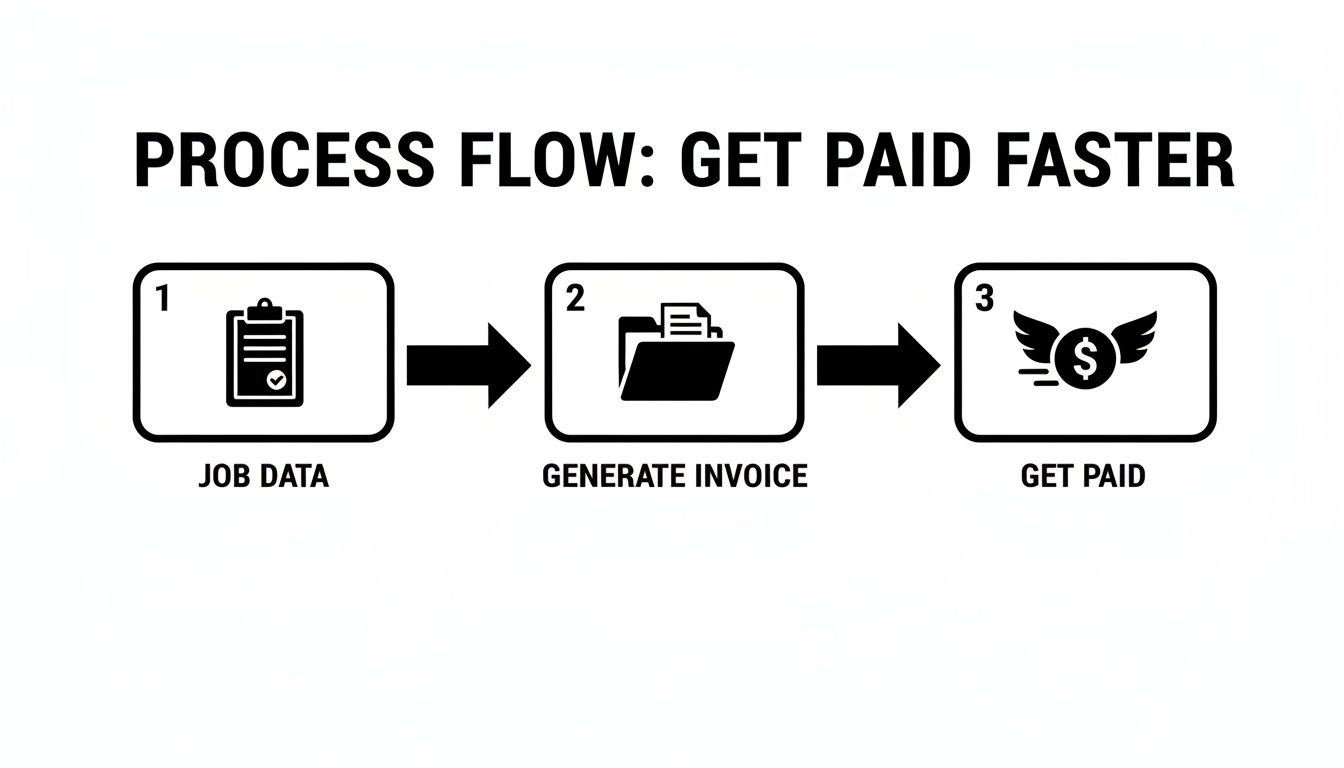
When each stage is connected like this, you completely eliminate the manual busywork that slows down payments.
Installation to Instant Invoice
Once the supplier confirms the PO, Pete picks up the new unit and gets the installation done. After he's finished and the area is cleaned up, he simply updates the job status to "complete" on his mobile app.
That final tap triggers the last step. Back at the office, the dispatcher gets a notification. All the information—from the original parts list to the final labor hours—is already tied to the job. They just hit a button to convert everything into a professional invoice.
Before Pete even backs out of the driveway, he sends the customer a secure payment link via text. She opens it, enters her card details, and settles the bill in less than a minute.
Pete’s story highlights a perfectly connected workflow. The purchase order was created and fulfilled without a hitch, the final invoice was generated without any extra work, and payment was in the bank immediately. This is exactly how top-performing contractors turn finished jobs into cash—fast.
How Software Solves Your PO and Invoice Headaches
If you're still juggling spreadsheets, paper forms, and a messy inbox to manage your invoice and purchase order workflow, you know the pain. It's slow, full of chances for costly mistakes, and it steals your focus from the work that actually brings in money. This is exactly where good field service management (FSM) software changes the game, acting as the command center for your entire financial process.
Think of it this way: instead of treating each document as a separate island, the software connects everything into one smooth, logical flow. It’s like turning a messy garage with tools thrown everywhere into a perfectly organized assembly line where everything moves from one step to the next without a hitch.
Eliminate Double Entry for Good
The single biggest time-waster in a manual system is entering the same information over and over again. You jot down job details on a notepad, type them into an estimate, re-type them for a purchase order, and then copy it all one more time for the final invoice. Every single one of those steps is an open invitation for a typo that can delay payment or start an argument with a customer.
FSM software makes this problem disappear. Once a customer gives the thumbs-up on an estimate, the system instantly converts it into an active job. All the parts, labor rates, and customer details are already in there, locked and loaded for what comes next.
By linking every document from the very beginning, you create a single source of truth for each job. This digital paper trail ensures the final invoice is a perfect match for the original approved estimate—and that’s the secret to getting paid faster, without any pushback.
Link POs to Jobs for Crystal-Clear Costing
When your POs aren't tied to specific jobs, you're flying blind on profitability. A purchase order for a new compressor might just get tossed into a generic "parts" category, making it impossible to know how much you actually spent on that one HVAC repair.
With an integrated system, every PO is attached to a specific job the moment you create it. This gives you laser-focused job costing. You see exactly what you spent on materials and what your real profit margin is. That's the kind of clarity you need to make smart calls about pricing and growth.
Centralize Your Parts and Inventory
Inconsistent pricing is another silent profit-killer. One tech might pull a price for a part from memory while another just guesses, leading to customer confusion and leaving money on the table. A central parts database puts an end to that by making sure everyone on your team is singing from the same price book.
Even better, real-time inventory tracking stops you from buying parts you already own. The software knows what's on the shelf in the warehouse and what's stocked in each van, cutting down on wasteful spending and making sure your techs show up with what they need to finish the job on the first trip.
The global market for this kind of software is booming, expected to reach $87.95 billion by 2029, because businesses are finally fed up with manual chaos. It's wild to think that 48% of small businesses still lean on paper invoices, a habit that directly causes the delays and errors that software like TackonFSM is designed to fix. You can dig deeper into why field service management software matters for your bottom line. Read the full research about the invoice software market growth.
Take Control of Your Business, From Order to Payment
Getting a handle on the relationship between a purchase order and an invoice isn't just about paperwork—it’s the backbone of a profitable trade business. We've walked through what each document does and the real-world headaches that come from sticking with manual, outdated systems.
When you switch to an integrated system, you’re not just digitizing forms. You’re trading ordering mistakes, late payments, and fuzzy job costing for a smooth, efficient process that gives you total control. The right software acts less like a tool and more like a partner, helping you protect your margins and get cash in the door faster. It frees you up to focus on the work that actually makes you money, not on chasing down documents.
Think of it this way: connecting every step, from the first PO you send to the final invoice you collect, creates a single, powerful workflow. This is how you ensure every job is profitable and every payment lands in your account on time.
Stop letting administrative friction slow you down. See for yourself how field service scheduling software saves time and gives you the power to build a stronger, more successful operation.
It’s time to take firm control of your business, from the first order to the final payment.
Frequently Asked Questions
When you're juggling parts, suppliers, and customer billing, it's easy to get tangled up in the paperwork. Let's clear up some of the most common questions contractors ask about purchase orders and invoices.
Can I Send a Purchase Order Instead of an Invoice?
That's a definite no. Mixing them up would be like trying to use a shopping list to check out at the grocery store—they look similar but serve completely different, opposite purposes.
A purchase order is you, the contractor, placing an order with your supplier. It’s an outbound document for buying materials. An invoice is your bill to the customer for the finished job. It’s an inbound document for getting paid.
What Happens if an Invoice and Purchase Order Do Not Match?
A mismatch is a surefire way to hit a brick wall with payments. If your supplier's invoice doesn't perfectly line up with your purchase order—maybe the part number is wrong or the price is different—your accounts payable process grinds to a halt. Someone has to manually track down the error before that bill can be paid.
The same goes for your customers. When the final invoice you send them perfectly matches the work they approved, there's no room for confusion or disputes. It’s a straight path to getting paid faster.
A clean match between what was ordered (the PO), what was delivered, and what is billed (the invoice) is the foundation of a smooth accounts payable process. Any discrepancy breaks this chain and brings your payment cycle to a halt.
How Does Software Help Manage Inventory with POs?
This is where things get really efficient. Good field service software connects your purchase orders directly to specific jobs and your live inventory. When you create a PO for a new compressor, the system earmarks it for the right customer job before it even arrives.
The moment that part is delivered and checked in, your inventory count updates automatically. This gives you a crystal-clear, real-time view of what’s in the warehouse and on every tech’s truck, so you stop wasting money buying parts you already have.
Is a Digital Purchase Order a Legal Contract?
Yes, absolutely. As soon as your supplier accepts your PO, it becomes a legally binding agreement. They don’t even have to sign it; simply shipping the items you requested counts as acceptance.
This is why getting the details right on your purchase order is so critical. That document locks in exactly what you ordered, the quantity, and the price you both agreed on, forming the legal basis for the transaction.
Stop chasing paperwork and start running your business. TackonFSM replaces disconnected tools with one platform to manage everything from purchase orders and inventory to estimates and final payments. Take control of your workflow today at TackonFSM.





