A Guide to HVAC Dispatching Software for Modern Field Operations
So, what exactly is HVAC dispatching software?
Think of it as the air traffic control tower for your entire business. Trying to manage technicians, jobs, and customer calls with whiteboards, spreadsheets, or even just a paper calendar is like trying to guide airplanes with sticky notes and a bullhorn. It’s chaotic, stressful, and sooner or later, something important is going to get missed.
HVAC dispatching software replaces that chaos with a calm, organized command center. It’s a single platform that brings together your office staff, your field technicians, and your customers, making sure everyone is on the same page in real time.
How It Works: Connecting Your Entire Operation
At its heart, this software acts as the digital nervous system for your field service operations. It creates a seamless link between the three most critical parts of your daily workflow:
- Your Office: Your dispatcher gets a bird's-eye view of everything. They can see all scheduled jobs on a visual calendar, drag and drop assignments to the right technician based on their skills and location, and track job progress without having to make a dozen phone calls.
- Your Technicians: Out in the field, your team gets everything they need on a phone or tablet. All the job details, customer history, specific notes, and even turn-by-turn directions are right there. No more deciphering messy handwriting or calling back to the office for an address.
- Your Customers: The software keeps them in the loop automatically. From appointment confirmation texts to reminders and even "on-the-way" alerts with a picture of the technician, it builds trust and dramatically reduces the chance of a customer forgetting an appointment.
This fundamental shift from manual juggling to automated coordination is why the market is exploding. The global HVAC service management software market is expected to jump from USD 2.00 billion in 2025 to a whopping USD 7.03 billion by 2035. That's not just a trend; it's a massive industry-wide move toward smarter, more efficient operations. You can find more details on this growth in market reports from firms like SNS Insider.
To really grasp the difference, let's look at a side-by-side comparison of day-to-day tasks.
Comparing Manual vs. Automated HVAC Dispatching
This table breaks down the operational shift you can expect when moving from traditional methods to a dedicated software solution.
| Operational Task | Manual Method (Paper/Spreadsheets) | With Dispatching Software |
|---|---|---|
| Scheduling Jobs | Manually finding open slots on a calendar or in a spreadsheet. High risk of double-booking. | Drag-and-drop visual board. The system instantly shows technician availability and flags conflicts. |
| Assigning Technicians | Based on memory or handwritten notes about who is available and skilled for the job. | Intelligent suggestions based on skills, location, and real-time availability. |
| Communicating Job Info | Phone calls, texts, or paper work orders that can get lost or misread. | All job details, history, and notes are sent directly to the tech's mobile app. |
| Tracking Progress | Constant phone calls to techs: "Where are you?" "Are you done yet?" | Real-time GPS tracking and job status updates (Traveling, Started, Paused, Completed). |
| Customer Updates | The customer calls the office for an ETA. The office calls the tech. The office calls the customer back. | Automated "on-my-way" texts, appointment reminders, and follow-up requests. |
| Creating Invoices | Technicians bring back messy paperwork; office staff re-enters everything into billing software. | Techs create and send professional invoices from the field, often capturing payment on the spot. |
As you can see, it's not just about doing the same things faster. It's about changing how you operate entirely.
By bringing scheduling, job management, and communication into one place, the software changes your workflow from reactive and disorganized to proactive and predictable. It gets rid of the guesswork and cuts down on the administrative headaches.
Ultimately, this is about moving beyond just throwing the next available job at the nearest technician. Good HVAC dispatching software gives you the visibility and tools to truly optimize your entire service process, making your business stronger, more efficient, and a lot more profitable.
Core Features That Drive Profitability and Efficiency
HVAC dispatching software is so much more than a digital calendar. Think of it as your team's digital toolkit—a collection of interconnected tools designed to solve the real-world problems you face every day. Each feature works in tandem to slash wasted time, cut down on errors, and ultimately, put more money back into your business.
To really grasp how this kind of software can turn a chaotic day into a smooth, profitable operation, you need to understand its core components. Let's break down the features that truly move the needle.
The Visual Drag-and-Drop Dispatch Board
The dispatch board is the heart of the whole system. It's your command center. Instead of a grease-stained whiteboard or a spreadsheet nightmare, you get a clean, interactive map of your entire day, week, and month.
- See Everything at a Glance: All your active, scheduled, and pending jobs are laid out in one place, often color-coded so you know what’s an emergency and what’s routine maintenance.
- Assign Jobs Instantly: Got a new service call? Just drag it from the "unassigned" column and drop it right onto an available tech's timeline. It’s that simple.
- Respond to Emergencies Faster: When that "my AC is out and it's 95 degrees" call comes in, you can instantly see which qualified tech is closest and has a gap in their schedule. No more frantic phone calls disrupting the whole team.
This visual approach takes the guesswork and stress out of dispatching. It replaces chaos with calm, strategic decisions.
The Technician's Mobile App
If the dispatch board is the heart, the mobile app is the lifeblood for your field crew. This is probably the single most important feature for boosting efficiency. It puts every piece of information a tech could possibly need right in the palm of their hand.
With a good mobile app, your technicians can finally:
- Get Complete Job Details: No more calling the office for an address or customer name. It's all there—contact info, notes about the problem, and even gate codes.
- Access Full Service History: Before they even ring the doorbell, techs can see past repairs, what equipment is on-site, and any notes from previous visits. This helps them diagnose problems in minutes, not hours.
- Create Invoices on the Spot: They can build a professional estimate or invoice right on their tablet, capture a customer's signature, and take payment before they even leave the driveway. This one feature alone can radically improve your cash flow.
This map here shows how all these pieces connect. It’s a constant flow of information between your office, your techs, and your customers.
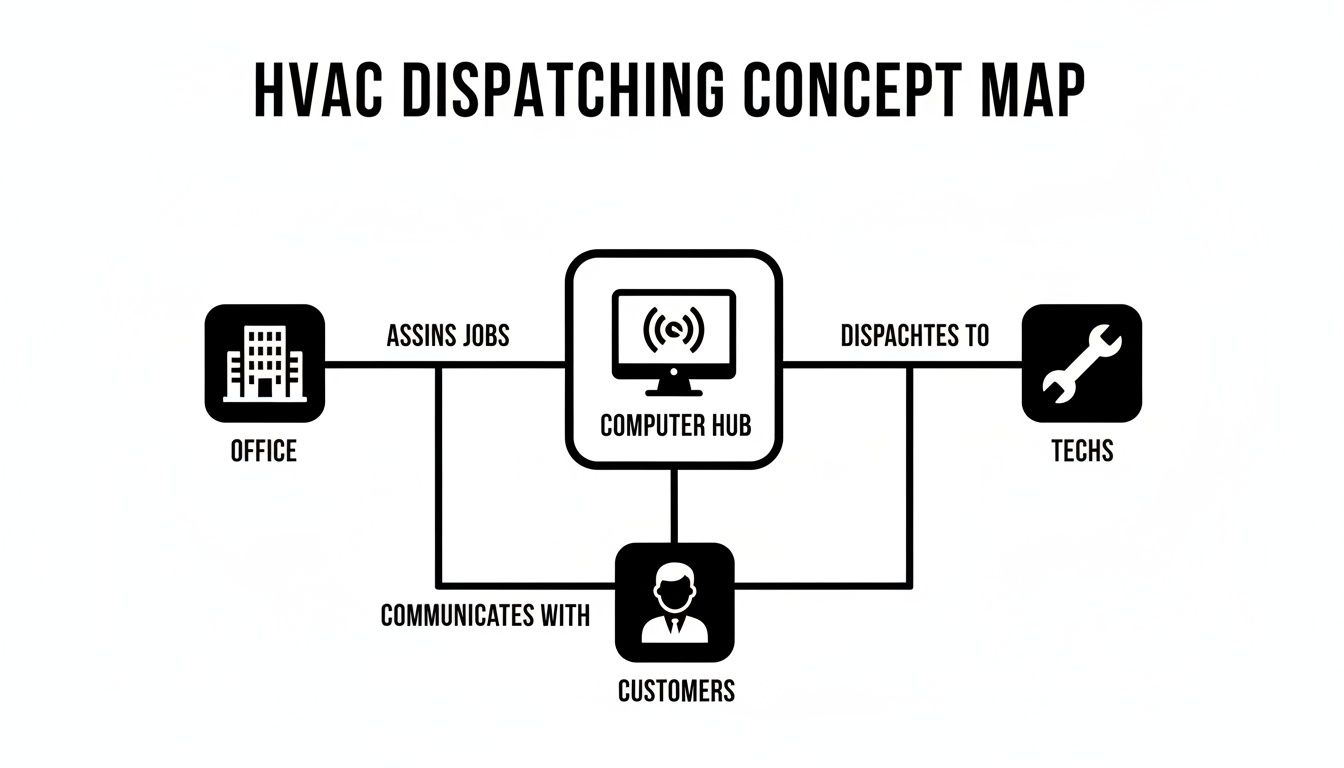
As you can see, the software acts as the central hub, making sure everyone is on the same page in real-time. No more miscommunication.
Automated Scheduling and Customer Communication
Let’s be honest: manually scheduling jobs and calling customers with reminders is a huge time-suck and a prime spot for mistakes. Modern dispatch software automates nearly all of it. A great example is using automated appointment reminder software to dramatically cut down on no-shows, which keeps your techs' schedules tight and productive.
But the automation goes way beyond just reminders. It also handles:
- Job Confirmations: As soon as a job is booked, the customer gets an automatic text or email.
- "On-My-Way" Alerts: You can send a text letting customers know their tech is en route, sometimes even with a link to a map showing their location.
- Follow-Up Requests: After a job is done, the system can automatically ask for a review on Google or send a customer satisfaction survey.
By automating these communications, you're not just saving hundreds of admin hours. You're also providing a modern, professional experience that customers love and remember.
Integrated Parts and Inventory Management
Nothing kills a day's profit margin faster than a tech getting to a job only to realize they don't have the right capacitor on the van. Integrated inventory management helps make sure your team has what they need, when they need it.
This feature lets you track every part, whether it's in the main shop or on one of your five service vans.
Cloud-based systems, which now hold a 65-68% market share, are what make this real-time tracking possible. They connect your office to every van in the field, so when a tech uses a part on a job, it's automatically deducted from inventory and added to the invoice. This stops parts from "walking away" and ensures you're billing for everything you use. It’s a simple way to protect your margins on every single job.
How to Calculate the ROI of Your Dispatching Software
As a business owner, you know every investment has to answer one simple question: what’s in it for me? When you're looking at HVAC dispatching software, it's easy to get caught up in the cool features. But the real measure of its worth is the return on investment (ROI). It’s about more than just subtracting the monthly fee from your revenue; it's about seeing how the software impacts both your bank account and your brand.
Calculating this return means looking at the hard numbers—the tangible financial wins—and the equally powerful, though less obvious, benefits that make your business stronger.
Let's start with the money you can actually track. These are the measurable gains you’ll start seeing right away.
Tracking the Tangible Returns
The quickest returns show up in your day-to-day operations. Think of it like finally plugging all the tiny leaks that have been slowly draining your profits for years.
-
More Jobs Per Day: When your scheduling is smart and your routing is optimized, your techs spend less time behind the windshield. If each of your five technicians can squeeze in just one extra job per week, that's suddenly 20 more high-margin service calls a month. The math on that is pretty compelling.
-
Reduced Fuel Costs: Less driving means less fuel. It's that simple. Shaving even a modest 15% off your fleet's fuel bill can translate into thousands of dollars in savings by the end of the year.
-
Minimized Parts Loss: How often does a part get used on a job but never make it onto the invoice? Real-time inventory tracking puts a stop to that. Every part is accounted for and billed, protecting your margins from that slow, silent bleed.
-
Improved Cash Flow: The ability to create an invoice and take payment on the spot is a game-changer. Your billing cycle shrinks from weeks to minutes. You can learn more about simplifying invoices and see how it transforms your cash flow.
These concrete benefits alone often build a rock-solid financial case for making the switch.
Accounting for the Intangible Benefits
Now for the benefits that are a bit harder to put on a spreadsheet but can have an even bigger impact on your long-term success.
These are the things that build customer loyalty and keep your best employees from jumping ship—the two pillars of any healthy service business. They are what separate a company that just gets by from one that truly thrives.
Think about the ripple effect of these outcomes:
- Higher Customer Satisfaction: Automated appointment reminders and "tech on the way" texts create a polished, professional experience that customers love. Happy customers leave great reviews online and, more importantly, they tell their friends. That's marketing you can't buy.
- Improved Technician Morale: Let's be honest, nobody likes clunky, outdated processes. Giving your team modern tools that actually make their job easier reduces daily frustrations and prevents burnout. A happy, efficient tech delivers better service and is far less likely to look for a job with your competitor down the street.
When you add up the tangible savings and the powerful intangible gains, the true value of hvac dispatching software becomes crystal clear. It stops being an expense and starts acting like what it really is: a profit-generating engine that sharpens your operations, wows your customers, and lets your team shine.
Choosing the Right HVAC Dispatching Software for Your Business
Picking the right HVAC dispatching software can feel like a huge decision, but it doesn't have to be overwhelming. The secret is to break the process down into manageable steps. Forget the flashy sales demos for a minute and start by looking at how your own business actually runs. A rock-solid understanding of what you really need is your best guide.
First things first: what are your biggest operational headaches right now? Are your techs constantly calling the office for basic job details? Is your dispatcher playing a stressful game of Tetris trying to squeeze in emergency calls? Maybe your biggest challenge is chasing down payments weeks after the work is done. Grab a pen and paper and list out these specific pain points.
That list you just made is gold. It’s your personalized feature checklist. If your schedule is pure chaos, then a visual, drag-and-drop dispatch board is a must-have. If cash flow is the problem that keeps you up at night, then features like instant invoicing and on-the-spot payment processing should be at the very top of your list.
Assess True Ease of Use
Let's be honest, a software platform is only as good as the team that uses it. You could have the most powerful system in the world, but if it’s too clunky for your dispatcher or your techs in the field, it’s just dead weight. Don't just take the salesperson's word for how "user-friendly" it is—get your hands dirty with a free trial and, most importantly, get your team involved.
Have your dispatcher play around with scheduling a few mock jobs. Even better, have a couple of your technicians use the mobile app for a real workday. Can they find customer history without a hassle? Can they update job statuses and create a clean invoice in a few taps? Their feedback is the most crucial data you can get. A system that feels natural to them is one they'll actually use, which means you'll see a real return.
A common mistake is getting wowed by software built for massive, enterprise-level fleets. For most small-to-mid-sized HVAC shops, simplicity and speed are far more valuable than a hundred features you’ll never touch. You're looking for a tool that makes the day easier, not one that requires a week-long training course to understand.
Prioritize Critical Integrations
Your dispatching software shouldn't be a lonely island. To really get your operations humming, it needs to talk to the other tools you depend on every day—especially your accounting software.
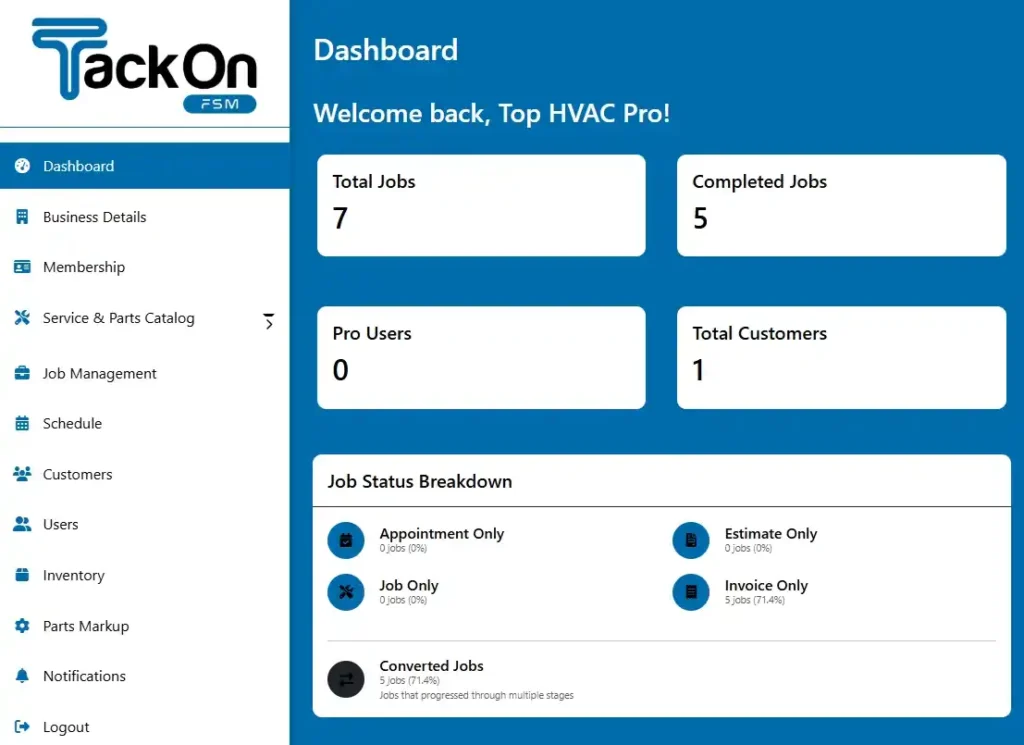
A solid, reliable integration with a platform like QuickBooks is non-negotiable. This single connection eliminates the mind-numbing, error-prone task of entering data in two different places. When a tech creates an invoice in the field, it should automatically and accurately sync over to your books. This keeps your financials up-to-date without anyone lifting an extra finger. You can get a sense of what a modern, clean interface looks like by viewing examples of a modern field service management dashboard.
HVAC Dispatching Software Evaluation Checklist
Choosing the right software involves asking the right questions. This checklist is designed to help you methodically compare different platforms and identify the one that best aligns with your business needs. Use it to keep your evaluation focused on what truly matters.
| Evaluation Criteria | Key Questions to Ask | Notes/Vendor Comparison |
|---|---|---|
| Core Dispatching Features | Does it have a visual, drag-and-drop dispatch board? Can you see tech locations and job statuses in real-time? | |
| Mobile App Usability | Is the app native for iOS and Android? Can techs work offline? How easy is it to access history, add notes, and create invoices? | |
| Scheduling & Automation | Can you set up recurring jobs for service agreements? Does it offer automated customer reminders (text/email)? | |
| Accounting Integration | Does it offer a deep, two-way sync with QuickBooks (or your accounting software)? How seamless is the process? | |
| Estimating & Invoicing | Can techs build multi-option proposals on-site? Can customers approve and pay instantly? | |
| Ease of Use & Training | Did my team find the free trial intuitive? What kind of training and onboarding is included in the price? | |
| Customer Support | Is support based in the U.S.? What are their hours? Can I get a real person on the phone quickly when I need help? | |
| Pricing Structure | Is it a per-user fee? Are there hidden costs for setup, training, or support? Is there a long-term contract requirement? |
By systematically working through these points with each potential vendor, you'll build a clear picture of which solution is the true best fit, not just the one with the slickest sales pitch.
Evaluate Onboarding and Support
Finally, think of the software provider as a business partner, not just a vendor. How they handle your transition from your old way of doing things is critical for avoiding chaos and downtime. Be sure to ask some pointed questions about their implementation process:
- Do they offer assisted data migration? A provider who will help you import all your customer lists, service history, and parts inventory will save you dozens of hours of painful manual entry.
- What does training actually look like? Is it just a library of pre-recorded videos, or do you get a dedicated specialist to walk your team through the setup and answer questions?
- How responsive is their support team? When you have a real problem on a busy Tuesday morning, you need to know you can get a knowledgeable human on the phone right away.
Choosing a provider with a reputation for strong, hands-on support is one of the best ways to ensure you get the full value from your investment right from the start. By following this structured approach, you can confidently choose the right HVAC dispatching software that fits your business like a glove.
Getting the Price Right and Nailing the Rollout
So, you're ready to invest in HVAC dispatching software. That's a huge step. But picking the right tool is only part of the puzzle. You also need to wrap your head around how you'll pay for it and, just as importantly, how you'll get it up and running without causing chaos for your team.
Let's talk money first. Most of the software you'll look at these days is subscription-based. This is great because it means you don't have a massive upfront cost, but you do need to be crystal clear on what that monthly payment actually gets you.
How Software Companies Charge
You'll generally run into two main ways companies price their software.
- Per-User, Per-Month: This is the most common setup. You pay a flat fee for every person using the system, from the dispatcher in the office to the tech on their tablet. It's straightforward and grows with you. If you hire a new tech, you just add another seat.
- Tiered Plans: Many companies bundle features into packages—think "Basic," "Pro," or "Enterprise." A starter plan will handle the essentials like scheduling and dispatching. The higher tiers will add the bells and whistles, like sophisticated inventory control or deep-dive business analytics.
One thing to keep a sharp eye on is hidden fees. They can sneak up on you. Always ask about one-time setup charges, the cost to move your existing customer data over, or if you have to pay extra for top-tier support. A good partner will lay all the costs on the table from the start.
Best Practices for a Smooth Switch
Bringing new software into your business is a big deal. A sloppy rollout can frustrate your team, disrupt your workflow, and kill morale. A successful launch is all about planning and talking to your people.
Getting your crew on board from day one is absolutely critical. You have to explain the why behind the change. Frame the new hvac dispatching software as a tool that will make their lives easier—no more messy paperwork, no more calling back to the office for a customer's address, just a clear, simple plan for the day. If you can, let a senior tech or your lead dispatcher test drive a few options. It really helps build buy-in.
A lot of owners think implementation is just an IT project. It's not. It's a people project. Your success will come down to good communication, solid training, and picking a software company that will actually help you through the transition.
Follow these steps to make the changeover as painless as possible:
- Clean Up Your Data: Before you move anything, get your house in order. That means tidying up your customer list, making sure your service and parts lists are consistent, and fixing any outdated information. Remember the old saying: "garbage in, garbage out." A clean start is essential.
- Make Time for Training: Don't just throw a manual at your team and hope for the best. Carve out dedicated time for them to learn the system without the stress of live jobs breathing down their necks. The best software providers will walk you and your team through it, step by step.
- Crawl, Walk, Run: Resist the urge to turn on every single feature at once. Start with the basics—scheduling, dispatching, and getting the techs comfortable with the mobile app. Once everyone has the hang of it, you can start rolling out the more advanced tools like inventory management and custom reporting.
If you budget smart and map out a clear plan, your new software will start paying for itself from day one instead of becoming another headache.
Common Mistakes to Avoid When Adopting New Software
Making the switch to new software is a huge step, and getting it right is about more than just picking a platform with flashy features. It's just as much about sidestepping the common traps that can trip up even the best-laid plans. Diving in headfirst without a clear strategy can sink your investment before you even get started, leaving your team frustrated and your customers waiting.
Let's walk through some of the biggest hurdles I've seen shops face, so you can navigate the process with a bit more confidence.
One of the most frequent mistakes is getting star-struck by overly complicated software. It’s tempting to go for the system that promises to do everything, but if your crew can't figure it out without a user manual the size of a phone book, it’s going to cause more headaches than it solves. Focus on finding a tool that solves your real-world problems, not one that just has the longest feature list.
Overlooking the People Problem
At the end of the day, the software is just a tool. Your people are the ones who have to use it. Forgetting that simple fact is a recipe for disaster.
-
Forgetting Technician Training: Tossing a tablet at your techs and saying "good luck" is a guaranteed way to fail. You have to block out real, dedicated time for hands-on training. The goal is to make them feel comfortable and confident before the system goes live on a busy Monday morning.
-
Ignoring Data Prep: You’ve probably heard the old saying, "garbage in, garbage out." It couldn't be more true here. Importing a messy customer list full of duplicate entries or inaccurate parts data will cripple your new hvac dispatching software from the get-go. Set aside time to scrub your data clean before you move it over.
The best software rollouts are treated like a team project, not just something the IT guy handles. Without a clear person leading the charge internally, or by underestimating the time it actually takes, a promising upgrade can quickly turn into a very expensive headache.
By keeping these common pitfalls in mind, you're setting yourself up for a much smoother transition and ensuring your investment actually starts paying you back.
Your Top Questions About HVAC Dispatching Software, Answered
Picking the right software for your business is a big decision, and it’s natural to have questions. Let’s tackle some of the most common ones I hear from HVAC owners so you can feel confident moving forward.
How Long Does It Realistically Take to Get Set Up?
This is always a big concern, but it’s usually faster than you think. For most small to mid-sized shops, you’re looking at anywhere from a few days to a couple of weeks.
The two things that really dictate the timeline are getting your customer data ready to import and getting your team comfortable with the new system. My advice? Look for a provider that offers hands-on help with data migration. That alone can shave days off the process and prevent a lot of headaches.
Will My Techs Actually Use the Mobile App?
They will if it makes their lives easier. The whole point of modern HVAC software is that it’s built for the field, not just the office. The mobile apps are designed to be dead simple and intuitive.
The best way to know for sure is to have your crew test it. Any reputable platform will offer a free trial. Let your most skeptical tech give it a spin. If they can easily pull up job details, update their status with a tap, and head to the next call without a fuss, you've found a winner.
A good mobile app shouldn’t feel like another piece of tech they have to learn. It should feel like a tool that gets the frustrating stuff out of their way so they can just focus on the job.
Can This Software Talk to My Accounting Program?
Yes, and honestly, you shouldn't even consider a system that doesn't. Strong integration with accounting software like QuickBooks is non-negotiable.
This connection is what stops the madness of entering the same information in two different places. When your HVAC dispatching software automatically sends invoices and customer payments over to your books, it eliminates double-entry, slashes the risk of errors, and frees up a massive amount of your office manager's time.
Ready to see how a single platform can replace the chaos with calm control? TackonFSM helps you schedule smarter, protect your profit margins, and get paid without the chase. Start your free trial at https://www.tackonfsm.com.