

How to Reduce No Show Appointments: 9 Proven Ways to Boost Attendance
No-show appointments are a silent profit killer, but they aren't something you just have to live with. Tackling them head-on requires a smart mix of proactive communication, more intelligent scheduling, and having some clear, firm policies in place. When you set solid expectations with customers and use automation to your advantage, you can slash the number of missed appointments and keep your revenue flowing.
The True Cost of an Empty Time Slot
A no-show isn't just an empty spot on the calendar; it's a real, measurable financial hit that echoes through your entire business. For any HVAC, plumbing, or electrical company, every time a customer isn't home, you're losing money in more ways than one. It’s a problem that’s far too easy to underestimate.
Think about it. When a customer ghosts you, the loss goes way beyond the potential revenue from that specific job. You’ve already sunk real money and resources into just getting your tech to their front door.
These costs are already spent, with zero return:
- Technician's Wages: Your tech is getting paid by the hour, whether they're fixing a furnace or sitting in the truck waiting for a customer who never shows. That's a direct hit to your payroll.
- Fuel and Vehicle Costs: You paid for the gas to get to the appointment and back. You're also putting wear and tear on your van for absolutely nothing.
- Opportunity Cost: This is the big one. That wasted time slot could have been filled by another paying customer, maybe even an emergency call that would have been a high-ticket job.
Calculating Your No-Show Rate
To really see what this is costing you, you need to know your no-show rate. It's a straightforward but incredibly revealing number. Just take the number of no-shows in a month, divide it by the total number of jobs you had booked, and multiply by 100 to get the percentage.
A well-run shop should be aiming for a no-show rate under 5%. If you're seeing numbers closer to 10% or more, that’s a major red flag. It means you're leaving a serious amount of cash on the table every single month and it’s time to act.
Getting a handle on this financial leak is the crucial first step. The good news? This is a completely solvable problem. The strategies we'll break down here are all about turning this common headache into a tightly managed part of your operation.
Core Strategies to Reduce No-Show Appointments
Before we dive deep, let's look at the big picture. These are the three pillars that will support your efforts to ensure customers are home and ready for your technician's arrival. Each one tackles the problem from a different angle, creating a comprehensive system that protects your team's time.
| Strategy | Primary Benefit | Key Tool |
|---|---|---|
| Proactive Communication | Keeps the appointment top-of-mind for the customer and makes it easy to confirm or reschedule. | Automated SMS/Email Reminders |
| Smarter Scheduling | Reduces customer frustration by providing tighter, more reliable service windows and real-time updates. | Visual Dispatch Board |
| Clear Policies | Filters for serious clients and creates a financial incentive for them to respect your schedule. | Deposits & Cancellation Fees |
By combining these tactics—better communication, sharper scheduling, and clearer policies—you'll build a system that locks in customer commitment and makes sure your team’s time is always spent generating revenue.
Mastering Proactive Appointment Communication
Let's be real—a single reminder text the day before the job just doesn't cut it anymore. Your customers are homeowners juggling a hundred different things. If you want to stop staring at empty slots on your schedule, your communication has to be persistent, genuinely helpful, and incredibly easy for them to respond to.
The goal is to shift from just sending out reminders to having an actual, two-way conversation. You're not just telling them you're coming; you're getting a solid "yes, we'll be here." That means setting up a sequence of messages that makes it almost impossible for a customer to forget you're on the way.
This whole process boils down to three core ideas: communicating clearly, scheduling smarter, and having firm policies in place. When you get these right, you build a system that protects your time and revenue.
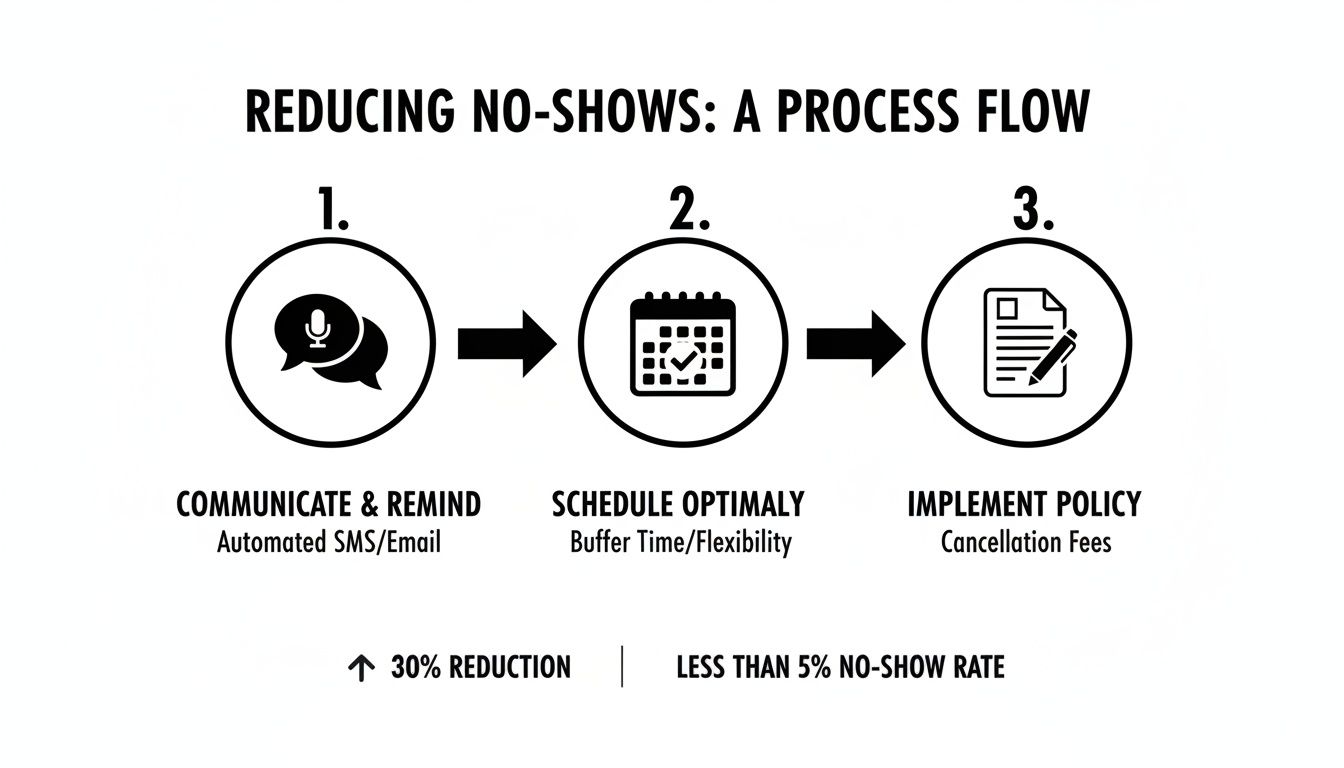
As you can see, the path from good communication to a confirmed job is a straight line. Back it up with smart policies, and you've got a powerful defense against no-shows.
Build an Automated Communication Cadence
A winning communication strategy isn’t a one-and-done message. It’s a series of touchpoints, with each one nudging the customer closer to the appointment and making it dead simple for them to confirm.
Here’s a proven sequence you can set up today:
- Right After Booking: The moment an appointment is scheduled, an automated text and email should fire off. This isn’t just a confirmation; it’s your first chance to show them you’re professional and on top of things.
- The 24-Hour Check-In: This is your most important message. A day before the job, send a text or email that demands a simple action, like "Reply C to CONFIRM."
- The 'On My Way' Alert: On service day, have your tech trigger an automated text when they're heading to the job. This gives the homeowner a precise ETA and kills any last-minute "are they almost here?" anxiety.
This three-step system works because it tackles the #1 cause of no-shows: people just forget. Multiple, helpful nudges build certainty for everyone.
The Magic of Two-Way Communication
Now, here's the real game-changer: letting customers reply directly to your reminders. Forcing someone to stop their day and call your office just to confirm is a huge point of friction. Frankly, most people won't do it.
Giving customers the power to confirm, cancel, or ask to reschedule with a one-word text reply is massive. It removes the barrier and gives you a clear answer on whether that appointment is solid.
This is where modern field service software becomes non-negotiable. A platform like TackonFSM, for example, brings all this communication into one place. Your dispatcher isn't bouncing between apps; they see the customer’s "CONFIRM" reply pop up right in the job details on their dispatch board. Everything is in one spot. Some businesses are even exploring things like using AI for confirming reservations to take it a step further.
Let’s See It In Action
Imagine a customer, Sarah, books a furnace tune-up for next Tuesday.
- Immediately After Booking: Sarah gets a text: "Hi Sarah, this is ACME HVAC. Your furnace tune-up is confirmed for Tuesday, Oct 26th between 1-3 PM. We'll text you a reminder the day before. Thanks for choosing us!"
- The Day Before: On Monday, an automated text goes out: "Hi Sarah, friendly reminder of your tune-up with ACME HVAC tomorrow between 1-3 PM. Please reply C to CONFIRM your appointment." Sarah simply texts back "C," and the job status in your system updates automatically.
- Day of Service: The tech, Mike, finishes his job and marks himself as en route. This triggers the final text: "Hi Sarah, your ACME HVAC tech Mike is on his way and will arrive in approximately 25 minutes. You can track his arrival here: [Map Link]"
This entire, seamless flow didn't require a single phone call from your office. Sarah got all the info she needed, confirmed with one letter, and felt confident in your service before Mike even pulled up to the curb.
The impact here is huge. For HVAC and plumbing contractors, automated reminders have been shown to slash no-show rates by up to 50%. I know of one mid-sized HVAC company that was bleeding around $150,000 a year from no-shows alone. After putting a system like this in place, they saw a 25% drop in no-shows within the first three months.
For a shop running 5-20 techs, this isn't just about saving money—it's about reclaiming 10-15 hours of valuable field time every single week.
Getting Some Skin in the Game with Smart Booking Policies
Great communication is your best tool against no-shows, but let's be honest—sometimes, friendly reminders just aren't enough. For certain jobs or customers, you need a policy that gets them to commit. This is where you bring in financial policies that turn a casual verbal agreement into a solid business transaction.
The point isn't to punish anyone. It's about respectfully showing that your technician's time is a valuable, reserved resource. Implementing deposits or cancellation fees helps you filter for serious clients and shields your business from the financial gut-punch of a last-minute ghosting. It’s a professional standard that signals you’re a serious operation.
When you frame it the right way, these policies actually build trust. You're telling the customer you're dedicating a specific expert just for them, and in return, you're simply asking for that same level of commitment.
Why You Need Deposits for Big Projects
A deposit should be non-negotiable for any big job—think a new furnace install, a full-house rewiring, or a major plumbing overhaul. These projects force you to order expensive materials and block out huge chunks of your team's time, often for days. A no-show on one of these isn't just an inconvenience; it's a massive financial hit.
Asking for a deposit secures the client's spot on the calendar and covers your upfront material costs, which immediately lowers your risk. It’s a standard practice in the industry, and any serious customer will understand and expect it for a larger project.
How to talk about it:
- On the phone: "To reserve your installation date and get the specific unit for your home ordered, we require a 25% deposit. This locks in your spot and makes sure we have everything ready to go on the big day."
- In your quotes: "A deposit of 25% of the total project cost is required to schedule your installation. This allows us to get all the necessary materials and dedicate our crew to your project."
This phrasing makes the deposit feel like the natural next step in getting the job done, not just another fee.
Using Diagnostic or Trip Fees to Find Serious Customers
For service calls, a small, upfront diagnostic fee is a game-changer for weeding out the "tire-kickers." When a customer pays a trip fee for your expert to come out and diagnose their problem, they are far more likely to be home and ready for the appointment. They've already invested in finding a solution.
This fee instantly establishes the value of your tech's time and expertise. You're not just sending someone out for free; you're dispatching a skilled professional whose diagnostic work is a service in itself.
By collecting a modest trip or diagnostic fee upfront, you immediately elevate the perceived value of the appointment. This simple step can dramatically reduce no-shows for service calls because the customer has a financial stake in being there.
A lot of businesses will apply this fee as a credit toward the final repair bill if the customer moves forward with the work. This makes the policy feel incredibly fair and takes away any hesitation they might have.
The Power of a Clear Cancellation Policy
A cancellation policy is all about setting clear, respectful boundaries. The key is to be firm but fair, and completely transparent from the start. A common and effective approach is stating that any cancellation within 24 or 48 hours of the appointment will result in a fee. This gives you a fighting chance to fill that empty spot.
Make sure this policy is communicated clearly when the appointment is booked and is included in your confirmation emails. No surprises.
What your policy should cover:
- The Timeframe: Be specific (e.g., "We require at least 48 hours' notice for any cancellations").
- The Consequence: State the fee clearly (e.g., "a fee of $75 will be charged to the card on file").
- The Exceptions: It’s good practice to mention that you handle emergencies on a case-by-case basis.
This kind of transparency builds trust. Using a field service management platform like TackonFSM makes this incredibly easy. You can automatically send secure payment links in your confirmation texts, allowing the customer to pay a deposit or diagnostic fee online in seconds. They’re locked in and committed long before your truck ever leaves the shop.
Fine-Tuning Your Dispatch and Scheduling Workflow
Let's be honest, few things frustrate a customer more than a vague arrival window. Telling someone, "We'll be there between 8 AM and 5 PM," is a surefire way to make them feel like their time doesn't matter. When a customer feels like their entire day is being held hostage, their commitment to that appointment drops like a rock.
This is where we can make some massive operational improvements. It's not just about being more efficient behind the scenes; it's about fundamentally respecting the customer's time. A few smart adjustments to your workflow, powered by the right tools, can turn a point of friction into a moment of great service.

Ditch the All-Day Arrival Window for Good
If you're still using massive, all-day arrival windows, you're practically inviting no-shows. It signals to the customer that they're just another stop on a long route, creating uncertainty and making it way too easy for them to forget or simply book something else.
The fix? Commit to tighter, more respectful service windows. Even moving from an eight-hour block to a two-hour one can change the game entirely.
- Two-Hour Windows: This has become the gold standard in the trades. It gives your customer a clear, manageable chunk of time they can actually plan their day around.
- AM/PM Slots: If you can't quite swing two-hour windows yet, at least split the day into morning (e.g., 8 AM-12 PM) and afternoon (e.g., 1 PM-5 PM) blocks. It's a huge step up from the alternative.
This one simple change shows you value the homeowner's schedule, making them a partner in the process, not just a passive recipient of your service.
Give Your Dispatcher a Visual Command Center
Trying to manage tighter windows with a paper calendar or a messy spreadsheet is a recipe for disaster. This is where a modern, visual dispatch board becomes your best friend. It gives your office team a real-time, bird's-eye view of every job, every technician, and every status update.
A tool like the dispatch board in TackonFSM lets your dispatcher see the entire day's schedule at a glance. They can spot potential overlaps instantly, find the closest tech for an emergency call, and drag-and-drop jobs to make adjustments on the fly. This is the kind of control you need to confidently offer those precise arrival times and actually stick to them.
A visual dispatch board transforms your scheduling from a rigid, static plan into a dynamic, flexible operation. It’s the command center that empowers your team to provide precise ETAs and react instantly to changes, turning potential chaos into controlled efficiency.
This operational agility is everything. A customer calls to reschedule? You can see every open slot in seconds. A job wraps up an hour early? Your dispatcher can pull the next appointment forward, creating a more productive day for your team and a better experience for the customer.
Give Customers Real-Time Technician Tracking
Once your windows are tighter, the next logical step is to give customers live visibility. Sending an automated "on my way" text with a map link showing the tech's progress is an incredibly powerful touch. It completely erases that "are they really coming?" anxiety and re-confirms the appointment at the most critical moment.
This simple feature accomplishes two key things:
- It acts as a final, immediate confirmation. It's the last nudge reminding them you're about to arrive.
- It builds trust and anticipation. The customer sees you're on the way and feels like they're in capable hands.
I've seen some HVAC and electrical contractors nearly eliminate no-shows by making day-of confirmation calls mandatory. Their rule is simple: dispatch calls ahead, and if they can't get a direct confirmation after two tries, the slot is opened up for someone else. This alone saves them thousands, considering each no-show can easily cost $100-$200 in wasted labor and fuel.
To truly optimize your booking and reminder systems, you can even borrow principles from other industries that have perfected this process. For example, some tools like patient appointment scheduling software offer a masterclass in locking in appointments. By combining a smarter workflow with better technology, you solve one of the biggest root causes of no-shows: a poor customer experience.
Using Data to Fine-Tune Your Strategy
You can't fix what you don't measure. The real shift happens when you stop seeing no-shows as random frustrations and start treating them as data problems you can solve. Gut feelings and anecdotes from your team are a good starting point, but the hard numbers are what tell you exactly where your process is breaking down.
By tracking just a few key metrics, you can turn that vague annoyance into a concrete action plan. This is how you pinpoint the root cause—is it a specific type of service, a particular lead source, or even a time of day that consistently falls flat?
Key Metrics Every Trade Business Should Track
You don't need a complex analytics dashboard to get a handle on this. Just start by consistently tracking these three essential Key Performance Indicators (KPIs). These are the numbers that reveal the true impact of no-shows on your bottom line.
- No-Show Rate: This is your main health check. It’s the percentage of appointments where the customer completely ghosts you.
- Formula: (Total No-Shows / Total Booked Appointments) x 100
- Cancellation Rate: This tracks the customers who at least give you a heads-up, even if it's last-minute. A high rate here could signal problems with your scheduling flexibility or how you confirm appointments.
- Formula: (Total Cancellations / Total Booked Appointments) x 100
- Cost Per Missed Appointment: This one hurts, but you need to know it. It calculates the direct financial hit from a single no-show, including the revenue you lost and the money you already spent.
- Formula: (Average Job Revenue + Technician Hourly Wage + Fuel/Vehicle Costs)
You can absolutely start by tracking these in a simple spreadsheet week over week. But honestly, a good field service platform like TackonFSM will do the heavy lifting for you, calculating these metrics automatically so you can spot trends without the manual data entry.
Turning Data Into Actionable Insights
Once you have the numbers, you can start asking much smarter questions. For example, you might look at your data and realize that appointments booked through that third-party lead gen service have a 30% higher no-show rate than direct calls. Now that's an insight you can act on.
Data reveals the hidden patterns in your no-shows. It shows you if the problem is with unqualified leads, a specific technician's route, or a certain type of service call, allowing you to fix the actual source of the issue.
Let's look at a real-world scenario. Your analysis shows that 20-30% of your no-shows are from "tire-kickers"—people who aren't serious and are just price shopping. A 90-day HVAC case study found that by implementing AI-powered appointment setting to better qualify leads and follow up with SMS reminders, they slashed their no-shows by 25-50%.
The results were huge: their contact rate shot up to 68%, and they saw a 39% increase in closed jobs. They did it by using data to filter out low-commitment leads before they ever hit the schedule. You can discover how they used data dashboards to refine their HVAC appointment setting services. This is exactly what a tool like TackonFSM’s visual dispatch board helps with—qualifying jobs upfront so you’re only sending techs to serious customers.
By tracking these KPIs, you move beyond guesswork. You get the clarity you need to tweak your scheduling, adjust your communication, and ultimately build a more profitable operation that knows exactly how to reduce no show appointments.
Got Questions About No-Show Policies? Let's Talk.
Rolling out new policies to tackle no-shows always brings up a few legitimate worries. It's totally normal to wonder how your customers will take it or if your team can keep up with the new process. So, let's get into the most common questions I hear from shop owners.
These aren't just textbook answers; they come from years of seeing businesses just like yours make these exact same changes. The real goal here is to protect your revenue and your team's time without scaring off the great customers you want to keep.
"Will I Lose Customers if I Start Charging a Fee or Deposit?"
This is the big one, the hesitation that stops most owners in their tracks. And it's a fair question. The short answer? No, you won't lose the right customers. In fact, when you handle it correctly, it actually strengthens your relationship with them.
Homeowners who are serious about getting their problem fixed understand that your time and expertise are valuable. When they put down a deposit for a big install or pay a diagnostic fee for a service call, they're simply showing they're committed. It works as a natural filter, weeding out the tire-kickers and window shoppers who were probably going to ghost you anyway.
Think of it this way: the tiny handful of people who raise a fuss over a reasonable, clearly explained policy are the same people who would've left your tech sitting in an empty driveway. You're not losing a customer; you're just identifying a bad prospect early.
Pro Tip: It's all in how you frame it. This isn't a penalty. It's a "priority reservation fee" or a "deposit to secure your equipment and crew." That small shift in language changes the entire conversation from what they might lose to the guaranteed service they're about to receive.
The key is to be upfront and professional from the very first call. Explain that the policy allows you to reserve a highly-trained technician and a specific time slot just for them. Good clients get it. They appreciate the professionalism.
"My Team is Already Buried. How Can They Manage All This?"
I get it. The last thing your dispatcher needs is another list of manual tasks to juggle. This is exactly why automation isn't just a "nice-to-have" feature anymore—it's essential for any service business that wants to grow without burning out its people.
The right software doesn't create more work; it takes it away. A good field service management (FSM) platform automates that entire communication sequence we've been talking about.
- You set up your reminder sequence one time.
- The system automatically sends booking confirmations via email and text.
- It fires off the 24-hour and day-of reminders without anyone lifting a finger.
- It lets customers confirm their slot with a simple one-letter reply.
- It triggers the "on-my-way" text with GPS tracking the moment your tech heads over.
This frees your dispatcher from the soul-crushing grind of making endless follow-up calls. Instead of chasing down confirmations, they can focus on what really matters: optimizing schedules, handling actual emergencies, and giving customers a great experience. The time you put into setting up the system pays for itself almost immediately.
"What's the Single Best Thing I Can Do to Start?"
If you want the biggest impact with the least amount of heavy lifting, start with automated two-way SMS reminders. This is the foundation. It delivers immediate, measurable results and is hands-down one of the best ways to reduce no show appointments.
Think about it: text messages have a nearly 100% open rate, blowing email out of the water. When you let a customer just reply "C" to confirm, you remove every bit of friction. This one change directly solves the #1 reason for no-shows: people just plain forgot.
A very close second is the tech's "on-the-way" text that includes a map link. This gives the customer instant value and serves as a perfectly timed final heads-up. It grabs their attention at the most critical moment and reinforces that you're a professional outfit that respects their time.
While deposits and cancellation fees are powerful tools, mastering automated communication is the fastest path to a healthier schedule. It’s a simple, customer-friendly solution that stops no-shows before they even happen.
Ready to stop chasing no-shows and start running a more profitable operation? TackonFSM gives you the automated communication, smart scheduling, and streamlined payment tools you need to lock in every appointment. See how our platform can help you reduce no-shows and reclaim your team's valuable time. Start your free 14-day trial of TackonFSM today!


