

The Ultimate Guide to Electrical Contractor Software

Tired of running your electrical business from a jumble of spreadsheets, paper invoices, and a whiteboard that’s always out of date? Imagine having a single command center to run the entire show. That’s exactly what electrical contractor software is designed to do—it's a specialized platform that manages everything from the moment a customer calls to the minute their payment clears. For any modern contractor looking to grow, it’s no longer a luxury; it’s essential.
What Is Electrical Contractor Software and Why It Matters
Let's get real about your current process. How much time is wasted trying to coordinate schedules over the phone? Do you ever find out a part was used on a job but never made it onto the final invoice? These are the little profit leaks that add up over time. Electrical contractor software is built specifically to plug these holes by connecting your office team with your electricians in the field, all in real time.
This isn't just some fancy app. Think of it as the central nervous system for your entire operation, handling all the critical tasks that need to talk to each other to keep things running like a well-oiled machine.
From Chaos to Control
When your systems don't connect, information gets stuck in silos. Job details are scribbled on a notepad, the schedule is on a whiteboard in the office, and invoices are painstakingly created later in a separate accounting program. This kind of disconnect is a recipe for mistakes, delays, and unhappy customers.
The real goal of this software is to get rid of all that operational friction. It makes sure that when your tech shows up on-site, they have every piece of information they need—customer history, required parts, pricing—right there on their phone or tablet.
The industry itself is voting with its wallet. The market for this type of software was valued at USD 3,200.75 million in 2025 and is on track to hit a massive USD 6,780.80 million by 2032. That’s a steady growth of 9.4% every year, with North America leading the charge at a 36.5% market share. This isn't just a trend; it's a fundamental shift in how electrical businesses operate. Discover more insights on the electrical contractor software market growth.
A Practical Solution for Everyday Problems
At its heart, this software is about solving the real-world headaches you face every single day. It automates the tedious admin work that eats up your time, freeing you and your team to focus on what you do best: completing jobs and taking care of customers. When you look at the various dedicated software solutions available, you can see how they bring all these complicated workflows under one roof.
Instead of trying to make a dozen different tools play nicely together, you can manage everything in one place:
- Scheduling and Dispatch: See your whole team on a map and drag-and-drop jobs to the right technician based on their skills and location.
- Field Operations: Give your electricians mobile access to job notes, safety checklists, and the customer's full service history.
- Estimating and Invoicing: Build accurate quotes on the spot and turn them into an invoice the second the job is done.
- Payment Processing: Take credit card payments right there in the field, which dramatically improves your cash flow.
Ultimately, it’s about moving away from a reactive, paper-driven business to a proactive, data-driven one. Understanding why field service management software matters is the first real step toward building a more organized, resilient, and profitable company.
The Core Features of Top Electrical Contractor Software
So, what should you actually expect to find inside a top-tier electrical contractor software? It's not just about having a single system; it's about having the right tools that solve the real, everyday headaches that come with running an electrical business. These features aren't just flashy add-ons. They're built to directly improve how you work, make you more money, and keep your customers happy.
Think of it like this: you wouldn't use a multi-tool for a complex panel upgrade. You need specialized, precise instruments. The same goes for your software. Each feature is a purpose-built tool designed to give you the control you need to run your business like a well-oiled machine.

Scheduling and Real-Time Dispatching
The schedule is the nerve center of your entire operation. For many shops, it’s a whiteboard covered in scribbles or a spreadsheet that’s out of date the second it's saved. That chaos leads to double-bookings, missed appointments, and techs zigzagging across town.
Modern software throws that mess out the window and gives you a dynamic, visual dispatch board that actually works for you.
- Drag-and-Drop Calendars: Your dispatcher can see every tech's schedule at a glance. A new job comes in? Just drag it into an open slot. Emergency call? They can spot the closest available electrician and reroute them in seconds.
- Real-Time Technician Tracking: With GPS, you know exactly where your team is. This means smarter dispatching, less wasted drive time, and lower fuel bills. It also means you can finally give customers a truly accurate arrival window.
- Automated Customer Notifications: The system can shoot off a text or email when the tech is en route. This one feature alone dramatically cuts down on those "where's my electrician?" phone calls and shows your customers you respect their time.
This isn't just about being organized; it's about turning your schedule into a strategic tool. You can dive deeper into how this works by checking out our guide on field service scheduling software that saves time.
Mobile App for Field Technicians
Your electricians in the field are the face of your company. Giving them the right tools is non-negotiable. A good mobile app connects them directly to the office, putting all the information they need to get the job done right in the palm of their hand.
Forget about messy paper work orders or calling the office to ask about a customer's history. With a dedicated app, a tech can pull up job notes, see previous work done at the site, and access safety checklists before they even start. When the job is done, they can snap photos of their work, get a digital signature from the customer, and update the job status instantly.
Estimating and Professional Quoting
Winning jobs often comes down to who can get an accurate, professional-looking estimate to the customer first. Relying on old price books and a calculator is slow, and it's way too easy to make mistakes that either lose you the job or tank your profit margin.
Good software makes this process fast, consistent, and profitable.
An integrated estimating tool ensures that every quote you send is not only professional but also profitable. It protects your margins by standardizing pricing and preventing parts or labor from being accidentally left off.
Your team can build quotes with multiple options right there with the customer. They'll pull from a digital price book with your exact parts, materials, and labor rates, so every quote is consistent. The customer can approve an option with a quick signature on the tablet, and that estimate instantly becomes a job in the system—no extra work required. Strong project management capabilities are a hallmark of great software, helping you manage these jobs from estimate to final invoice.
Integrated Invoicing and On-Site Payments
That gap between finishing a job and seeing the money in your bank account can kill a business's cash flow. Sending invoices from the office days later and then waiting for a check in the mail is a recipe for financial stress.
Software with built-in invoicing and payments closes that gap completely. The second a tech marks a job as "complete" on their app, the system can fire off a professional invoice to the customer's email.
Even better, your techs can take payment right on the spot. Whether it's with a simple card reader or a secure payment link sent via text, getting paid immediately changes everything.
- Improves Cash Flow: You get your money in days, not weeks or months.
- Reduces Administrative Work: No more chasing down overdue payments.
- Enhances Customer Experience: You're giving customers a convenient, modern way to pay you.
By linking job completion directly to payment, you create a seamless financial cycle that keeps your business healthy and growing.
How Software Delivers Real ROI and Boosts Profitability
Thinking about investing in electrical contractor software? It's easy to see it as just another expense, but that’s the wrong way to look at it. The right software is a direct investment in your bottom line. The real magic happens when all the pieces of your business—from dispatch and invoicing to inventory and payments—start working together. That connection is where you'll find serious opportunities for growth.
Let's break it down with a simple, powerful example. What if better scheduling and smarter routing meant each of your technicians could squeeze in just one extra job per week? If you have a team of five techs, and the average job is billed at $400, that’s an extra $2,000 in your pocket. Every. Single. Week.
Do the math for a year, and you’re looking at over $100,000 in new business. That’s pure profit generated from the same crew, all by turning wasted drive time and scheduling gaps into billable hours.
Protecting Your Profit on Every Job
Bringing in more revenue is great, but it’s only half the battle. You also have to protect the profit margins you already have. For most electrical contractors, one of the biggest silent profit killers is "leakage"—all those untracked parts and materials that never make it onto the final invoice.
Think about it. A technician grabs a specific breaker or a few feet of conduit from their van for a quick fix. If that part isn't logged, you've just given it away for free. Over hundreds of jobs, that adds up to a significant loss.
This is where software with solid inventory management comes in. It creates a digital paper trail for every component.
- Accurate Part Tracking: When a tech uses a part, they scan it or select it in their mobile app. It's automatically added to the work order, ready to be invoiced. No more forgotten materials.
- Real-Time Stock Levels: Everyone, from the office to the field, can see what’s on each truck. This puts an end to those frustrating, time-wasting trips to the supply house for a part you already had.
- Reduced Shrinkage: With a clear record of where every part goes, you'll see a dramatic drop in inventory shrinkage and accidental loss.
Suddenly, every single item used on a job gets billed, locking in your profit margin on every project.
Slashing Administrative Overhead
Let’s be honest, the hidden costs of running the office can be a major drain. Manually creating invoices, chasing down payments, and typing the same information into three different spreadsheets are all time-sucks that don't make you a dime. Automating these workflows frees up your office staff to focus on things that actually grow the business, like improving customer service or bidding on new projects.
Automating the invoicing and payment cycle does more than save time—it fundamentally improves your company's financial health by accelerating cash flow and reducing the manual labor needed to get paid for your work.
In the United States, the adoption of electrical contractor software is quickly separating the pros from the pack. In fact, a recent report from uslightingtrends.com predicts that nearly one in three contractors will be using AI-driven tools or advanced project management systems by 2026. These are the companies winning bigger, more complex jobs because their bids are faster, more accurate, and backed by solid data.
Improving Cash Flow and Customer Loyalty
Finally, getting paid the moment a job is finished is an absolute game-changer. Waiting 30, 60, or even 90 days for a check to come in the mail can put a serious strain on your cash flow. With integrated payment processing, your technicians can take a credit card right on-site or text the customer a secure payment link before they even leave the driveway.
Not only does this get money into your bank account faster, but it also makes for a much better customer experience. A smooth, professional process from start to finish—including making it easy to pay—builds trust and is the kind of thing that earns you repeat business and glowing online reviews. You can learn more about how we handle this in our guide on how to simplify estimates quotes and invoicing.
Choosing the Right Software for Your Electrical Business
Picking the right software for your electrical business feels a lot like buying a new work truck. It's a big investment, and you need something that not only handles today's jobs but can also keep up as you take on more work down the road. It’s easy to get overwhelmed by flashy feature lists and slick sales pitches, but the trick is to ignore the noise and focus on what will actually make your day-to-day life easier.
Think of this guide as your practical checklist. It’s here to help you ask the right questions when you’re looking at different options and to judge them based on what really matters for an electrical contracting business: growth potential, ease of use, solid support, and how well it plays with your other tools. You're not just buying a piece of software; you're choosing a partner that will help your company grow.
Assess Scalability and Pricing Models
Your business is going to change, and your software needs to be ready for that. The platform you choose today has to work just as well when you have twenty electricians on the road as it does when you have two. A system that’s perfect for a small crew can quickly become a bottleneck—or a huge expense—as you expand.
When you're looking at different options, ask yourself these questions:
- Growing Pains: Does the price jump every time you hire a new technician? Look for plans that don't punish you for growing and avoid steep per-user fees.
- Locked-Up Features: Are essential tools, like inventory tracking or detailed job costing reports, stuck in the most expensive "enterprise" plan? Make sure the features you actually need are in a package you can afford right now.
- System Strain: If your job volume doubles next year, will the software slow to a crawl? It needs to handle more customers, more jobs, and more parts without bogging down.
Beyond just the monthly fee, you need to know exactly what you’re paying for. Hidden charges for setup, training, or getting your existing customer list into the new system can turn a "great deal" into a money pit. Always get a full rundown of every possible cost before you sign anything.
Prioritize Field Usability and Support
Let's be honest: the most feature-packed software on the planet is worthless if your electricians won't use it. The mobile app is the heart of the whole operation. If it's clunky, slow, or a pain to use on a noisy job site, your team will go right back to scribbling notes on scraps of paper.
A good mobile app should be a tool that makes the job easier, not another problem to solve. It needs to be so straightforward that your least tech-savvy electrician can pick it up and get to work with little to no hand-holding.
Look for a clean layout and offline functionality—because we all know cell service can be spotty. The basic tasks, like building an estimate, updating a job's status, or taking a payment, should be quick and simple. When you're getting a demo, don't just watch the salesperson fly through it. Ask them to slow down and really show you the mobile side.
Just as crucial is the support you get after you've paid. What happens next? A good software partner will have a real onboarding process to help you move your data over, set up your price book, and train your whole team. And when you hit a snag six months from now, you need to know you can get a real person on the phone who knows what they're talking about.
Verify Key Integrations
Finally, your electrical contractor software can't be an island. It has to connect smoothly with the other tools you use to run your business, especially your accounting software. An integration with a program like QuickBooks isn't just a nice perk; it's a must.
This connection is what saves you from spending hours manually entering invoices and payments into two different systems. It cuts down on the kind of simple typos that can throw your books completely off. When an invoice gets paid in the field, that information should flow directly into your accounting system without anyone having to lift a finger. That's how you keep your financials accurate and save a ton of administrative headaches.
A Day in the Life with Electrical Contractor Software
It’s one thing to talk about features and benefits, but it’s another to see how software actually works on a real service call. Let’s walk through a typical job, from the first phone call to the final payment, to see how these tools connect and get rid of the usual chaos.
The day starts at 9:05 AM. A homeowner calls the office—their kitchen outlets are dead. Instead of scribbling on a notepad, the office manager opens the software. In less than a minute, they create a new job ticket, pulling up the customer's address and service history automatically. All the important details are captured right from the start.
From Dispatch to On-Site Arrival
Next up, the dispatcher glances at the live map on their screen, which shows where every technician is in real-time. They spot Dave, an electrician who just wrapped up a job only three miles away. A quick drag-and-drop on the map assigns the new job to him.
Instantly, Dave's tablet buzzes with a notification. He’s got the customer's name, address, phone number, and all the notes from the office. He taps an "On My Way" button, which shoots a text message to the customer with his ETA and a link to track his van. Just like that, you've eliminated those "where's my electrician?" calls.
This seamless handoff between the office and the field is the core strength of a unified software platform. Information flows instantly, eliminating miscommunication and wasted time.
When Dave arrives, he pulls up a pre-loaded safety checklist on his mobile app. He runs through the steps, confirms the power is off, and follows protocol before he even touches a wire. This digital record is automatically saved to the job file, creating a clear compliance trail for every single call.
Building the Quote and Closing the Job
A quick look reveals the culprit: a faulty GFCI outlet. Dave opens the estimating tool on his tablet and pulls the part from his digital price book. The software automatically adds the company's standard labor rate for this kind of fix.
He turns the tablet to the customer, showing them a clean, itemized quote. The customer sees exactly what they're paying for, agrees to the price, and signs right on the screen with their finger. That approved estimate is now locked in and attached to the work order.
Once the new outlet is installed and tested, Dave marks the job as "complete" in the app. This single tap triggers the next step automatically—the system generates the final invoice from the approved quote. He hands the tablet back, and the customer pays right there with a credit card using a small mobile reader.
The diagram below outlines the key decisions—scale, pricing, and support—that every business needs to weigh when choosing software that can make these smooth workflows a reality.
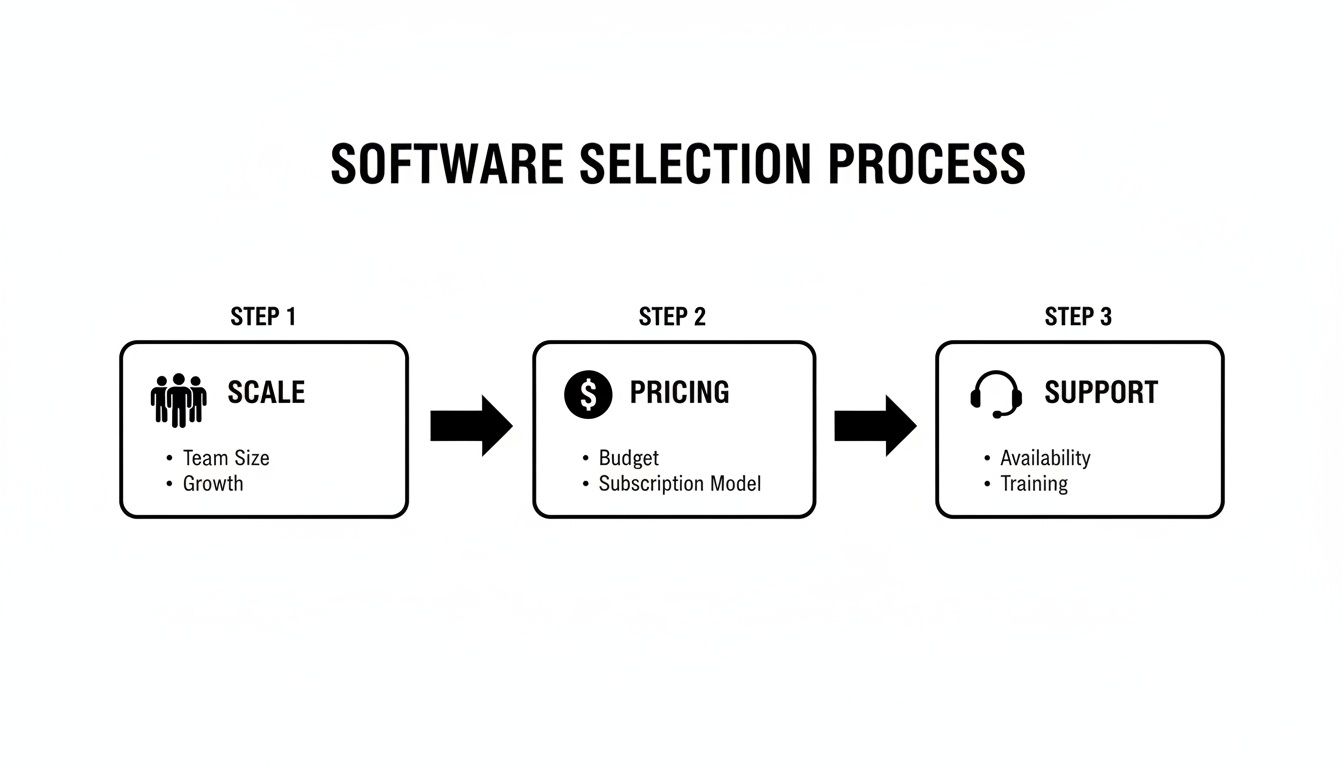
As you can see, the right choice comes down to matching the platform's features with your team's size, your budget, and how much help you'll need along the way.
Closing the Loop Back at the Office
The moment that payment goes through, the job cycle is complete. The invoice is marked "paid," the transaction details sync directly with the company's QuickBooks account, and the inventory count for that GFCI outlet is automatically subtracted from Dave's van stock.
Back in the office, the manager sees the job's status flip to "Completed and Paid" on their main dashboard. There's no paperwork to file, no invoice to create later, and no one has to chase down a payment. The entire process, from phone call to money in the bank, took less than an hour and involved zero double entry. That's the power of a single, connected system.
Overcoming the Common Hesitations to Adopting New Software
Let's be honest, making a big change to how you run your business is intimidating. You can see the potential payoff on the other side, but a few legitimate concerns always seem to stand in the way. It’s completely normal.
We're going to walk through the most common fears I hear from electrical contractors and talk about some practical, real-world solutions.
"My Crew Isn't Tech-Savvy"
This is probably the number one concern, and it's a valid one. You've got experienced electricians who can wire a panel in their sleep but get nervous around new apps.
But here’s the thing: modern electrical contractor software is built for them. The best mobile apps have clean, simple screens with big, obvious buttons. The workflows are designed to mimic what they’re already doing in the real world—just without the paper.
The goal of a great field app isn't to turn an electrician into a computer whiz. It’s to give them a tool that feels as natural and reliable as their favorite multimeter. It should make the job easier, not add another layer of complexity.
Because of this focus on user-friendliness, getting your team up to speed is usually much faster and less painful than you might imagine.
"It Costs Too Much"
The sticker shock is real. Looking at a monthly subscription fee can feel like just another expense. The key, however, is to shift your thinking from cost to return on investment (ROI).
Think about it this way: what happens when better tracking prevents just one forgotten part from being left off an invoice each day? The software has already started paying for itself. What happens when smarter scheduling lets each tech squeeze in just one extra job per week? Now, the software isn't a cost—it's a profit generator.
"We Don't Have Time for a Complicated Setup"
This is another huge one. As a business owner, your time is your most valuable asset. The last thing you need is a month-long, headache-inducing setup process. You’re right to think, "I just don't have time for this."
A good software provider gets this. They know that a smooth transition is non-negotiable. Look for a partner that offers dedicated onboarding support, where an actual human being guides you through the process. They should help you import your customer lists, parts data, and price books. This hands-on help is what turns a potentially overwhelming project into a series of manageable steps.
The truth is, the demand for these tools is exploding. The electrical contractor software market was valued at USD 12.28 billion in 2023 and is projected to hit USD 24.39 billion by 2031. Why? Because this software solves real, expensive problems—like compliance. With tightening energy management regulations, precise documentation is crucial. Automating safety reports isn't just a convenience; it's a shield against hefty fines. You can read the full research on this market trend to see where the industry is heading.
Your Questions Answered: Electrical Contractor Software FAQs
Making a big change in how you run your business always brings up questions. It’s smart to be thorough. Let’s tackle some of the most common things contractors ask when they’re looking at electrical contractor software. We'll get straight to the point on the practical stuff that really matters.
We’ll cover everything from the initial price tag to how this kind of software will actually affect your team and your bottom line down the road.
What's This Going to Cost Me?
This is usually question number one, and honestly, it depends. Most of this software runs on a subscription, so you're looking at a monthly cost, often priced per user or per tech. For a smaller crew, a basic plan can start somewhere in the $40 to $80 per user, per month range.
If you need the heavy-duty features—think complex job costing or managing parts across multiple vans and a warehouse—you might be looking at $150 to $250+ per user. My advice? Look for straightforward pricing and don't be shy about asking if there are extra fees for setup or moving your data over. The goal is to find a plan that fits you now, not to pay a premium for enterprise-level tools you'll never touch.
Expert Tip: Try not to focus solely on the price tag. Think about the value. If the software helps each of your techs squeeze in just one extra job a month, it's likely already paid for itself several times over.
Is This Stuff Hard for My Techs to Learn?
That’s a perfectly fair question. Nobody wants to deal with a revolt from their field crew. The good news is that the people who build this software know that if it’s not easy to use on a phone in the middle of a job site, it’s useless.
Most mobile apps are designed to be dead simple. We're talking big buttons, clear instructions, and a logical flow that walks your techs through everything from clocking in to finalizing an invoice. Realistically, it might take a couple of weeks for everyone to feel completely at home with it. Reputable providers will offer solid onboarding support, like video guides and live training calls, to get both your office staff and your field team up and running smoothly.
Will It Work With My Accounting Software?
Yes, and you should consider this non-negotiable. Any top-tier electrical contractor software is built to play nice with the big names in accounting, like QuickBooks Online and QuickBooks Desktop.
This connection is a game-changer. It gets rid of double-entry for good, saving a ton of time and cutting down on costly human errors. When a tech creates an invoice or takes a payment on-site, all that financial info zips right over to your accounting system automatically. Your books stay accurate and current in real-time, without anyone having to manually punch in numbers back at the office.
Ready to see what it feels like to have everything in one place? TackonFSM pulls all the essential tools—scheduling, dispatch, inventory, and on-the-spot payments—into a single, easy-to-use system designed to end the chaos and grow your profits.
Start your free 14-day trial and transform your business today.





