Creating a Purchase Order That Protects Your Profits
When you're running a trade business, a purchase order (PO) is so much more than just another piece of paperwork. It's the official handshake between you and your supplier, a formal request for specific parts or materials at a price you've both agreed on. Once your vendor accepts it, that PO becomes a binding contract, protecting everyone involved. For any contractor trying to get a handle on job costs and inventory, it's an absolutely critical tool.
Why Mastering Purchase Orders Is a Game-Changer
Let's be real—POs can feel like a chore. But for busy HVAC, plumbing, and electrical shops, they are the unsung heroes of profitability. When parts purchasing is a free-for-all, you’re practically inviting project delays, ticked-off customers, and profit leaks that are almost impossible to trace.

From Costly Chaos to Controlled Profit
Picture this all-too-common scene: your best tech is on-site for a crucial AC repair on a 90-degree day, but the one specific capacitor they need isn't on the van. The job grinds to a halt. The customer is fuming. Now your tech has to burn two hours driving to a supply house and back—time you can't bill for. This exact scenario, and others like it, nearly always points back to a weak or non-existent PO process.
Without a formal system for ordering, you're leaving the door wide open to some serious financial headaches:
- Inventory Shrinkage: Parts get ordered but are never tracked. They just… disappear, or get used on the wrong job without being billed.
- Double Ordering: Your tech in the field orders an expensive compressor, not realizing the office manager already ordered the same one an hour ago. Now you're stuck with a costly surplus.
- Wrong Parts: A quick text or a verbal order over a crackly phone line leads to the wrong part arriving, derailing the entire project schedule.
- Zero Job Costing: Without a PO linking materials to a job, you have no real way to know if you're actually making money on your work.
The Shift to Strategic Purchasing
The industry is catching on fast: manual, disorganized purchasing is a major liability. Back in the day, it wasn't uncommon for contractors to lose an estimated 10-15% of revenue to problems like lost inventory and redundant orders. It’s no wonder the global purchase order software market is expected to skyrocket to $18,204.45 million by 2033.
A solid PO process changes purchasing from a reactive, chaotic task into a strategic advantage. It’s your best defense against shrinking margins and a critical tool for delivering the kind of service that keeps customers calling back.
To really get control and unlock the full potential of your purchasing, you have to look at modern tools. Good purchase order automation software can make all the difference. Platforms like TackonFSM integrate PO creation directly into your workflow, making sure every part is accounted for, billed correctly, and ultimately, profitable. If you want to see how this fits into the bigger picture, you should check out our overview of why field service management software matters.
The Anatomy of a Perfect Purchase Order
A purchase order isn't just paperwork; it's your first line of defense against profit-killing mistakes. Think of it as a legal contract between you and your supplier. When it’s clear, specific, and complete, it prevents confusion, stops ordering errors cold, and makes sure you get exactly what you paid for.
A sloppy PO is an open invitation for problems. A precise one, on the other hand, protects your job margins and keeps the entire workflow—from the tech in the field to the office manager paying the bills—running smoothly.
The Core Details That Leave No Room for Error
There are a few pieces of information that are absolutely non-negotiable. I've seen more headaches caused by missing these simple details than almost anything else. Getting them right from the start saves you time, money, and a ton of frustration down the road.
First, every single PO needs its own unique PO number. This is your secret weapon for tracking and prevents you from accidentally paying for the same order twice. A simple sequential system, like 2024-001, 2024-002, works perfectly.
Next, you need complete supplier and company information.
- Supplier Info: Don't just put "Ferguson." Include the full legal name, the correct branch address, and your sales rep's contact information. This ensures the order actually goes to the right person at the right place.
- Your Info: Clearly state your business name, the job site or van for delivery (the "ship to" address), and your office address for the invoice (the "bill to"). Never assume your supplier knows where things are supposed to go.
Why Vague Descriptions Are a Recipe for Disaster
Here’s where a lot of trade businesses trip up. Simply writing “3/4 inch copper fitting” on a PO is practically asking for the wrong part to show up. Was that a press fitting or a sweat fitting? A ninety-degree elbow or a tee? This kind of ambiguity leads to extra trips to the supply house, project delays, and irritated customers.
A bulletproof item description is painfully specific. It should always include:
- Part or SKU Number: The supplier's exact code for the item.
- Detailed Description:
3/4" Viega ProPress Copper 90° Elbow, Model #77432 - Quantity: The exact number of units you need.
- Unit Price: The price per item that you agreed on.
- Total Price: The simple math of quantity multiplied by unit price.
This isn't about micromanaging your supplier. It’s about creating a single source of truth that your tech, your office, and your vendor can all rely on. It’s a critical part of running a profitable and efficient operation.
When you nail this level of detail, receiving parts and matching invoices becomes almost effortless. You can see any discrepancy between what you ordered and what arrived immediately, empowering you to solve the problem before you pay the bill.
To put it all together, here’s a breakdown of what every solid purchase order needs. Getting these fields right every time will transform your purchasing process.
Anatomy of a Perfect Purchase Order
| PO Field | What It Is | Why It Matters (Pro-Tip) |
|---|---|---|
| PO Number | A unique ID for the order. | Crucial for tracking. Use a sequential system (e.g., 2024-001, 2024-002) to prevent duplicate payments and easily find orders later. |
| Supplier & Company Info | Full legal names, addresses, and contacts. | Ensures accuracy. Differentiate between "ship to" (the job site or van) and "bill to" (your office) to avoid delivery chaos. |
| Item Description | The specific details of each part. | Prevents wrong orders. Include brand, model number, size, and SKU to eliminate any guesswork for your supplier. Be painfully specific. |
| Quantity & Price | How many you need and the cost per unit. | Protects your budget. This locks in pricing and helps with accurate job costing before the work even starts. It's your proof of the agreed-upon price. |
| Requested Delivery Date | The date you expect to receive the items. | Manages project timelines. This gives you a firm date to hold your supplier accountable for, which is essential for scheduling technicians and managing customer expectations. |
| Job or Customer Name | The internal job number or customer associated with the parts. | Simplifies job costing. Linking parts directly to a job makes it incredibly easy to see if you're staying on budget and maintaining profitability. |
By treating your purchase order as a critical business document rather than a simple request form, you build a powerful system for financial control and operational efficiency. It's a small change in process that pays huge dividends.
Connecting Estimates to Orders: The Smart PO Workflow
A truly efficient purchase order process doesn't start with a blank form. It begins the second your customer gives you the green light on an estimate. The smartest workflows automatically turn that customer’s “yes” into a nearly complete PO, pulling every part needed directly from the job you just won.
This is the connection that takes all the guesswork out of ordering. I’ve seen it countless times: manual data entry is where mistakes happen. When your system links the approved estimate to the purchase order, the right parts and correct quantities are already loaded. That simple step can make your parts list 100% accurate from the jump, saving you from costly ordering headaches down the road.
From Approved Estimate to Accurate Order
Let’s walk through a real-world example. Say you're an HVAC contractor and a customer just signed off on an install that includes a specific condenser model, a 50-foot line set, and a new smart thermostat. Without an integrated system, someone in your office now has to manually key all that into a new PO. It’s easy to mistype a part number or forget an item entirely.
Now, imagine using a platform like TackonFSM. As soon as that estimate is marked "approved," the system automatically drafts a PO with those exact items, ready for a quick review. This doesn't just save your admin time; it's a critical checkpoint for job profitability. You can see how this benefits your entire operation when you learn to simplify estimates and invoicing.
The image below breaks down the core pieces of a perfect purchase order, which this automated process helps you nail every time.

As you can see, a solid PO is built on a unique ID number, precise item details, and verified vendor info. Managing all of this is so much simpler in a connected system.
Linking Parts and Locking In Margins
Once the draft PO is ready, your next moves are all about control and precision. This is where you connect the dots to protect your profit margins.
- Supplier Selection: Instead of digging through contacts or old invoices, you can instantly choose from your pre-loaded list of trusted suppliers.
- Job Costing: The PO is automatically tied to the specific job, so every single part's cost is tracked against that project's budget from day one.
- Margin Enforcement: Before you hit "send," you can see right away if the supplier's pricing aligns with your quoted margins. No more hoping a job is profitable—you'll know for sure.
If you’re interested in the nuts and bolts, you can learn how to create your own purchase order system to get a deeper feel for the underlying mechanics. This visibility also extends to your current stock, letting you check if you even need to place an order or if the part is already sitting in a tech's van.
By turning an approved estimate directly into a PO, you're doing more than just automating a task. You're building a rock-solid workflow that guarantees accuracy, protects your profits, and creates a clear audit trail from customer approval all the way to the final invoice.
Building Your Supplier and Approval Playbook
We’ve all been burned by chasing the cheapest price on a part. Choosing a supplier based on cost alone is a rookie mistake that almost always ends in project delays and frustrated customers. A cheap part that arrives late—or is the wrong one entirely—costs you a fortune in wasted labor and return trips. The real savings are found in reliability, not the sticker price.
The first step in a solid purchasing system is to build a roster of suppliers you can actually count on. This goes way beyond just price shopping. You need to start tracking their performance. Who gets your orders right the first time? Which supplier is proactive about letting you know a part is on backorder? A great supplier relationship is one of your best-kept secret weapons.
This has never been more critical. With ongoing supply chain chaos, recent supply chain risk survey findings show that 82% of companies have been hit by new tariffs, disrupting 20-40% of their operations. For contractors who rely on specialty or imported parts, picking the right vendors is now a matter of survival.
Setting Up Smart Approval Workflows
Once you know who to buy from, you need to control who can spend money and when. An open-door purchasing process is one of the fastest ways to drain cash from a business. This is where a simple approval workflow saves the day.
Think of it as a set of guardrails, not a cage. An approval workflow is just a simple set of rules that makes sure every order gets a second look before it goes out the door. It’s not about micromanaging your team; it’s about preventing surprise bills and keeping your jobs profitable.
A typical, effective setup might look something like this:
- Any purchase order under $250 is automatically approved.
- Orders between $250 and $1,000 need a manager's signature.
- Anything over $1,000 has to be approved by the owner.
This kind of tiered system gives your team the freedom to quickly get what they need for smaller, routine jobs. At the same time, it gives you crucial oversight on the big-ticket items that can really impact your cash flow. It’s the perfect balance of speed and control.
Field service software like TackonFSM can automate this whole thing. A technician can build a PO on their tablet in the field, and the system automatically sends it to the right person for approval based on the limits you’ve set. The manager gets a notification, reviews the details, and can approve it with a tap.
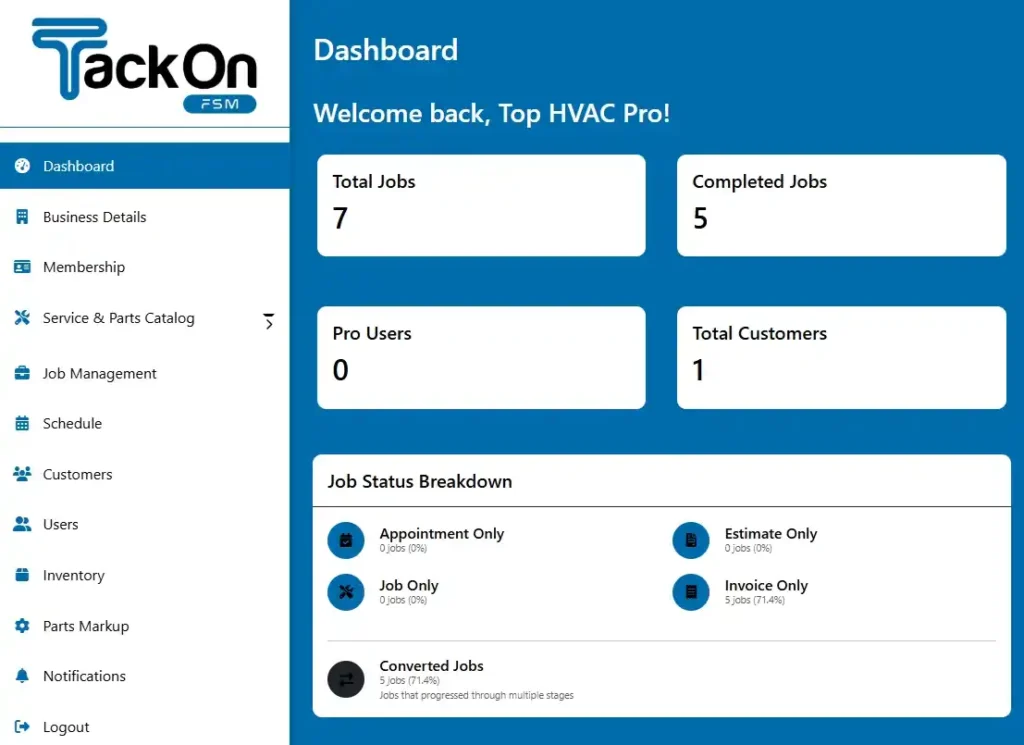
What you get is a perfect audit trail. Every approval or rejection is logged with a name and timestamp, so there are no more guessing games about who authorized a purchase. Having that level of visibility from a central dashboard is how you maintain tight financial control, even when your team is spread out across town. You can see exactly how this works by looking at the TackonFSM dashboard in action. This is how you stop rogue spending and make sure every PO is working for your bottom line.
From Receiving to Reconciliation: Closing the Financial Loop
Getting the purchase order out the door feels like a win, but the job is far from over. In fact, this is where your profits are most vulnerable. Once your supplier ships the parts, that PO becomes the official record you'll use to make sure you get what you paid for and protect your bottom line from costly, yet common, mistakes.

When that delivery truck pulls up, it’s not just time to unbox parts; it’s a crucial verification step. The person accepting the shipment, whether it’s a tech on-site or your warehouse manager, needs to have the original PO in hand (or on screen) and check it against the packing slip, item by item.
The Art of a Solid Receiving Process
A little discipline here saves a world of headaches later. A rock-solid receiving process keeps your inventory counts clean and stops you from accidentally accepting—and paying for—the wrong stuff.
Here’s what your team should be checking every single time:
- Count Everything: Does the quantity on the packing slip match what’s in the box? And more importantly, does it match what’s on your PO? Don’t just glance; do a physical count.
- Look for Damage: Give everything a once-over for visible damage. If a box looks like it lost a fight with a forklift, document it with photos before signing. If the part itself is clearly busted, refuse that specific item.
- Verify Part Numbers: This one is huge. Make sure the part numbers or SKUs on the items themselves match what’s listed on your purchase order. This catches supplier mistakes before the wrong condenser fan motor makes it onto a tech’s van and out to a customer’s house.
Once everything checks out, it’s time to update your inventory. In a system like TackonFSM, you can instantly assign the parts to the job they were ordered for or add them to the main warehouse or a specific technician's van stock. This real-time update is the key to knowing your true job costs and what you actually have on hand.
The Final Check: Your Three-Way Match
Now for the moment of truth that directly impacts your bank account: the three-way match. This is a non-negotiable step where your office team compares three critical documents to make sure the story they tell is identical.
You’re matching up:
- The Purchase Order (what you agreed to buy).
- The Packing Slip/Receiving Report (what you actually received).
- The Supplier Invoice (what they want you to pay).
By locking these three documents together, you create an airtight process for paying bills. A study by The Hackett Group found that better procurement management, with processes like this at its core, can slash related costs by up to 30%.
Think about it this way. Your PO was for five compressors at $300 each. Your tech signs the receiving slip showing only four arrived. A week later, the supplier’s invoice comes in, billing you for all five. Without a three-way match, it’s frighteningly easy for accounting to just pay the invoice and—poof—$300 is gone.
This is where good field service software pays for itself. The system will automatically flag that the invoice for five units doesn’t match the receiving report for four. This stops the overpayment cold and gives you the exact documentation you need to call your supplier and get the invoice corrected. It turns a silent profit leak into a simple, documented conversation.
Common Questions About Creating Purchase Orders
When it comes to purchase orders, I hear the same questions pop up all the time. It doesn't matter if you're a one-person shop or running a full office staff—getting the purchasing process right is a constant challenge. Let's clear up a few of the most common sticking points I see with trade contractors.
What's the Difference Between a Purchase Order and an Invoice?
This is a big one, and it's easy to get them mixed up. The simplest way to think about it is that a purchase order (PO) is the "ask," and an invoice is the "bill."
You're the one who creates the PO. You send it to your supplier to formally request parts, spelling out exactly what you need, how many, and the price you've agreed on. It’s your control document, sent before anything ships.
The invoice comes from your supplier after they've sent the goods. It’s their request for payment. The PO sets the terms upfront; the invoice settles the bill afterward.
Can I Just Use a Spreadsheet for My Purchase Orders?
Look, you can, but I guarantee you’ll outgrow it almost immediately. I've seen dozens of contractors try to make spreadsheets work, and it always ends in a mess. They’re clunky, prone to typos, and you have absolutely no real-time visibility or control.
A spreadsheet can’t tell you if a part has been received, if it's already in a tech's van, or if you're about to be double-billed. It's a static document in a dynamic business. A system like TackonFSM connects your purchasing to your inventory, jobs, and accounting automatically. It’s designed to prevent the expensive mistakes that spreadsheets can't even see.
How Should I Handle Backorders or Partial Shipments?
This is where a dedicated system really earns its keep. Let's say you ordered five compressors but the supplier only ships three. This happens all the time.
With a proper system, you "receive" only the three units that actually showed up. Don't just mark the whole PO as complete.
Your purchase order should now show a status like 'Partially Received'. This is crucial for two reasons:
- It prevents you from accidentally paying an invoice for the full five compressors.
- It leaves a clear, open record showing that two units are still on backorder.
Once the final two compressors arrive, you receive them against that same original PO, which finally closes it out. This simple workflow keeps your inventory numbers accurate and makes sure you only pay for what’s actually in your shop.
Ready to stop chasing paperwork and finally get a handle on your job costs? With TackonFSM, you can turn estimates into purchase orders in a click, manage approvals from your phone, and see exactly where your parts and money are going in real-time. Learn more and start your free trial at https://www.tackonfsm.com.