

Finding the Best Software for Electrical Contractors

The best software for an electrical contractor is an all-in-one Field Service Management (FSM) platform that ties everything—scheduling, dispatching, estimating, and invoicing—into one neat package. The real trick is finding a solution that balances powerful, trade-specific features with genuine ease of use, ensuring it can support your business whether you're a one-person shop or a growing commercial firm.
Choosing the Right Software for Your Electrical Business

Taking the leap from messy spreadsheets and paper invoices to a dedicated software solution is a huge step for any electrical business. It's about way more than just "going digital." It’s about taking back control of your operations, fixing cash flow problems, and giving your customers an experience that makes you their first call, every time.
These modern platforms are built to solve the real, everyday headaches that eat up your time and shrink your profits. Instead of patching together different tools that don't talk to each other, a single system connects your office to your techs in the field. This means no more miscommunications and everyone gets real-time updates on job progress.
What to Look for in Electrical Contractor Software
At its core, this software is meant to bring your entire workflow under one roof. When that happens, you see fewer missed calls, create more accurate quotes, and get paid a whole lot faster. The features that make a direct impact on your bottom line are the ones you need to focus on:
- Integrated Quoting and Estimating: Build professional, accurate bids in minutes using pre-loaded parts and labor rates, so you can stop guessing and start protecting your margins.
- Smart Scheduling and Dispatching: See your entire team's schedule on a drag-and-drop calendar. This lets you optimize routes for fuel savings and react instantly to those high-priority emergency calls.
- Full Mobile Access: Give your technicians the power to manage work orders, pull up job histories, snap site photos, and take payments right from their phone or tablet.
- Streamlined Invoicing and Payments: Turn an approved estimate or finished work order into an invoice with one click, then give customers the option to pay you online right away.
This isn't just a niche trend; it's a major industry shift. The global market for this kind of software was valued at around $1.5 billion in 2023 and is on track to hit $3.6 billion by 2032. This shows a massive, industry-wide push for better operational efficiency. You can explore more about the market growth for electrical contractor software on dataintelo.com.
The fundamental goal is to find a system that fits your current operational needs while providing the flexibility to scale as your business grows. The best software for electrical contractors isn't just a tool; it's a central hub for your entire business.
Quick Guide to Electrical Contractor Software Types
Before we jump into a side-by-side comparison, it helps to know the main categories of software out there and who they’re built for. Some tools are simple and focused, while others are designed to run your entire operation.
| Software Type | Primary Function | Best For |
|---|---|---|
| Simple Estimating Tools | Creating basic quotes and bids. | Solo electricians or contractors focused on bidding new construction. |
| Scheduling & Dispatch Apps | Managing appointments and technician assignments. | Small residential service teams needing to organize daily jobs. |
| All-in-One FSM Platforms | Integrating all operations from lead to payment. | Most electrical contractors, from small crews to large firms. |
Understanding where you fit helps narrow the search significantly. An all-in-one platform is usually the right long-term move, but knowing the alternatives gives you a better perspective on what you truly need.
The Must-Have Features for Any Electrical Contractor
When you’re looking for the right software, it's easy to get lost in a sea of features. But for an electrical contractor, it boils down to a handful of core tools that solve your biggest day-to-day problems. These aren't just nice-to-haves; they are the gears that make your business run smoothly, stopping profit leaks and making your team more effective.
The whole point is to find one system that does it all. Juggling multiple apps is a real problem in the trades. In fact, recent industry reports show that around 57% of commercial specialty contractors are wrestling with two or three different software solutions just to manage their operations. This kind of patchwork system is exactly why so many are moving to all-in-one platforms. You can dig deeper into these adoption patterns in the electrical software market at datainsightsmarket.com.
Scheduling and Dispatching
Good scheduling is the nerve center of your operation—it's way more than just a digital calendar. The best systems give you a visual, drag-and-drop dispatch board where you can see your entire team’s schedule at a glance. For an electrical business juggling multiple calls, this is absolutely essential.
Picture this: a high-priority commercial client calls with a partial power outage. Instead of a frantic series of phone calls, your dispatcher looks at the board, instantly spots the closest technician with the right commercial experience, and assigns the job. Some systems even offer route optimization, automatically mapping out the most efficient way to get from one job to the next. That means less time in traffic and more time on the tools.
Estimating and Quoting
Winning good, profitable work starts with sending out fast and accurate estimates that look professional. When you're quoting from memory or using old price lists, you're either going to underbid and lose money or overbid and lose the job. Modern software fixes this by building your digital price book right into the estimating tool.
Here's what that looks like in the real world:
- Integrated Parts Catalogs: You can pull from a pre-loaded list of common electrical parts—breakers, wire, outlets—all with your cost and markup already calculated.
- Labor Rate Management: You can set different rates for different types of work, whether it's a standard service call, an after-hours emergency, or a job handled by an apprentice. Every hour is billed correctly.
- Professional Templates: With a click, you can generate a clean, branded quote on a PDF, complete with your logo and terms, and email it to the customer before you even leave their driveway.
This turns quoting from a chore into a sales advantage. It shows the client you’re a professional and makes sure every job is priced to be profitable from the get-go.
An integrated estimating tool isn’t just about being fast. It's about protecting your margins. It ensures every material cost, labor hour, and bit of overhead is captured in every single bid you send out.
Mobile Field Access
The real magic happens when your techs in the field are connected to the office in real time. A solid mobile app is a game-changer, giving your team everything they need on their phone or tablet to work smarter and provide better service.
For instance, when a technician gets to a job site, they can pull out their phone and:
- View Complete Job History: See every past work order, invoice, and note for that customer. This is gold when troubleshooting a recurring problem.
- Update Work Orders Instantly: Add notes as they work, snap photos of the panel before and after, and change the job status from "in progress" to "complete."
- Capture Customer Signatures: Get a digital sign-off on the completed work right on their device. No more chasing down paper forms.
This constant flow of information gets rid of the dreaded end-of-day paperwork pile, cuts down on billing mistakes, and keeps everyone in the loop.
Inventory Management and Invoicing
For an electrician, your parts are your money. If you don't track your inventory well, you end up with lost materials, last-minute trips to the supply house, and jobs getting delayed. The best software includes inventory management that tracks parts from your main stockroom right down to what’s on each tech's van.
When a tech uses a specific breaker on a job, they log it in the app. The system automatically subtracts it from their van's inventory and, just as importantly, adds it to the customer's invoice. Every single part is accounted for and billed out.
Finally, integrated invoicing closes the financial loop. A completed work order, with all the tracked labor and parts, becomes a professional invoice with one click. From there, you can email or text a payment link directly to the customer. This simple step dramatically shrinks the time it takes to get paid and keeps your cash flow healthy.
Comparing the Top Electrical Contractor Software
Choosing the right software isn't about finding a magic bullet; it's about matching a platform's strengths to your specific, day-to-day operational headaches. To find the best software for electrical contractors, we need to look past generic feature lists and really dig into how these tools perform in the real world. We'll put a few different types of platforms side-by-side to see how they handle the realities of running an electrical business.
We’ll look at an enterprise-level beast like ServiceTitan, a popular option like Jobber, and a focused solution like TackonFSM, which is built for growing small to mid-sized shops. This approach will throw the key differences into sharp relief and help you find the platform that truly fits your crew.
At its core, any good field service software has to nail three things: dispatching jobs, creating quotes, and getting you paid. This is the fundamental loop that turns a customer call into a completed, paid job.
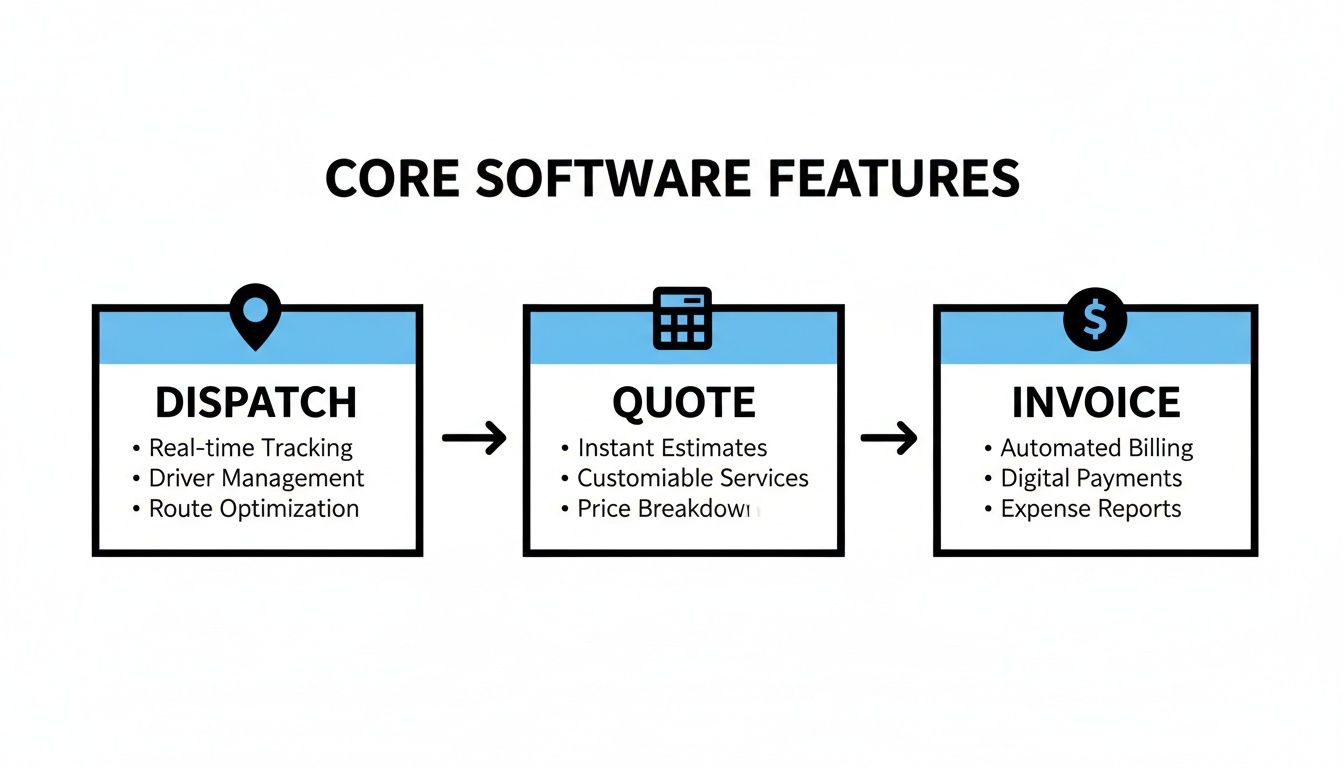
When these three pillars work together seamlessly, your entire operation becomes more efficient and profitable. Let's see how different platforms handle that.
Use Case 1: Residential Service Calls and On-Site Payments
Picture this common scenario: a 5-technician residential company is struggling to keep up. Scheduling is a mess, techs don't have customer history when they arrive on-site, and cash flow is slow because invoicing is always a week behind. Sound familiar?
An enterprise platform like ServiceTitan throws a ton of power at this problem. It has an incredibly detailed dispatch board and a mobile app packed with features. Technicians can see a customer's entire service history, pull up flat-rate pricing books, and even present "good, better, best" repair options right on their tablet. The whole system is designed to maximize revenue on every single call.
Jobber also handles this well, offering a clean, user-friendly interface that solves the core problem. The dispatch board is intuitive, and the mobile app gives techs the work order details and payment processing tools they need to close out a job on the spot. It effectively connects the office to the field without being overwhelming.
TackonFSM, on the other hand, is built specifically for this kind of efficient, straightforward service work. A dispatcher can see who's closest and assign a job in seconds on a visual calendar. The tech gets the notification, can text the customer "I'm on my way" through the app, and processes a credit card payment right then and there. It's direct, fast, and completely cuts out the administrative lag.
For a residential service business, TackonFSM hits the sweet spot. It delivers the must-have tools—smart dispatch, easy mobile payments, and customer communication—without the steep learning curve or high cost of a massive enterprise system. It's a direct solution for faster cash flow and better field-office sync.
This focus on efficiency is no accident. With the U.S. electrical construction market topping $115 billion, software companies are all competing to build the best tools for contractors. You can find more about the U.S. electrical services market on fieldpromax.com to see just how big the opportunity is.
Use Case 2: Managing Small Commercial Projects and Parts
Now, let's switch gears. Imagine a 10-technician shop that splits its time between residential service and small commercial projects—think office lighting retrofits or tenant improvements. Their biggest pain point is creating accurate estimates with detailed parts lists and then tracking that inventory to make sure jobs are actually profitable.
This is where a powerhouse like ServiceTitan flexes its muscles. Its project management modules can handle complex bidding, progress billing, and detailed job costing. You can build incredibly granular estimates and manage large, multi-phase projects with a high degree of precision. It’s ideal for contractors who live and breathe commercial work.
Jobber provides solid estimating features and can handle multi-day projects, but it may not have the deep, job-costing capabilities needed for more complex commercial bids. It's great for straightforward projects but might require some manual workarounds for more intricate jobs with tight margins.
TackonFSM tackles this from a more practical angle with accessible estimating and inventory control. You can build detailed quotes using a pre-loaded parts database, making sure every single component is accounted for and priced correctly. Crucially, its inventory system tracks parts from the warehouse to each technician's van, helping you avoid those last-minute runs to the supply house that destroy a project's profitability.
For a shop balancing service calls and project work, TackonFSM connects your price book and inventory directly to your estimates. This is a huge advantage, ensuring your quotes are not only professional but are built on real-time stock levels and protected margins.
Feature Comparison Across Leading FSM Platforms
To really see how these platforms stack up for an electrical contractor, a side-by-side look at the features that matter most is incredibly helpful. This table breaks down their core philosophies and highlights where each one really shines.
| Feature | ServiceTitan | Jobber | TackonFSM | Ideal Use Case |
|---|---|---|---|---|
| Dispatch & Scheduling | AI-assisted dispatching, advanced route optimization, and skill-based assignments. Complex but powerful. | Clean drag-and-drop board with great mobile sync and solid route planning for daily jobs. | Simple, visual calendar board designed for lightning-fast assignments and real-time tech tracking. | |
| Estimating & Quoting | Highly detailed, multi-option proposals with integrated flat-rate pricing books and sales tools. | Professional templates with easy-to-add line items and digital signature capture. Great for service work. | Fast, accurate estimates built from an integrated, searchable parts database to protect margins on every quote. | |
| Inventory Management | Full-scale, multi-location warehouse and van tracking with complete purchase order management. | Good van-level tracking and stock alerts, often with basic PO features. | Practical field and shop inventory control focused on ensuring parts get billed to the right job. | |
| Ideal Use Case | Large-scale residential or commercial contractors focused on deep data analytics and revenue optimization. | Small to medium-sized service businesses needing a polished, all-around solution that’s easy to use. | Small to mid-sized electrical contractors who need an affordable, no-nonsense platform to nail core operations. |
The table makes the different approaches pretty clear. Enterprise solutions are built to analyze and optimize every possible metric, while a platform like Jobber offers a great all-around experience. TackonFSM, meanwhile, is laser-focused on giving growing shops the essential tools to operate efficiently and profitably without the complexity.
So, How Do You Choose?
Ultimately, the best software for your electrical business comes down to your goals. If you're running a massive commercial operation with dozens of techs and long-term, complex projects, the depth of an enterprise solution is probably what you need.
But for the vast majority of small to mid-sized electrical shops, the real priority is finding a system that’s easy to get started with, affordable, and just plain excellent at the fundamentals. It needs to solve today’s problems—like chaotic scheduling and slow payments—while giving you a solid platform to build on.
This is exactly where TackonFSM fits in. It gives you powerful, reliable tools for scheduling, quoting, invoicing, and inventory without the enterprise-level price tag or six-month implementation project. It’s built to help a growing business operate with the efficiency of a much larger company, paving the way for smart, sustainable growth.
How to Choose Software for Your Business Size
There's no single "best software for electrical contractors." The right platform for a solo electrician in one van would be total overkill for a 20-person commercial outfit, and the enterprise software a large company needs would crush a small shop's budget.
The most important thing you can do is match the software to the size of your business right now. Your team size dictates your biggest headaches. A small crew needs to be fast and nimble, a growing business needs to build solid processes, and a big company needs to analyze every detail.
Let's break down what you should be looking for at each stage.
For the Sole Proprietor (1-3 Techs)
When you're a small crew, every single dollar and minute is precious. You don't need a massive, complicated system that takes weeks to learn; you need a tool that makes your day easier, period. The priorities here are simple: affordability, a great mobile app, and ease of use.
Your business runs from your phone, so your software has to, as well. You need to be able to run your entire operation from the driver's seat of your truck.
- Core Needs: You have to be able to create quotes quickly, schedule jobs easily, invoice on the spot, and get paid right away.
- Key Features: A clean, fast mobile app is non-negotiable. Look for tools that let you text professional-looking quotes and invoices, get digital signatures, and take credit card payments the second the job is done.
- Red Flags: Steer clear of any platform that wants big setup fees, long-term contracts, or tries to sell you on features you'll never touch, like multi-warehouse inventory or detailed project management.
The goal here is simple: find something that makes you look professional and helps you get paid faster, without getting in your way.
For the Growing Business (4-15 Techs)
As you add more trucks and techs to your team, the old ways of doing things start to fall apart. That simple calendar can't handle multiple crews, and figuring out who has what parts on their van becomes a nightmare. This is when you need a true all-in-one Field Service Management (FSM) platform that can scale with you.
Your focus shifts from just getting work done to creating repeatable, efficient systems. You need software that brings order to your dispatching, quoting, and inventory. This is the sweet spot where a platform like TackonFSM really shines, offering the right mix of powerful features without the enterprise-level price tag.
For a business hitting this growth spurt, the right software is the backbone that lets you scale without chaos. It's about putting systems in place for dispatch, parts tracking, and job costing to make sure you stay profitable as you get bigger.
A solid FSM for a growing business should deliver:
- Scalable Features: A visual dispatch board to see all your techs at once, a shared price book so all your quotes are consistent, and practical inventory management to track parts on every truck.
- Crucial Integrations: A direct link to your accounting software (like QuickBooks) is a must-have. It kills double-entry and keeps your books clean.
- Predictable Costs: Look for clear, per-user pricing. You should be able to add a new technician without getting hit with a massive, unexpected bill.
At this stage, you're investing in a system that won't just organize today's work but will support you for years to come.
For the Large Commercial Contractor (15+ Techs)
Once your business is operating at this scale, especially doing commercial work, the complexity jumps. You're not just handling service calls anymore; you're juggling big projects with multiple phases, buying huge amounts of materials, and tracking job costs down to the penny to protect tight margins.
At this level, you're looking for a powerful, enterprise-grade system. These platforms are built around deep data analytics, letting you see exactly where you're making or losing money. The focus is less on simple scheduling and more on total project and financial control.
You'll need advanced features, including:
- Complex Project Management: Tools to handle progress billing, manage purchase orders, and track timelines for jobs that last months.
- In-Depth Reporting: Custom dashboards to monitor key performance indicators (KPIs), see how efficient your techs are, and analyze job profitability.
- Multi-Location Capabilities: If you have multiple offices, you need the ability to manage crews, inventory, and schedules across every location.
Choosing the right software is about being honest about where your business is today and where it’s headed. Picking a platform that fits your current size ensures you get the tools you actually need, without paying a premium for features that don’t solve your real problems.
Implementing Your New Software System

You’ve done the hard work and picked the right software. But remember, the platform itself is just a tool. The real payoff comes from how you introduce it to your team and your daily operations. A successful launch is what turns that software investment into real, measurable value from day one.
Getting this part right isn't about just flipping a switch. It's about smart planning, moving your existing data carefully, and getting your team genuinely excited to use the new system. If you rush this stage, you'll end up with frustrated employees and a tool nobody wants to use, which defeats the entire purpose.
Create a Realistic Timeline and Phased Rollout
It's tempting to want everything up and running at once, but that approach almost always backfires. The smartest way to launch new software is with a phased rollout. Start with the features that solve your biggest headaches first, master them, and then build from there.
This method minimizes disruption and lets your team see the benefits right away. Here's what a practical four-week timeline could look like:
- Week 1 – Data Migration: Your only goal this week is to get your data in order. Import all customer lists, job histories, and your parts catalog. Clean, accurate data is the bedrock of the entire system, so give this step the attention it deserves.
- Week 2 – Core Function Training: Now, train the team only on the essentials: scheduling, dispatching, and handling work orders on their mobile devices. These are the daily bread-and-butter tasks. Get everyone comfortable here before adding anything else.
- Week 3 – Financial Workflow: It's time to connect the dots to your money. Introduce how to build quotes, send invoices, and take payments in the field. This is also when you'll want to link the software to your accounting program, like QuickBooks.
- Week 4 – Advanced Features: Once your team has the fundamentals down, you can introduce the other tools. This is the time for inventory management, custom reports, and any other secondary features that will make your operation even more efficient.
This step-by-step process prevents your team from feeling overwhelmed. Instead, they get a series of small wins that build their confidence and show them how the software makes their jobs easier.
Adopting a phased approach transforms a daunting overhaul into a series of manageable wins. By focusing on core functions first, you ensure your team sees the benefits immediately, which is the single most important factor for generating buy-in.
Focus on Data Migration and Team Training
All that information you have—customer details, past job notes, invoices, and parts lists—is incredibly valuable. A clean data migration is non-negotiable. Good software providers will have a dedicated support team to help you pull this information over without losing a thing. Don't skip this.
With your data securely in the new system, the spotlight turns to training. And good training isn't a two-hour lecture showing off every feature. It's about connecting the software directly to the daily pain points of each team member.
For Your Office Staff:
- Show them how the drag-and-drop dispatch board means no more frantic calls trying to locate a technician.
- Demonstrate how they can generate an invoice with one click instead of spending an hour on paperwork at the end of the day.
For Your Technicians in the Field:
- Point out how the mobile app gives them instant access to a customer's complete job history, so they walk in prepared.
- Explain that taking payments on-site means no more chasing down checks or waiting for paperwork to be processed.
When your team clearly understands "what's in it for me," adoption happens organically. The software stops feeling like a mandate from the boss and starts feeling like a tool that actually helps them get their work done with less frustration.
Common Questions About Electrical Contractor Software
Alright, so you've compared a few options and narrowed down your list. That's a great start, but I'm willing to bet you still have some practical, real-world questions bouncing around. Choosing the right software is a huge decision, and you're smart to do your homework.
Let's tackle the most common questions I hear from electricians and business owners. Think of this as your final gut-check before you pull the trigger. We'll get into the nitty-gritty of cost, data security, and what it actually takes to get this stuff up and running.
How Much Does Software for Electrical Contractors Cost?
The price tags are all over the map, so it’s crucial to look past the monthly fee. For a solo operator, a simple app might run you $30 to $50 a month. Once you start managing a small or mid-sized crew, you're typically looking at a more complete FSM platform, which usually lands somewhere between $50 and $150 per user, per month. The big, enterprise-level systems? Those can easily hit several hundred dollars per user, not to mention hefty implementation fees that can climb into the thousands.
My advice is to always ask about the total cost of ownership. What are the setup fees? Is there a cost to migrate your existing customer list? Is customer support included, or is that an extra charge? Sometimes, a slightly higher monthly subscription that includes everything is a far better deal than a cheaper plan that nickel-and-dimes you for every little thing.
Is Cloud-Based Software Secure for My Business Data?
Yes, without a doubt. In fact, it's probably more secure than what you're doing now. Reputable cloud providers use security protocols that most small businesses could never afford to implement on their own. We're talking about enterprise-grade data encryption, backups stored in multiple secure locations, and 24/7 monitoring.
Here's the thing most people don't think about: security isn't just about hackers. If a work laptop gets stolen from a truck or an office computer dies, all your data is gone. With a cloud system, your customer lists, job histories, and financials are completely safe and accessible from any other device. It's a business continuity lifeline.
This protects you from both online threats and real-world problems like hardware failure or theft, ensuring you can keep your business running no matter what.
How Long Does It Take to Implement New Software?
This really comes down to two things: the complexity of the software and the size of your team. For a straightforward platform designed for a small crew, you can be up and running in less than a week. That usually involves importing your customer data and doing a couple of quick training sessions to get everyone comfortable with the basics.
On the other end of the spectrum, a massive system for a large commercial outfit could take weeks or even months to roll out. Those projects are a whole different beast, often needing custom configurations and phased training schedules. For most growing electrical businesses, a good benchmark is this: the launch should be measured in days, not months.
Does This Software Integrate with Accounting Programs?
It absolutely should. This is a deal-breaker. Any modern FSM platform worth its salt needs to connect seamlessly with accounting software like QuickBooks or Xero. If it doesn't, you're just signing your office staff up for hours of painful administrative work.
When they’re properly linked, the financial data flows automatically. You create an invoice in your FSM, and it instantly pops up in QuickBooks. A customer pays, and the record syncs. This kills double-entry, which not only saves a ton of time but also drastically cuts down on human error, keeping your books clean and accurate.
Ready to see how an FSM built for the trades can solve your biggest operational headaches? TackonFSM gives you the tools to schedule smarter, quote faster, and get paid without the wait. Start your 14-day free trial today and see the difference.


