Best Small Business Scheduling Software for Trades
If you're in the trades, you know that the best scheduling software isn't just a calendar. It’s the command center for your entire operation. For a small business, this means a specialized Field Service Management (FSM) platform. Tools like TackonFSM are built from the ground up to manage mobile crews, job sites, inventory, and payments—all in one place.
Choosing the Right Scheduling Software for Your Trade Business
Running an HVAC, plumbing, or electrical business is a masterclass in logistics. Scheduling isn't about just penciling in appointments; it's a complex dance. You have to dispatch the right tech, make sure their van is stocked with the right parts, and keep the customer in the loop from start to finish. Generic scheduling tools just weren't built for that kind of pressure, and trying to make them work often leads to wasted time and lost money.

This is exactly why FSM software has become a non-negotiable tool for so many contractors. The numbers tell the story: the global FSM market hit $3.83 billion in 2022 and is on track to hit $7.16 billion by 2028. That growth is fueled by small businesses just like yours needing to do more with less, especially with ongoing labor shortages. Getting your scheduling optimized can mean completing 20-30% more jobs every single day. That’s a game-changer. You can dig deeper into FSM market trends to see how it’s impacting the trades.
Generic Schedulers vs. FSM Platforms: What's the Real Difference?
Getting a handle on the core differences between these tools is the first real step. A generic scheduler manages your time, but a true FSM platform manages your entire field operation.
The table below breaks down the key distinctions that directly affect your efficiency and bottom line.
| Feature Area | Generic Scheduling Tool (e.g., Calendly) | Specialized FSM Platform (e.g., TackonFSM) |
|---|---|---|
| Dispatching | Simple appointment booking. No way to see where your techs are. | A live, drag-and-drop dispatch board with GPS tracking and skills-based assignments. |
| Inventory | Zero connection to parts or materials management. | Real-time inventory tracking on every van and in the warehouse, all linked to specific jobs. |
| Mobile App | Techs can maybe see their calendar. That's it. | A powerful app for pulling up job details, running through checklists, uploading photos, and even collecting payment on-site. |
| Invoicing | You're stuck exporting data to separate accounting software. | A seamless workflow from estimate to invoice to payment, all in one system. |
The crucial difference isn't just about booking jobs. It's about managing all the moving pieces—your people, your parts, and the job information—that make a job profitable. Generic tools leave those critical components completely disconnected.
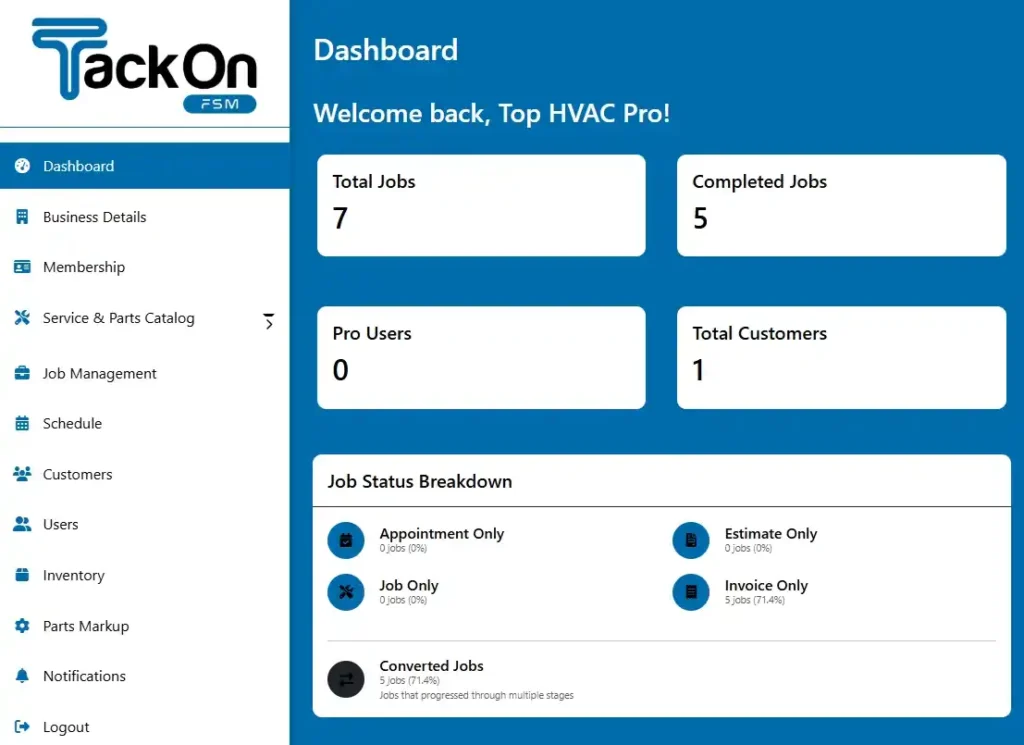
This guide is built for contractors running teams of 1-20 technicians. We'll walk you through a practical framework for picking a platform that genuinely streamlines your work and helps you grow your business the right way. To get a feel for what this looks like, you can see how a purpose-built FSM dashboard pulls all these complex operations together.
What Field Service Businesses Really Need From Scheduling Software
When you're choosing scheduling software for a small business, especially in the trades, it's easy to get sidetracked. You're not just looking for a digital calendar. You're looking for an operational hub—a single platform that connects the first customer call to the final paid invoice. The key is to understand what separates a basic appointment book from a true field service management (FSM) tool that actually makes you money.
A generic scheduler can tell you when a job is happening. That's about it. It can't tell you who the best tech for that specific job is, if they have the right parts on their truck, or the smartest way to get them to the customer's location. A real FSM platform is built from the ground up to answer these critical questions, making sure every move you make is efficient and profitable.
Core Feature Evaluation Checklist for Trade Businesses
To help you see the difference clearly, let's break down what you should be looking for. This checklist compares the typical features of a generic scheduling tool against what a specialized FSM system like TackonFSM should deliver for a trade business.
| Feature Category | What to Look For (Critical for Trades) | Generic Software (Typical Offering) | Specialized FSM like TackonFSM (Expected Offering) |
|---|---|---|---|
| Scheduling & Dispatch | Visual, drag-and-drop board with tech skills, location, and availability. Route optimization. | Basic calendar view. Manual assignments. No route planning. | Smart dispatch board, real-time tech tracking, automated job assignment, and optimized routing. |
| Mobile App for Techs | Full access to job history, digital forms, on-site quoting/invoicing, status updates. Offline mode. | Limited functionality, often just a view of their daily schedule. | Comprehensive mobile office: job details, forms, checklists, quoting, payments, and communication. |
| Parts & Inventory | Real-time tracking of parts on trucks and in the warehouse. Tie parts directly to jobs and invoices. | No inventory management features. | Fully integrated parts tracking, purchase orders, and automatic updates when parts are used on a job. |
| Estimates & Invoicing | Create professional quotes in the field, get digital signatures, and convert approved quotes to jobs and invoices instantly. | May have basic invoicing, but it’s disconnected from the job or any parts used. | Seamless quote-to-job-to-invoice workflow. Customizable templates and integrated payment processing. |
| Customer Management | Centralized database with complete service history, equipment records, notes, and communication logs for every client. | Simple contact list with name, address, and phone number. | A full-fledged CRM with detailed client and property history, attached files, and service reminders. |
This comparison highlights a fundamental divide: generic tools manage appointments, while FSM platforms manage your entire service operation. For a trade business, the latter isn't a luxury; it's essential for growth.
Visual Scheduling and Intelligent Dispatch
The heart of any serious FSM platform is the dispatch board. Forget a simple list of appointments—this is your mission control. A drag-and-drop interface is a must-have, letting your dispatcher see the whole day, week, or month at a glance and move jobs around based on a technician's availability, skills, and current location.
This visual approach turns scheduling from a chaotic, reactive chore into a strategic advantage. Instead of playing phone tag to find an open slot, a dispatcher can instantly spot an opening for an emergency call or optimize a technician’s route to squeeze in one more job. In fact, smart scheduling has been shown to boost the number of jobs a tech can complete per day by up to 30%. That’s a direct result of intelligent dispatching.
Here’s what a modern, visual dispatch board looks like, giving you a clear overview of who is where and what they’re doing.
With a centralized view like this, you can make changes on the fly and eliminate the costly downtime and overlapping appointments that kill profitability in manual systems.
A Powerful Mobile App Your Techs Will Actually Use
Your technicians are the face of your company. How efficient they are in the field is a direct reflection of your business and has a huge impact on your bottom line. A robust mobile app isn't just a nice-to-have; it's non-negotiable. It essentially puts the entire office in the palm of their hand.
Any app worth its salt should deliver these core functions:
- Complete Job Details: Full customer history, notes on the property, equipment service records, and any photos or manuals.
- Digital Checklists and Forms: Use standardized forms to guarantee quality work and make sure nothing gets missed.
- On-Site Quoting and Invoicing: Let your techs build a professional quote or invoice on the spot for the customer to approve or pay right away.
- Real-Time Status Updates: Techs can update their status—"Traveling," "On-Site," "Completed"—which instantly updates the office and can even notify the customer.
A great mobile app closes the communication gap between the field and the office. When a technician can access job history and update their status instantly, it eliminates dozens of phone calls and ensures everyone is working from the same accurate information.
Integrated Parts and Inventory Management
Forgetting to bill for a single part can wipe out the profit on an entire job. It happens more than you think. That's why the best scheduling software for trade businesses must include integrated inventory management. This isn't a separate module; it's a system that links the parts in your warehouse and on every van directly to jobs and invoices.
This integration is your safety net against lost revenue. It ensures every single part that gets used on a job gets billed for. It also shows technicians exactly what’s on their truck, cutting down on time-wasting trips to the supply house. When you can track a part from the moment you order it to the moment it’s installed, you gain real control over your job costs. A seamless system for simplifying estimates and invoices is a direct result of tight inventory control.
As scheduling tools evolve, some are even exploring features like AI Action Calendly to bring more automation into the appointment-setting process itself.
Comparing Different Types of Scheduling Software
Picking the right scheduling software for your small business is a bigger decision than just finding a digital calendar. The market is packed with options, but they really boil down to three different categories, each built for a totally different kind of work. Figuring out these core differences is the first step to choosing a tool that actually solves your problems instead of creating new ones.
Let's be honest, not all scheduling tools are built to handle the controlled chaos of a mobile trade business. A simple plumbing repair and a multi-day HVAC installation are worlds apart, and your software has to be able to manage that reality. We'll break down the three main types using real-world scenarios to show you where they shine and where they'll inevitably let you down.
General-Purpose Schedulers
Think of tools like Calendly or Acuity. These platforms are brilliant at one thing: letting one person book a specific time slot with another. They're the digital version of an open appointment book—perfect for consultants, coaches, or anyone whose main resources are just their time and expertise.
Their greatest strength is their simplicity. You set your availability, share a link, and clients can book themselves without the endless email back-and-forth. For a trade business, though, that simplicity is also their biggest flaw.
Scenario: A Simple Plumbing Repair
For a quick, one-off job like fixing a leaky faucet, a general-purpose scheduler seems like it could work. A customer books an open slot, and the appointment lands on the plumber's calendar. But the second any complexity creeps in, the whole system falls apart.
- Dispatching: Who takes the job? The tool has no idea about a technician's location, their specific skills, or who’s closest to an emergency call.
- Parts: Does the plumber have the right washer on their van? The software has zero inventory management, leaving a critical part of the job completely up to chance.
- Communication: The office has no way to see the job’s progress or update the customer without a constant stream of phone calls and texts.
These tools handle the what and when but completely ignore the crucial who, where, and with what.
All-in-One Small Business Tools
This next category includes software like QuickBooks Time or other platforms that try to bundle scheduling with bigger business functions like accounting or payroll. Their goal is to be a jack-of-all-trades, offering a little bit of everything for the average small business.
These are definitely a step up from a simple scheduler because they at least understand you have employees and tasks. They can be pretty good at tracking employee hours for payroll and might offer some basic project management features.
Scenario: A Multi-Day HVAC Installation
Now, let's look at a more involved job. An HVAC company is installing a new system over two days. The job needs a lead installer, an apprentice, specific equipment, and a list of parts pulled from the warehouse.
An all-in-one tool might let you block out two days on the calendar for the crew. But it hits a wall almost immediately.
- Crew Coordination: It can assign two people to the job, but it can’t manage the dependencies between them. It has no way of knowing the lead installer needs to be on-site before the apprentice can get started.
- Inventory & Equipment: The system can't reserve the specific AC unit from your stock or track the parts used against the original quote. This is exactly where profits get lost.
- Field Workflow: Technicians have no mobile interface to follow installation checklists, upload photos of the finished work, or get a customer's signature on the spot.
All-in-one tools get that you have a team, but they just don't have the operational depth to manage the complex, on-the-move reality of a field service business. They connect scheduling to your payroll but fail to connect it to the actual work getting done.
This decision tree really helps visualize the moment when a generic tool just isn't enough for a growing trade business.
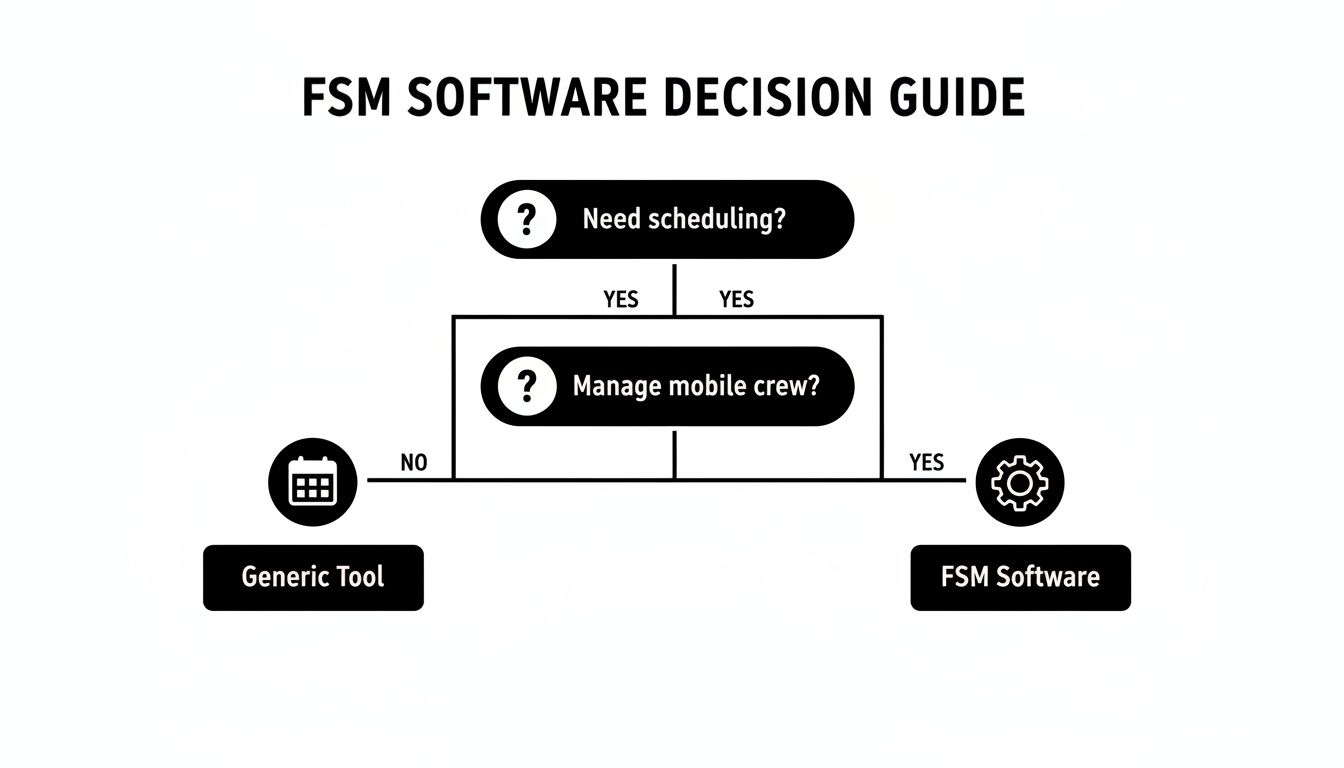
The takeaway here is crystal clear: as soon as you need to manage a mobile crew and the parts they carry on their trucks, you've officially outgrown basic schedulers.
Specialized Field Service Management (FSM) Platforms
This brings us to the final, and most powerful, category: specialized FSM software. Think TackonFSM, Jobber, or Housecall Pro. These platforms are purpose-built for the trades. They were designed from day one to be the operational command center for businesses that send technicians out to job sites.
They don't just schedule appointments; they manage the entire service lifecycle. That means everything from the first customer call and estimate, to dispatching, inventory, job execution in the field, and finally, getting paid.
Revisiting the Multi-Day HVAC Installation with an FSM
Let's look at that same complex HVAC job, but this time through the lens of a true FSM platform.
- Smart Scheduling: The dispatcher looks at a visual drag-and-drop board showing every technician's real-time location, skill set, and availability. They can easily assign the certified lead installer and the apprentice to the job, and the system automatically blocks out their calendars for both days.
- Integrated Inventory: The specific AC unit and all the required parts are reserved from the warehouse inventory and tied directly to the job. When the techs use those parts, the system automatically deducts them from stock and adds them to the final invoice, ensuring 100% of materials are billed correctly.
- Powerful Mobile App: Out in the field, the technicians access everything they need on their phone or tablet. They see the full customer history, follow a digital installation checklist, snap photos of their work, and capture the customer's signature right on the screen.
- Seamless Invoicing: The moment the job is marked "complete," the system generates a perfect invoice—with all labor and parts included—that can be sent to the customer for immediate online payment.
An FSM platform connects every moving part of your business into one, cohesive system. It’s the difference between just knowing a job exists and actively managing it for maximum efficiency and profitability. While general tools might get the job done for a solo operator with simple needs, any trade business with a mobile team will see a massive return from a specialized FSM.
How the Right Software Solves Real-World Trade Scenarios
Checklists and feature lists are a good starting point, but the real test of any scheduling software is how it holds up under pressure. Let’s get out of the weeds of theory and walk through three everyday scenarios that every small trade business runs into. You'll see exactly how a dedicated Field Service Management (FSM) platform delivers a smooth, profitable solution where generic tools just can't keep up.
Beyond marketing, many contractors get bogged down by unpredictable project schedules, which is precisely the kind of chaos that purpose-built software is designed to fix.

These situations explain why small and medium-sized businesses (SMEs) are adopting FSM software faster than anyone else. In fact, Grand View Research projects this segment will grow at a blistering 16.4% CAGR through 2030 as affordable platforms start delivering enterprise-level results. Think about it: mobile-first tools can slash dispatch errors by 40%. Dispatchers using a visual drag-and-drop board can assign jobs 50% faster. All this while automated texts cut down on those "where are you?" customer calls by 35%. You can dig deeper into these numbers with the full FSM market growth report on Grandviewresearch.com.
Scenario 1: The Emergency Call
It's the call every plumber dreads. A homeowner is on the line, frantic because a pipe has burst and their basement is flooding. Every second counts, and so does sending the right tech with the right parts.
- The Old Way: The dispatcher starts a frantic game of phone tag, calling technicians one by one. "Where are you? What parts do you have on the van?" The minutes tick by, leaving the customer anxious and the team scrambling.
- The FSM Solution: The dispatcher pulls up a live dispatch board. Instantly, they see every technician's real-time GPS location on a map. With a click, they filter for plumbers certified for this kind of repair and see who’s closest. Another click shows each tech's van inventory, confirming the nearest one has the necessary fittings. The job is assigned with a simple drag-and-drop, instantly routing the tech to the address while the customer gets an automated "on-the-way" text.
An FSM platform transforms a chaotic emergency into a controlled, efficient response. This isn't just about being fast; it’s about dispatching with intelligence. You're using real-time data on location and inventory to make the perfect assignment in seconds.
Scenario 2: The Multi-Day Install
An electrical contractor is kicking off a three-day commercial lighting installation. The job needs a lead electrician, an apprentice, a scissor lift delivered to the site, and a specific list of materials pulled from the warehouse.
- The Old Way: The project details are scattered across spreadsheets, a messy text message chain, and a shared digital calendar. The lead tech has to call the office just to confirm when the lift is showing up, and there’s no clean way to track daily progress or the parts being used.
- The FSM Solution: The whole project is built out as a single multi-day job in the system. The lead and apprentice are assigned, which blocks out their schedules for the entire duration. The equipment delivery is scheduled as a task within the job, and all required materials are reserved from warehouse inventory and assigned to the project.
Each day, the techs use their mobile app to:
- Follow a digital checklist for the installation, ensuring nothing gets missed.
- Snap and upload photos of their progress for the office records.
- Log the exact parts they use, which automatically deducts them from inventory.
Suddenly, you have a single source of truth for the entire project, from coordinating the crew all the way to sending the final invoice.
Scenario 3: The Recurring Maintenance Contract
Your HVAC company has dozens of annual service agreements. Every spring and fall, you have to schedule, dispatch, and invoice for all those preventive maintenance visits without letting a single one fall through the cracks.
- The Old Way: An office manager spends weeks buried in a spreadsheet, calling each customer one by one to get them on the calendar. Invoices are created by hand after each visit, which inevitably leads to delays and missed billing.
- The FSM Solution: You create a recurring job template for each service agreement. The system then automatically generates work orders at the right intervals—say, every six months. You can even have these jobs pop up in a designated "maintenance week," letting the dispatcher optimize routes for dozens of visits at once. As soon as a tech finishes the service and gets a signature on their mobile device, an invoice is automatically generated and sent to the customer.
This kind of automation turns recurring maintenance from a massive administrative headache into a predictable, reliable revenue stream. The system ensures no contract is ever forgotten and every single visit gets billed promptly, protecting your cash flow and your bottom line.
Why TackonFSM Is Built for Growing Trade Businesses
Lots of scheduling platforms can put an appointment on a calendar. But when you’re running a trade business—managing mobile teams, juggling complex jobs, and tracking actual physical inventory—generic software just doesn’t cut it. That’s where a purpose-built solution like TackonFSM makes a real difference. It was designed from the ground up with the specific headaches of HVAC, plumbing, and electrical contractors in mind, especially those running teams of 2 to 20 technicians.
For a growing shop, software isn't just about scheduling. You need a command center that connects the dots, from the first customer call all the way to the final payment. TackonFSM gets this. It nails the core workflows that actually drive profit in the trades, steering clear of the overwhelming features and high costs you see in enterprise-level systems.
A Focus on What Truly Matters for Trades
Many field service platforms try to be everything to everyone. TackonFSM took a different path. It doubles down on the features that have the biggest impact on a trade business's bottom line. This means every tool inside the platform is directly tied to your day-to-day operations.
You can see this focus in the user interface. It’s clean and efficient, built so dispatchers and office managers can get work done without clicking through a bunch of menus designed for a totally different industry.
The dashboard below is a great example—it gives you a clear, actionable overview of your business at a glance.
This isn’t just about managing appointments. It’s about actively managing the health of your business in real time.
The Inventory Management Differentiator
Let's be honest: one of the biggest profit killers in the trades is poor inventory management. Lost parts, mystery van stock, and materials that never make it onto the invoice can bleed a job dry. This is an area where even some so-called "specialized" platforms offer little more than a simple list.
TackonFSM treats inventory control as a core function, not an afterthought. It fully integrates inventory, linking every part in your warehouse and on every truck directly to a job and its invoice. You’ll never lose money on unbilled materials again.
The secret sauce here is the Elastic Parts Database. It's a shared, searchable pricebook that comes pre-loaded with over 3,000 common HVAC, plumbing, and electrical items. Better yet, as your team adds new parts on the job, the database grows, creating an incredibly powerful, customized resource for your whole company.
This deep integration solves a few critical problems at once:
- Accurate Quoting: Build estimates with real-time part costs to protect your margins.
- Reduced Shrinkage: Track every single part from purchase order to final installation.
- Increased Field Efficiency: Techs know exactly what’s on their van, which means fewer last-minute trips to the supply house.
For any business that relies on materials to get the job done, this level of control is a game-changer. You can see how the right field service scheduling software saves time and money when features are this deeply connected.
Onboarding and Migration Built for Small Businesses
Switching to a new system can feel like a massive undertaking, especially when you don't have a dedicated IT department. TackonFSM gets it, and they’ve built a support structure to make the transition as painless as possible.
Unlike competitors that hit you with big setup fees or just hand you a login and wish you luck, TackonFSM provides complimentary assisted onboarding for every single customer. Their team actually works with you to get your system configured right from day one.
They also handle data migration from the popular platforms you might be outgrowing, including:
- Jobber
- ServiceTitan
- Housecall Pro
- QuickBooks
This commitment to a smooth start removes one of the biggest hurdles to upgrading your software. The goal is to get you up and running more efficiently, fast, without the usual headaches.
Straightforward Pricing Without Surprises
Finally, TackonFSM's pricing is designed for the kind of predictability a small business needs. You won't find any long-term contracts or hidden setup fees. The plans are structured to grow with you, whether you’re running two trucks or twenty.
This transparent approach backs up the platform's mission: to give small and medium-sized contractors powerful, trade-specific tools to help them grow. By combining a true understanding of trade workflows with real support and fair pricing, TackonFSM stands out as the go-to choice for any business ready to move beyond basic scheduling and take full control of its operations.
Your Top Questions About Scheduling Software Answered
Picking the right software for your business is a big deal, and it’s smart to have questions. Getting straight answers is the only way to find a tool that genuinely makes your life easier, not more complicated. We’ve gathered the most common questions we hear from trade business owners just like you.
Our goal here is to give you practical, no-fluff advice so you can feel confident in your decision and choose a system that actually helps you grow.
What's the Real Difference Between Scheduling and FSM Software?
This is probably the most important thing to get right if you're in the trades. Basic scheduling software is essentially a digital calendar. It’s great at telling you when a job is supposed to happen, but that's where its usefulness ends. Think of simple booking tools—they just manage appointments.
Field Service Management (FSM) software, on the other hand, is your entire operations hub. It doesn't just handle the when; it connects the who, where, what, and how for every single job. A true FSM platform links your schedule to a live dispatch board, tracks your techs' locations, manages what parts are on each truck, pulls up customer history, and handles invoicing. For any serious trade business, this all-in-one approach is the only way to run a tight, profitable ship.
How Much Should I Expect to Pay for a Good System?
Prices are all over the map, but you can generally sort them into a few buckets:
- Free or Dirt-Cheap Plans ($0 – $30/month): These are the bare-bones appointment schedulers. They’re fine for a one-person show with simple needs, but you won't get critical features like dispatching or inventory tracking.
- Small Team Plans ($50 – $200/month): This is the sweet spot for most growing trade businesses. In this range, you should expect core FSM features like a dispatch board, a mobile app for your techs, and solid customer management for a handful of users.
- Advanced/Growth Plans ($200 – $500+/month): If you're running a larger crew or need more firepower—like detailed reporting, full-blown inventory control, and custom integrations—you'll be looking in this price bracket.
Don't just look at the monthly fee. A real FSM platform that saves a tech from forgetting to bill for one part or helps them squeeze in just one extra job a week can easily pay for itself almost immediately.
How Painful Is It to Switch to a New System?
I get it—the idea of moving all your data to a new platform sounds like a massive headache. The truth is, the difficulty completely depends on the provider’s onboarding process. Some will just hand you a login and wish you luck, leaving you to piece it all together yourself.
The key is to find a partner that offers assisted onboarding and data migration. A good FSM company will have a team ready to help you import everything—customer lists, parts inventory, even old job history from QuickBooks, Jobber, or those spreadsheets you've been living in. That hands-on support makes the switch far less stressful and gets you up and running in days, not weeks.
Can This Software Talk to My Accounting Tools, Like QuickBooks?
Yes, and it absolutely should. Any of the best small business scheduling software options will connect with accounting tools like QuickBooks (both Online and Desktop). This isn't a "nice-to-have" feature; it's essential for keeping your financials straight without spending your nights doing manual data entry.
A solid integration means that when an invoice is created or paid in your FSM software, it automatically shows up correctly in QuickBooks. Your books stay clean, bank reconciliation is a breeze, and you always have a clear view of your business's financial health. Before you commit to any platform, always ask how deep and reliable their integration really is.
Ready to see how a platform built from the ground up for the trades can change your business? TackonFSM brings together smart scheduling, powerful inventory control, and effortless invoicing to help you get a real handle on your operations. Start your free 14-day trial today and find a better way to work.