Best Software for Billing and Inventory for Contractors 2026

At its core, billing and inventory software is simply a tool that connects your parts warehouse to your customer invoices. For contractors, it means finally ditching the endless spreadsheets and stacks of paper for one system that tracks every part from the moment you buy it to the moment you bill for it. This isn't just about tidying up; it's about plugging the leaks that drain your profits and getting a real-time handle on your business.
Why Integrated Software Is a Game Changer for Contractors

Does this sound familiar? A technician is on-site and needs to know if a specific part is in stock. Meanwhile, a customer is calling about an invoice, and you’re stuck digging through paperwork trying to figure out if you even made money on their job last week. This daily chaos is where so many contractors lose money and waste time.
When your inventory and billing are disconnected, you’re constantly fighting an uphill battle:
- Vanishing Profits: A tech grabs a part from their van but forgets to jot it down. Without a system to track it, that part is never billed to the customer. It’s a direct hit to your profit margin.
- Wasted Hours: Your team makes an unnecessary trip to the supply house for a part that was sitting in another tech’s van the whole time. That's wasted fuel and lost billable hours, all because nobody knew where it was.
- Guesswork Pricing: You struggle to price new jobs with confidence. Why? Because you don’t have accurate data on what past jobs really cost in parts and labor.
The Power of a Central Nervous System
Think of integrated billing and inventory software as the central nervous system for your business. It links every single action into one smooth, logical flow. When a tech uses a capacitor on an HVAC unit, the system automatically updates inventory and adds that part to the customer's bill. It’s that simple.
It’s just like how your online banking app instantly shows a transaction after you buy something. Every item that goes out is accounted for and paid for, no questions asked.
The real magic of an integrated system is having a single source of truth. It puts an end to the guesswork, stops the arguments over missing stock, and guarantees that every dollar you spend on parts makes its way onto an invoice.
See the Difference: Manual vs. Integrated
To really understand the impact, let's compare the old way of doing things with an integrated software workflow. The table below shows how an FSM system transforms common pain points into streamlined advantages.
Manual Methods vs. Integrated Software Workflow
| Task | The Old Way (Paper and Spreadsheets) | The Integrated Way (FSM Software) | Business Impact |
|---|---|---|---|
| Using a Part on a Job | Tech writes it on a paper form (or forgets). Office staff manually enters it later. | Tech selects the part from a mobile app. Inventory is updated instantly. | Eliminates forgotten parts and lost revenue. |
| Checking Stock | Call the office or another tech. Hope someone knows where the part is. | Tech checks real-time inventory levels for all warehouses and vans on their tablet. | Reduces wasted trips to the supply house and minimizes job delays. |
| Creating an Invoice | Office staff manually compiles parts used from messy work orders. | Invoice is auto-generated with all parts and labor from the work order. | Speeds up billing by 80% or more, improving cash flow. |
| Job Costing | Manually add up material slips and timesheets. Often inaccurate. | The system automatically calculates precise part and labor costs for every job. | Provides accurate data for profitable quoting and business decisions. |
As you can see, the shift isn't just about convenience—it's about building a more resilient and profitable business from the ground up.
A Growing Trend for a Good Reason
Contractors are moving away from these disconnected methods for a reason. The field service management (FSM) market, which is the category this software falls into, is expected to explode from $6.14 billion in 2026 to $13.79 billion by 2034. According to a detailed report from Fortune Business Insights, this surge is driven by owners trying to operate more efficiently in the face of technician shortages and rising customer expectations.
It’s all about having real-time data at your fingertips. And as our guide on how scheduling software saves valuable time explains, connecting your operations gives you a live dashboard of your company’s financial health.
The Core Features That Drive Profitability
Let's cut through the marketing fluff. Certain features in billing and inventory software aren't just nice to have—they directly put more money in your bank account. These are the tools built to solve the small, everyday problems that silently bleed profits from HVAC, plumbing, and electrical businesses.
To really see their value, you have to understand how they work. We'll break down the core capabilities that protect your margins, stop expensive mistakes in their tracks, and make sure you get paid faster and more accurately for every single job.
Taming the Chaos with Multi-Location Inventory Tracking
We’ve all seen it. Parts seem to vanish from service vans, and nobody has a clue where they went. You end up over-ordering stock just because you can't get an accurate count, leading to that dreaded industry problem: "shrinkage."
The solution is a non-negotiable feature: multi-location inventory tracking. Think of your business as a central hub with several mobile mini-warehouses—your shop, and every single truck on the road. Good software lets you create a virtual stockroom for each of these locations.
When a tech uses a part, they log it on their phone or tablet. The system instantly deducts that specific part from that specific van's stock. Suddenly, you have a live, accurate count of every component, on every truck, all the time.
- Real-Time Visibility: Dispatch can see if a technician has the right part for an emergency call without having to play phone tag.
- Smart Restocking: You know exactly which vans need which parts for the next day, killing guesswork and last-minute trips to the supply house.
- Accountability: It becomes crystal clear when parts are used but not billed to a job, finally putting an end to those mysterious inventory losses.
Automated Parts-to-Invoice Workflows
Here’s a classic scenario: a technician replaces three small but expensive fittings on a job. In the rush to wrap up, they only jot down one on the paper work order. Your office invoices for one, and you just gave away the profit on the other two.
This is where a connected software system works its magic by creating an unbreakable link between what happens in the field and what lands on the bill. When a tech adds a part to a work order on their mobile app, that part is automatically added to the final invoice. There is no "oops, I forgot."
This automated workflow turns your technicians into profit guardians without adding a single minute of admin work to their day. The system handles the tedious task of tracking every item used, making sure your invoice is 100% accurate. This feature alone can easily reclaim thousands of dollars in lost revenue over a single year.
Among the many features that drive profitability, the ability to effortlessly automate invoice processing stands out, reducing manual errors and saving valuable time for your office team.
Dynamic Price Book and Quoting Engine
Material costs are constantly on the move, but your team might still be quoting jobs from an old price list saved in a spreadsheet. Every time that happens, you're chipping away at your profit margins before the job even starts.
A centralized price book acts as your single source of truth for all pricing. It's a living, digital catalog of your parts and services, complete with costs, markups, and final customer prices. When your supplier hikes the price of a compressor, you update it once in the system. From that moment on, every new quote and invoice automatically uses that new price.
This feature acts as your financial guardrail. It allows you to set and enforce minimum profit margins, preventing under-bidding and ensuring every job is profitable from the moment the estimate is created.
This is exactly why the Field Service Management market is projected to grow from $5.12 billion in 2025 to $10.09 billion by 2030. As one market report on FSM growth explains, these kinds of predictive tools are what's fueling the expansion. Systems like TackonFSM tie inventory directly to billing, ensuring the markups you set on your estimates are the ones that actually make it to the final invoice. For more on this, check out our resource explaining how to simplify your estimates and invoicing.
A Job's Journey From Estimate to Final Payment
To really see how integrated software for billing and inventory works in the real world, let's follow a typical service call from start to finish. This is where the rubber meets the road—and where you’ll see how a connected system prevents mistakes, saves time, and keeps your profits from slipping through the cracks.
Let’s say a homeowner calls about a dead air conditioner. Instead of your dispatcher grabbing a notepad and hoping the details make it to the tech, they create a new job right in the software. All the customer's information is logged, and the job is ready for the next step.
From Digital Estimate to Scheduled Job
Your technician gets to the house and, after a quick look, finds the culprit: a bad capacitor. This is where the old way of doing things starts to break down. But with modern software, the tech just pulls out their tablet.
They open the job, tap into your company’s digital price book, and find the right capacitor. The part, along with your pre-set price and markup, instantly gets added to a clean, professional-looking estimate. Add the service call fee, and it’s all done in less than two minutes.
The technician hands the tablet to the customer, who sees a clear, itemized price. No surprises. They sign right on the screen, and that simple action does a few powerful things at once: the estimate becomes an approved work order, the job is officially on the books, and the office is updated instantly. No phone tag required.
The moment that estimate is approved, the system automatically deducts that specific capacitor from the tech’s van inventory count. This is huge. It means another tech can’t unknowingly “steal” that part for a different job, and your office knows exactly what’s on every truck, right now.
This is how you turn a classic inventory headache into a source of efficiency and profit.
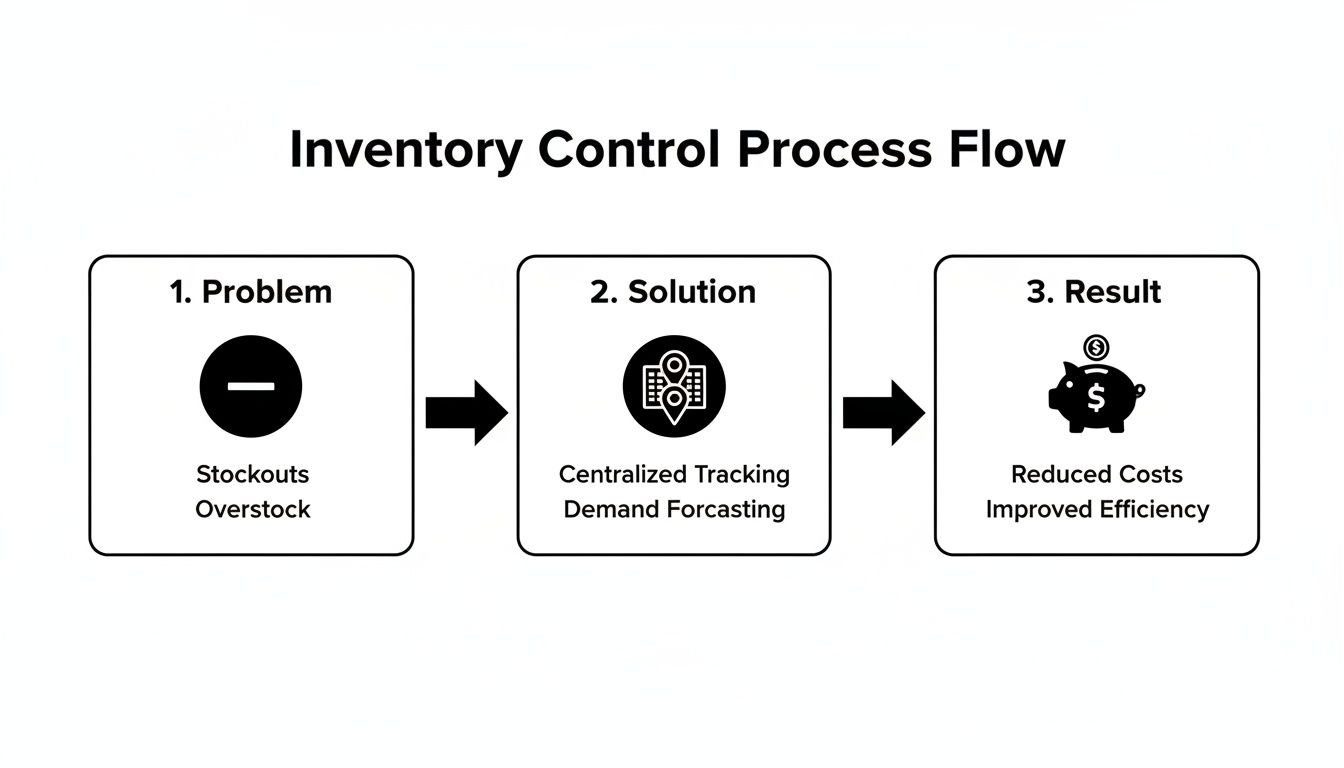
As you can see, connecting your inventory across different locations—from the warehouse to every van on the road—gives you the control needed to actually boost your bottom line.
Flawless Invoicing and On-Site Payment
With the new capacitor installed, the AC is humming again. Because the part was already tied to the work order from the estimate phase, it’s automatically added to the final invoice. Nothing gets forgotten on a crumpled piece of paper in the van. You bill for what you used, every single time.
This seamless link between the field and the office is exactly why the field service management market is projected to grow from $5.6 billion in 2026 to $12.7 billion by 2033. An in-depth industry analysis found that contractors are rapidly adopting these tools to get away from paper chaos and shorten the time it takes to get paid.
Back on-site, the job is done. The tech generates the final invoice on their tablet, which perfectly matches the approved estimate. The customer pays right there with a credit card, or the tech can text them a secure payment link.
The payment is processed, the job is closed out, and an email receipt is already in the customer's inbox. Think about what just happened in that single visit:
- No Paperwork: The entire process was digital, with no risk of losing a vital document.
- Guaranteed Accuracy: The parts and labor tracked from the start made the invoice 100% correct.
- Real-Time Sync: The office knew the job was done and paid for, and inventory levels were updated the second the part was used.
- Immediate Payment: You got paid before your technician’s truck even left the driveway, dramatically improving cash flow.
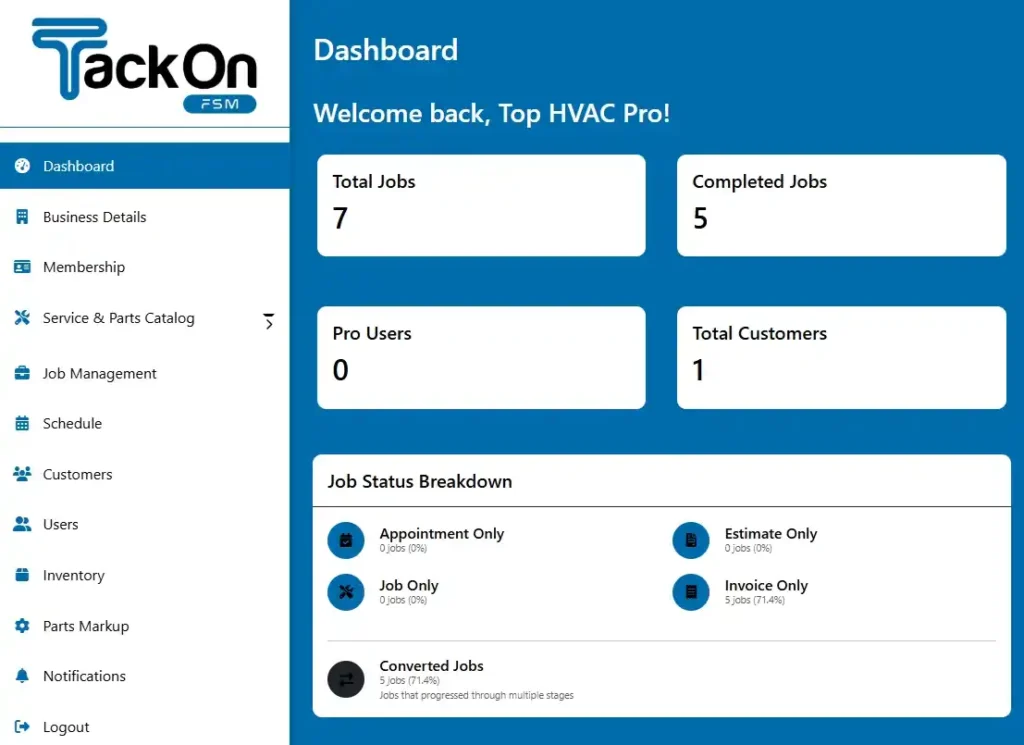
This is how the most successful trade businesses run their operations today. Every service call becomes a smooth, perfectly documented, and profitable workflow. You can get a better sense of this by looking at a visual of the TackonFSM dashboard to see how these pieces all fit together.
How to Choose the Right Software for Your Business
Shopping for billing and inventory software can feel like navigating a maze. A dozen companies claim they have the "best" solution, but how do you cut through the noise and find what actually works for your trade business?
Making the right choice isn't just about ticking off a list of features. It’s about finding a real partner for your business—a system that helps you grow, cuts down on daily headaches, and makes life easier for your team out in the field. Moving from spreadsheets or a simple accounting tool to a fully integrated platform is a big leap. You have to look past the flashy dashboards and focus on what will really matter five years from now.
Assess Scalability and Growth Potential
The first question you should ask is: can this software grow with me? A platform that’s perfect for a two-truck operation needs to handle a twenty-truck fleet without forcing you to start over or hitting you with a massive price hike. A truly scalable system never penalizes you for being successful.
Look for pricing models that are based on the number of users or technicians. This lets you start small and simply add to your plan as you hire more people. Be wary of solutions that demand huge upfront costs or lock you into long, restrictive contracts.
Your software for billing and inventory should be a growth engine, not an anchor. It must be able to handle an increasing volume of jobs, parts, and customer data without slowing down or becoming more complex to manage.
This idea of scaling applies to features, too. As your business matures, you’ll likely need more advanced tools like multi-warehouse management or deep profitability reporting. Make sure any platform you consider has a clear path to unlock those capabilities when you’re ready for them.
Prioritize Ease of Use for Technicians
Let's be honest: the most powerful software in the world is completely useless if your technicians hate it. For any contractor, the mobile app is the single most important factor for success. If it's clunky, slow, or confusing, your team will find workarounds—meaning they'll go right back to paper and phone calls, and your investment will be for nothing.
The best field apps are built from the technician's point of view. Key tasks should only take a few taps.
- Viewing their schedule and job details at a glance
- Getting turn-by-turn directions to the next job
- Updating a job’s status from "en route" to "completed"
- Adding parts used right to the work order
- Snapping photos and adding notes for documentation
- Creating an invoice and taking payment on the spot
When you're looking at software, insist on a demo of the mobile app. Even better, sign up for a free trial and have one of your best techs put it through its paces on a real job. If it makes their day easier, they'll actually use it.
Look for Trade-Specific Features and Support
Generic business software just doesn’t understand the trades. An HVAC, plumbing, or electrical business has specific workflows that a one-size-fits-all platform simply can't handle. A perfect example of this is a shared parts database that comes pre-loaded for your industry.
For instance, a platform like TackonFSM includes a database with thousands of common HVAC, plumbing, and electrical parts right out of the box. This alone can save you hundreds of hours of manual data entry and gives you a solid price book from day one.
Next, look at how a provider handles data migration. Moving your customer lists, job history, and inventory from an old system can be a nightmare. A company that offers free, assisted data migration is a massive advantage. Their experts know how to pull and map your data from programs like QuickBooks or even messy spreadsheets, ensuring a smooth switch with minimal downtime. When evaluating different software options for your business, it's beneficial to explore various accounting software options, including the best free accounting software that can meet your needs.
Finally, get a clear picture of the pricing. The best partners have transparent, predictable costs with no hidden setup fees or mandatory long-term contracts. That kind of flexibility reduces your risk and makes it easy to see a clear return on your investment.
Real-World Scenarios in HVAC Plumbing and Electrical

It’s one thing to talk about features, but where the rubber really meets the road is seeing how software for billing and inventory actually performs in the day-to-day grind. Let’s make this concrete by walking through a few mini-case studies for HVAC, plumbing, and electrical contractors. Each trade has its own unique headaches, and the right software provides specific solutions that deliver a real return.
These aren't just stories about getting organized. They’re real-world examples of how tying your parts directly to your payments can completely change a business. By taking tedious tasks off your plate and giving you clear data, this software helps you get back lost time, protect your profits, and focus on what you're best at: doing great work.
HVAC Contractor Mastering Seasonal Demand
An HVAC company’s calendar is all about feast or famine—the mad dash of summer AC calls followed by the slow trickle of jobs in a mild spring. For one contractor, trying to manage parts for this cycle was a constant source of stress and lost money. They’d either tie up cash by overstocking pricey compressors in the off-season or run out of simple capacitors during the first heatwave, leading to second trips and unhappy customers.
The game changed when they implemented a system with built-in inventory forecasting. By looking at their own job history, the software spotted a clear trend: capacitor replacements shot up by 400% in May and June.
- Proactive Purchasing: Armed with that insight, the owner set up automated reorder alerts. Now, the system prompts them to stock up on capacitors in April, long before the rush, which often lets them lock in better bulk pricing.
- Reduced Overstock: The software also flagged parts that just sat on the shelf all winter. This allowed them to dial back their stock of certain AC-only components and free up thousands of dollars.
The result? The company cut its emergency runs to the supply house by over 60% during their busiest season. More importantly, their techs showed up to jobs with the right parts already on the truck, letting them complete more jobs each day and seriously boosting their summer revenue.
Plumbing Business Taming the Truck Stock Nightmare
For a plumbing business running six vans, the biggest leak wasn't in a customer's wall—it was in their inventory. Small but essential fittings like P-traps, angle stops, and supply lines were constantly vanishing into thin air. Techs would grab parts from other vans, paperwork would go missing, and the office had no real idea what was actually being used versus what was sold.
This chaos created two huge problems: constant, time-sucking trips back to the supply house for a $5 part, and a ton of inventory shrinkage that was a direct hit to their bottom line.
By implementing software with van-level inventory tracking, the owner finally got a real-time view of every part on every truck. Each van became its own virtual warehouse in the system.
Now, when a technician installs a part, they just select it from their van’s digital stock list on a mobile app. Instantly, the part is removed from the truck’s inventory and added to the customer’s invoice. This simple change completely overhauled their operation, leading to a 30% reduction in inventory shrinkage within six months. The time they got back from eliminating pointless supply runs added up to nearly one extra billable hour per tech, every single week.
Electrical Company Coordinating Complex Projects
An electrical contractor who specialized in big commercial retrofits had a different kind of problem. Their jobs were complicated, often lasting for weeks and needing a massive list of materials—from conduit and wire to hundreds of outlets and switches. Their biggest battle was tracking their actual material costs against the original bid while the job was still in progress.
Too often, they’d get to the end of a project, add up all the slips and invoices, and discover that cost overruns had completely wiped out their profit margin. They needed a way to know if a job was going off the rails before it was too late to fix.
The answer was software for billing and inventory that tied project management directly to job costing.
- Budgeting: For every new project, they built a budget right in the software, assigning specific quantities of materials based on their estimate.
- Real-Time Tracking: As technicians pulled wire, outlets, and breakers from the shop for a job, they logged each item against that specific project using their phones.
- Live Profitability Reporting: At any moment, the office manager could pull up a dashboard and see the exact, up-to-the-minute material and labor costs, right next to the budgeted amount.
This live visibility was a game-changer. On one major office renovation, they noticed just three days in that they were burning through more high-gauge wire than planned. A quick chat with the foreman revealed a routing mistake. They corrected it immediately and got the project right back on budget. This level of control turned financial guesswork into precision management, boosting their overall project profitability by an average of 12%.
Common Questions About Billing and Inventory Software
Thinking about new software? I get it. You’ve got questions, and they’re probably the same ones I hear from every contractor looking to make a change. You need to know how this will actually work for your team, your budget, and your sanity.
Let's cut through the noise and get straight to the practical answers you need to make a smart call for your business.
How Hard Is It to Switch From My Current System?
This is the big one, isn't it? The thought of moving years of customer info and parts lists from your old system—whether it's QuickBooks, Jobber, or a chaotic mess of spreadsheets—is daunting. I've been there.
The good news is that it’s much less painful than you think. Modern software providers know this is your biggest hesitation, and the best ones have made the process incredibly smooth. They won't just throw you the keys and wish you luck.
Look for a company that offers free, assisted data migration. A good onboarding team will literally map your old data to the new system for you, pulling over your customer lists, parts, and job history. You shouldn't have to start from scratch. A free trial combined with this kind of hands-on support is the best way to get up and running with virtually zero downtime.
Will My Technicians Actually Use It in the Field?
Your investment is worthless if your techs in the field won't use the tool. Technician adoption boils down to one simple thing: is the mobile app easier than their old clipboard?
If an app is clunky, slow, or looks like it was designed by an accountant, your team will fight it every step of the way. But when it's genuinely built for them, they'll embrace it.
When a mobile app makes a technician's job simpler—eliminating messy paperwork, cutting out phone calls back to the office, and helping them get to the next job faster—they won’t just use it, they’ll wonder how they ever worked without it. The key is software designed for the field, not just the front office.
When they can see their schedule, pull up job notes, process a payment, and take photos in just a few taps, the tool sells itself.
Is This Software Affordable for a Small Business?
Yes, absolutely. Forget about the days of spending thousands on software licenses and expensive servers you had to maintain yourself. Most modern software for billing and inventory runs on a flexible monthly subscription, typically priced per technician.
This model is perfect for small and growing shops. If you’re running just two or three trucks, you get access to the exact same powerful tools as a company with 50, but you only pay for what you need. As you hire more techs, you just add them to your plan. It’s that simple.
To make sure you're not getting into a bad deal, look for providers that offer:
- Transparent Pricing: No surprises. You should know the exact cost per user.
- No Long-Term Contracts: You need the freedom to walk away if it's not working out.
- No Hidden Setup Fees: Onboarding and data migration should be part of the package.
This approach lets your software costs scale directly with your business growth.
How Does It Track Inventory Across Multiple Vans?
This is where an integrated system really proves its worth. Imagine each of your service vans has its own virtual stockroom.
Here’s how it works: you set up your main shop or warehouse as one inventory location in the software. Then, you create a separate virtual location for Van #1, Van #2, and so on. When you stock a truck for the week, you simply transfer parts from the "main warehouse" to the "Van #1" location in the system.
Now, when a tech on a job uses a part, they mark it as used on their mobile app. Instantly, the system deducts that part from their specific van’s inventory. This gives you a live, perfectly accurate count of every part, on every truck, at all times. It's how you finally stop inventory shrinkage, prevent last-minute supply house runs, and give your office a clear view of who needs to be restocked.
Ready to see how a truly integrated system can transform your operations? TackonFSM provides all the tools you need—from multi-van inventory and automated invoicing to scheduling and on-site payments—in one simple platform. Start your free trial today and discover a better way to run your business.