

Work Order to Invoice Software: Get Paid Faster With Automated FSM Workflows
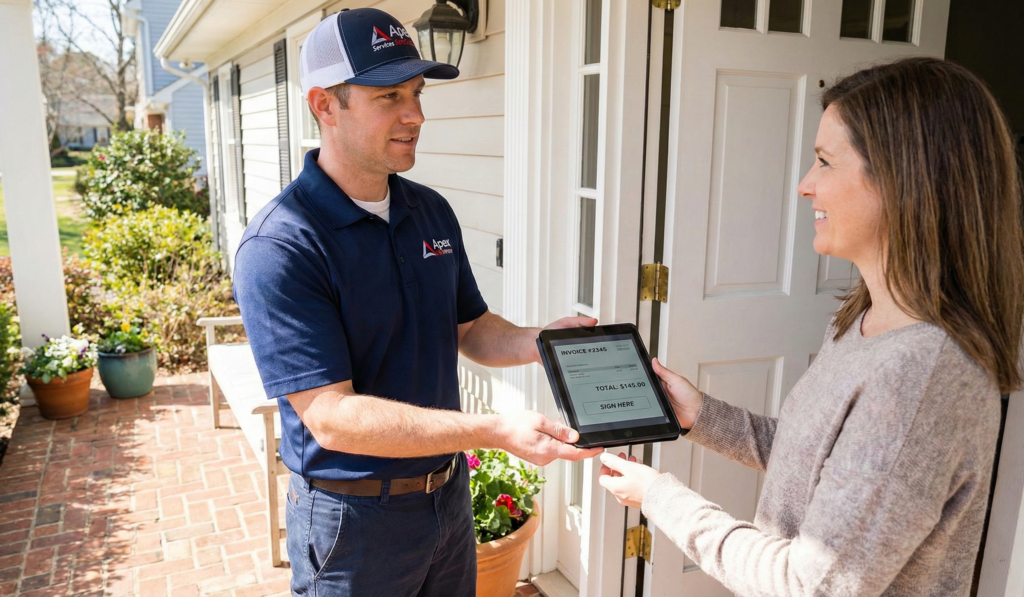
work order to invoice software for field service contractors

Why Work Order to Invoice Software Changes Everything

The gap between finishing a job and getting paid is where most HVAC, plumbing, and electrical contractors lose money — and most of them don’t even realize it. It’s not the work itself that bleeds your margins. It’s the paperwork that follows. Work order to invoice software closes that gap by connecting the job your technician completes in the field to the bill your customer pays — automatically, in real time, without a stack of paper tickets sitting on a dashboard for three days. When the workflow is digital, there’s no lost paperwork, no forgotten line items, and no 30-day wait for a check in the mail. Industry data backs this up. Research from Levvel and Quadient estimates that manually processing a single invoice costs between $12 and $35 depending on labor costs and process complexity. For a contractor processing 100 invoices per month, that’s $1,200 to $3,500 in administrative overhead alone — before you factor in the revenue lost from unbilled parts and delayed collections. Meanwhile, the average Days Sales Outstanding (DSO) for construction and trades businesses ranges from 35 to 55 days for residential HVAC, plumbing, and electrical work, and as high as 60 to 90 days for commercial projects. Every day your cash sits in a customer’s pocket instead of your bank account is a day you’re financing their project with your money. If you’re still exploring which FSM platform fits your business, start with our Complete Buyer’s Guide to FSM Software.

What a Broken Workflow Actually Looks Like

If you’re running an HVAC, plumbing, or electrical business without a unified system, the handoff from field to office probably looks something like this: Step 1: A technician finishes a repair and scribbles the parts used and hours worked on a carbon-copy paper ticket. Step 2: The ticket rides around on the van’s dashboard for one to three days until the tech makes it back to the office. Step 3: Someone in the office squints at the handwriting, manually types everything into QuickBooks or your accounting system, and emails or mails the invoice to the customer. Step 4: You wait 30 to 60 days for a check — assuming nothing was lost, misread, or forgotten along the way. Every step in that chain is a failure point. The technician forgets to log a $45 expansion valve. The office misreads “1.5 hours” as “1 hour.” The customer disputes a charge because the handwritten ticket doesn’t match what they remember agreeing to. These aren’t rare edge cases. For contractors running 5 to 15 jobs per day, this is Tuesday. And the worst part? You never see the money you lost. It doesn’t show up as a line item on your P&L. It just… never arrives.

The Digital Workflow: From Dispatch to Payment

Good work order to invoice software replaces every one of those failure points with a connected digital workflow. Here’s what it looks like when the handoff actually works: Dispatch to mobile work order. A dispatcher assigns the job and everything the technician needs — customer history, equipment details, job notes, access codes — lands in the mobile app before the tech arrives on-site. No phone calls to the office for missing information. No wasted windshield time tracking down an address. On-site execution with live documentation. As the technician works, they update the digital work order in real time — logging hours, adding parts from their truck inventory, snapping before-and-after photos, and capturing notes. The system can require a customer signature and photo documentation before the job can be marked complete, so nothing gets skipped. Automatic invoice generation. The moment the tech marks the job complete, the system pulls together all labor, materials, and fees into a ready-to-send invoice. No one in the back office has to touch it. No double entry. No three-day delay waiting for a paper ticket. On-site payment capture. With the invoice ready on the technician’s device, the customer can pay immediately — credit card, debit card, or ACH. The payment processes through the app, the receipt is sent automatically, and the cash hits your account. That 35-to-55-day DSO? It just became zero.

The Part Most FSM Platforms Miss: Inventory

Here’s the gap that separates basic scheduling apps from real work order to invoice software: what happens to the parts your technician uses on a job. Most platforms let you create a work order and generate an invoice. That’s table stakes. But if the parts your technician pulls off the truck aren’t tracked — if there’s no connection between the work order, the invoice, and your actual inventory — you’ve got a revenue leak that no amount of scheduling automation can fix. Think about it: your tech replaces a contactor, a thermostat, and two capacitors on an HVAC service call. If any one of those parts isn’t logged on the work order, it doesn’t appear on the invoice, and you just gave away materials for free. Multiply that across every truck, every day, and you’re looking at thousands per month in unbilled parts. This is the exact problem our FSM Savings Calculator helps you quantify. Plug in your team size and average job count, and you’ll see how much unbilled materials and manual workflows are actually costing your operation. For a deeper look at how estimating and pricebooks protect your margins before the work even starts, read our guide to contractor estimating software.

How TackOn FSM Connects Every Step

TackOn FSM is built around what we call the AEJI workflow — Appointment → Estimate → Job → Invoice. It’s the natural path every service call follows, and the platform is designed so each stage flows into the next without manual handoffs. Not every job hits all four stages — a simple service call might go straight from Appointment to Job to Invoice, while a larger project might start with an Estimate before work begins. The system adapts to how your business actually operates.
TackOn FSM was designed around a single principle: every part, every hour, and every dollar should be tracked from the moment a job is dispatched to the moment the customer pays. No gaps. No manual handoffs. Work order → inventory → invoice — one workflow. When a technician adds a part to the digital work order, TackOn FSM does two things simultaneously: it adds the item’s cost and markup to the customer invoice, and it deducts that specific part from the technician’s truck inventory in real time. Nothing is missed. Nothing requires a second entry. Truck-level inventory visibility. Dispatchers see exactly what’s on each truck at any given moment. That means they can route the right tech with the right parts to the right job — fewer return trips, fewer “sorry, we have to come back tomorrow” calls, fewer wasted hours. Digital signatures and photo documentation. Before a technician can close a job, the customer signs off on the completed work directly in the app. Photos, notes, and scope details are all captured on the same ticket — so if there’s ever a question about what was done, the documentation is airtight. On-site payment processing. TackOn FSM includes built-in payment processing starting at 2.8% plus 30 cents per transaction. Customers pay on the spot, and the revenue cycle closes in minutes instead of weeks. Pricing that grows with you. Plans start at $69 per month (Duo Team) for small crews, $139 (Crew) for growing teams, and $179 (Command) for larger operations. Fleet pricing is available for custom enterprise needs. No per-technician fees that punish you for hiring. See full plan details on the TackOn FSM pricing page, or explore all platform features. Want to see how TackOn FSM compares to the biggest names in the space? Our ServiceTitan vs Jobber vs Housecall Pro comparison breaks it all down.

The Revenue Impact: What Changes When You Fix the Workflow

Switching from manual handoffs to connected work order to invoice software doesn’t just save time. It changes the economics of your business in three concrete ways:
You stop giving away materials. When every part is tracked from truck to work order to invoice, unbilled materials drop to zero. For a 5-truck operation losing even $200 per week in unlogged parts, that’s over $50,000 per year back in your pocket.
You get paid the same day instead of next month. On-site payment capture eliminates the DSO problem entirely for residential service work. Cash that used to arrive in 30 to 60 days is now in your account before the tech leaves the driveway.
You free up your office staff. When invoices generate automatically from completed work orders, your back office stops spending hours re-entering data, chasing paper tickets, and reconciling mismatched records. That time goes back into customer communication, scheduling, and growth — work that actually moves the business forward.
The compound effect matters. Tighter inventory, faster payments, and less admin overhead don’t just add up — they multiply. Each improvement reinforces the others, and the financial gap between a connected workflow and a manual one widens every month.

Close the Gap Between Finishing the Job and Getting Paid

See how TackOn FSM connects dispatching, work orders, inventory, and invoicing in one seamless workflow. 14-day free trial — no credit card required.

Start Your Free 14-Day Trial →

Frequently Asked Questions

What is a field service work order?
A field service work order is a digital or paper document that serves as the job's game plan. It includes customer details, the problem description, equipment history, assigned technician, and fields for logging hours and materials used. In modern work order to invoice software, the work order is a living digital record that updates in real time as the technician works — and automatically feeds into the invoice when the job is complete.
Can FSM software automatically convert work orders to invoices?
Yes. The best FSM platforms convert a completed work order into a customer-ready invoice with a single tap — no double entry, no waiting for the office to process paperwork. All labor, materials, and fees captured during the job flow directly into the invoice, ready for the customer to review and pay on-site.
How does work order to invoice software reduce Days Sales Outstanding?
By enabling technicians to generate invoices and collect payment on-site immediately after completing a job, work order to invoice software eliminates the delay between service delivery and payment. Instead of mailing invoices and waiting 30 to 60 days for a check, the transaction closes in minutes. For residential service contractors, this can reduce DSO from an industry average of 35 to 55 days to effectively zero.
How much does manual invoice processing cost?
Industry research from Levvel and Quadient estimates that manually processing a single invoice costs between $12 and $35, depending on company size, labor costs, and process complexity. For a contractor handling 100 invoices per month, that translates to $1,200 to $3,500 in administrative overhead — not including revenue lost from unbilled parts, data entry errors, or delayed collections.
Why is inventory tracking important in work order to invoice workflows?
Without inventory tracking tied to your work orders, parts used on a job may not appear on the invoice. Every unlogged part is revenue you gave away for free. When inventory is connected to the work order and invoice workflow, every part a technician uses is automatically added to the bill and deducted from truck stock — eliminating unbilled materials and giving dispatchers real-time visibility into what's on each truck.
Does TackOn FSM support on-site payment collection?
Yes. TackOn FSM includes built-in payment processing starting at 2.8% plus 30 cents per transaction. Technicians can collect credit card, debit card, or ACH payments directly through the mobile app at the job site. The payment processes immediately, receipts are sent automatically, and the revenue hits your account without waiting for checks or manual billing cycles.