

Master purchase order management for Contractors: Practical Guide
Purchase order management is the system a company uses to create, approve, track, and pay for purchase orders (POs). For trade contractors, this isn't just about paperwork. It's the blueprint for job profitability, making sure you get the right parts at the right price and bill them to the correct job.
What Purchase Order Management Really Means for Contractors
Think of purchase order management less like an administrative chore and more like the central nervous system for your parts and materials. It’s what connects your techs in the field, your team in the office, and your suppliers, all using one official document: the purchase order. This isn't about adding red tape; it's about building a solid, reliable foundation for every single job you take on.
Without a formal PO process, things get messy fast. A tech might call in a part request, the office orders something close to what they heard, and the supplier ships an item based on a vague description. The result is always the same: the wrong part shows up, the job gets delayed, the customer gets frustrated, and your profit margin on that job just vanished.
Moving Beyond Simple Definitions
Effective purchase order management is a strategic move that hits your bottom line in a few critical ways. It’s the difference between guessing your job costs and knowing them down to the penny. By putting a formal system in place, you gain a massive amount of control over your operations. To really get a handle on it, a deeper understanding of purchase orders is a great place to start, as it lays the groundwork for smarter management.
This system creates a clear, documented trail for every single part or piece of material bought for a job. That audit trail is your best defense against the most common profit leaks.
A disciplined PO process transforms procurement from a reactive, often chaotic task into a proactive, strategic advantage. It provides the visibility needed to protect cash flow, control job costs, and ensure every purchased item contributes directly to revenue.
The Real-World Impact on Your Business
For any HVAC, plumbing, or electrical business, putting a strong purchase order management system in place delivers real benefits you can see almost immediately. It’s a game-changer for your day-to-day efficiency and your long-term financial health.
Here’s a look at how it helps:
- Boosts Project Profitability: When every purchase has to be linked to a specific job, no material costs can slip through the cracks. This stops unbilled parts from quietly eating away at your margins.
- Protects Your Cash Flow: Formal approvals put a stop to unauthorized or unnecessary spending before it even happens. No more surprise invoices for parts you didn't even know were ordered.
- Eliminates Guesswork and Errors: POs spell out the exact part numbers, quantities, and agreed-upon prices. This clarity prevents expensive mistakes, like ordering the wrong size condenser or the incorrect gauge of wire.
- Enhances Client Satisfaction: Getting the right parts the first time means fewer job delays and frustrating return visits. That efficiency translates directly into a better customer experience and a stronger reputation.

Ultimately, a robust system for purchase order management creates accountability and control. It gives everyone—from the technician in the field to the manager in the office—a clear plan to work from, ensuring nothing gets missed.
Mapping the Contractor Purchase Order Workflow
To really get why purchase order management is so critical, you need to follow the money—and the parts. Let's walk through the journey of a single component, from the moment a tech identifies a need in the field to the final payment on an invoice.
Imagine this: one of your best HVAC techs is on a high-priority call and discovers a failed AC compressor. This isn't just a quick run to the supply house; it's a series of handoffs where a single mistake can blow up a job's profit margin. Each step is a control point, an opportunity to stop errors, manage costs, and keep the project moving forward.
Step 1: On-Site Need Identification
It all starts in the field. Your tech diagnoses the problem and confirms a specific compressor is needed for the repair. In a purely manual world, this is where things often go sideways. The tech might scribble a part number on a greasy piece of cardboard or send a vague, typo-filled text to the office.
This initial request is arguably the most important link in the chain. Get it right, and the job stays on track. Get it wrong, and you kick off a domino effect of problems—from ordering the wrong part to massive job delays. A modern system lets the technician look up the exact part number on their tablet and submit a formal, trackable request right then and there.
Step 2: Formal PO Creation in the Office
Once that digital request hits the office, the back-office team takes over. Their job is to turn the tech's field request into an official purchase order (PO). Think of a PO as more than just a shopping list; it's a legally binding contract in waiting.
A rock-solid PO always includes:
- Specific Part Numbers: No more guessing games about what's actually needed.
- Quantity and Agreed-Upon Price: This locks in your cost and prevents nasty surprises from the supplier later.
- Job or Project Code: This is absolutely essential for accurate job costing. You need to tie every expense directly to the work that created it.
- Supplier Information: Clearly states who you're ordering from and where it needs to go.
As you map out your process, remember that a clear and complete purchase order form is your best friend. A good template ensures no one misses these crucial details.
Step 3: Management Approval
Before a single dollar gets spent, the PO needs a green light. This is a vital financial control that stops unauthorized or "rogue" spending in its tracks. A manager reviews the PO to confirm the expense is necessary, fits the budget, and is correctly coded to the right job.
The old-school way involves hunting down a manager for a signature on a piece of paper, which can take hours or even days. Software changes the game by shooting an instant notification to the manager’s phone. They can review and approve the purchase in seconds, whether they're in the office or on the road.
Step 4: Sending the PO to the Supplier
With approval locked in, the official purchase order is sent to the vendor. This communication confirms all the order details and acts as your formal agreement. The supplier now has a clear, unambiguous document to fulfill the order correctly.
This step also creates a bulletproof audit trail. You have a timestamped record of when the order was placed and the terms you agreed to, which is priceless if a dispute pops up later. The industry is moving this way for a reason. The global market for outsourcing purchase order management was valued at USD 5.5 billion in 2024 and is expected to hit USD 9.2 billion by 2030. That's a clear signal that contractors are serious about systemizing this process.
Step 5: Receiving and Verification
When the new compressor arrives at your shop or job site, it doesn't just get tossed in a van. The part has to be physically checked against the original purchase order. This "receiving" step confirms two simple but critical things: you got the right part, and you got the right quantity.
This verification stage is your last line of defense against supplier mistakes. Catching an error here prevents a tech from driving all the way to a customer's house with the wrong component, saving you from eating hours of wasted labor and fuel.
Step 6: Three-Way Invoice Matching
The final piece of the puzzle clicks into place when the supplier's invoice arrives. Your accounts payable team performs what's known as a three-way match. They meticulously compare the supplier's invoice against both the original purchase order and the receiving documents.
This check guarantees you're only being billed for what you ordered and what you actually received. No more overpaying or paying for parts that never showed up. Once everything lines up, the invoice is approved for payment, and the loop is closed.
Manual vs. Automated PO Workflow Comparison
The difference between a paper-based process and one run with modern software is night and day. A manual workflow is plagued by delays, errors, and a lack of visibility, while an automated one brings speed and control.
Here’s a side-by-side look at how these two approaches stack up at each stage:
| Workflow Stage | Manual Process (Paper & Spreadsheets) | Automated Process (With FSM Software) | Business Impact |
|---|---|---|---|
| Need Identification | Tech jots down part numbers; verbal/text requests. | Tech selects parts from a digital catalog on a mobile app. | Reduced ordering errors; faster request submission. |
| PO Creation | Office staff manually enters data into a spreadsheet or form. | PO is auto-generated from the tech's request; templates ensure consistency. | Time saved on data entry; consistent, professional POs. |
| Approval | Manager must physically sign a paper copy; delays are common. | Automated approval request sent to manager's phone; approve in one click. | Drastically reduced approval times; jobs start sooner. |
| Receiving | Manual check-off on a printed list; paperwork can get lost. | Parts are scanned and received in the system, updating inventory instantly. | Real-time inventory accuracy; clear visibility of what's on hand. |
| Invoice Matching | AP manually compares three separate documents; slow and error-prone. | System auto-flags discrepancies between PO, receiving, and invoice. | Faster payment cycles; eliminates overpayment and fraud. |
As the table shows, automation doesn't just make the process faster—it makes it fundamentally more reliable and profitable.
This diagram shows how a disciplined purchase order process directly fuels the core goals of your business.
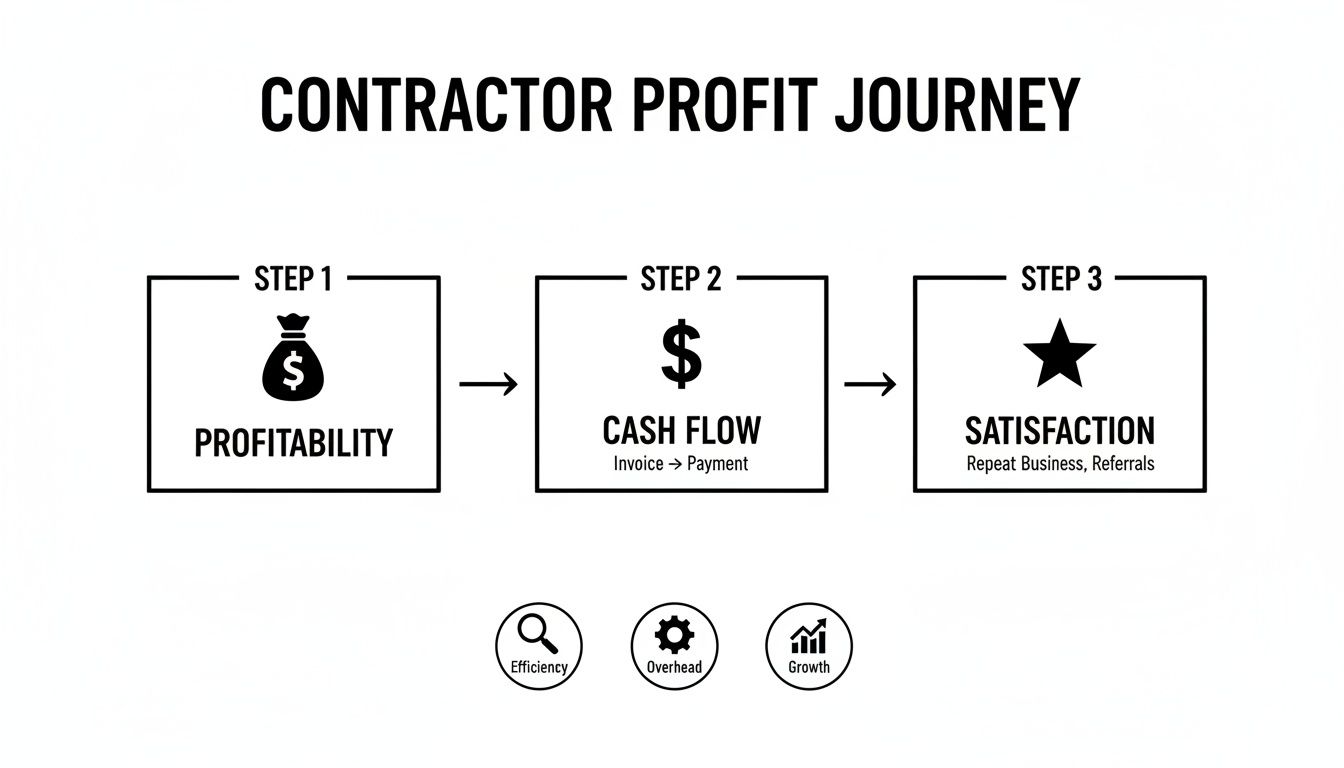
It’s simple, really. Controlling every step of the purchasing journey is fundamental to protecting your profitability, keeping cash flow healthy, and ultimately, making sure your clients are happy.
Solving Your Biggest Purchase Order Headaches
For trade contractors, the line between a smooth job and a money-losing disaster often comes down to one thing: parts. Without a solid system, the simple act of buying a component can spiral into a mess of costly problems that bleed your profits and frustrate your entire team. Good purchase order management isn't just about being organized; it's about getting rid of the daily friction that keeps your business from growing.
Let's walk through the common purchasing nightmares that keep owners up at night and see how a proper system can turn these headaches into strengths.
The Mystery of the Crumpled Receipt
We’ve all seen it. A tech is on an urgent call, needs a part right now, and puts it on their personal card. A week later, a crumpled, grease-stained receipt lands on the office manager's desk. No job number, no clear part description, no context whatsoever. The office staff now has to play detective, wasting billable hours just trying to figure out which job to bill it to.
This chaos creates two huge risks. First, that part might never get billed to the customer, meaning the cost comes straight out of your pocket. Second, getting technicians reimbursed becomes a slow, painful process that kills morale. A PO system fixes this by making every purchase start with a digital request tied to a specific job. You get a clean, clear record before a dime is ever spent.
Stopping Wrong Parts and Expensive Delays
Ordering the wrong part is one of the most frustrating and costly mistakes you can make. It sets off a chain reaction of problems: your tech wastes time and gas driving back to the supplier, the entire day's schedule gets derailed, and an already impatient customer is left waiting. One simple error can flip a profitable job into a loss.
A structured purchase order management process puts a stop to this by building in simple, common-sense checks.
- Standardized Part Numbers: Instead of guessing, technicians pick from a pre-approved digital catalog, which kills typos and vague descriptions.
- Approval Workflows: A second set of eyes in the office can quickly double-check the part against the job's needs before the order goes out.
- Supplier Clarity: The vendor gets a crystal-clear PO, ensuring they ship the exact item you asked for.
By formalizing the request, you create a safety net that catches mistakes before they cost you time, money, and your reputation.
Think of a purchase order as the single source of truth for every buy. This clarity eliminates the miscommunications that lead to duplicate orders, wrong parts, and unbilled materials, directly protecting your bottom line.
Ending Duplicate Orders and Profit Leaks
When you don't have a central purchasing system, it's shockingly easy for duplicate orders to happen. A tech might request a part and, not hearing back right away, ask a colleague to order it, too. Now you’ve got two expensive components on the way when you only needed one. This kind of redundant spending drains cash flow and ties up capital in inventory you don't need.
A centralized PO system gives everyone total visibility. Before creating a new PO, the office team can see every pending and approved order in one place. They can instantly see if a part has already been requested for that job, stopping duplicate buys in their tracks and making sure your money is spent wisely.
Here’s a great example of how a field service platform provides that clear, central view, preventing confusion and double-buying.
This kind of dashboard immediately shows which POs are open, completed, or partially received, giving your team the real-time information they need to make smart purchasing decisions.
How to Measure Your Purchasing Performance
You can't fix what you don't measure. In the trades, this is especially true for your purchasing process. Even if it feels like things are running smoothly, hidden problems could be quietly eating into your profits. To get a real grip on how you're doing, you need to track a few specific Key Performance Indicators (KPIs).
Think of KPIs as the dashboard for your company's financial engine. They give you hard data that points directly to where your purchase order management is working well and where it's costing you money. When you start tracking these numbers, purchasing stops being just another back-office chore and becomes a real strategic tool for boosting your bottom line.
PO Cycle Time
First on the list is PO Cycle Time. This is simply the total time it takes from the moment a tech in the field realizes they need a part to the moment that part actually arrives from the supplier. It’s a direct measurement of your company’s speed.
A long cycle time is a killer. It means jobs get stalled, techs are left waiting around, and customers start getting impatient. If you can shrink that window, you can squeeze more jobs into the week and get cash in the door faster. Start by looking for bottlenecks. Is a single manager always holding up approvals? Or is the office taking too long to turn a request into an official PO?
PO Accuracy Rate
Next up, you’ve got the PO Accuracy Rate. This KPI tells you what percentage of your purchase orders go through from start to finish without a single mistake. An error could be anything—a wrong part number, the wrong quantity, or a price that doesn't match the quote.
A low accuracy rate is a huge red flag. It’s a sign that costly mistakes are happening, leading to return trips, project delays, and parts that just sit on a shelf collecting dust. You should be aiming for 95% or higher. If you're falling short, it's a good bet you need better communication between your field and office teams, or maybe just more detailed, clearer POs.
Tracking your PO Accuracy Rate isn't just about catching typos; it's about figuring out why those mistakes are happening in the first place. A single wrong part can wipe out the entire profit on a service call.
Key Purchasing Metrics for Contractors
To really see the whole picture, you need to look at more than just one or two numbers. Here are the must-track KPIs every HVAC, plumbing, or electrical contractor should have their eye on:
- Supplier Lead Time: This is the average time it takes a supplier to get you the parts after you've sent the PO. Keeping tabs on this helps you quickly see which vendors are reliable and which ones are consistently slowing you down.
- Cost per PO: This metric uncovers the hidden administrative cost of processing a single purchase order. It factors in all the staff time spent creating, approving, and matching invoices for every order. A good software system can slash this cost dramatically.
- Emergency Purchase Ratio: This tracks how many of your purchases are last-minute emergencies made outside your normal process. A high ratio points to poor planning or inventory control, which almost always leads to paying premium prices and making rushed decisions.
By keeping a close watch on these KPIs, you can shift from constantly putting out fires to proactively managing your business. This data gives you the power to make smarter decisions, negotiate better deals with suppliers, and build a more stable, profitable company.
Choosing the Right Purchase Order Software
Taking the leap from messy spreadsheets and paper POs to a real software system is a huge step. It’s how you start getting a firm grip on your job costs and stop losing track of parts. But with so many options out there, how do you pick the right one?
The trick is to look past the fancy dashboards and focus on features that actually solve the problems your trade business runs into every single day.
Think of it like buying a new multi-tool for your techs. You don't need one with a hundred attachments you’ll never touch. You need a core set of reliable, well-built tools that just work. The same logic applies to your purchase order management software.
And you're not alone in looking for a solution. The market for order management software is expected to balloon to over $11 billion by 2032. That’s not just a passing trend; it shows how essential this technology has become for running a profitable shop. If you want to dig into the numbers, you can discover more insights about these market trends at metastatinsight.com.
Core Features Your Business Cannot Live Without
When you start looking at different platforms, a few features are simply non-negotiable for any HVAC, plumbing, or electrical contractor. These are the tools that will fix your biggest purchasing headaches and give you the quickest return on your investment.
Here's what your must-have list should include:
- Mobile Access for Techs: Your buying process starts in the field. Techs need to be able to request a part right from their phone or tablet while they're standing in front of the unit. This puts an end to scribbled notes on scrap paper, confusing texts, and the expensive mistake of ordering the wrong component.
- Integrated Inventory Management: The system has to give you a live, real-time look at what you have in stock—in the warehouse, at the shop, and on every single service van. Knowing what you have, and where, is the only way to stop ordering parts you already own.
- Automated Job Costing: This one is a game-changer. Every single purchase order must link directly back to a specific job or work order. When you have that connection, you guarantee that every part and piece of material gets billed for, protecting your profit margins from getting eaten away by forgotten costs.
Look Beyond the Feature List
A long list of features looks impressive, but it's only half the story. The most powerful software in the world is useless if your team finds it too confusing to use or if you can't get a real person on the phone when you need help.
The right software shouldn't just manage your purchase orders; it should simplify the entire workflow for everyone involved, from the newest apprentice in the field to the seasoned manager in the office. Usability is just as important as capability.
A system that connects your entire operation—from the first estimate to the final payment—is what truly makes a difference. For example, solid job scheduling is another critical piece of the operational puzzle. You can learn more about field service scheduling software that saves time in our other guide.
Your Practical Evaluation Checklist
To cut through the sales pitches and make a choice you won't regret, use this simple checklist. It will help you find a true partner, not just another software subscription.
- Ease of Use: Is the app easy for your techs in the field to use? Is the desktop version intuitive for the office team? A complicated system will never get used properly. Always insist on a live demo that walks through your typical workflow.
- Quality of Support: What happens when something goes wrong? You want a support team of real people who actually understand the trades, not just a generic call center reading from a script.
- Transparent Pricing: Are the pricing plans simple and clear? Watch out for vendors with hidden fees, long-term contracts you can't get out of, or confusing tiers that make it impossible to know what you'll actually be paying.
- Implementation and Onboarding: How are they going to get you up and running? A good partner will help you import your data and properly train your team to make the switch from your old methods as painless as possible.
From Job Site to Invoice: How Software Unifies Your Workflow

So, we've walked through the nuts and bolts of a solid purchasing process and how to measure it. But what ties it all together? The real breakthrough happens when you stop treating purchase order management like an isolated chore.
Think of it as the connective tissue running through your entire operation—from the moment a customer calls to the day their invoice is paid.
This is where modern Field Service Management (FSM) software steps in. It’s the central hub that finally connects your techs in the field, your dispatchers, and your office staff. Gone are the days of scribbled notes on scrap paper or shouting part numbers across the shop. Everyone is finally working from the same playbook.
Connecting the Field to the Office—Instantly
It all starts on the job. Your technician realizes they need a specific part to finish the repair. Instead of making a phone call, they pull out their phone or tablet, find the component in your digital parts catalog, and submit a purchase request on the spot.
This isn't just a quick text message. It's a clean, structured request that’s automatically linked to the specific work order they’re on. Back at the office, the team gets a perfect, error-free notification with every detail they need to create a formal purchase order.
This simple digital handoff cuts out the most common headaches: misheard part numbers, receipts lost in the truck console, and techs waiting for a quiet moment to call in their requests.
From Purchase Order to Profit Protection
Once that PO is created in the system, its link to the job is set in stone. This is where you see the real financial muscle of an integrated system. It becomes a powerful tool for protecting your bottom line.
When every purchase order is permanently tied to a work order, it becomes impossible for a part to be ordered and not billed. The software acts as a safety net, ensuring every single dollar you spend on materials is accounted for on the final customer invoice.
This automated connection doesn't just prevent lost revenue. It also gives you flawless job costing. You get a crystal-clear, real-time view of the exact material costs for every single job, revealing your true profit margins without waiting for a month-end scramble. The whole workflow becomes easier when you simplify estimates, quotes, and invoicing all in one place.
The Power of a Unified System
Bringing everything under one roof creates a ripple effect of efficiency that touches every corner of your business. It’s about more than just ordering parts.
- Real-Time Inventory Visibility: The moment a part is received, the system updates inventory levels everywhere—from your main warehouse right down to each tech’s van.
- Reduced Administrative Drain: Automation does the heavy lifting, matching POs to invoices and flagging any problems. This frees up your office staff to focus on things that actually grow the business.
- Better First-Time Fix Rates: With accurate inventory data, you can dispatch techs with the right parts already on their truck. That means fewer return trips and happier customers.
Ultimately, weaving purchase order management into your FSM platform changes it from a tedious task into a genuine competitive advantage. You gain the control and visibility you need to run a smarter, more profitable operation.
Answering Your Top Questions About Purchase Order Management
Making the leap to a more structured system for purchase order management can feel like a big step, especially if you're used to running on verbal agreements and scribbled notes. It’s completely normal to wonder how this all plays out in the real world of a busy trade business.
Let's dig into the most common questions we hear from contractors who are thinking about making a change.
How Does a PO System Help a Small Company?
For a two-truck operation, a purchase order system isn't about adding corporate fluff—it's about building a foundation for survival and smart growth. Think of it as putting financial guardrails on your business. It stops those small leaks that can turn into huge problems, like a part that was never billed to a customer or a duplicate order placed during a chaotic week.
A simple PO process makes sure every single dollar you spend on materials is tied directly to a paying job. That kind of clarity is absolutely critical for smaller businesses where cash flow is king and the profitability of every job counts. It’s what lets you scale from two trucks to ten without letting chaos take over.
What Is the Real Difference Between a Purchase Order and an Invoice?
This is a classic point of confusion, but the difference is actually pretty straightforward and incredibly important.
-
A Purchase Order (PO) is the request you send to a supplier before you buy anything. It's your official, documented instruction spelling out exactly what you want, how many you need, and the price you've agreed on. It’s a proactive document that sets clear expectations from the start.
-
An Invoice is the bill a supplier sends you after they’ve delivered the parts or completed the service. It’s a reactive document asking you to pay for what you’ve already received.
Think of it this way: A purchase order is the question ("Can I buy this from you at this price?"), while an invoice is the answer ("Yes, you did, and here's the bill."). A solid PO system ensures the answer always matches the question you asked.
How Long Does It Take to Implement a Modern PO System?
Getting up and running with modern software is a lot quicker than you probably imagine. We're not talking about old-school enterprise systems that took months and a team of consultants to install. Today's cloud-based field service platforms are built for a fast and easy setup.
For most small to mid-sized contractors, the process is surprisingly simple. With a dedicated onboarding team walking you through it, you can be up and running in a matter of days, not weeks. The process usually involves importing your parts list and customer data, configuring your approval rules, and getting your office staff and techs comfortable with the new tools. A good software partner will hold your hand through every step to make it a smooth switch.
Ready to answer all your purchasing questions with a single, unified platform? TackonFSM integrates purchase order management directly into your job workflow, from field request to final invoice, giving you total control over your job costs and inventory. Learn more at https://www.tackonfsm.com.




