The Ultimate Guide to Quote to Invoice Software for Contractors
Quote-to-invoice software is really the central nervous system for a modern trade business. It’s a single platform that connects every step of a job, all the way from the first quote you send a customer to the moment their final payment hits your bank account.
Think of it as the ultimate replacement for that chaotic mix of paper quote pads, scattered spreadsheets, and manual double-entry that so many shops get bogged down with. Instead of disconnected pieces, you get one clean, efficient system where everything lives.
What's Wrong With the Old Way?
Let’s be honest, running a job without a unified system feels like a clumsy relay race. A customer calls, and you're off. The first runner (your salesperson or you) scribbles down a quote. Once the customer says yes, you pass the "baton"—a messy piece of paper or a half-remembered conversation—to the dispatcher.
They then pass it to the tech in the field, who does the work. Finally, that baton, now covered in grease and notes, makes its way back to the office for invoicing, and then someone has to chase down the payment. At every handoff, there's a huge risk of dropping the baton. We’ve all seen it: lost paperwork, wrong pricing on the invoice, forgotten follow-ups, and payments that drag on for months.
Quote-to-invoice software smooths out all those handoffs, creating a seamless digital track where nothing gets lost.
This isn't just about sending a fancier invoice. It’s the operational backbone for any serious contractor today, whether you're in HVAC, plumbing, electrical, or any other field service. It tackles the one problem that holds so many great businesses back: disconnected processes that bleed cash and create headaches for everyone involved.
The Real Cost of Disconnected Systems
When your tools don't talk to each other, information gets siloed and lost. The price you quoted a month ago might not be what ends up on the final bill. Parts your tech pulls from the van might never get added to the invoice. An email with an invoice attached gets buried in a customer's inbox, and suddenly you're playing collections agent.
Every one of these disconnects is a hit to your bottom line and a frustrating experience for your customer. Here’s how a proper system fixes it:
- No More Manual Entry: A quote becomes a job, and that job becomes an invoice with a click. All the critical details—customer info, job notes, pricing—flow through automatically. No more typos or forgotten line items.
- Everyone on the Same Page: From the person answering the phone to the tech at the job site, everyone is looking at the exact same real-time information. This alone eliminates a ton of confusion and mistakes.
- Look Like a Pro: Your customers get clear, professional-looking quotes and invoices every time. They get automated reminders (so you don't have to nag them) and can often pay instantly online.
Why This is No Longer a 'Nice-to-Have'
Switching to a fully integrated system isn't just a minor upgrade; it’s a fundamental shift in how you run your business. The market for what’s broadly called Quote-to-Cash (Q2C) software is expected to more than double, exploding from around $1.17 billion to $2.75 billion by 2031.
And who’s driving this growth? It’s small and medium-sized businesses—the local electrical, plumbing, and HVAC shops—realizing this is the fix for chronic problems like inaccurate billing and slow cash flow. If you want to learn more, you can discover more insights about the Q2C software market and its projected growth. For businesses on the ground, this kind of software has moved from the 'maybe someday' list to an absolute must-have for staying competitive and profitable.
From First Call To Final Payment: How The Workflow Changes
The real magic of quote-to-invoice software is how it stitches together a bunch of separate, clunky tasks into one smooth process. Think of it as the central nervous system for your service calls. Instead of juggling notepads, spreadsheets, and calendar apps, every piece of a job—from the first phone call to the final payment—lives in one connected system.
Let’s follow a typical job for an HVAC contractor to see exactly how this works in the real world.
Stage 1: The Quote That Wins The Job
A homeowner calls, frantic because their AC unit died. The old way? You scribble notes, promise to get back to them with a price, and hope you remember all the details later. This is where jobs fall through the cracks.
With a proper system, the experience is completely different. Your office staff logs the customer's info directly into the software while on the phone. When the tech arrives and diagnoses the problem, they build a quote right on their tablet.
- Accurate Pricing, Every Time: They pull parts and labor costs from your digital pricebook, so pricing is always consistent and, more importantly, profitable.
- Good-Better-Best Options: The tech can present tiered repair options on the spot. This gives the customer control and often bumps up the average ticket price.
- On-the-Spot Approval: The customer sees the options, picks one, and signs digitally. No waiting, no "I'll think about it." The approval instantly kicks off the next step.
Stage 2: From "Yes" To A Scheduled Job In One Click
Once the customer says "yes," the traditional scramble begins. The tech calls the office, someone has to re-enter all the information into a separate calendar, and details inevitably get lost in translation.
Here, the software does the heavy lifting. A single click converts the approved quote into a scheduled job. All the critical data—customer info, job details, parts needed, and any special notes—carries right over. Your dispatcher sees the new job on a drag-and-drop calendar and can assign it to the best tech for the work.
The system doesn’t just put the job on a calendar; it sets your tech up for success. They get a notification with the full job history, the customer's contact details, and a list of all required parts, right on their phone or tablet.
Stage 3: Invoice Sent, Payment Collected—Before Leaving The Driveway
The job is done. Now for the most important part: getting paid. Manually, this is a mess. The tech brings back greasy paperwork, someone in the office has to decipher it, build an invoice in another program, and then email it out. This process can drag on for days, even weeks, wrecking your cash flow.
A modern quote-to-invoice software makes this final step instant. As soon as the work is finished, the tech marks the job "complete" in their app, which also updates your van's inventory. The system immediately generates the final invoice.
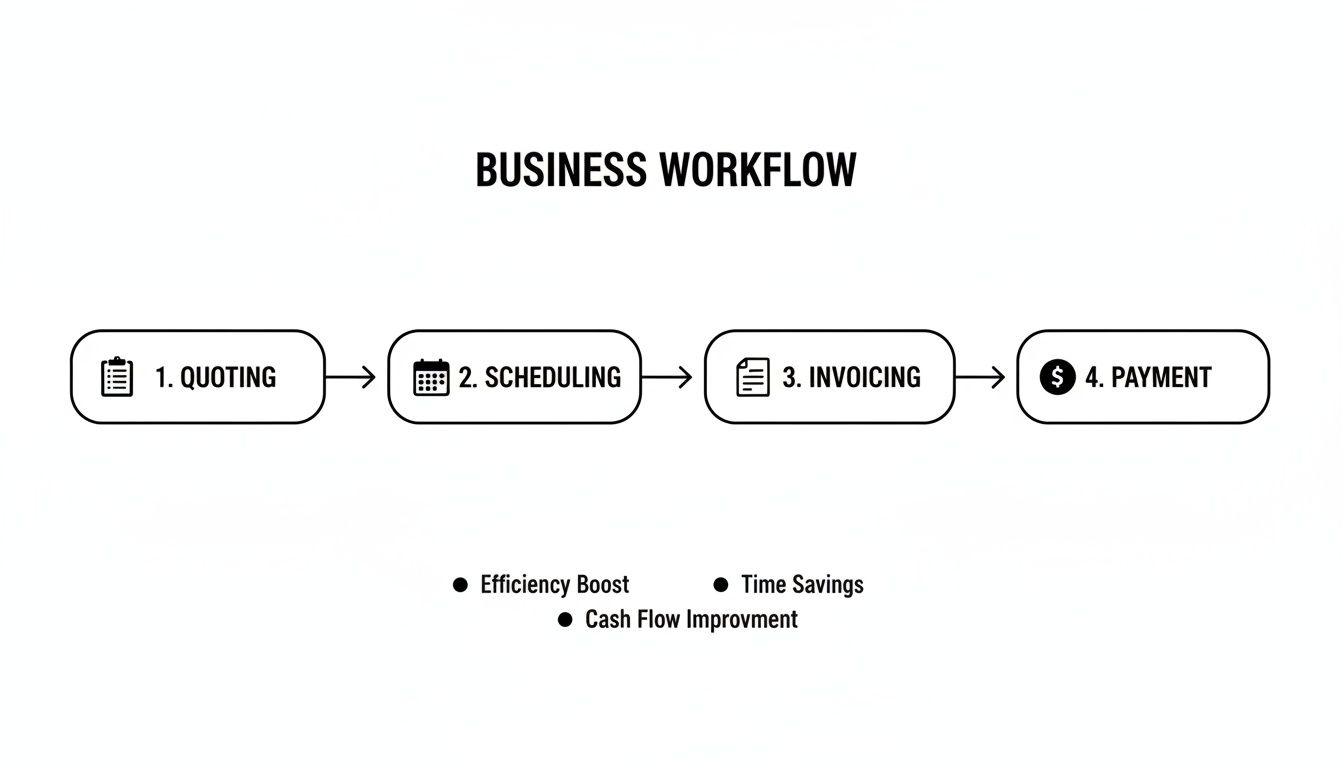 scheduling, invoicing, to payment, improving efficiency.” title=”Best Field Management Software in”>
The image above really drives home how each step flows directly into the next, closing the gaps where mistakes and delays always seem to happen.
Your tech can then hand their tablet to the customer to review the invoice and take payment on the spot with a card reader. Or, they can text a secure payment link directly to the customer's phone. Your payment cycle shrinks from weeks to mere minutes.
To get a better sense of how this works, you can think of it as a specialized type of document automation software built specifically for the chaos of a field service business.
Connecting every stage like this does more than just get you paid faster. It cuts out the administrative busywork and creates a far more professional experience for your customers. For a deeper look into the benefits, check out our insights on why Field Service Management Software Matters.
The old, disconnected way of doing things is full of time sinks and opportunities for error. A modern, automated system turns that chaos into a clean, repeatable process.
Manual vs. Automated Quote to Invoice Workflow
| Workflow Stage | Manual Process (Paper & Spreadsheets) | Automated Process (Quote to Invoice Software) |
|---|---|---|
| Quoting | Handwritten notes, calculations by hand, emailed PDF later. Prone to errors. | Digital pricebook, tiered options built on-site, instant digital signature. |
| Scheduling | Tech calls office, info is manually entered into a separate calendar. Double-entry. | Quote converts to a job with one click. All data transfers automatically. |
| Job Execution | Tech relies on memory or messy notes. Office is in the dark on job status. | Tech has full job history, parts list, and customer info on a mobile app. |
| Invoicing | Paperwork returned to office, manual data entry into accounting software. | Invoice is auto-generated upon job completion. No re-typing needed. |
| Payment | Invoice is mailed or emailed. Chase payments for days or weeks. | Payment collected on-site via card reader or secure link. Cash flow is immediate. |
This side-by-side comparison makes it clear: automation doesn't just speed things up; it fundamentally changes how you operate, giving you more control and freeing up your team to focus on what actually makes you money—delivering great service.
Must-Have Features for Trade Contractors
Not all quote-to-invoice software is created equal. What works for a marketing agency or a retailer is going to fall completely flat for a trade contractor. If you're in HVAC, plumbing, or electrical, your software needs to be tough enough for the field and smart enough for the office. Choosing the right platform means you have to look past the flashy dashboards and zero in on the features that actually make you more money and save you time.
Think of it like buying a new work truck. You wouldn't pick one without the right payload capacity or a proper ladder rack, because those things are essential for getting the job done. The same logic applies here. For a modern trade business to run smoothly, certain features are simply non-negotiable.

A Centralized Pricebook for Consistent Pricing
The heart of any good quote is dead-on pricing. A centralized digital pricebook acts as the single source of truth for every part, piece of equipment, and labor rate your company offers. Without it, you're just winging it with guesswork, old spreadsheets, or foggy memories—all of which lead to inconsistent quotes and shrinking profits.
When your techs can pull pre-approved items from a shared database right on their tablet, every quote they build is consistent, professional, and, most importantly, profitable. It puts an end to the "I think this part costs about…" moments that silently drain your bank account. This feature guarantees that the price a customer gets in the field is the exact same correct price the office would have quoted.
Customizable Templates and Margin Controls
Your quotes and invoices are a direct reflection of your brand. Let's be honest, a generic, plain-text document doesn't exactly scream "professional." Good software lets you create customizable templates with your company logo, colors, and specific terms and conditions. Suddenly, every document you send out looks sharp and builds trust.
But looks are only half the battle; profitability is the real war. This is where margin controls become a game-changer. This feature lets you set minimum profit margins on parts and labor. If a tech accidentally prices a part too low, the system can flag it or even stop the quote from being sent until it’s fixed. It’s a digital safety net protecting your bottom line on every single job.
By enforcing margin rules directly within the software, you move from hoping for profitability to actively managing it. It’s the difference between running a business and a hobby.
Integrated Inventory Management
"Do we have that part on truck three?" Every time that question gets asked, it costs you time and money. Integrated inventory management solves this problem by giving you a real-time view of stock levels across all your locations, including every single service vehicle.
When a technician uses a part on a job, they simply log it in their mobile app. The system instantly does two things:
- You get paid for every part used. Nothing gets forgotten or left off the final bill.
- You know when to reorder. The office gets an alert when stock is low, preventing those last-minute, job-delaying trips to the supply house.
This simple link between what happens in the field and what the office sees plugs major leaks in both your revenue and your team's productivity.
A Powerful Mobile App for Technicians
Your technicians are the face of your company. Their efficiency on-site has a direct impact on your revenue. A clunky, confusing mobile app is a recipe for frustration and will never get used properly. The best quote-to-invoice software comes with a simple, intuitive mobile app designed specifically for guys in the field.
This app becomes their go-to tool. From a phone or tablet, they should be able to:
- See their daily schedule and all the job details.
- Pull up the customer's complete history and notes.
- Build multi-option quotes right from the pricebook.
- Snap photos and videos to document their work.
- Generate an invoice and take payment on the spot.
A solid mobile app gets rid of the mountain of end-of-day paperwork, cuts down on the frantic calls back to the office, and gives your team the power to handle the entire job cycle from a single device. You can see how TackonFSM helps to simplify estimates, quotes, and invoicing with a mobile experience built for techs.
The demand for this kind of efficiency is making the market explode. The automated quotation system market, which is a core piece of this workflow, is projected to hit USD 11.24 billion by 2032. This boom is being driven by contractors who are tired of the errors and uncompetitive pricing that come from doing things by hand. By choosing software with these essential features, you’re setting your business up to win.
Calculating the Real ROI for Your Business
Dropping money on new software can feel like a gamble. But with quote-to-invoice software, it's not really a cost—it's an investment that starts paying you back from day one. The return isn't just some fuzzy promise of "better efficiency." We're talking about a real, measurable impact on your bottom line.
The biggest wins come from plugging all the little leaks in your business where time and money quietly drain away. Let's break down exactly where you'll see the returns: reclaiming lost admin hours, making every job more profitable, and getting cash in the bank faster.

This is the task every business owner faces: figuring out how a new tool actually translates into more money in the bank.
Reclaiming Your Most Valuable Asset: Time
Just think about all the hours your team burns on admin work every week. Building quotes from scratch, double-entering job details into a calendar, chasing techs for paperwork, and piecing together invoices… it’s death by a thousand papercuts.
Let’s run a quick, realistic scenario. Say this new software helps you shave off just five administrative hours per week for an office manager who makes $25 an hour. The math is simple:
- Weekly Savings: 5 hours x $25/hour = $125
- Annual Savings: $125/week x 52 weeks = $6,500 per year
That $6,500 is pure profit that goes right back into your business, all from automating tasks that shouldn't have been manual in the first place. Now, that time can be spent on things that actually grow the business, like following up with customers or drumming up new leads.
Boosting Profitability on Every Single Job
Inaccurate quotes are the silent killers of profit. Forgetting to add one part, using last year's pricing, or just miscalculating your margins can flip a good job into a loser. The right software acts as your financial safety net.
With a centralized pricebook and margin controls, you move from guessing to knowing. Every quote is built with accurate, up-to-date pricing for parts and labor, ensuring each job is profitable by design, not by chance.
This is a game-changer for parts management. When a tech pulls a part from the van, the system automatically adds it to the job invoice. This one simple move makes sure you get paid for 100% of the materials used, plugging one of the most common and costly revenue leaks out there.
Accelerating Your Cash Flow from Weeks to Days
How long does it take to get paid after you finish a job? If you're waiting weeks—or even a month—your cash flow is taking a beating. That gap between completing the work, sending the invoice, and seeing the money hit your account can starve a business of the cash it needs to operate.
Quote-to-invoice software completely overhauls this cycle.
- Instant Invoicing: The second a tech marks a job "complete" on their phone, a clean, accurate invoice is ready to go.
- On-Site Payments: Your technicians can swipe a card right there on the spot or send a secure payment link straight to the customer's phone.
This simple workflow shrinks the payment cycle from an average of 30+ days down to just a few hours. Getting paid faster means you have the cash on hand to make payroll, buy materials, and invest in growth without sweating it. Of course, to truly nail your ROI calculation, you need to understand and avoid chargeback fees, which can eat into your profits. Better software and cleaner, faster transactions are your best defense.
A Simple Checklist for Picking the Right Software
Trying to choose a quote to invoice software can feel like a chore. You're hit with a dozen options, and it’s tough to tell what's a sales pitch and what will actually work for your business out on a real job site.
To cut through the noise, you need a solid plan. Think of this checklist as your guide to asking the right questions—the ones that reveal whether a platform is a good fit or just another flashy dashboard. Getting this right from the start saves a world of headaches later on.
Does It Actually Cover Your Full Workflow?
This is the big one. Does the software handle the entire journey, from the first customer call to the final payment? A lot of tools claim to be “all-in-one,” but you need to dig into what that really means for a trade business.
Don't be shy—ask vendors straight up:
- Can we build a quote with a few different options, get the customer’s e-signature, and then turn that into a scheduled job with one click?
- When a tech uses a part from the truck, does the system track it and add it to the invoice automatically?
- Can my guys take payment right there on the spot, the moment the work is finished?
If you’re still patching things together with spreadsheets or juggling multiple apps, then it’s not a true quote-to-cash system. You're looking for a seamless flow, not a collection of disconnected features.
Can Your Least Tech-Savvy Person Use It?
Let's be honest—the fanciest software is worthless if your crew can't figure it out. Your technicians are out there trying to get work done, not fiddle with a complicated app. The mobile side of the software has to make their lives easier, period.
The real test for any field service software is simplicity. If a tech can't pull up a job, create an invoice, and take a payment in just a few taps, the system is a failure. User adoption is everything.
During a demo, think about that one employee who still uses a flip phone. Could they navigate the app to see their schedule, add job notes, and get paid? If you hesitate, it's a red flag. For more on this, check out our guide on Field Service Scheduling Software That Saves Time.
Will It Grow With Your Business?
The tool you pick today needs to keep up as you grow. Whether you’re running two trucks or aiming for twenty, your software shouldn't hold you back or become a massive expense.
Think about the future and ask these questions:
- Pricing Model: How does the cost change as I add techs? Are there sudden, steep price hikes when you hit a certain team size?
- Feature Access: Are essential tools like inventory management locked away in an expensive "enterprise" plan I don't need yet?
- Performance: Will the system get bogged down when it’s managing thousands of jobs and customers instead of hundreds?
Choosing a partner that can scale with you from the beginning means you won't have to go through the painful process of switching systems in a few years.
What's the Real Price?
Finally, get crystal clear on the total cost. Hidden fees, surprise onboarding charges, and iron-clad annual contracts can quickly turn a good deal sour. You need to know exactly what you’re paying for.
Get direct answers to these questions:
- Are there any fees for setup or for moving my existing customer data over?
- Is this a flexible month-to-month plan, or am I locked into a yearly contract?
- Does the price you quoted include training for my team and ongoing support when we need help?
A company with transparent, predictable pricing is one you can trust. Your quote to invoice software is an investment meant to make you money, not a confusing bill that chips away at your profits.
Dodging the Bullets: How to Sidestep Common Implementation Headaches
Switching to new quote-to-invoice software can feel like a huge undertaking, but trust me, knowing where the landmines are makes all the difference. I’ve seen countless contractors run into trouble, not because the software was bad, but because their game plan for switching was. There are three big hurdles that trip up almost everyone: messy data, a team that won’t get on board, and picking software that’s way too complicated for the job.
Nail these three things from the get-go, and you’ll save yourself months of frustration. More importantly, you'll start seeing a return on your investment almost right away. Let's walk through how to clear these hurdles.
The “Garbage In, Garbage Out” Problem
Look, your shiny new system is only as smart as the information you feed it. If you try to dump a messy jumble of customer lists, inconsistent price books, and years of scattered job notes into it, you’re just creating a digital junk drawer. It’s like moving into a brand-new workshop but insisting on bringing all the broken tools and random scrap metal with you.
Before you even think about migrating, it’s time for a spring clean:
- Tackle the duplicates: Go through your customer list and merge all the different entries for the same person.
- Standardize your price book: Make sure every part and service has a consistent name and price. No more "1/2 inch copper pipe" and "Copper Pipe .5 in."
- Archive the old stuff: Be honest about what you really need. Bring over active clients and recent history, not every job you’ve done since 2005.
A clean start means your team can actually trust the data they see. That trust is the foundation for getting them to use the system.
Getting Your Team to Actually Use It
Honestly, the biggest roadblock you'll face isn't technical—it's people. If your techs in the field see this new app as just another hassle or, worse, as Big Brother watching over their shoulder, they’ll find a million ways not to use it properly.
The secret to getting your crew on board is simple: show them what’s in it for them. It’s not about making the office’s life easier; it's about making their life on the job better.
Instead of a boring feature tour, show them how the mobile app gets rid of that mountain of paperwork they have to do at the end of the day. Show them how they can look up a part without calling the shop ten times. Frame it as the tool that helps them finish the job and get paid without chasing down signatures and lost invoices.
Once they see it helps them spend more time wrenching and less time writing, they won't just adopt it—they'll embrace it.
Got Questions? We've Got Answers
Switching up your business software always comes with a few questions. It’s a big decision. Here are some honest, straight-to-the-point answers to what we hear most often from contractors like you.
Will This Actually Work With My Accounting Software?
Yes, and this is a big one. Any decent quote to invoice software is built to play nice with tools you already use, especially accounting platforms like QuickBooks. Think of it as building a bridge between your field operations and your financial records.
The whole point is to stop manual data entry. When your tech sends an invoice or takes a payment out in the field, that information should automatically appear in your accounting books. This connection alone saves an incredible amount of time and cuts down on those frustrating typos that can throw your numbers off.
Is This Stuff Hard For Techs to Learn?
Not the good stuff, no. The best platforms are designed for the person who’s actually using them the most: your technician. They’re usually simple mobile apps that feel as natural to use as any other app on their phone. The goal is to make their life easier, not give them more homework.
Honestly, adoption is usually pretty fast. After a quick walkthrough, most techs get the hang of it right away. They can see their schedule, look up a customer's service history, build a quote on the spot, and get paid—all from a phone or tablet. It’s about giving them tools, not chores.
A good piece of field software is measured by one thing: does it help the people doing the work? If your techs don't love it, you've got the wrong tool.
Is This Too Expensive For a Smaller Shop?
Definitely not. It's a common misconception that this kind of software is only for the big players with massive budgets. The reality is, many of the best modern platforms are built specifically for small and medium-sized trade businesses. The pricing is designed to grow with you.
You'll want to look for flexible plans that are based on how many people are on your team. Avoid getting locked into long, complicated contracts or getting hit with surprise setup fees. For even a small team, the right quote to invoice software quickly pays for itself by helping you get paid faster, work more efficiently, and stop losing track of parts and materials.
Ready to see how an all-in-one platform can pull your entire operation together? See how TackonFSM helps contractors smooth out their workflow from the first call to the final payment. Start your free trial today.