A Guide to Work Order System Software for Modern Contractors

At its core, a work order system is the digital command center for any serious trade business. Think of it as the brain of your operation, replacing the messy web of paper trails, spreadsheets, and sticky notes with one clean, organized platform. It’s the software that tracks a job from the moment a customer calls until the final invoice is paid, making sure nothing ever gets lost in the shuffle.
From Uncontrolled Airspace to a Central Hub
Ever feel like you're trying to run an airport with nothing but a walkie-talkie and a handful of sticky notes? That’s what it's like managing an HVAC, plumbing, or electrical business without a proper system. Your technicians are like pilots flying blind, your office staff is guessing at arrival times, and your customers are left completely in the dark. It’s a state of uncontrolled airspace where mistakes and miscommunication become the norm.
A modern work order system is your air traffic control tower. It gives everyone a single, unified view of every single job, turning chaotic service requests into a smooth, predictable process.
The Problem with Manual Methods
When you don't have a central system, your business is spread thin across a bunch of disconnected tools. This creates a ton of friction day in and day out.
- Paper Work Orders: They get lost, coffee-stained, or scribbled on with handwriting no one can read. This leads directly to billing errors and missed job details.
- Spreadsheets: Sure, they're a step up from paper, but they’re a nightmare to update in real-time, riddled with human error, and offer zero automation for scheduling or dispatching.
- Text Messages and Phone Calls: The constant back-and-forth between the office and the field is a massive time-waster. Important details get buried in a long text thread or forgotten after a quick call.
This shift isn't just a fleeting trend; it’s a fundamental change in how the best field service companies operate. The global market for this kind of software is expected to hit $2,030.87 million by 2032, which tells you everything you need to know about where the industry is heading.
To really see the difference, let’s compare the old way with the new way side-by-side.
Comparing Manual Methods vs a Digital Work Order System
The table below breaks down the daily struggles of manual processes versus the streamlined efficiency you get with a dedicated work order system.
| Operational Area | Manual Process (Paper & Spreadsheets) | Work Order System (e.g., TackonFSM) |
|---|---|---|
| Job Creation | Manually writing out tickets, often with incomplete customer info. | Instantly create digital work orders with full customer history and job requirements. |
| Scheduling | A whiteboard mess or a clunky spreadsheet. Double-booking is common. | A drag-and-drop calendar shows real-time tech availability, preventing conflicts. |
| Dispatching | Calling or texting techs one by one, with no visibility of their location. | One-click dispatch sends all job details directly to the tech's mobile app. |
| Invoicing | Handwriting invoices, then manually entering them into accounting software later. | Generate and send professional invoices from the field the moment a job is done. |
| Customer Comms | No automated updates. Customers call the office asking, "Where's the tech?" | Automated appointment reminders and "on-my-way" texts keep customers happy. |
| Reporting | Manually crunching numbers in a spreadsheet to figure out profitability. | Instant access to dashboards showing job profitability, tech performance, and more. |
It becomes pretty clear that clinging to outdated methods just holds your business back.
Gaining Control with a Digital System
By putting a work order system in place, you consolidate everything into one digital hub. Every job detail, customer note, and technician’s location is tracked and visible to your whole team. This leap from manual chaos to digital control is what separates stagnant businesses from those ready for growth. For a deeper dive, it’s worth understanding the advantages of a digital system in today's service-driven economy.

Ultimately, implementing a platform like TackonFSM is about working smarter, not harder. It brings order to the chaos, boosts your bottom line, and gives you the control you need to scale your business the right way. You’ll give both your team and your customers the professional, organized experience they expect.
The Core Features That Actually Run a Profitable Field Operation
Think of a modern work order system as less of a single tool and more like the central nervous system of your entire business. It's not just about digitizing your old paper forms; it's about connecting every moving part of your operation—from the office to the field—to solve those persistent, profit-killing headaches for good.
Each feature works in tandem, turning daily operational chaos into a well-oiled machine. Let's break down the essential components that give you back control.
This diagram nails the transition. It shows how you move from a tangled mess of manual tasks to a clean, dashboard-driven command center.
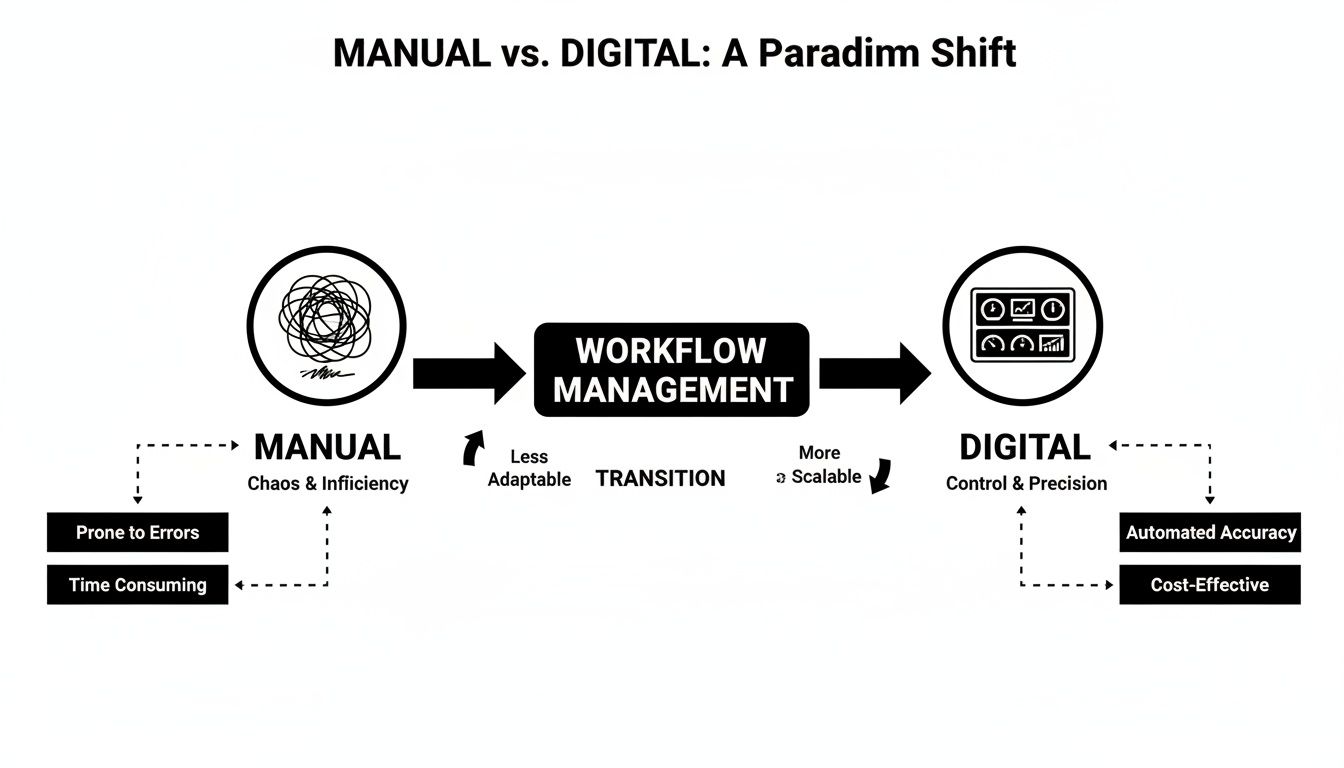
It’s all about bringing order and total visibility to your operation, creating a single source of truth instead of relying on sticky notes and memory.
Your Command Center for Scheduling and Dispatch
That messy whiteboard or confusing spreadsheet calendar? It’s time to retire it. Your new scheduling and dispatch board becomes the live command center for your field team. In one glance, your office manager sees the whole picture: who's available, where they are, and the real-time status of every single job.
With a simple drag-and-drop interface, assigning jobs based on a tech’s skills, location, and current workload takes seconds, not minutes. When a frantic customer calls with an emergency, you can instantly spot the closest available tech and get them on the road. That kind of rapid response is what builds a loyal customer base.
It’s a world away from the old method of making a dozen phone calls just to find the right person for a job. A solid system relies on good software workflow management solutions to keep everything flowing smoothly from one step to the next.
The Mobile App: Your Tech's Digital Toolkit
Honestly, the technician’s mobile app might be the single most impactful part of any work order system. It’s not just an app—it’s their digital toolkit, their direct line to the office, and their point-of-sale system, all rolled into one. It effectively turns their truck into a mobile office, empowering them to get more done.
Right from their phone or tablet, techs can:
- See complete job details and arrive fully prepared with the right info and parts.
- Pull up the full customer history, including past services, equipment details, and important notes.
- Update job status in real-time—"en route," "started," "completed"—so the office knows what’s going on without a single phone call.
- Upload photos and notes to document their work, which protects your business and gives customers a clear record.
This constant connection completely eliminates the communication bottlenecks that grind an operation to a halt.
The Virtual Warehouse for Parts and Inventory
"Do you have the part on the truck?" It's a simple question that can make or break a job's profitability. Without a system, your inventory is just a black hole of wasted money and lost time. The inventory management feature acts as your virtual warehouse, giving you eyes on every single part you own.
You can track inventory levels across the main shop, every service van, and any other storage location. When a technician uses a part, it’s automatically deducted from their van’s stock and added to the invoice. Nothing gets missed. This simple function prevents costly shrinkage, stops techs from ordering parts you already have, and cuts down on all those unnecessary trips to the supply house.
The big takeaway here is control. When you bring work order creation, assignment, and progress tracking into a single, unified system, you gain incredible visibility over the entire service cycle.
From Estimate to Invoice in a Few Clicks
The path from giving a quote to getting paid is often a minefield of manual data entry and costly mistakes. A great work order system connects these steps into one seamless workflow. You can build professional-looking estimates using pre-loaded parts and labor rates, which keeps your pricing consistent and, most importantly, profitable.
Once the customer gives the digital thumbs-up, that estimate converts into a work order with a single click. When the job’s done, the work order becomes an invoice just as easily. But this seamless flow is about more than just convenience.
Globally, 70% of field service firms using these systems report a jump in technician productivity. Plus, integrated estimating tools help slash duplicate data entry by 50%, which drastically speeds up how fast you get paid. This integration is your safety net, ensuring every minute of labor and every part used is accurately billed, protecting your margins on every single job.
How to Calculate the ROI of a Work Order System
Let's be honest: investing in a new work order system feels like a big expense. But it shouldn't be viewed as just another cost—it's a strategic move designed to put real money back into your pocket. To truly grasp its value, you have to look past the monthly subscription fee and see how it directly impacts your bottom line. Calculating the return on investment (ROI) helps you see the software for what it is: a profit-generating engine, not just another bill to pay.

The formula is straightforward enough—you compare the net profit you gain from the system to what it costs. The real trick, though, is figuring out where those gains are actually coming from in your day-to-day operations. Let's dig into the tangible metrics you can actually track.
Measuring Increased Technician Productivity
The most immediate way a work order system boosts your revenue is by helping your techs complete more jobs. Just think about all the time currently being burned on administrative friction—driving back to the shop for a forgotten part, calling the office for job details, or wrestling with paperwork at the end of a long day.
A solid mobile app puts a stop to all that wasted time. When your techs have everything they need right on their phone or tablet—customer history, job notes, even real-time inventory levels—they show up prepared and can roll from one job to the next without the usual delays.
- Metric to Track: Average jobs completed per technician per day.
- Simple Calculation: If you can bump this number by just half a job per tech each day, the extra revenue stacks up fast. For a five-technician team, that could mean 2.5 extra billable jobs every single day.
Reducing Operational Costs and Waste
Efficiency gains aren't just about doing more work; they also show up as direct cost savings that fatten your profit margins on every single job. Two of the biggest culprits for wasted money are inefficient scheduling and poor inventory management, both of which a digital system tackles head-on.
Smarter routing, for instance, means less time spent sitting in traffic and significant savings on fuel. In the same way, real-time parts tracking stops your techs from buying parts you already have sitting in the shop—a surprisingly common and costly mistake. Studies have shown that automated workflows can slash status-update calls by 35%, giving valuable time back to both your office staff and your technicians.
Bringing tasks like work order creation, progress monitoring, and resource tracking into a single, unified system gives you unprecedented visibility and control. This is where measurable ROI really begins.
Accelerating Your Invoice-to-Payment Cycle
How long does it really take to get paid after a job is done? For a lot of contractors, the lag between finishing the work and seeing the money hit your account can be a serious cash flow killer. Paper invoices get misplaced, manual data entry creates delays, and chasing down late payments is a massive time-suck for your office team.
A modern work order system shrinks that gap dramatically.
- Instant Invoicing: The moment a job is finished, your tech can generate and email a professional invoice right from their mobile device.
- On-Site Payments: They can take a credit card payment right there in the field, securing your revenue on the spot.
- Secure Payment Links: If the customer isn't home, you can text or email a payment link for them to pay online quickly and easily.
This workflow doesn't just make you look more professional; it fundamentally improves your cash flow by cutting the payment cycle down from weeks to days, or sometimes even minutes. This boost in available cash is a massive, and often overlooked, part of your system's financial return.
A Contractor's Checklist: How to Choose the Right Software
Software demos can be a whirlwind. You’re hit with flashy features and big promises, but it’s hard to know what you really need. To cut through the noise, you have to go in armed with the right questions—the kind that reveal if a work order system actually gets the day-to-day grind of a trade business.
Choosing a new platform is a huge decision, one that will impact every part of your operation. This checklist is built to help you look past the sales pitch and focus on what truly matters out on the job site. You need a system built by people who know the difference between a condenser and a circuit breaker, not some generic tool that doesn't solve your specific problems.
Digging into Field-Ready Functionality
Let’s start where the work happens: in the field. Grill them on the features your technicians will use every single day. A clunky, confusing mobile app will sink your entire investment, no matter how great the office software is. Your team needs tools that make their jobs easier, not another headache.
Ask these pointed questions about their mobile app:
- Offline Mode: What happens when a tech is in a basement with no cell service? Can they still build an invoice, capture a signature, and take payment? Find out exactly how the data syncs up once they're back online.
- Custom Forms and Checklists: Can you build your own safety checklists or equipment startup forms that techs must complete to close out a job? This is a game-changer for compliance and quality control.
- Customer History Access: When a tech walks onto a job, how much can they see? Can they pull up old invoices, view photos from previous visits, and read notes about that specific piece of equipment?
These aren't just features; they're the details that separate a truly useful field tool from a glorified digital form.
The right software isn't about ditching paperwork. It's about arming your team with the information they need to look professional and work smarter on every single call.
Evaluating Estimating and Invoicing Flexibility
In HVAC, plumbing, and electrical, estimates are rarely simple. Your software has to handle the complex, multi-option quoting that helps you win bigger jobs by giving customers real choices. This is non-negotiable for any trade business looking to grow.
Does the system let you build "good-better-best" proposals? You need to be able to present tiered options—with different equipment, warranties, and prices—on a single, clean document. For a great example of this, see our guide on streamlining your estimates and invoicing process. When a customer can just click to approve their choice and sign digitally, you close deals faster. Period.
Also, ask how the system protects your bottom line. Can you set minimum profit margins on parts and labor to stop accidental underbidding? Enforcing consistent, profitable pricing across the whole team is a hallmark of a great system.
Assessing Inventory and Data Migration Support
Finally, let’s talk about the two biggest headaches when switching software: managing parts and moving your data. Don't settle for vague answers here. The support you get during onboarding sets the tone for your entire relationship with the company.
For inventory, ask the tough questions:
- Can it track parts across multiple service vans and a main warehouse in real-time?
- When a tech uses a part, is it automatically pulled from their van's stock and added to the invoice?
- Does it stop you from ordering parts you already have sitting in another truck?
As for your data, find out what the migration process really looks like. Will they help you pull in your customer list, parts database, and job history from your old system, whether it’s QuickBooks, Jobber, or ServiceTitan? A provider like TackonFSM that offers free, assisted onboarding is invaluable. It saves you dozens of hours of soul-crushing manual data entry.
For shops with 1-20 technicians, the right platform can cut down on "where are you?" calls by 35% and slash parts shrinkage by 20-30%. Better yet, data shows it can increase jobs per day by 15-25%, with 80% of users reporting they get paid faster. For more on this, check out the work order management systems market report from Grand View Research.
Your Step-by-Step Implementation and Onboarding Guide
Making the jump to new business software can feel like a huge project, but when you have a clear roadmap, it’s not just manageable—it can actually be exciting. Moving from a jumble of spreadsheets and paper tickets to one unified work order system is one of the biggest leaps you can make toward real efficiency and growth. The trick is to see it not as flipping a switch overnight, but as a step-by-step process of getting your data, your training, and your team on the same page.

I’ve seen this countless times. Take a small plumbing company, let's call them "Reliable Pipes LLC," that was drowning in paperwork. The owner knew he had to change, but the fear of disrupting business was real. By following a structured plan, he turned that daunting task into a smooth, successful launch. This guide breaks that exact process down into steps you can actually use.
Phase 1: Prepare Your Foundational Data
Before you can build your new operational headquarters, you need to gather the materials. Your existing data is the foundation of your new system, and getting it organized upfront will make the transition ten times smoother. This isn't just about moving files around; it's a chance to clean house and set your team up for success right from day one.
Start by pulling three key data sets from whatever you're using now (like QuickBooks or a bunch of spreadsheets):
- Customer List: Get a clean list together with names, service addresses, phone numbers, and email addresses. This is the perfect time to zap duplicate entries and fix that outdated info you've been meaning to get to.
- Parts & Inventory: Create a master list of all the parts you regularly use. You'll want part numbers, descriptions, and what you currently pay for them. If you’re moving to a system like TackonFSM, you can use its Elastic Parts Database to make this part go a lot faster.
- Job History (Optional but Recommended): Having a record of past jobs gives your techs invaluable context when they show up at a customer's home. They’ll look like rockstars knowing the history before they even ring the doorbell.
Getting this information ready first means the actual import will be quick and accurate, letting you hit the ground running.
Phase 2: Lean on Assisted Onboarding
You do not have to do this alone. In fact, you shouldn't. One of the biggest mistakes I see is owners trying to self-implement complex software, which almost always ends in frustration and a system nobody uses correctly. The best work order system providers offer dedicated onboarding support to walk you through it.
A provider that offers free, assisted onboarding is your most valuable ally. They’ve migrated hundreds of businesses just like yours and know how to avoid common pitfalls, saving you hours of manual effort and technical headaches.
This kind of support is critical. A real, live onboarding specialist can help map your old data fields to the new system, configure settings to match your actual workflows, and make sure the import goes off without a hitch. With a partner like TackonFSM, this hands-on support is part of the deal, turning a complex data migration into a simple, guided procedure.
Phase 3: Train Your Team for Success
Introducing new tech requires a smart approach to training. Your real goal here is to build confidence and show your team how this new system makes their jobs easier, not harder. Frame it as the tool that finally gets rid of their biggest headaches—like trying to read messy handwriting or having to call the office for basic customer info.
Break the training into two distinct, focused sessions:
- For the Office Team: Walk your dispatchers and office managers through the core workflow. Zero in on creating a work order, using the drag-and-drop schedule to dispatch a technician, and generating an invoice from a completed job.
- For the Field Technicians: Keep this session short, sweet, and focused entirely on the mobile app. Show them how to see their schedule for the day, update job statuses with a single tap, snap and upload photos, and collect customer signatures and payments right there on-site.
Once you’ve covered the basics, run a few "mock jobs" through the system from start to finish. This hands-on practice builds muscle memory and helps everyone feel comfortable before you go live. Do this right, and your new work order system will be an asset from the very first real customer call.
The Future of Your Field Service Business Is Digital
Let's be honest. Running a trade business on paper, spreadsheets, and a tangled web of phone calls is a recipe for chaos. It’s like trying to build a modern smart home with a hammer and a handsaw—you might get it done, but it’s going to be inefficient, messy, and you’ll fall behind the competition fast. A work order system isn't just another piece of software; it's the digital blueprint for a more professional, profitable, and scalable business.
This kind of platform lets you stop playing defense and putting out fires all day. Instead, you get a bird's-eye view of your entire operation, from the moment a customer calls to the second their payment hits your account. This is how small and mid-sized contractors punch above their weight, often out-maneuvering the big guys by delivering a better, more personal customer experience.
A work order system is designed to give you back your most valuable asset: time. It pulls you out of the administrative quicksand so you can focus on actually growing your company.
Think about what that really means for your business. Predictable cash flow. Technicians who are happier and more productive because they have the information they need. And for you? The mental space to finally plan for the future, not just survive the present. You get the real data to analyze which jobs are most profitable, spot new opportunities, and build a business that can weather any storm. This isn't some far-off dream; it's a completely achievable reality.
The most important part is just getting started. See what a modern platform can do for your operations—take a look at a tool like TackonFSM by starting a free trial and experience the difference firsthand.
Frequently Asked Questions About Work Order Systems
Even when you see the benefits laid out, making a jump to a new work order system naturally brings up a few practical questions. Let's tackle some of the most common ones we hear from contractors thinking about making the switch.
How Long Does Implementation Take for a Small Team?
For a small team—say, 2 to 10 technicians—you’d be surprised how fast you can get up and running. A system like TackonFSM that comes with free assisted onboarding can get you live in about a week. That includes importing all your customer and parts data and getting your team comfortable with the basics.
The key is to pick software that's built for usability and set aside just a few focused hours for the initial setup. Most businesses we see are running real jobs through their new system within the first 14 days.
Is a Work Order System Affordable for a New Contractor?
Absolutely. The old days of expensive, locked-in contracts are over. Modern, cloud-based systems operate on simple monthly pricing, with different plans depending on the size of your crew. This means a new contractor with just one or two trucks on the road can access the same powerful tools as a bigger operation without a massive upfront cost.
The smartest way to start is to find a provider that offers a no-risk trial period. This lets you actually use the software with your own team and real-world jobs before you spend a dime, making sure it’s a perfect fit.
Keep an eye out for platforms with no setup fees and free trials—it’s the best way to test the waters.
Will My Technicians Struggle with a Mobile App?
This is probably the number one concern we hear, and it’s a valid one. That’s why the best work order systems are designed with the field tech in mind. The mobile apps are incredibly straightforward, guiding techs through their day with simple checklists, big tap-friendly buttons for job updates, and easy photo uploads. If they can use Google Maps, they can use this.
Honestly, after a quick walkthrough, most techs realize the app is way easier than juggling messy carbon copies or calling the office a dozen times a day. The whole point is to make their job easier, not to add another headache. The app should feel like a tool that helps them, not a task they have to do.
Ready to see how a modern work order system can actually change how you run your business? TackonFSM gives you the tools to schedule smarter, get paid faster, and finally feel in control. Start your free 14-day trial today.