HVAC Management Software That Simplifies Your Operations
HVAC management software is your command center. It takes all the messy paperwork, disconnected spreadsheets, and clunky apps you're juggling and pulls them into one clean, integrated system. Think of it as the digital brain of your entire operation, handling everything from scheduling and dispatch to inventory and invoicing. It's built to bring clarity, efficiency, and ultimately, more profit to your trade business.
From Chaos to Control with HVAC Management Software
Picture a typical Monday morning. The phone is ringing, a mountain of paper invoices is threatening to collapse on your desk, and you're scrambling to figure out which technician has the right part for an emergency job across town. Sound familiar? This daily chaos is the reality for countless HVAC owners. It’s like trying to run a city-wide delivery service with a hand-drawn map and a bunch of sticky notes.
HVAC management software is the upgrade you desperately need. It swaps that crumpled paper map for a live, dynamic GPS for your entire company. It doesn't just show you where to go—it optimizes the routes, accounts for traffic (metaphorically speaking), and keeps every tech in constant communication with the office. This single platform acts as your dispatcher, inventory clerk, and bookkeeper all in one, turning frantic manual tasks into a smooth, predictable rhythm.
Ditching Disconnected Systems for a Single Source of Truth
The biggest problem this software solves is fragmentation. Right now, your customer list might be in your phone, your schedule on a whiteboard, your invoices in a separate program, and your parts inventory in a spreadsheet that's always out of date. These information silos are where mistakes happen and money gets lost.
Good HVAC software tears down those walls. It gives you:
- A Unified Dashboard: See every active job, technician location, and outstanding invoice from a single screen. No more switching between ten different tabs.
- Real-Time Data Sync: When a technician closes out a job on their tablet in the field, the office sees it update instantly. Invoicing can happen in minutes, not days.
- Centralized Customer History: Anyone on your team can pull up a customer’s complete service history, including the equipment they have and every past invoice, in just a few clicks.
Let's look at a clear comparison of the old way versus the new way.
Manual Methods vs HVAC Management Software
| Business Function | The Old Way (Manual & Disconnected) | The New Way (Integrated Software) |
|---|---|---|
| Scheduling | Whiteboards, paper calendars, constant phone calls to techs. Double-bookings are common. | Drag-and-drop digital calendar. Techs see their schedule instantly on their phones. |
| Dispatching | Manually calling or texting techs with job details. No real-time location tracking. | Automated job assignments based on skill and location. GPS tracking shows who's closest. |
| Invoicing | Handwritten invoices, manual data entry into accounting software. Delays are inevitable. | Invoices are generated automatically on-site and emailed to the customer. Payments can be collected immediately. |
| Inventory | Manual counts, messy spreadsheets. Parts get lost or over-ordered. | Real-time tracking of parts on each truck and in the warehouse. Automated reorder alerts. |
| Customer Data | Filing cabinets stuffed with old work orders. Information is hard to find and share. | A searchable digital database with complete customer history, accessible to everyone. |
This shift toward a single source of truth is why the HVAC software market is booming. Valued at USD 1.0 billion in 2024, it's on track to hit USD 6.1 billion by 2034. That's not just a trend; it's a signal that businesses are fed up with outdated methods and are demanding better tools. For more on this, check out this market analysis about the growth of HVAC service software.
Creating Repeatable Success Through Standardization
Real control comes from consistency. When every job is quoted, scheduled, and completed the exact same way, you minimize errors, boost service quality, and build a business that can actually scale. To make this happen, you need to standardize your processes, and a great place to start is by mastering standard operating procedure templates.
By building your standard workflows directly into the software, you're not just getting organized—you're creating a reliable, repeatable engine for growth that doesn't depend on one person's memory or a specific spreadsheet.
This is the point where you stop putting out fires all day and start running a modern, efficient operation. The goal is to spend less time on frantic, reactive tasks and more time on growing your business, knowing your systems have your back.
The Core Features Driving Profit and Efficiency
Good HVAC management software does more than just organize your day—it's built from the ground up to make your business more profitable. These platforms aren't just glorified digital calendars; they're powerful engines designed to fix the real-world problems that eat into your margins. Think wasted drive time, lost parts, and chasing down payments.
We're going to dig into the must-have components. You'll see how a visual dispatch board creates more billable hours, how smart estimates lock in profit from the get-go, how inventory control plugs costly leaks, and why a solid mobile app turns every tech into a hyper-efficient field operator.
Visual Drag-and-Drop Dispatching
Let's be honest, the old way of dispatching is a chaotic mess of frantic phone calls, messy whiteboards, and a whole lot of guesswork. A visual, drag-and-drop dispatch board completely changes the game. It gives you a real-time, bird's-eye view of your entire operation on a single screen—every job, every tech, and every open slot.
This clarity means your dispatcher can make smarter decisions, faster. When an emergency call comes in, they can instantly see which qualified tech is closest and has an opening, then reassign jobs with a simple click. That kind of agility means less downtime for your crew and more jobs knocked out each day.
Professional Quoting and Estimating
Profitability doesn't start when the work begins; it starts with the estimate. The quoting and estimating tools inside HVAC software are your first line of defense for protecting your margins on every single job. Instead of fumbling with spreadsheets, your team can pull from a pre-loaded pricebook with all your parts and labor rates.
This guarantees consistency and accuracy, no matter who builds the quote. You can set specific markups and even establish minimum profit margins to stop underbidding in its tracks. When a customer gets a professional, detailed estimate with clear line items, it builds instant trust and lets them approve the work with a quick digital signature, locking in that revenue on the spot.
Key Takeaway: An estimate isn't just a price; it's a contract for your profitability. Software that bakes in your costs and margins ensures you’re making money before a technician ever leaves the shop.
The move to these digital tools is picking up serious steam. In the U.S. alone, the market for HVAC software is projected to more than double, hitting USD 529.5 million by 2035. Cloud-based systems are leading the charge, with over 69% of U.S. HVAC companies now using automated dispatch and 66% using digital invoicing to button up their operations. You can find more data on the rise of HVAC software adoption.
This diagram shows how scheduling, inventory, and payments all come together under one central control system.
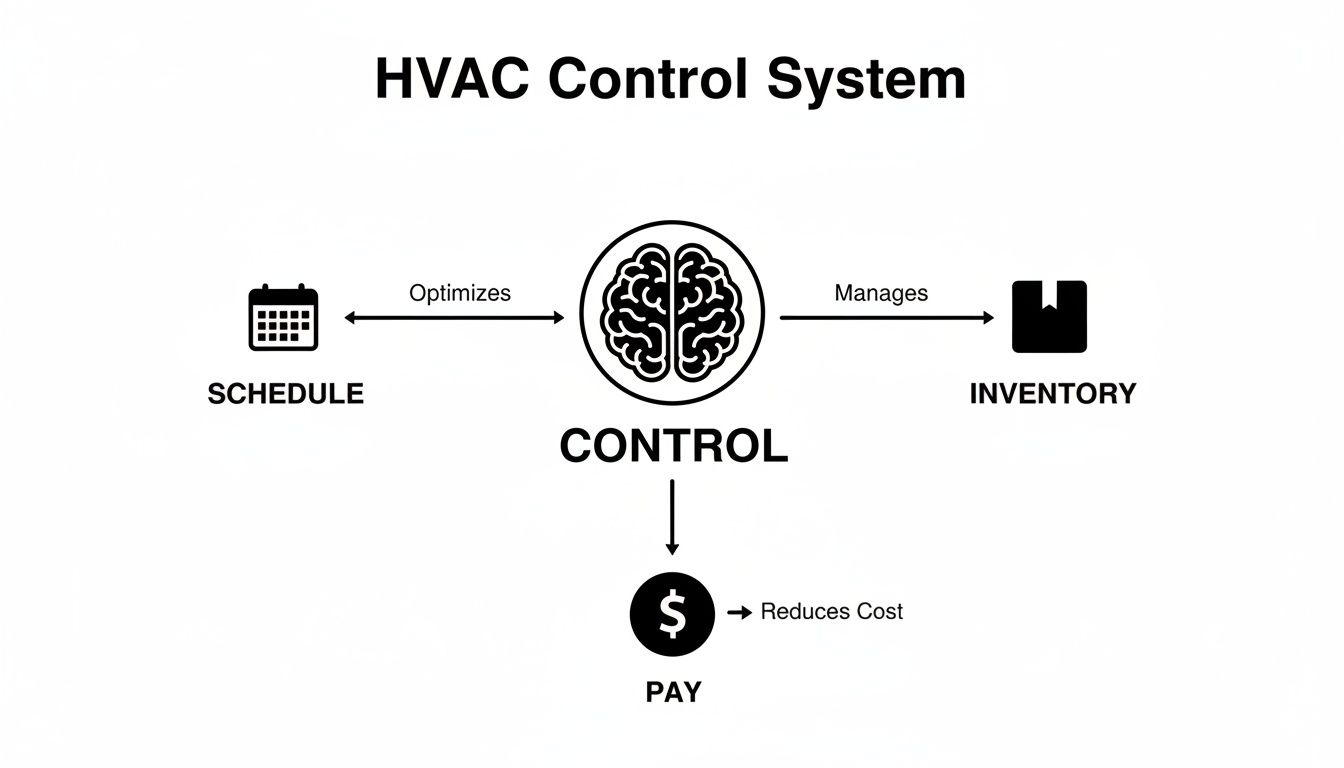
It’s a great visual for how a single platform acts as the brain of the operation, turning a bunch of separate tasks into a smooth, efficient workflow.
Robust Inventory Management
"Where is that specific capacitor?" It's a question that can bring a profitable job to a screeching halt. Disorganized inventory is a silent profit killer, causing project delays, pointless trips to the supply house, and parts just plain disappearing. True hvac management software solves this with robust inventory tracking.
It gives you a live look at the parts on every truck and in the warehouse. When a tech uses a part, it’s automatically taken out of their van's stock and added to the invoice. Nothing gets missed.
- Prevent Stockouts: Set up low-stock alerts that automatically trigger a reorder before you run out.
- Eliminate Shrinkage: Track every part from the moment you buy it to the moment it's installed, cutting down on loss and theft.
- Improve First-Time Fix Rates: Make sure your techs roll up to every job with the right parts, so they can get it done in one trip.
A Powerful Mobile App for Technicians
Your techs are the face of your company, and their efficiency on the job directly hits your bottom line. A great mobile app essentially turns their truck into a mobile office, giving them the tools they need to do their best work. Right from their phone or tablet, they can access their schedule, get turn-by-turn directions, pull up a customer’s entire service history, and follow standardized checklists for different job types.
Even better, the app closes the loop on the entire job while they're still on-site.
Technicians can:
- Update Job Status: Keep the office in the loop in real-time as they travel, start, and finish a job.
- Capture Photos and Notes: Document their work for your records and for the customer's peace of mind.
- Process Payments Immediately: Take a credit card right there or send a secure payment link, which does wonders for your cash flow.
By arming your field team with these tools, you slash the administrative busywork back at the office, get rid of paperwork errors, and shrink the time it takes to get paid. It's this combination of features that creates a seamless flow, driving both a tighter operation and a healthier bank account.
How to Choose the Right HVAC Software for Your Business
Picking the right HVAC management software can feel overwhelming. You're swimming in a sea of sales pitches and endless feature lists, and every provider claims they have the magic bullet for your business. But here’s the thing: the best platform isn't the one with the most bells and whistles. It's the one that actually fits how you work.
Think of it like buying a new work truck. You wouldn’t just grab the one with the shiniest chrome. You'd pop the hood, check the towing capacity, and make sure it has the right bed and tool storage for the jobs you run every day. Applying that same practical mindset to software is the key. Your goal is to cut through the marketing fluff and find a real operational partner that will grow with you.
Start With an Evaluation Checklist
Before you even think about scheduling a demo, you need to map out what you're looking for. A simple checklist is your best friend here—it keeps you grounded and helps you compare different systems on an apples-to-apples basis.
To start building your list, ask your team: what are the top three biggest headaches we deal with every single day? Is it disorganized scheduling, technicians running out of parts, or invoices that take weeks to go out? Nailing down your biggest pain points right away helps you separate the “must-have” features from the “nice-to-haves.”
This is a simple but powerful exercise. It ensures you’re looking for a tool that will deliver a real impact from day one.
To help you get started, here's a practical checklist you can use to compare different software options. Don't just take their word for it; rate each platform yourself based on what you see and hear during the demo.
HVAC Software Evaluation Checklist
| Feature/Criteria | Key Questions to Ask | Your Rating (1-5) |
|---|---|---|
| Mobile App UX | Is the app fast and easy to use? Does it work offline? Can techs easily view job history and add photos? | |
| Dispatch & Scheduling | How easy is it to drag-and-drop jobs? Can you see tech locations in real-time? How does it handle emergency calls? | |
| Inventory Management | Can it track parts on trucks and in the warehouse? Does it automatically add parts to invoices? | |
| Quoting & Invoicing | Can techs build multi-option quotes in the field? Is the invoicing process quick and simple? | |
| Data Migration | What's their process for moving my customer data? Do they offer dedicated support for this? | |
| Scalability | How does the pricing and feature set change as my team grows from 3 techs to 15? | |
| Support & Training | What does onboarding look like? Is support included in the price? What are their support hours? | |
| Reporting | Can I easily track key metrics like job profitability, tech performance, and revenue by service type? |
This checklist forces you to look past the sales pitch and focus on how the software will actually function in your day-to-day operations.
Critical Areas to Investigate During a Demo
Once you have your priorities straight, it's time to put these platforms to the test with a live demo. Don't just sit back and watch a canned presentation. You need to take control and ask tough questions based on real-world situations your team faces.
Here are the key areas you absolutely have to dig into:
- Scalability for Growth: Be direct. Ask, "How will your system support us as we grow from a couple of vans to a fleet of twenty?" The last thing you want is a platform you'll outgrow in a year or two.
- Mobile App Experience: Your techs will live in this app, so it has to be rock-solid. Is it intuitive? Can they use it in a customer's basement with spotty cell service? A clunky app will be dead on arrival with your team.
- The Dispatch Board: During a crazy-busy day, is the dispatch board actually helpful? You should be able to see tech locations, job statuses, and open time slots with just a glance.
- Real-World Inventory Management: Find out if the system can track parts on each truck as well as in a central warehouse. How simple is it for a tech to add a part to a work order and make sure it gets billed correctly?
- Data Migration & Onboarding: Getting your data out of your old system and into a new one can be a nightmare. Ask them to walk you through their exact process. A company that offers a smooth, supported transition is worth its weight in gold.
A software demo isn’t a passive viewing experience—it's an interrogation. Your job is to push beyond the polished talking points to see how the system holds up under pressure.
Understanding the True Cost
Finally, you need to get crystal clear on pricing. Many software providers love to hide extra fees for things like adding users, data storage, or getting priority support. Demand a full breakdown of every potential cost so there are no nasty surprises waiting for you six months down the line.
Look for a provider with straightforward, tiered pricing that makes sense for your business size. A plan for a two-person team should look very different from an enterprise plan for a fifty-person company. Double-check that the plan you're considering includes all your "must-have" features without forcing you into expensive add-ons.
By taking this methodical approach, you can turn an overwhelming decision into a confident one. When you focus on your specific needs and aren't afraid to ask the hard questions, you'll find the right hvac management software that solves today's problems and is ready to help you grow for years to come.
Solving Daily Headaches with Real-World Scenarios
Features and specs are one thing, but the true test of any HVAC management software is how it handles the frustrating, money-draining problems you bump into every single day. So let's step away from the bullet-point lists and put ourselves in the shoes of business owners dealing with situations that will feel all too familiar. These stories show how the right software delivers real solutions to common operational headaches.

We'll dive into three classic scenarios: a small startup needing to punch above its weight, a mid-sized company losing its grip on inventory, and a busy contractor buried under an avalanche of customer calls. Each example highlights a specific pain point, the software-driven fix, and the tangible results that follow.
Scenario 1: The Two-Person Startup Needing a Professional Edge
Meet Alex and Ben. They're a skilled two-person HVAC team, and their work is top-notch, but their back-office operations are stuck in the past. They're still scribbling quotes on carbon copy paper, texting job details back and forth, and making awkward phone calls to chase down payments. They look and feel like a small operation, which makes it tough to land bigger, more profitable jobs against the established players.
Their main problem is a lack of professionalism that’s hurting their credibility and slowing them down. They need a system that makes them look as good as their work actually is.
The Software Solution:
By adopting HVAC management software, they instantly level up their entire customer experience.
- Polished Digital Quotes: They can now build professional-looking estimates right on a tablet, complete with their logo, clear line items, and photos. Customers can approve with a simple digital signature on the spot.
- Automated Scheduling: When a job gets the green light, it drops directly into a shared digital calendar. No more double-bookings or missed appointments because of a text that got lost in the shuffle.
- Seamless Invoicing & Payments: The moment a job is finished, an invoice is automatically generated and emailed to the customer, complete with a secure link to pay online.
The outcome is immediate. Alex and Ben start winning more bids because their quotes project confidence and quality. They get paid faster, which completely changes their cash flow, and they spend less time buried in paperwork and more time doing billable work.
Scenario 2: The Mid-Sized Company Bleeding Money on Inventory
Now, let's look at Maria. She runs a plumbing company with five service vans and a small warehouse. She knows she's losing money on parts but can't pinpoint where the leak is. Technicians grab what they need, but things aren't always logged correctly. This leads to stockouts that delay jobs and "shrinkage" that quietly eats into her profits.
Her core problem is a total lack of inventory visibility. Her spreadsheet is always out of date, and she has no clue what parts are on which truck at any given moment.
When inventory isn't tracked in real-time, every part that leaves the shelf without being billed is pure loss. This "ghost inventory" can silently drain thousands of dollars from a business's bottom line each year.
The Software Solution:
Maria implements a platform with integrated inventory management, giving her a centralized, live view of every single part her company owns.
- Real-Time Van Stock: Each van is set up as its own mini-warehouse in the system. When a tech uses a part on a job, it's automatically deducted from their van's inventory and added straight to the customer's invoice.
- Low-Stock Alerts: Maria sets minimum quantity levels for critical parts. The software automatically flags when it's time to reorder, putting an end to last-minute, panicked runs to the supply house.
- Usage Reporting: She can now pull reports to see which parts are used most often and by which technicians. This helps her spot trends and manage her stock much more intelligently.
The result is a game-changer. Within three months, Maria slashes her inventory write-offs by over 40%. Her first-time fix rate climbs because techs show up to jobs with the right parts, and job profitability improves because every last component gets billed correctly.
Scenario 3: The Busy Contractor Drowning in Phone Calls
Finally, picture Tom, an electrical contractor whose office phone never stops ringing. Customers are constantly calling to ask, "When will my technician be here?" or "Did you get my check?" His office manager spends half her day acting as a human answering machine instead of focusing on tasks that actually grow the business.
Tom's biggest issue is reactive customer communication. The lack of proactive updates creates anxiety for his customers and a massive administrative burden for his team.
The Software Solution:
Tom opts for software with strong customer communication tools, which automates the most common back-and-forth.
- Automated Reminders: Customers automatically get a text and an email the day before their appointment.
- "On-My-Way" Texts: When a tech marks themselves as en route, the customer receives a notification with an ETA—just like they’d get from a ride-sharing app.
- Real-Time Job Updates: The office can see every job's status—traveling, in-progress, completed—on a live dashboard, without ever having to call the tech for an update.
The impact is felt on day one. Customer calls to the office drop by more than half, freeing up his office manager to handle marketing and follow up on quotes. Customer satisfaction scores go up, and online reviews start highlighting the company's fantastic communication. Tom is no longer just fixing electrical problems; he's delivering a modern, seamless service experience.
Making the Switch Without the Headaches
The very thought of swapping out the software that runs your business is enough to make anyone nervous. It brings up visions of lost customer data, a schedule in chaos, and technicians pushing back against learning something new. It’s no wonder so many owners stick with clunky spreadsheets or outdated software—the headache of switching just seems bigger than the daily frustrations.
But here’s the thing: moving to a modern HVAC platform doesn't have to be a nightmare.
With a smart plan and the right partner, the transition can be a smooth, even empowering, upgrade for your entire crew. It’s not about flipping a switch and hoping for the best. It’s about taking a step-by-step approach that carefully handles your data, your people, and your daily operations.
Preparing for a Seamless Migration
A successful switch starts long before you ever click "cancel" on your old system. The first, most critical step is getting your data house in order. Think of it like packing for a big move—a little organization upfront saves you from a massive mess when you're trying to unpack.
Start by tidying up your most essential information. This means:
- Customer Lists: Get all your customer names, service addresses, phone numbers, and emails into a clean spreadsheet. This is the time to merge duplicates and fix any typos.
- Parts Inventory: Create a master list of your current inventory. You'll need part numbers, descriptions, how many you have on hand, and what they cost. This list will become the backbone of your new digital pricebook.
- Service History: If you can, export your old job records. Even if not all of it can be imported directly, having that history on hand is incredibly valuable.
Honestly, choosing a software provider that offers dedicated onboarding support is a must. You're not a data expert, and you shouldn't have to be. Companies like TackonFSM actually offer free data migration, taking that entire technical burden off your plate. Their team will work with you to make sure your customer and inventory lists are mapped and imported correctly into the new system.
Empowering Your Team for Quick Adoption
New software is useless if your team won’t use it. The migration process has to be just as much about training and getting buy-in as it is about moving data. This goes for your techs in the field and your staff in the office.
For your technicians, the mobile app is their new best friend. The key here is to keep it simple and show them the immediate benefits.
- Start with the Basics: The first training shouldn't be a data dump. Just focus on the core tasks: seeing their schedule, updating a job's status, and adding a few notes or photos. That’s it.
- Highlight the "What's In It for Me": Frame it around their pain points. Show them how the app gets rid of paperwork, gives them instant access to a customer's history (so no more calls back to the office), and provides turn-by-turn directions to the next job.
- Run a Pilot Group: Pick one or two of your most tech-friendly techs and have them use the app for a week. Let them be the ones to tell the rest of the crew how much easier it made their day.
Back in the office, the goal is to build new muscle memory around the dispatch board and invoicing. Your office staff will love it once they see how the new system ends hours of manual data entry and frees them from the constant "where's my tech?" phone calls.
A well-planned migration isn’t just about moving data; it's about leading your people through change. By demonstrating how the new software makes their individual jobs easier, you turn potential resistance into enthusiastic adoption.
The reality is, once a business finds a platform that truly works for them, they rarely leave. The data backs this up: customer retention for top HVAC software is over 82%, while the number of companies that switch platforms is under 14%. This loyalty is often built on great support and smooth migrations that take the fear out of getting started. You can dive deeper into HVAC software market trends to see just how much these tools are helping businesses grow.
How to Measure the ROI of Your New Software

So you've invested in new HVAC management software. It's a big step, but how can you be sure it's actually paying off? Getting past a simple gut feeling that things are running smoother means looking at cold, hard data. If you want to see a clear return on investment (ROI), you have to track the right numbers—your key performance indicators (KPIs).
This isn't about becoming a master accountant overnight. It’s about keeping an eye on a few core metrics that tell the true story of your business's health. Think of it like the dashboard in your work van. You don't need to be a mechanic to know that the speedometer, fuel gauge, and temperature light are telling you something important. The software's ROI is measured by how much those business vitals improve.
Key Metrics for Proving Software Value
To make sure your new platform is pulling its weight, you need to focus on real changes in your efficiency, cash flow, and cost control. The trick is to get a baseline before you make the switch. Measure these numbers now, and then track them again 30, 60, and 90 days after you go live. That’s how you'll see the impact.
Here are the essential KPIs you should be watching:
- Jobs Completed Per Tech Per Day: This is your bread and butter. Better scheduling and dispatching should mean your techs are handling more billable work without putting in more hours. A bump here goes straight to your revenue.
- Average Time to Payment: How long does it take from "job done" to "money in the bank"? With digital invoicing and on-the-spot payment options, this window should shrink dramatically. Getting that cash into your business faster is a huge win.
- Inventory Write-Offs: Take a hard look at the value of parts that get lost, damaged, or just vanish. A solid inventory system should make this number nose-dive, since every part is tracked from the moment it hits your shelf to the final invoice.
The goal is to replace assumptions with answers. When you can confidently say, "Our techs complete 15% more jobs per week and we get paid 12 days faster," you've proven the software’s value beyond a doubt.
Putting a Financial Value on Efficiency
The great thing is, you can put real dollar amounts on these gains. Let’s say your average invoice is $400. If each of your five technicians can complete just one extra job per week thanks to the software, that’s an extra $2,000 in revenue coming in every single week.
It’s the same story with inventory. If you were writing off $1,000 in lost parts every month and the software cuts that waste by 70%, you’ve just put $700 back into your pocket. By tracking these specific data points, your hvac management software stops being an expense on a spreadsheet and becomes a measurable profit center for your business.
Got Questions? We've Got Answers
Making a big software decision is a huge step, and it's smart to have questions before you jump in. We've pulled together the most common things we hear from business owners just like you, offering clear answers to help you feel confident about finding the right HVAC management software for your company.
How Much Does HVAC Software Typically Cost?
The price tag for HVAC software can be all over the map, but most modern tools run on a subscription. Think of it like a monthly gym membership for your business operations.
For a smaller team, you're likely looking at somewhere between $50 to $150 per month. This usually covers the essentials like scheduling, dispatching, and invoicing. If you’re a larger outfit that needs the whole nine yards—things like multi-location inventory tracking or advanced reporting—you can expect to be in the $200 to $500+ per month range. The key is to find transparent pricing and steer clear of any company that tries to nickel-and-dime you for basic support.
Will My Technicians Actually Use a Mobile App?
This is probably the number one concern we hear from owners, and for good reason. Your team is busy, and the last thing they need is another complicated piece of tech to wrestle with.
The secret to getting your techs on board is choosing software with a mobile app that’s genuinely easy to use. If it's clunky or confusing, they'll drop it in a heartbeat.
Pro Tip: When you're getting a demo, insist on seeing the mobile app from a technician's point of view. A great app makes their life easier by getting rid of paperwork, putting customer history at their fingertips, and giving them navigation to the next job. It should remove friction, not add it.
Once your techs realize the app saves them time and headaches, they'll wonder how they ever lived without it.
Can This Software Integrate With QuickBooks?
Absolutely. Any reputable HVAC management software today should offer a rock-solid integration with accounting platforms like QuickBooks. This isn't just a "nice-to-have" feature; it's a must-have.
This connection is what saves you from the nightmare of double data entry. When a tech closes out a job and creates an invoice in the field, a good integration pushes that information straight into QuickBooks automatically. Your books stay clean, your office staff isn't bogged down with manual data entry, and tax season becomes a whole lot less stressful.
Is My Business Too Small for This Software?
Not at all. In fact, we often see small and growing shops get the biggest bang for their buck, and fast. The right software lets a two-person operation punch way above its weight class, giving you the professional polish of a much larger company.
Think about it: you can send sleek, branded quotes, set up automatic appointment reminders, and take payments on the spot. It helps you build a solid operational foundation from the start, so when you're ready to grow, you can scale up smoothly instead of scrambling in chaos.
Ready to see how TackonFSM can help you get organized and boost your bottom line? Start your free 14-day trial today and discover a better way to run your HVAC business.