

The Ultimate Mobile App for Field Service Guide

At its core, a mobile app for field service is a piece of software built for smartphones and tablets that puts your entire business operation in your technicians' pockets. It's the digital link between your team in the field and your staff back at the office.
This isn't just about getting rid of paper; it’s about replacing the constant phone calls, messy whiteboards, and confusing spreadsheets with one organized, central system.
Your Business Command Center in Your Pocket
Think about running your entire field operation right from your phone. That's what a mobile field service app delivers. It’s not just another app—it's the universal tool for your technicians on the road and the main control panel for your dispatchers and office managers. It’s designed to cut through the daily chaos that eats up your time and profits.
You can think of it as the master key that finally connects everyone and makes the whole operation run smoothly. Instead of fumbling with paper invoices, deciphering text message threads, or trying to update a spreadsheet from three days ago, everything lives in one spot. This shift turns a clunky, disorganized workflow into a well-oiled machine.
From Manual Chaos to Mobile Control
For any serious HVAC, plumbing, or electrical contractor today, this kind of technology is the key to scaling up. It directly solves the nagging problems that hamstring so many businesses:
- Lost Paperwork: When work orders and invoices are digital, they can't get lost in the truck or left on a customer's counter.
- Dispatch Confusion: Your techs get every single job detail sent straight to their device—customer history, turn-by-turn directions, and a list of the parts they'll need.
- Delayed Payments: With on-site payment processing, you can collect what you're owed the second the job is finished. No more chasing invoices for weeks.
Moving to a mobile app isn't just a small upgrade; it's a fundamental change in how a modern trade business runs. The proof is in the numbers. The global field service management market is expected to jump from USD 5.64 billion in 2025 to USD 9.68 billion by 2030.
This huge growth isn't just a passing trend. As you can see in recent research on field service management trends, companies are realizing these apps are essential to stay competitive. A mobile app for field service is no longer a "nice-to-have"—it's a must-have for building a business that's ready for the future.
The Core Features That Actually Run Your Field Operations
A great mobile app for your field service business is far more than a fancy digital calendar. Think of it as the central nervous system for your entire operation—the one thing that connects your office, your techs, and your customers. The right set of features doesn't just make life easier; they directly solve the most frustrating and costly problems that keep business owners up at night.
These are the absolute must-haves that turn daily chaos into calm control.
Intelligent Scheduling and Dispatching
At the heart of it all is intelligent scheduling and dispatching. Picture this: a drag-and-drop calendar where your dispatcher sees everyone’s location, availability, and specific skills in real time. No more frantic phone calls trying to figure out who’s closest or who knows how to work on a specific boiler model. A job gets assigned in a few clicks, and a notification with all the details zips straight to the technician's phone.
This bird's-eye view is a game-changer. It stops inefficient routing and last-minute scheduling panics in their tracks. The visual below really drives home how a mobile app replaces scattered, manual systems with a single, organized command center.
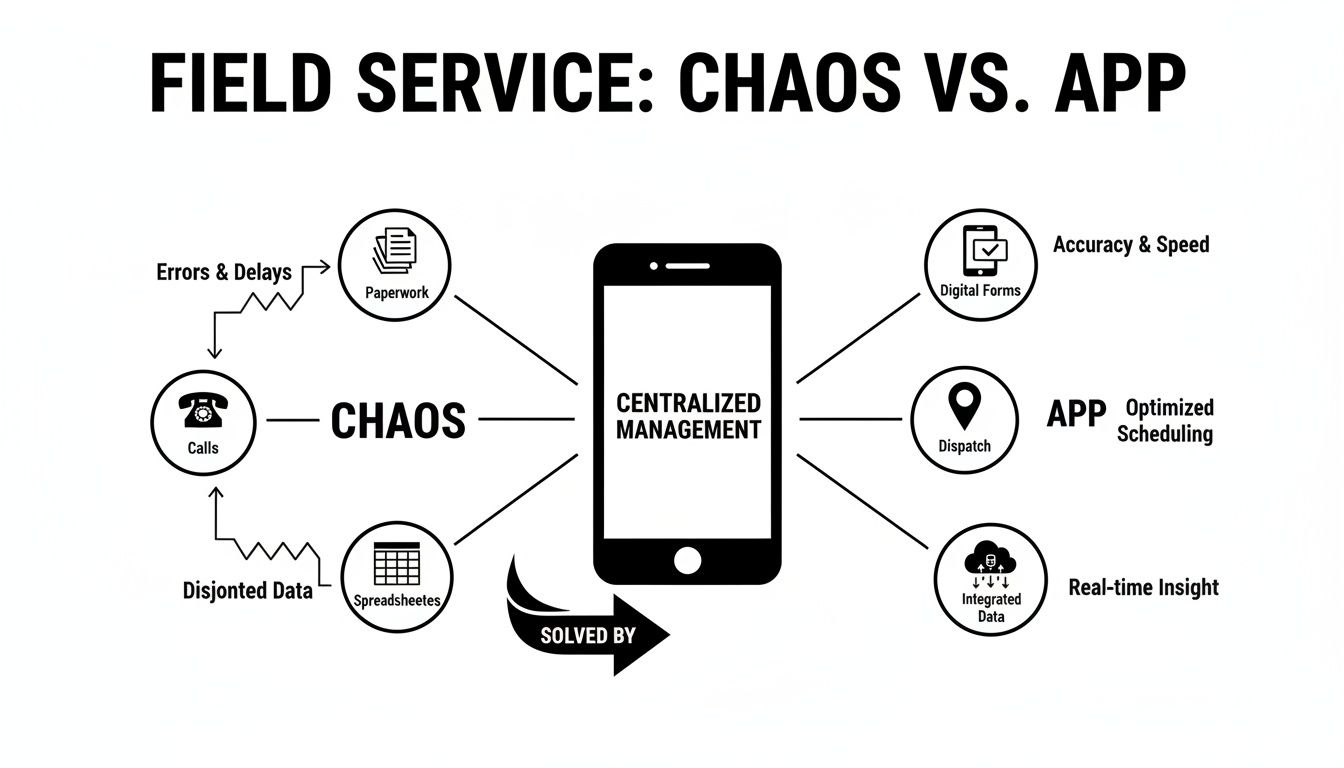
This map shows the shift from a mess of paperwork, endless phone tag, and confusing spreadsheets to one unified mobile solution. It's all about bringing communication and data management under one roof for the whole team.
Mobile Access to Job and Customer History
Once that job is dispatched, your technician has everything they need right in their pocket. With a mobile app for field service, they can instantly pull up the customer’s complete service history—past invoices, old notes, even photos of the previous setup. This kind of context is gold for diagnosing issues quickly and spotting opportunities for new work.
They can also see detailed equipment information, check on warranty status, and review any special requests the customer made. Arriving on-site this prepared makes your team look incredibly professional and ready to get the job done right, without ever having to call the office for basic info.
Tools for Quality Control and Proof of Work
Your reputation is built on the quality of your work, and a good app helps you protect it by building quality control directly into the process.
- Digital Checklists and Forms: Your techs can follow custom, step-by-step checklists for any job, whether it’s a standard HVAC tune-up or a complex plumbing installation. This ensures that crucial steps are never forgotten and that safety protocols are followed every single time.
- Photo and Video Attachments: Snapping before-and-after photos is simple. These images provide undeniable proof of work, which is invaluable for protecting your business from disputes and creating a visual record for future calls.
A mobile app turns every technician into your best inspector. By standardizing procedures with digital checklists, you ensure consistent, high-quality service on every single job, building customer trust and reducing callbacks.
Finally, let’s talk about getting paid. Modern field service apps come with integrated payment processing. This means your technician can create an invoice, show it to the customer on a tablet, and take a credit card payment right then and there. This one feature dramatically improves cash flow and puts an end to the frustrating task of chasing down unpaid invoices.
The table below breaks down how these app features directly solve the everyday headaches you're probably all too familiar with.
From Manual Problems to Mobile Solutions
| Common Challenge | Mobile App Feature | Business Outcome |
|---|---|---|
| "Who is available for an emergency call?" | Real-Time Scheduling & GPS Tracking | Dispatchers instantly see the nearest available tech, reducing travel time and improving response. |
| "I can't read the tech's handwriting." | Digital Forms & Checklists | Clean, standardized digital records eliminate errors and ensure all job data is captured correctly. |
| Customer claims a part wasn't replaced. | Photo & Video Documentation | Before-and-after photos provide undeniable proof of work, resolving disputes quickly and professionally. |
| Waiting weeks for invoice payments. | On-the-Spot Invoicing & Payments | Technicians collect payment immediately after the job is done, dramatically improving business cash flow. |
| Techs calling the office for customer history. | Mobile Access to Customer Data | Full service history, notes, and equipment details are available on-site, empowering techs to work faster. |
As you can see, it’s not just about technology for technology's sake. It's about implementing smart tools that provide clear, measurable solutions to the real-world problems that cost your business time and money.
Real-World Benefits for Your Trade Business

The features of a mobile app for field service sound great on paper, but what do they actually mean for your bottom line? This is where the rubber meets the road. The right app translates those digital tools into more money in your pocket, happier customers, and a team that runs like a well-oiled machine. It connects every single action in the field directly back to real business results.
At the end of the day, a smoother operation always leads to a healthier bank account.
Boost Your Profitability and Cash Flow
Think about this: you’re standing in a customer's living room, building a detailed, multi-option quote right on your tablet. With your parts, labor rates, and markups already loaded, you can present "Good, Better, Best" choices on the spot. This not only protects your margins but also tends to bump up the average ticket size. When customers see professional options laid out clearly, their confidence soars, and you get approvals much faster.
That same speed applies to getting paid. On-site payment processing means you can collect funds the second the job is finished. This one change can have a massive impact on your cash flow, putting an end to the frustrating cycle of chasing down unpaid invoices for weeks.
Elevate the Customer Experience
Top-notch service is your best marketing tool, and a mobile app is your secret weapon for delivering it every time. Say goodbye to those vague, four-hour service windows that leave homeowners annoyed and waiting. Modern apps create a far better experience with simple, automated communication.
- Automated Reminders: Appointment confirmations and reminders are sent out automatically via text or email. This seriously cuts down on no-shows and keeps your schedule packed.
- "On-My-Way" Alerts: With a single tap, your techs can send a pre-written text letting the customer know they're on their way.
- Tech Tracking Links: Many apps now include a map link so customers can see their technician's location in real-time—just like they would for their pizza delivery.
By getting rid of the guesswork and communicating clearly, you turn the customer experience from a frustrating wait into a professional, transparent process. That's how you build trust and earn those glowing five-star reviews.
Drive Unbeatable Team Efficiency
A well-organized team simply gets more done in less time, and that's precisely what a mobile FSM app helps you achieve. It often starts with optimized routing, which automatically maps out the most efficient travel paths for your crew. That small tweak alone can significantly reduce fuel costs and non-billable drive time, squeezing more paying jobs into every day.
Plus, the instant sync between the field and the office eliminates redundant paperwork and double-entry. When a technician closes out a job on their phone, the invoice is ready, inventory is updated, and the customer’s history is complete. This seamless flow of information is becoming mission-critical, especially as smaller trade businesses are adopting these tools faster than ever.
In fact, the small and medium-sized business segment is expected to grow at a CAGR of 16.4% through 2030, mostly thanks to easy-to-use cloud software. You can read more about how smaller contractors are leading FSM adoption on Grand View Research. This trend proves that efficiency tools aren't just for the big guys anymore; they are essential for any business looking to grow.
How to Choose the Right Field Service App
Picking the right software for your business can feel overwhelming. You're hit with a wall of marketing hype and feature lists that all start to sound the same. But finding the perfect mobile app for field service gets a lot easier once you know what to look for. Your goal isn't just to buy a piece of software; it's to find a partner that genuinely gets the day-to-day grind of your trade.
Think about it like buying a new work truck. You wouldn’t get a small van if you’re hauling heavy-duty equipment, and you wouldn't buy a massive rig for quick residential calls. The software needs to be the right size and have the right tools for the jobs you actually do.
Evaluate Its Fit for Your Trade
First, ask yourself: is this a generic, one-size-fits-all app, or was it built with my industry in mind? A platform designed for HVAC contractors will have totally different workflows and parts lists than one made for plumbers or electricians. Look for software that speaks your language and solves problems you face every single day.
Here's another huge thing that often gets missed: offline capability. Your techs are constantly in basements, rural areas, or new construction sites where cell service is a joke. A great mobile app has to let them see job details, fill out checklists, and create invoices without a signal. Once they’re back online, it should all sync up automatically.
Choosing a field service app is a long-term commitment. Prioritize a solution that not only meets your current needs but also offers the scalability to grow alongside your business without forcing you into costly and disruptive platform changes down the road.
Analyze Core Functional Needs
Once you've confirmed it’s a good fit for your trade, it's time to dig into the features that really move the needle on profit and efficiency. Your checklist should be filled with sharp questions about how the software handles the most important parts of your operation.
- Inventory Management: Can it track parts from the main warehouse all the way to a specific tech's van? A solid inventory system stops parts from "walking away," makes sure your job costing is accurate, and prevents you from showing up to a job unprepared.
- User-Friendliness: How easy is the mobile app to actually use? Your crew are skilled tradespeople, not tech wizards. If the app isn't simple to learn and quick to operate, you'll be fighting an uphill battle just to get them to use it.
- Pricing and Scalability: Is the pricing clear and predictable? Watch out for solutions with a bunch of hidden fees or a price that skyrockets the moment you add a few more team members. You want a clear structure that lets you grow without blowing up your budget.
- Onboarding and Support: What kind of help do you get when you're making the switch? A provider that offers real, dedicated support during onboarding and helps you move your old data over is worth its weight in gold. It makes the whole transition so much smoother.
As you weigh your options, you might even look into the flexibility of newer methods like building apps without coding, which can help you create a solution perfectly matched to your specific needs. By zeroing in on these core areas, you can cut through the noise and pick a field service app that will become a real engine for your business's growth.
How to Get Your New System Up and Running—Without the Headaches
The thought of switching software can be daunting. Too many businesses stick with clunky paper systems because they’re worried about a messy transition that throws daily operations into chaos. But here's the thing: moving to a mobile app for field service doesn't have to be a nightmare. With a clear, step-by-step plan, you can get it done smoothly.
Think of it like a kitchen renovation. You don’t just show up one day and start swinging a sledgehammer. You plan the layout, order the appliances, and schedule the work in phases to keep disruption to a minimum. Implementing new software is no different. It’s all about smart preparation and a structured rollout.
The real goal of implementation isn't just to "go live." It's to make sure your team actually uses the new tool confidently, turning its features into real-world efficiency gains. A rushed or poorly planned launch can easily create more problems than it solves.
A smooth transition starts long before anyone logs in for the first time. The most important first step? Getting your existing data organized and ready to move.
Prepare Your Data for a Clean Slate
Before you can move into your new digital "home," you have to pack the boxes. This means gathering all your essential business information and getting it ready for the new system. A good software partner will have an onboarding team to handle the technical side of things, but the cleaner your data is, the faster and more accurate the whole process will be.
Start by compiling and tidying up these core records:
- Customer Information: Get all your customer details—names, addresses, phone numbers, and emails—into a single, clean spreadsheet.
- Parts and Price Books: Pull together your complete list of parts, services, and current pricing. This is the perfect chance to update any old costs and get rid of items you no longer use.
- Service History: If you can, export job histories from whatever system you're using now. This data is gold for your technicians out in the field.
Roll It Out to Your Team in Phases
Once your data is ready, the last thing you want to do is overwhelm your team by throwing everything at them at once. A phased training approach is the way to go. It builds confidence and momentum.
I always recommend starting with the people in the trucks. Get your technicians comfortable using the mobile app first. Let them master viewing jobs, filling out digital forms, and taking payments on their phones or tablets. When they see how much easier their day becomes, their buy-in will drive the whole process forward.
To help ensure your team fully embraces the new tools, it can be helpful to review a guide to digital adoption software for proven strategies.
After your field crew is up and running, you can then introduce the advanced scheduling, dispatching, and reporting features to the office staff. This methodical approach breaks a big change down into small, manageable wins and sets your business up for success from day one.
Why TackonFSM Is The Right Fit For Your Trade
When you're shopping for a mobile app for field service, you're really looking for a partner that gets the nitty-gritty of your trade. Generic software just doesn't cut it. It wasn't built to handle the chaos of tracking truck stock, the nuance of building good-better-best quotes, or the absolute need for a simple interface that your techs won't hate using.
That’s exactly where we started when building TackonFSM. We designed it from the ground up for the unique headaches that HVAC, plumbing, and electrical contractors face every single day.
Think of it less as just another piece of software and more as a tool to finally get a handle on your margins. It all starts with an interface that makes sense to your crew, which means less pushback and a much faster rollout. When your team is actually using the tech, the real benefits—like dead-on job costing and getting paid faster—start showing up right away.
Inventory Control That Finally Works
For so many trade businesses, parts and inventory are where profits go to die. We tackle this problem head-on with powerful, built-in controls that other platforms often bolt on as an afterthought. Our system is designed to stop parts from "walking away" and to make sure you bill for every single component that leaves the truck.
- A Living Parts Database: We get you started with a shared pricebook of over 3,000+ items, but the real magic happens as your team adds new parts on the fly. This makes every future quote faster and more accurate.
- Van and Warehouse Tracking: Know what’s on every truck and in the shop. This simple visibility cuts down on those last-minute, profit-killing runs to the supply house and ensures your techs show up ready to work.
With TackonFSM, inventory management isn't just a feature—it's the heart of the system. We give you the clarity you need to protect your profitability on every job, turning what was once a weakness into a serious competitive advantage.
A Straightforward Path to Growth
We believe powerful tools should be within reach for everyone. That’s why you’ll find our pricing is transparent and scalable, without any long-term contracts or sneaky setup fees. Our Duo Team plan starts at just $69/month, giving even a two-person shop access to the same professional-grade tools for quoting, scheduling, and getting paid.
TackonFSM is built to be your command center, simplifying everything from the first customer call to the final invoice. It’s the mobile app for field service that helps you lock down your inventory, protect your margins, and build a more profitable business.
Still Have Questions? Let's Clear Things Up.
Making a big change in your business always comes with a few "what ifs." It's completely normal. Let's tackle some of the most common questions that pop up when owners are thinking about moving to a field service app.
How Long Does It Really Take to Train My Team?
This is probably the biggest worry I hear, and the answer is usually a pleasant surprise: not long at all. With a well-designed app, your techs can get the hang of the essentials—like checking their schedules, pulling up job details, and running through checklists—in just a few hours.
A good software partner won't just hand you the keys and walk away. They should provide hands-on onboarding to get everyone up to speed. The goal is to have your entire crew comfortable and using the system effectively within the first week, so you don't miss a beat.
Can I Bring My Existing Customer and Parts Data Over?
Yes, and you absolutely should. You've spent years building that information—it's gold. Any worthwhile FSM provider will see data migration as a critical part of the setup.
They'll help you import everything from your customer lists and service histories in QuickBooks to your parts pricing locked away in old spreadsheets. This ensures you can hit the ground running without losing a single piece of your business's history.
Is This Kind of Technology Actually Affordable for a Small Shop?
It is now. The old way of doing things involved massive upfront costs for clunky, server-based software. Thankfully, those days are over. Modern, cloud-based systems are built on flexible subscription plans that fit the budget of a growing business.
Many owners are shocked when they realize a professional mobile app for field service often costs less than what they're already losing to wasted fuel, disorganized paperwork, and delayed payments every month.
Think of it less as an expense and more as an investment. The right tool pays for itself surprisingly fast by plugging the leaks that drain your profits.
Ready to see how a platform built specifically for the trades can make a real difference? Find out how TackonFSM puts you back in control of your inventory, margins, and daily operations at https://www.tackonfsm.com.


