

Boost Efficiency with work order software for field teams
Work order software is your business's central nervous system. It's the one place that connects your office team, your technicians in the field, and your customers, getting everyone on the same page. It’s what finally gets you out of the messy world of paper, spreadsheets, and endless phone tag.
Moving Beyond Paperwork and Spreadsheets
If you're a trade contractor, you know the daily grind all too well. It’s the frantic call from a customer about a work order you can't find, a technician showing up to a job without the right notes, or parts getting used on a job but never showing up on the final invoice.
These aren't just minor hiccups; they're symptoms of a disconnected process. Trying to run a business on paper, whiteboards, and scattered spreadsheets creates black holes where information disappears, costing you serious time and money. Every missed part is pure profit down the drain, and an unprepared tech chips away at your hard-earned reputation.
The Shift to a Digital Command Center
Modern work order software fixes this by becoming the single source of truth for your entire operation. Don't think of it as just another piece of technology—think of it as the practical answer to your biggest daily headaches. It organizes every bit of job information, from the first call to the final payment, and makes it available to whoever needs it, whether they're in the office or on a job site.
This isn’t just a niche trend; it’s where the entire industry is headed. The global market for these systems was valued at USD 760.4 million in 2024 and is expected to hit USD 1,187 million by 2030. This boom is happening because cloud-based platforms have made powerful tools affordable for businesses of all sizes. You can read the full research about these market trends to see just how fast things are changing.
Instead of juggling calls, texts, and paperwork, your team operates from one unified system. This replaces guesswork with clarity, allowing you to focus on completing more jobs and growing your business, not chasing down information.
From Paper Piles to a Profit Platform
To really get it, let's look at the real-world difference between the old way and the new way. This isn't just about small tweaks; it’s about swapping out stressful, error-prone habits for smooth, profitable workflows.
The table below breaks down what that looks like day-to-day.
| Operational Task | Manual Method (Paper/Spreadsheets) | Work Order Software Solution |
|---|---|---|
| Job Creation | A dispatcher handwrites notes on a pad or enters basic data into a spreadsheet. | A customer service rep creates a digital work order with all customer details, job notes, and history instantly available. |
| Dispatching | The dispatcher calls or texts technicians with job addresses, hoping they write it down correctly. | The job is assigned to the best available tech via a digital schedule, who gets an instant notification on their phone. |
| On-Site Work | Technicians rely on memory or messy paper notes, often lacking customer history or required parts info. | The tech pulls up the complete job file on their tablet, including service history, notes, and attached photos. |
| Tracking Progress | The office has no idea where a tech is or what the job status is without making a phone call. | GPS tracking and real-time status updates (e.g., "Traveling," "In Progress," "Completed") keep the office in the loop. |
| Invoicing | The tech turns in crumpled paperwork, and the office manually enters parts and labor into an invoice, risking errors. | The tech adds parts and labor to the work order on-site. The software generates a professional invoice automatically. |
It's clear that work order software isn't just about "going paperless." It's about building a stronger, more profitable, and far less stressful business—one where operational headaches become your competitive edge.
How Core Software Features Run Your Business

At its heart, work order software isn't just a digital filing cabinet. Think of it more like the engine of your business, with interconnected parts that power your entire field service operation, from that first customer call straight through to the final payment.
Understanding these core features is like popping the hood on a high-performance vehicle—it shows you exactly what makes the system drive your business forward. These tools work in lockstep to close the communication gaps and kill the double-entry that bogs down any business running on paper or spreadsheets.
Instead of information getting lost in a game of telephone, it all lives in one central hub, accessible to everyone in real time. This is what lets a five-person HVAC shop operate with the same clockwork precision as a company fifty techs strong. To see how these components come together, you can often explore a detailed breakdown, like the one on qrstar's features page.
Visual Scheduling and Dispatching
Remember the old scheduling whiteboard? The one covered in magnets, faded sticky notes, and smudges from last-minute changes? Now, picture that as a clean, digital drag-and-drop board on your computer. That’s modern scheduling and dispatching in a nutshell.
Your dispatcher can see every tech's availability, current job status, and location on a single map or calendar. A new job comes in, and instead of a dozen phone calls, they just drag the work order onto the best tech's timeline. That tech instantly gets a notification on their phone with every detail they need.
This visual approach turns dispatching from a reactive, chaotic scramble into a strategic advantage. You can build smarter routes to cut down on fuel costs, squeeze more jobs into the day, and confidently tackle emergency calls because you know exactly who's free to handle it. It's all about maximizing billable hours without the administrative burnout.
By automating service requests and work schedules, modern software saves valuable time and drastically reduces manual workload. It turns your daily operations into a streamlined, predictable system.
Integrated Estimating and Invoicing
Forgetting to bill for a single part or fumbling the math on labor hours can silently eat away at your profit margins. Integrated estimating and invoicing tools are built to stop that kind of revenue leak.
Instead of scribbling quotes on a notepad, your team builds professional estimates right in the system using a pre-loaded digital pricebook. This is your single source of truth for parts, services, and labor rates, making sure every quote is both consistent and accurate.
- Create Accurate Quotes: Pull from your digital pricebook to build detailed, professional estimates in minutes, not hours.
- Get Instant Approval: Customers can review and approve quotes with a simple click, creating a clean, documented record.
- Convert to Invoices: Once the job is done, the approved estimate flips into an invoice with one tap. No re-typing, no mistakes.
This seamless flow guarantees that what you quoted is what you bill, and what you bill is what you get paid. It gets rid of the manual back-and-forth that invites human error and ensures every part and minute of labor is accounted for, protecting your bottom line on every single job.
The Mobile App for Field Technicians
The mobile app is the lifeline connecting your office to your team in the field. It turns a technician's phone or tablet into their mobile command center, empowering them to do more than just turn wrenches. They become a true extension of your office.
From the job site, a tech can access a customer's entire service history, follow step-by-step checklists to ensure quality, and see detailed notes from the office. But the real game-changer is how they feed information back in real-time.
For example, a tech can snap photos of a busted part, log the new components they used from their van's inventory, and capture the customer's signature right on their screen. They can even process a credit card payment on the spot, which massively improves cash flow. This constant, immediate flow of information keeps the office in the loop without anyone having to pick up the phone.
How Software Features Actually Make You Money
It’s one thing to hear about powerful software features, but what really matters is how they hit your bottom line. We're not just talking about getting jobs done faster. We’re talking about making every single job more profitable, professional, and predictable. For trade contractors, the true magic of work order software is seeing how digital tools turn into real, measurable business growth.
This isn't some abstract idea. The trades are embracing this technology in a big way, with the work order management market expected to hit between USD 830 million and USD 910 million by 2025. The fact that cloud-based systems are driving most of this growth tells you something important: businesses want flexible, affordable solutions that start paying for themselves right away. You can dive deeper into this shift by exploring the market data on Data Insights Market.
So, let's get down to brass tacks and see exactly how these features translate into profits every business owner can see and count.
Stop Leaking Profit on Every Job
Profit leaks are the silent killers in any trade business. It’s the missed part on an invoice, the underestimated labor cost, or the inconsistent pricing that slowly eats away at your margins. Good work order software puts a stop to all that, acting like a financial guardrail to make sure you capture every dollar you've earned.
It all starts with a solid, accurate quote. When you use a digital pricebook, you can build detailed estimates with your exact labor rates and material costs already loaded in. That alone takes the guesswork out of pricing and locks in your profit margin from the get-go.
- Capture Every Single Billable Item: A technician grabs a part from their van and logs it right there in their mobile app. That simple step guarantees the item shows up on the final invoice, turning what used to be a common loss into pure revenue.
- Standardize Your Pricing: With a central pricebook, everyone—from the office to the field—is working from the same sheet. No more underbidding or confusing customers with different prices.
Think about it. What if you could recover just $20 in unbilled parts or labor on each job? If your team does just ten jobs a day, that’s an extra $1,000 in your pocket every single week.
Get Paid Faster and Fix Your Cash Flow
We’ve all been there. "Net 30" turns into "Net 60" or even "Net 90" while you’re stuck chasing paper invoices and waiting for a check that feels like it’s never coming. That lag time can put a serious strain on your cash flow, making it tough to cover payroll, buy materials, or invest in new equipment.
Work order software completely changes the game. It shrinks the payment cycle from a long, manual headache into an instant transaction. By giving your techs the right tools, you can get paid the second the job is done.
By enabling on-site digital payments and secure payment links, you compress the billing cycle from weeks or months down to mere minutes. This isn't just a convenience; it's a fundamental improvement to your financial health.
Your technicians can take a credit card payment right on their tablet or phone. Or, they can text the customer a secure link to pay online immediately. Suddenly, money is hitting your bank account in days, not weeks, giving you the working capital you need to breathe and grow.
Create an Unforgettable Customer Experience
A fantastic customer experience is your best marketing tool, period. It builds loyalty, drives five-star reviews, and gets people talking. Modern work order software helps you deliver a level of professionalism that makes you stand out from the competition.
The experience starts long before your tech even rings the doorbell. Automated text and email reminders confirm the appointment, cutting down on no-shows and keeping the customer in the loop. When your tech is heading their way, another notification with their photo and ETA builds a sense of trust and security.
Once the work is done, you send a clean, professional digital invoice that details everything you did. This kind of clear communication prevents disputes and means fewer follow-up calls for your office staff to field. A happy, informed customer is one who will call you for their next project and tell their neighbors to do the same.
How to Choose the Right Software for Your Trade
Picking the right work order software can feel like a huge task, but it doesn't have to be. The best way to think about it is like hiring a new operations manager. You need to make sure they're a perfect fit for your crew, your daily headaches, and where you want to take your business.
The key is to look past the slick sales pitches and focus on how a platform will actually perform in the real world. A system that’s great for a giant manufacturing plant could be a clunky, overpriced disaster for a five-person HVAC crew. You’re looking for a tool that genuinely makes your life easier, not one that adds another layer of complexity.
Prioritize Trade-Specific Functionality
Generic software just doesn't cut it for contractors. Your business has unique workflows and problems that a simple digital to-do list can't solve. When you’re looking at different options, zero in on features that were clearly built for your trade.
For an HVAC company, that means having a pre-loaded pricebook with all the common parts, from capacitors to compressors. This alone can save hundreds of hours of manual data entry and keep your quotes consistent. A plumbing business, on the other hand, needs a system that can handle multi-day projects and track all the materials needed for a complex rough-in.
The best work order software speaks your language. It’s designed around the actual workflows of electricians, plumbers, and HVAC techs—not just an office project management tool with a few tweaks. This focus is what separates a truly helpful tool from a daily frustration.
Demand Simplicity for Everyone
The most feature-packed software in the world is worthless if your team hates using it. Ease of use is non-negotiable, both for your office staff and your technicians in the field.
The system has to be intuitive enough for a dispatcher to master the schedule board in an afternoon. More importantly, it needs to be simple enough for a tech to update a job on their phone, even with greasy hands. Look for a clean layout, drag-and-drop scheduling, and a mobile app that just works. If your least tech-savvy employee can't figure it out with minimal hand-holding, it's the wrong choice.
Ensure the Software Can Scale with You
The business you run today isn't the one you'll be running in a couple of years. The software you choose should be a partner in that growth, not a roadblock that holds you back. Scalability simply means the platform can handle your needs whether you have two trucks on the road or twenty.
Ask these critical questions about a system's growth potential:
- User Limits: Can you add new office staff and technicians easily, without getting forced into a ridiculously expensive new plan?
- Feature Tiers: Does the company let you add more advanced features like inventory or warehouse management as your business grows and needs them?
- Performance: Will the whole system grind to a halt once you have thousands of customers, jobs, and invoices in the database?
Picking a scalable solution from the start saves you the massive headache of switching systems right when your business is taking off. As you compare options, it can be helpful to review expert guides on software evaluation, like this one on choosing the best approval management system.
Scrutinize Pricing and Support
Finally, get into the nitty-gritty of pricing and customer support. You need total transparency. Watch out for hidden fees, massive setup costs, or long-term contracts that lock you in before you’ve even seen a return on your investment. A good partner will have clear, straightforward pricing with no gotchas.
Just as important is the quality of their support. What happens when your tech is on-site at 8 AM and can't log in? You need to know you can get a real person on the phone or chat who can fix the problem right away. Look for providers that include solid, accessible support in their standard package, not as an expensive add-on.
Making the Switch Without the Headaches
Thinking about changing your business software can feel like deciding to overhaul your entire shop. You know it’s necessary, but the thought of the mess and downtime is enough to make anyone procrastinate. It's why so many contractors are still wrestling with paper work orders, clunky spreadsheets, or ancient software—it just seems easier than dealing with the pain of a transition.
But what if it wasn't a painful overhaul? What if it was more like getting a brand-new, perfectly organized tool chest delivered to your shop, ready to go?
That's the idea behind modern work order software. It’s built for quick setup and next-to-no disruption. This isn't some massive IT project; it’s a straightforward business upgrade that starts paying you back immediately in saved time and captured revenue. A good provider will walk you through it, making the move feel less like a headache and more like a smart, organized step forward.
Prepare for a Smooth Handoff
If you do one thing to guarantee a smooth switch, it's getting your data ready beforehand. It’s just like stocking your truck before you head to a big job—having all your parts and tools in the right place makes the actual work a whole lot faster.
Most of the information that runs your business probably lives in just a few places. The trick is to pull it all into a clean, simple format, like a spreadsheet. Your new software partner can then take that file and import it in one shot, instantly bringing your system to life with the information your team needs every day.
- Customer List: Get all your customer names, addresses, phone numbers, and emails into one list. This is the backbone of your entire operation.
- Parts and Services: Jot down your most common materials and labor charges. This will let you build quotes and invoices accurately from the get-go.
- Existing Jobs: Make a list of any jobs that are currently open or scheduled. This ensures nothing falls through the cracks when you flip the switch.
Get Your Team on Board Early
A new tool is only as good as the people who use it. Bringing your technicians and office staff into the loop from day one isn't just a courtesy—it’s the single best way to make sure the change actually sticks. When your crew feels like they’re part of the decision, they become advocates for the new system, not roadblocks.
Start by explaining why you're making a change. Don't talk about ROI or efficiency metrics; talk about their daily frustrations. Frame it as the solution to messy handwriting on work orders, late-night calls to confirm job details, or the hassle of chasing down paperwork. Show them how it makes their job easier.
The real test is letting your team take it for a spin during the trial period. If your least tech-savvy technician can figure out how to create an invoice on their phone without a long tutorial, you’ve probably found the right tool. Their honest feedback is gold.
Your 4-Step Software Implementation Checklist
A successful software launch isn’t about luck; it’s about having a simple, clear plan. Following a checklist like this turns what feels like a massive project into a series of manageable steps. It helps you keep track of everything and sets your team up to start strong and confident from day one.
| Step | Action Item | Why It Matters |
|---|---|---|
| 1. Data Prep | Export and clean up your customer, parts, and job lists into simple spreadsheets. | Clean data is the foundation. This step ensures accurate quotes, customer history, and scheduling right from the start. |
| 2. Team Kickoff | Hold a meeting to show everyone the new software, explain the benefits, and set clear expectations. | This gets everyone on the same page, builds some positive buzz, and nips any potential resistance in the bud. |
| 3. Guided Training | Schedule an onboarding session with your software provider for both your office staff and field techs. | A proper walkthrough from an expert shortens the learning curve and makes sure everyone learns the right way to use the tool. |
| 4. Go-Live and Support | Pick a start date (a Monday morning is always good) and have your provider’s support number handy. | A clear launch date with easy access to help gives your team the confidence they need to dive in and start using it. |
Once you've walked through these steps, you're not just "live"—you're officially running a more organized, efficient, and modern operation. The initial effort pays off almost immediately when you see how much smoother your daily workflow becomes.
Calculating Your Real Return on Investment
Signing up for a new business tool can feel like a bit of a gamble. But when it comes to work order software, the return on investment (ROI) isn't some fuzzy, far-off concept—it’s something you can calculate and see on your bottom line. Think of the monthly subscription not as a cost, but as a direct investment in your company's efficiency, one that pays for itself many times over.
Let's get practical. Imagine a typical HVAC company with a five-technician crew. We’ll pinpoint three common areas where businesses bleed money without even realizing it. Then, we'll see how the right software doesn't just plug these leaks but turns them into new streams of profit. This isn't about theory; it's about real dollars flowing back into your business.
Of course, getting that ROI starts with a solid game plan. A clear implementation process ensures your team is ready to hit the ground running and capture these efficiencies from day one.
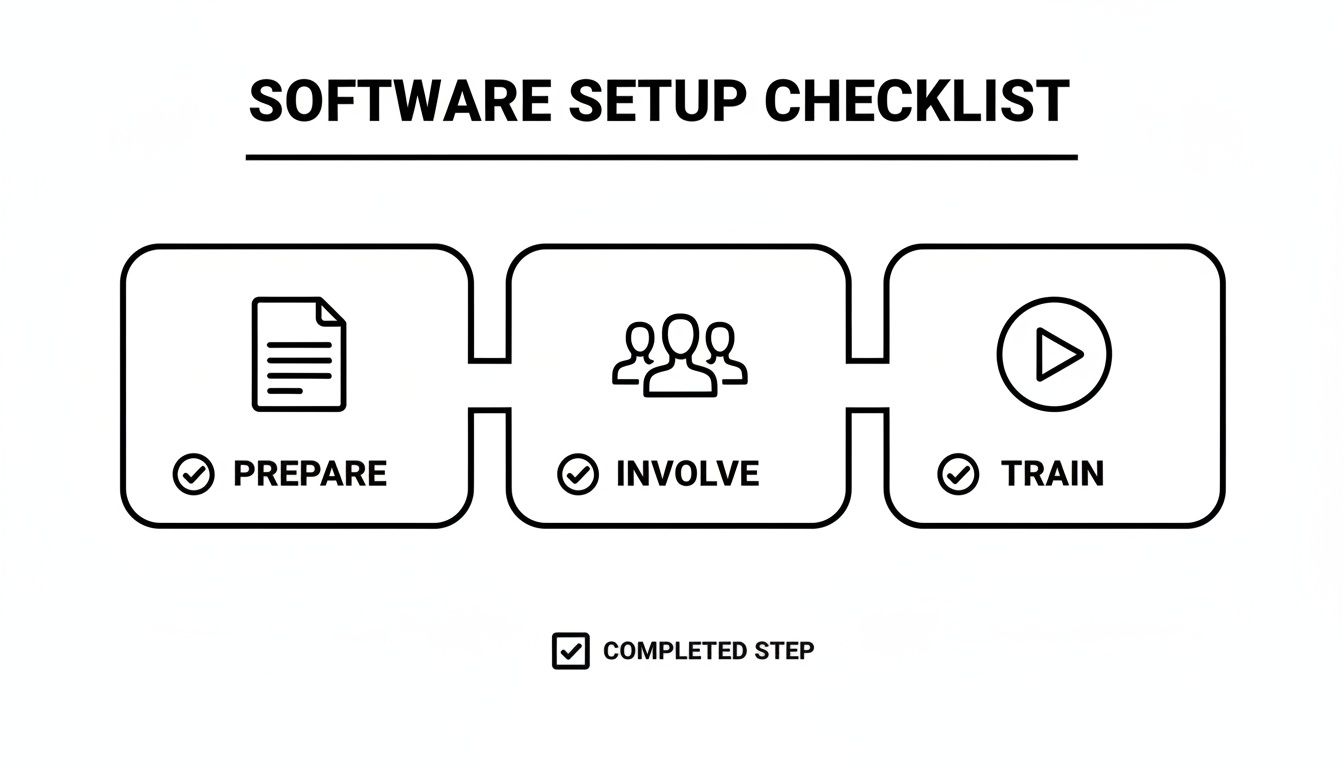
This simple three-step approach—getting your data ready, getting your team on board, and providing good training—is the foundation for a smooth and profitable switch.
Recovering Lost Revenue from Missed Parts
One of the sneakiest profit killers in any trade business is forgetting to bill for small parts. We’ve all seen it happen. A tech grabs a capacitor or a few fittings from the van, installs them, and in the rush to get to the next job, they never make it onto the paper invoice.
With work order software, the tech logs that part directly into the job from their phone or tablet. It’s a tiny action that has a massive financial impact.
Let’s run the numbers conservatively. Say you miss just $20 worth of parts per job. If your five technicians handle four jobs each day (20 jobs total), that’s $400 in lost revenue every single day. In a month, that adds up to a staggering $8,000 in pure, recovered profit.
Boosting Technician Efficiency and Billable Hours
Efficiency isn't just about speed; it's about fitting more paying work into the day. Manual scheduling, zigzagging routes across town, and calling the office for job details all add up to dead time that you're paying for.
By optimizing schedules and routes, the software can help each tech reclaim enough time to squeeze in just one extra job per week.
- Extra Job Profit: If you make an average profit of $150 on a service call, that one extra job per tech adds $750 to your bottom line every week.
- Monthly Impact: For a five-person team, that single extra job each week translates into an additional $3,000 in profit every month.
This isn't about working your crew harder; it's about working smarter. It’s the direct result of a system that cuts out the wasted time between jobs.
Slashing Administrative Overhead
The paperwork and phone calls required to run a trade business can be overwhelming. How many hours does your office staff spend manually creating invoices, playing phone tag to schedule jobs, and making reminder calls? That’s valuable time they could be using to focus on things that actually grow the business.
Work order software automates these repetitive, soul-crushing tasks. Invoices get generated automatically, scheduling becomes a simple drag-and-drop, and customer reminders go out without anyone lifting a finger. A conservative estimate is saving 10 hours of administrative work per week.
If you value your office manager's time at $25 per hour, saving those 10 hours puts $250 back in your budget weekly, which comes out to $1,000 per month.
So, let's tally it up: $8,000 from found parts, $3,000 from added efficiency, and $1,000 in admin savings. Suddenly, this five-tech team is generating $12,000 in new monthly value. Compared to that, a monthly software fee of a few hundred dollars is a no-brainer. It's not an expense; it's a profit-generating machine.
Common Questions About Work Order Software
Even with all the benefits laid out, it's totally normal to have some practical questions before pulling the trigger on a new system. Choosing work order software is a big move, so let's tackle some of the most common things trade business owners ask when they’re weighing their options.
Getting straight answers helps you make sure you’re picking a tool that actually fits your business, not just for today but for where you're headed.
Is This Only for Big Companies?
Not a chance. In fact, most of the modern cloud-based software out there is built specifically to be affordable and scalable for businesses of all sizes. A two-person plumbing crew can get the exact same powerful scheduling, quoting, and invoicing tools that a 50-technician electrical company uses.
The trick is to find a provider with flexible plans. You should be able to jump in with a basic, low-cost plan and then add more users or features, like inventory management, as your team grows and your needs change.
The right software solution grows with you. It supports your current operations without forcing you to pay for features you don't need, ensuring it's a smart investment from day one.
How Much Does Work Order Software Cost?
Most platforms use a monthly subscription model, and the price is usually tied to how many people on your team will be using it. For a small crew, you could be looking at less than $100 per month, while a larger operation needing more advanced tools might pay a few hundred.
Just make sure you look for transparent pricing. No one likes hidden surprises. The best providers have clear plans and don't hit you with massive setup fees or lock you into long, scary contracts. Always, always take advantage of a free trial to make sure the software feels right before you put any money down.
Is It Difficult for My Team to Learn?
This is a huge one, and the answer should always be a firm no. The best work order software is designed with the user in mind—especially your techs in the field who need to use it on the fly. A simple, intuitive mobile app isn't just a nice-to-have; it's a must.
Look for a clean layout, drag-and-drop scheduling, and straightforward steps for everyday tasks like updating a job status or adding a part to an invoice. Here’s a good rule of thumb: if your least tech-savvy employee can’t figure it out pretty quickly during a trial period, it’s probably not the right system for you. A good system should get your team up and running with very little training.
Ready to see how a modern field service platform can pull your entire operation together? TackonFSM is built for trade businesses like yours, combining scheduling, dispatching, invoicing, and inventory into one easy-to-use system. Start your 14-day free trial today and discover a smarter way to manage your business. Get started with TackonFSM.


